
「Reactでログイン完了 → react-router-domでAdminUserDashboard.tsxへ遷移」
+「セッションはSpring Boot側で管理したい」
という前提で、王道かつ安全な構成を順番に説明します。
全体像
1.Spring Securityの「HTTPセッション(JSESSIONID)」を使う
2.ログイン成功時にサーバでセッションを作る
3.React → axiosでwithCredentials: trueを使う
4.CORS設定でCookieを許可
5.ログイン成功後にreact-router-domで遷移
6.ダッシュボード表示時に「ログイン済みかAPIで確認」
JWTは使いません。
完全にサーバセッション管理です。
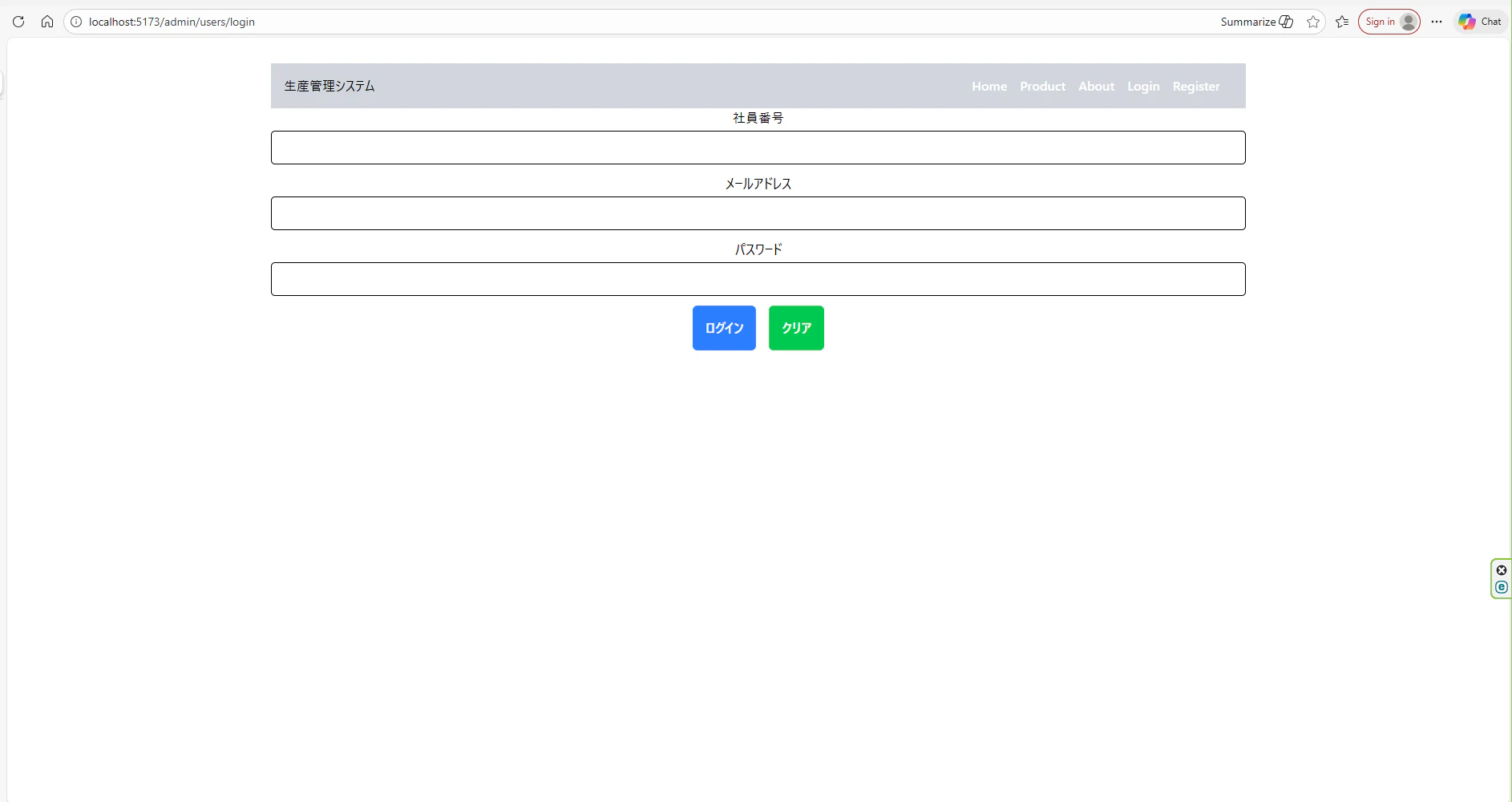
イメージ
ログイン画面でユーザ情報を入力します。
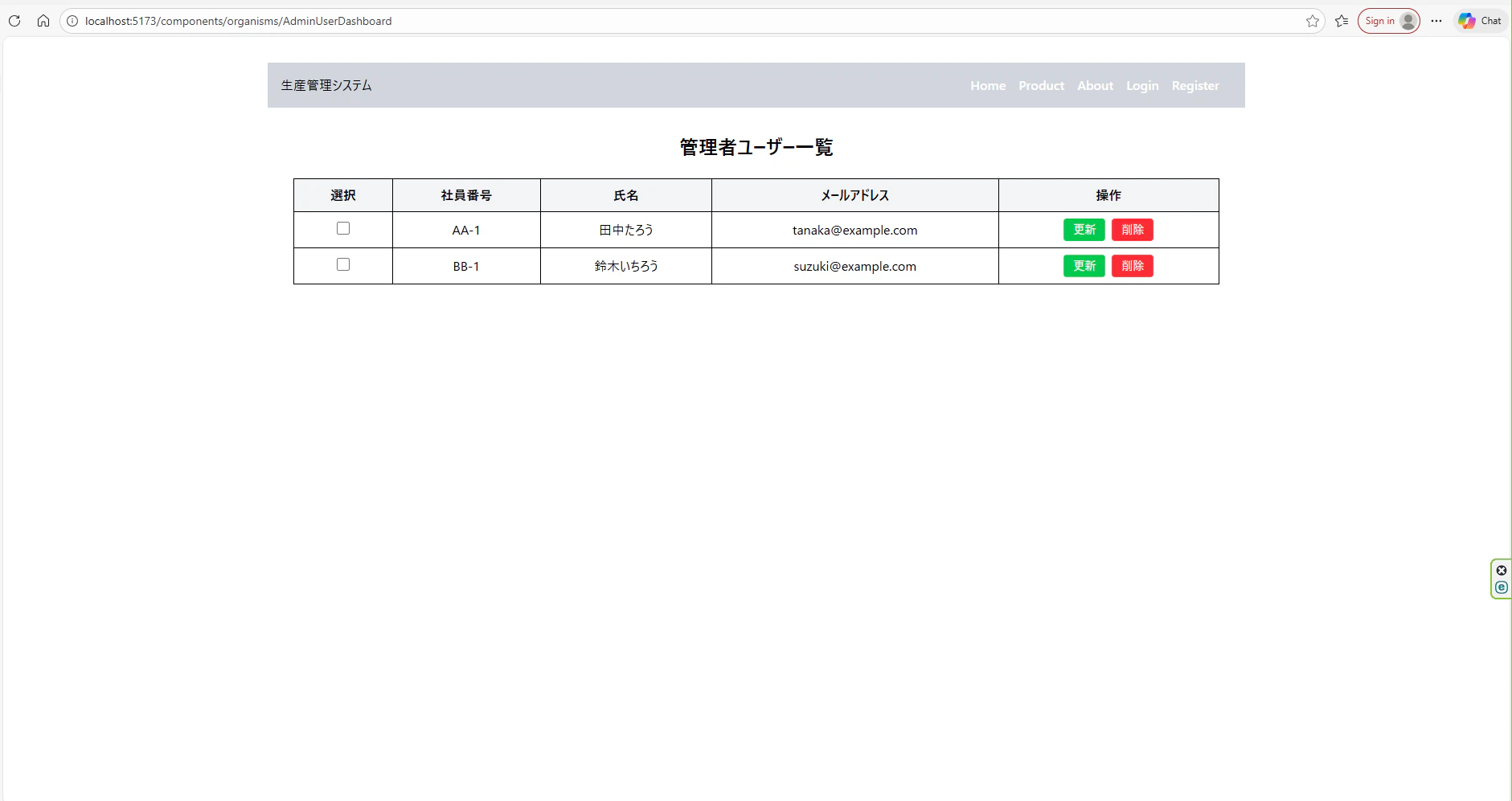
ログインが正常に完了すると管理画面を表示します。
実装の仕様
① Spring Security:セッション認証を有効にする
package com.example.config;

import org.springframework.context.annotation.Bean;
import org.springframework.context.annotation.Configuration;
import org.springframework.security.config.annotation.web.builders.HttpSecurity;
import org.springframework.security.config.http.SessionCreationPolicy;
import org.springframework.security.crypto.bcrypt.BCryptPasswordEncoder;
import org.springframework.security.crypto.password.PasswordEncoder;
import org.springframework.security.web.SecurityFilterChain;

@Configuration
public class SecurityConfig {
	@Bean // ←これが必須
	public PasswordEncoder passwordEncoder() {
		return new BCryptPasswordEncoder();
	}

    @Bean
    public SecurityFilterChain filterChain(HttpSecurity http) throws Exception {
        http
            .csrf(csrf -> csrf.disable()) // ここをラムダ形式に変更
            .cors(cors ->cors.configure(http))//.cors(cors ->{}) 追加
            .sessionManagement(session ->session.sessionCreationPolicy(SessionCreationPolicy.IF_REQUIRED))//追加
            .authorizeHttpRequests(auth -> auth
                .requestMatchers("/api/**").permitAll() // /api/** は誰でもアクセス可能
                .anyRequest().authenticated()           // 他は認証必須
            )
            .formLogin(form -> form.disable())//追加
            .httpBasic(basic->basic.disable())//追加
            ;
        return http.build();
    }
}
📌 ここがポイント
・Spring Securityは 自動で JSESSIONID を発行
・ログイン成功 = セッションに認証情報保存
② ログインAPIでセッションを作る
AdminUserController にログインAPIを追加
// セッション作成処理
@PostMapping("/login")//追加
public ResponseEntity<?> login(@RequestParam String email,@RequestParam String password, HttpServletRequest request){
    AdminUsersEntity user = adminUserLoginService.login(email, password);
    if(user == null) {
        return ResponseEntity.status(HttpStatus.UNAUTHORIZED).body("ログイン失敗");
    }
    // セッション作成
    HttpSession session = request.getSession(true);
    session.setAttribute("LOGIN_ADMIN", user);
    return ResponseEntity.ok(user);
}
これで下記の機能を実現できます。
・サーバ側:セッション保存
・レスポンス:Set-Cookie: JSESSIONID=xxx
③ CORS設定(Cookieを通す)
package com.example.config;

import java.util.List;

import javax.sql.DataSource;

import org.apache.ibatis.session.SqlSessionFactory;
import org.mybatis.spring.SqlSessionFactoryBean;
import org.mybatis.spring.SqlSessionTemplate;
import org.springframework.beans.factory.annotation.Autowired;
import org.springframework.context.annotation.Bean;
import org.springframework.context.annotation.Configuration;
import org.springframework.web.cors.CorsConfiguration;
import org.springframework.web.cors.CorsConfigurationSource;
import org.springframework.web.cors.UrlBasedCorsConfigurationSource;
import org.springframework.web.servlet.config.annotation.WebMvcConfigurer;

@Configuration
public class CorsConfig implements WebMvcConfigurer {
	@Bean
    public CorsConfigurationSource corsConfigurationSource() {
        CorsConfiguration config = new CorsConfiguration();
        config.setAllowedOrigins(List.of("http://localhost:5173"));
        config.setAllowedMethods(List.of("GET", "POST", "PUT", "DELETE", "OPTIONS"));
        config.setAllowedHeaders(List.of("*"));
        config.setAllowCredentials(true);

        UrlBasedCorsConfigurationSource source =
                new UrlBasedCorsConfigurationSource();
        source.registerCorsConfiguration("/**", config);

        return source;
    }

	// アプリケーションがデータベースとの接続を確立するためのもの
	@Autowired
	private DataSource dataSource;

	//データベース接続やトランザクション管理を担当するオブジェクト
    @Bean
    public SqlSessionFactory sqlSessionFactory() throws Exception {
        SqlSessionFactoryBean factoryBean = new SqlSessionFactoryBean();
        factoryBean.setDataSource(dataSource);
        // その他の設定を追加可能
        return factoryBean.getObject();
    }

    //SqlSessionFactoryのラッパーで、データベースへの操作を提供するオブジェクト
    @Bean
    public SqlSessionTemplate sqlSessionTemplate(SqlSessionFactory sqlSessionFactory) {
        return new SqlSessionTemplate(sqlSessionFactory);
    }


	/*
    // 1つ目のデータソース用SqlSessionFactory
    @Bean(name = "sqlSessionFactory")
    public SqlSessionFactory sqlSessionFactory(@Qualifier("dataSource1") DataSource dataSource) throws Exception {
        SqlSessionFactoryBean factoryBean = new SqlSessionFactoryBean();
        factoryBean.setDataSource(dataSource);
        factoryBean.setMapperLocations(new PathMatchingResourcePatternResolver().getResources("classpath:com/example/demo/mapper/*.xml")); // Mapperパス指定
        return factoryBean.getObject();
    }

    // 1つ目のデータソース用SqlSessionTemplate
    @Bean(name = "sqlSessionTemplate")
    public SqlSessionTemplate sqlSessionTemplate(@Qualifier("sqlSessionFactory") SqlSessionFactory sqlSessionFactory) {
        return new SqlSessionTemplate(sqlSessionFactory);
    }
    */
}
❌ origins="*" + Cookie は 絶対NG
④ React(axios):Cookieを送る
ログイン時
axios.post(
  loginUrl,
  formData,
  {
    withCredentials: true // ★必須
  }
)
これがないと
・JSESSIONID がブラウザに保存されない
・毎回未ログイン扱い
⑤ ログイン成功後に画面遷移(react-router-dom)
import { useNavigate } from "react-router-dom";

const navigate = useNavigate();

await axios.post(...);

navigate("/admin/dashboard");
<Route
  path="/admin/dashboard"
  element={<AdminUserDashboard />}
/>
⑥ ダッシュボード表示時に「ログイン確認」
ログイン確認API(Spring)
@GetMapping("/session")
public ResponseEntity<?> session(HttpSession session) {
    AdminUsersEntity user =
        (AdminUsersEntity) session.getAttribute("LOGIN_ADMIN");

    if (user == null) {
        return ResponseEntity.status(HttpStatus.UNAUTHORIZED).build();
    }
    return ResponseEntity.ok(user);
}
React 側(ガード処理)
useEffect(() => {
  axios.get("/api/session", { withCredentials: true })
    .catch(() => navigate("/login"));
}, []);
💡 これで下記のようなことが実現できます。
・未ログイン → 強制的にログイン画面へ
・ログイン済 → ダッシュボード表示
セッション方式のメリット / デメリット
👍 メリット
・実装が簡単
・セキュリティはSpringにお任せ
・管理画面向き
👎 デメリット
・スケール時はRedisなど必要
・SPA + API で CORS 設定必須
まとめ(ここだけ覚えてOK)
・✅ Spring Security + HttpSession
・✅ JSESSIONID を Cookie で管理
・✅ axios は withCredentials: true
・✅ CORSで allowCredentials
・✅ 画面遷移は react-router-dom
次回
■ログアウト機能について
■Admin権限でルートガードしたい
■本番環境(HTTPS)のCookie設定
技術Tips
Spring securityでパスワード照合
Spring Security標準のPasswordEncoder.matches()を使ってパスワードを照合します。
package com.example.demo.services;

import org.springframework.dao.DataAccessException;
import org.springframework.dao.DataIntegrityViolationException;
import org.springframework.security.crypto.password.PasswordEncoder;
import org.springframework.stereotype.Service;

import com.example.demo.entity.AdminUsersEntity;
import com.example.demo.repository.AdminUserRepository;

@Service
public class AdminUserLoginService {
	private final PasswordEncoder passwordEncoder;
	private final AdminUserRepository adminUserRepository;
	//コンストラクタ
	public AdminUserLoginService(PasswordEncoder passwordEncoder, AdminUserRepository adminUserRepository){
		this.passwordEncoder = passwordEncoder;
		this.adminUserRepository = adminUserRepository;
	}
	//ログイン処理
	public AdminUsersEntity login(String email, String password) {
		AdminUsersEntity user = new AdminUsersEntity();
		try {
			user = adminUserRepository.findByEmail(email);
		}catch(DataIntegrityViolationException e) {
			e.printStackTrace();
			throw e;
		}catch(DataAccessException e) {
			e.printStackTrace(); // ← rollback の原因を特定する
	        throw e;
		}catch(Exception e) {
			e.printStackTrace(); // ← rollback の原因を特定する
	        throw e;
		}

		// ユーザが存在しない場合
		if(user == null) {
			user = null;
		}

		if(!comparePassword(password, user.getPassword())) {
			throw new RuntimeException("パスワードが一致しません");
		}
		return user;
	}

	//パスワード照合
	private boolean comparePassword(String rawPassword, String hashedPassword) {
		return passwordEncoder.matches(rawPassword, hashedPassword);
	}
}
テーブルにチェックボックスる挿入
全ユーザー情報を取得し、admin_role の値に基づいて動的にボタンやチェックボックスを表示するダッシュボードの実装案です。
import { useEffect, useState } from "react";
import axios from "axios";
import { useNavigate } from "react-router-dom";

type AdminUser = {
  id: string;
  name: string;
  email: string;
  admin_role: boolean; // DBのTINYINT(1)はbooleanとして受け取れます
  gender: string;
  office: string;
};

export const AdminDashBoard: React.FC = () => {
  const navigate = useNavigate();
  const [users, setUsers] = useState<AdminUser[]>([]);
  const getAllUsersUrl = import.meta.env.VITE_ADMINUSER_GETALL; // .envに定義

  useEffect(() => {
    const fetchUsers = async () => {
      try {
        const response = await axios.get(getAllUsersUrl, { withCredentials: true });
        setUsers(response.data);
      } catch (error) {
        console.error("ユーザー取得失敗", error);
      }
    };
    fetchUsers();
  }, [getAllUsersUrl]);

  const handleDelete = (id: string) => {
    if (window.confirm(`${id} を削除しますか?`)) {
      // 削除API呼び出し処理をここに記述
      console.log("Delete:", id);
    }
  };

  const handleEdit = (id: string) => {
    // 編集画面へ遷移(例:/admin/edit/BB-1)
    navigate(`/admin/edit/${id}`);
  };

  return (
    <div className="p-8">
      <h1 className="text-2xl font-bold mb-6">管理者ユーザー一覧</h1>
      <table className="min-w-full bg-white border border-gray-300">
        <thead>
          <tr className="bg-gray-100">
            <th className="border px-4 py-2">選択</th>
            <th className="border px-4 py-2">社員番号</th>
            <th className="border px-4 py-2">氏名</th>
            <th className="border px-4 py-2">メールアドレス</th>
            <th className="border px-4 py-2">操作</th>
          </tr>
        </thead>
        <tbody>
          {users.map((user) => (
            <tr key={user.id} className="text-center">
              <td className="border px-4 py-2">
                {/* admin_roleがtrueの場合のみ表示 */}
                {user.admin_role && <input type="checkbox" className="w-4 h-4" />}
              </td>
              <td className="border px-4 py-2">{user.id}</td>
              <td className="border px-4 py-2">{user.name}</td>
              <td className="border px-4 py-2">{user.email}</td>
              <td className="border px-4 py-2">
                {/* admin_roleがtrueの場合のみ表示 */}
                {user.admin_role && (
                  <div className="flex justify-center gap-2">
                    <button
                      onClick={() => handleEdit(user.id)}
                      className="bg-green-500 text-white px-3 py-1 rounded text-sm hover:bg-green-600"
                    >
                      更新
                    </button>
                    <button
                      onClick={() => handleDelete(user.id)}
                      className="bg-red-500 text-white px-3 py-1 rounded text-sm hover:bg-red-600"
                    >
                      削除
                    </button>
                  </div>
                )}
              </td>
            </tr>
          ))}
        </tbody>
      </table>
    </div>
  );
};
ディレクトリ構造
Frontend
├── [Frontendディレクトリ構造]
└── Frontend/
    ├── node_modules
    ├── public
    └── src/
        ├── assets
        └── components/
            ├── atoms/
            │   ├── Button.tsx
            │   ├── Checkbox.tsx
            │   ├── Input.tsx
            │   ├── InputFile.tsx
            │   └── Label.tsx
            ├── molecules/
            │   ├── FileField.tsx
            │   ├── FormField.tsx
            │   └── PasswordField.tsx
            ├── organisms/
            │   ├── AdminUserLoginForm.tsx
            │   ├── AdminUserDashboard.tsx
            │   └── AdminUserForm.tsx
            ├── templates/
            │   └── AdminUserTemplate.tsx
            ├── pages/
            │   └── AdminUserRegisterPage.tsx
            ├── styles/
            │   └── global.css 👈自作
            ├── App.css
            ├── App.tsx
            ├── index.css
            ├── main.tsx
            ├── .env
            ├── eslint.config.js
            ├── index.html
            ├── package.json
            ├── package.lock.json
            ├── tsconfig.json
            ├── tsconfig.app.json
            ├── tsconfig.node.json
            └── vite.config.ts
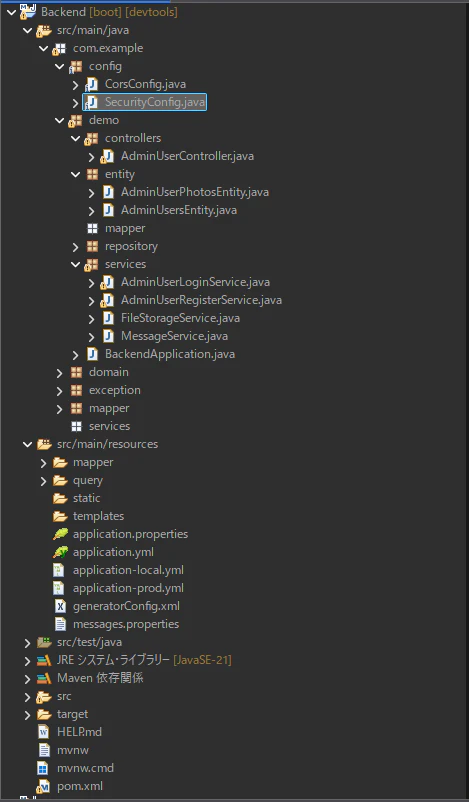
Backend
全体のソースコード
Frontend
import { FormField } from "../molecules/FormField"
import { PasswordField } from "../molecules/PasswordField"
import { useState } from "react"
import axios from "axios"
import { useNavigate } from "react-router-dom"

export const AdminUserLoginForm:React.FC = ()=>{
    // react-router-dom
    const navigate = useNavigate();
    // .envファイルからAPI情報を取得
    const adminUserLoginUrl = import.meta.env.VITE_ADMINUSER_LOGIN;

    const [id, setId] = useState<string>("");
    const [email,setEmail] = useState<string>("");
    const [password, setPassword] = useState<string>("");

    const handleSubmit = async(e:React.FormEvent)=>{
        e.preventDefault();
        const formData = new FormData();
        formData.append("id",id);
        formData.append("email",email);
        formData.append("password",password);

        try{
            const response = await axios.post(adminUserLoginUrl,formData,{
                withCredentials:true,
            });

            // 201 ではなく 200 をチェック(あるいは単に success 判定)
            if (response.status === 200) {
                navigate('/components/organisms/AdminUserDashboard');
            } else {
                alert('ログインに失敗しました');
            }
            /*
            if(response.status !== 201){
                alert('エラー');
            }
            */
            // ダッシュボード画面へ遷移する
            navigate('/components/organisms/AdminUserDashboard');
        }catch(error){
            alert(error);
            console.log(error);
        }
    }
    return (
        <form onSubmit={handleSubmit}>
            <FormField label="社員番号" value={id} onChange={(e)=>setId(e.target.value)}/>
            <FormField type="email" label="メールアドレス" value={email} onChange={(e)=>setEmail(e.target.value)}/>
            <PasswordField value={password} onChange={(e) => setPassword(e.target.value)} />
            <div>
                <button
                    type="submit"
                    className="bg bg-blue-500 rounded-md px-4 py-4 text-white font-bold cursor-pointer mr-4"
                >
                    ログイン
                </button>
                <button
                    type="button"
                    className="bg bg-green-500 rounded-md px-4 py-4 text-white font-bold cursor-pointer"
                >
                    クリア
                </button>
            </div>
        </form>
    )
}
import { useEffect, useState } from "react";
import axios from "axios";
import { useNavigate } from "react-router-dom";

type AdminUser = {
  id: string;
  name: string;
  email: string;
  adminRole: boolean; // DBのTINYINT(1)はbooleanとして受け取れます
  gender: string;
  office: string;
};

export const AdminDashBoard: React.FC = () => {
  const navigate = useNavigate();
  const [users, setUsers] = useState<AdminUser[]>([]);
  const getAllUsersUrl = import.meta.env.VITE_ADMINUSER_GETALL;

  useEffect(() => {
  const fetchUsers = async () => {
    try {
      const response = await axios.get(getAllUsersUrl, { withCredentials: true });

      // デバッグ用にログ出力して構造を確認
      console.log("取得データ:", response.data);
      // response.data 自体が配列の場合
      if (Array.isArray(response.data)) {
        setUsers(response.data);
      }
      // もし response.data.adminUsers のように階層がある場合
      else if (response.data && Array.isArray(response.data.adminUsers)) {
        setUsers(response.data.adminUsers);
      }
    } catch (error) {
      console.error("ユーザー取得失敗", error);
    }
  };
  fetchUsers();
}, [getAllUsersUrl]);

  const handleEdit = (id: string) => {
    // 編集画面へ遷移(例:/admin/edit/BB-1)
    navigate(`/admin/edit/${id}`);
  };

  const handleDelete = (id:string)=>{
    // 編集画面へ遷移(例:/admin/edit/BB-1)
    navigate(`/admin/delete/${id}`);
  }

  return (
    <div className="p-8">
      <h1 className="text-2xl font-bold mb-6">管理者ユーザー一覧</h1>
      <table className="min-w-full bg-white border border-gray-300">
        <thead>
          <tr className="bg-gray-100">
            <th className="border px-4 py-2">選択</th>
            <th className="border px-4 py-2">社員番号</th>
            <th className="border px-4 py-2">氏名</th>
            <th className="border px-4 py-2">メールアドレス</th>
            <th className="border px-4 py-2">操作</th>
          </tr>
        </thead>
        <tbody>
          {users.map((user) => (
            <tr key={user.id} className="text-center">
              <td className="border px-4 py-2">
                {/* admin_roleがtrueの場合のみ表示 */}
                {user.adminRole && <input type="checkbox" className="w-4 h-4" />}
              </td>
              <td className="border px-4 py-2">{user.id}</td>
              <td className="border px-4 py-2">{user.name}</td>
              <td className="border px-4 py-2">{user.email}</td>
              <td className="border px-4 py-2">
                {/* admin_roleがtrueの場合のみ表示 */}
                {user.adminRole && (
                  <div className="flex justify-center gap-2">
                    <button
                      onClick={() => handleEdit(user.id)}
                      className="bg-green-500 text-white px-3 py-1 rounded text-sm hover:bg-green-600"
                    >
                      更新
                    </button>
                    <button
                      onClick={() => handleDelete(user.id)}
                      className="bg-red-500 text-white px-3 py-1 rounded text-sm hover:bg-red-600"
                    >
                      削除
                    </button>
                  </div>
                )}
              </td>
            </tr>
          ))}
        </tbody>
      </table>
    </div>
  );
};
import { NavLink } from "../atoms/NavLink";

export const NavMenu: React.FC = ()=>{
    return (
        <nav>
            <NavLink href="/">Home</NavLink>
            <NavLink href="/product">Product</NavLink>
            <NavLink href="/about">About</NavLink>
            <NavLink href="/admin/users/login">Login</NavLink>
            <NavLink href="/admin/users/new">Register</NavLink>
        </nav>
    )
}
import './App.css'
import { BrowserRouter, Routes, Route } from 'react-router-dom'// react-router-domを追加
import { AdminUserRegisterPage } from './pages/AdminUserRegisterPage'
import { Header } from './components/organisms/Header'
import { AdminUserLoginForm } from './components/organisms/AdminUserLoginForm'
import { AdminDashBoard } from './components/organisms/AdminUserDashboard'

function App() {
  return (
    <BrowserRouter>
      <Header/>
      <Routes>
        <Route
          path="/admin/users/new"
          element={<AdminUserRegisterPage />}
        />
        <Route
          path="/admin/users/login"
          element={<AdminUserLoginForm />}
        />
        <Route
          path="/components/organisms/AdminUserDashboard"
          element={<AdminDashBoard/>}
        />
      </Routes>
    </BrowserRouter>
  )
}

export default App
Backend
設定クラス
package com.example.config;

import org.springframework.context.annotation.Bean;
import org.springframework.context.annotation.Configuration;
import org.springframework.security.config.annotation.web.builders.HttpSecurity;
import org.springframework.security.config.http.SessionCreationPolicy;
import org.springframework.security.crypto.bcrypt.BCryptPasswordEncoder;
import org.springframework.security.crypto.password.PasswordEncoder;
import org.springframework.security.web.SecurityFilterChain;

@Configuration
public class SecurityConfig {
	@Bean // ←これが必須
	public PasswordEncoder passwordEncoder() {
		return new BCryptPasswordEncoder();
	}

    @Bean
    public SecurityFilterChain filterChain(HttpSecurity http) throws Exception {
        http
            .csrf(csrf -> csrf.disable()) // ここをラムダ形式に変更
            .cors(cors ->cors.configure(http))//.cors(cors ->{}) 追加
            .sessionManagement(session ->session.sessionCreationPolicy(SessionCreationPolicy.IF_REQUIRED))//追加
            .authorizeHttpRequests(auth -> auth
                .requestMatchers("/api/**").permitAll() // /api/** は誰でもアクセス可能
                .anyRequest().authenticated()           // 他は認証必須
            )
            .formLogin(form -> form.disable())//追加
            .httpBasic(basic->basic.disable())//追加
            ;
        return http.build();
    }
}
モデルクラス
package com.example.demo.entity;

import java.util.ArrayList;
import java.util.List;

import jakarta.persistence.CascadeType;
import jakarta.persistence.Column;
import jakarta.persistence.Entity;
import jakarta.persistence.FetchType;
import jakarta.persistence.Id;
import jakarta.persistence.OneToMany;
import jakarta.persistence.Table;

import com.fasterxml.jackson.annotation.JsonIgnore;

@Entity
@Table(name = "adminusers")
public class AdminUsersEntity {

    @Id
    @Column(name = "id", length = 50)
    private String id;

    @Column(name = "name", nullable = false, length = 100)
    private String name;

    @Column(name = "email", nullable = false, length = 255, unique = true)
    private String email;

    @Column(name = "password", nullable = false, length = 255)
    private String password;

    @Column(name = "gender", nullable = true, length = 1)
    private String gender;

    @Column(name = "office", nullable = true, length = 20)
    private String office;

    @Column(name = "adminrole", nullable = false)
    private Boolean adminRole;

    @OneToMany(
    	fetch = FetchType.EAGER,
        mappedBy = "adminUser",
        cascade = CascadeType.ALL,
        orphanRemoval = true
    )
    @JsonIgnore
    //@JsonManagedReference // 追記
    private List<AdminUserPhotosEntity> photos = new ArrayList<>();

    // ===== 子を追加するヘルパー =====
    public void addPhoto(AdminUserPhotosEntity photo) {
        photos.add(photo);
        photo.setAdminUser(this); // setter 名を統一
    }

    public void removePhoto(AdminUserPhotosEntity photo) {
        photos.remove(photo);
        photo.setAdminUser(null);
    }

    // ===== Getter / Setter =====
    public String getId() {
        return id;
    }

    public void setId(String id) {
        this.id = id;
    }

    public String getName() {
        return name;
    }

    public void setName(String name) {
        this.name = name;
    }

    public String getEmail() {
        return email;
    }

    public void setEmail(String email) {
        this.email = email;
    }

    public String getPassword() {
        return password;
    }

    public void setPassword(String password) {
        this.password = password;
    }

    public String getGender() {
        return gender;
    }

    public void setGender(String gender) {
        this.gender = gender;
    }

    public String getOffice() {
        return office;
    }

    public void setOffice(String office) {
        this.office = office;
    }

    public Boolean getAdminRole() {
        return adminRole;
    }

    public void setAdminRole(Boolean adminRole) {
        this.adminRole = adminRole;
    }

    public List<AdminUserPhotosEntity> getPhotos() {
        return photos;
    }

    public void setPhotos(List<AdminUserPhotosEntity> photos) {
        this.photos = photos;
        for (AdminUserPhotosEntity photo : photos) {
            photo.setAdminUser(this);
        }
    }
}
package com.example.demo.entity;

import jakarta.persistence.Column;
import jakarta.persistence.Entity;
import jakarta.persistence.FetchType;
import jakarta.persistence.GeneratedValue;
import jakarta.persistence.GenerationType;
import jakarta.persistence.Id;
import jakarta.persistence.JoinColumn;
import jakarta.persistence.ManyToOne;
import jakarta.persistence.Table;

import com.fasterxml.jackson.annotation.JsonIgnore;

@Entity
@Table(name = "adminuser_photos")
public class AdminUserPhotosEntity {
    @Id
    @GeneratedValue(strategy = GenerationType.IDENTITY)
    private Integer id;

    @ManyToOne(fetch = FetchType.LAZY)
    @JoinColumn(name = "adminuser_id", nullable = false)
    @JsonIgnore  // ← 親(User)の情報は写真データの中には不要なので隠す
    private AdminUsersEntity adminUser;


    @Column(name = "file_path", nullable = false)
    private String filePath;

    @Column(name = "sort_order", nullable = false)
    private Integer sortOrder;

    public Integer getId() {
    	return id;
    }

    public void setId(Integer id) {
    	this.id = id;
    }

    public AdminUsersEntity getAdminUsersEntity() {
    	return adminUser;
    }

    public void setAdminUser(AdminUsersEntity adminUser){
    	this.adminUser = adminUser;
    }

    public String getFilePath() {
    	return filePath;
    }

    public void setFilePath(String filePath) {
    	this.filePath = filePath;
    }

    public Integer getSortOrder() {
    	return sortOrder;
    }

    public void setSortOrder(Integer sortOrder) {
    	this.sortOrder = sortOrder;
    }
}
Serviceクラス
package com.example.demo.services;

import java.util.ArrayList;
import java.util.List;

import org.springframework.dao.DataAccessException;
import org.springframework.dao.DataIntegrityViolationException;
import org.springframework.security.crypto.password.PasswordEncoder;
import org.springframework.stereotype.Service;

import com.example.demo.entity.AdminUsersEntity;
import com.example.demo.repository.AdminUserRepository;

@Service
public class AdminUserLoginService {
	private final PasswordEncoder passwordEncoder;
	private final AdminUserRepository adminUserRepository;
	//コンストラクタ
	public AdminUserLoginService(PasswordEncoder passwordEncoder, AdminUserRepository adminUserRepository){
		this.passwordEncoder = passwordEncoder;
		this.adminUserRepository = adminUserRepository;
	}
	//ログイン処理
	public AdminUsersEntity login(String email, String password) {
		AdminUsersEntity user = new AdminUsersEntity();
		try {
			user = adminUserRepository.findByEmail(email);
		}catch(DataIntegrityViolationException e) {
			e.printStackTrace();
			throw e;
		}catch(DataAccessException e) {
			e.printStackTrace(); // ← rollback の原因を特定する
	        throw e;
		}catch(Exception e) {
			e.printStackTrace(); // ← rollback の原因を特定する
	        throw e;
		}

		// ユーザが存在しない場合
		if(user == null) {
			user = null;
		}

		if(!comparePassword(password, user.getPassword())) {
			throw new RuntimeException("パスワードが一致しません");
		}
		return user;
	}

	//パスワード照合
	private boolean comparePassword(String rawPassword, String hashedPassword) {
		return passwordEncoder.matches(rawPassword, hashedPassword);
	}

	public List<AdminUsersEntity> getAllAdminUsers() {
		AdminUsersEntity users = new AdminUsersEntity();
		List<AdminUsersEntity> usersList = new ArrayList<AdminUsersEntity>();
		try {
			usersList = adminUserRepository.findAll();
		}catch(Exception e) {
			e.printStackTrace();
			throw e;
		}
		return usersList;
	}
}
Controllerクラス
package com.example.demo.controllers;

import java.util.ArrayList;
import java.util.List;

import jakarta.servlet.http.HttpServletRequest;
import jakarta.servlet.http.HttpSession;

import org.springframework.http.HttpStatus;
import org.springframework.http.ResponseEntity;
import org.springframework.web.bind.annotation.CrossOrigin;
import org.springframework.web.bind.annotation.GetMapping;
import org.springframework.web.bind.annotation.PostMapping;
import org.springframework.web.bind.annotation.RequestMapping;
import org.springframework.web.bind.annotation.RequestParam;
import org.springframework.web.bind.annotation.ResponseStatus;
import org.springframework.web.bind.annotation.RestController;
import org.springframework.web.multipart.MultipartFile;

import com.example.demo.entity.AdminUserPhotosEntity;
import com.example.demo.entity.AdminUsersEntity;
import com.example.demo.services.AdminUserLoginService;
import com.example.demo.services.AdminUserRegisterService;
import com.example.demo.services.FileStorageService;
import com.example.demo.services.MessageService;
import com.example.exception.BadRequestException;

@RestController
@RequestMapping("/api")
@CrossOrigin(origins = "*")
public class AdminUserController {
	// MessageServiceをDI注入
	private final MessageService messageService;

	// ファイル保存サービスクラスをDI注入
	private final FileStorageService fileStorageService;

	// データベース登録サービスクラスをDI注入
	private final AdminUserRegisterService adminUserRegisterService;

	// 管理者ログインサービスクラスをDI注入
	private final AdminUserLoginService adminUserLoginService;

	// コンストラクタ
	public AdminUserController(MessageService messageService,
			FileStorageService fileStorageService,
			AdminUserRegisterService adminUserRegisterService,
			AdminUserLoginService adminUserLoginService) {
		this.messageService = messageService;
		this.fileStorageService = fileStorageService;
		this.adminUserRegisterService = adminUserRegisterService;
		this.adminUserLoginService = adminUserLoginService;
	}

	@PostMapping(value = "/new/adminusercreate",consumes = "multipart/form-data")
	@ResponseStatus(HttpStatus.CREATED)
	public ResponseEntity<String> getAdminUser(
			@RequestParam("id") String id,
			@RequestParam("name") String name,
			@RequestParam("email") String email,
			@RequestParam("password") String password,
			@RequestParam("adminrole") boolean adminRole,
			@RequestParam(value="files[]", required=false) List<MultipartFile> files
	) {
		System.out.println("id=" + id);
	    System.out.println("name=" + name);
	    System.out.println("email=" + email);
	    System.out.println("files count=" + (files != null ? files.size() : 0));

		//System.out.println("Received: " + body);
		System.out.println("Received: " + id + name + email);

		// ファイル保存 + Entity作成
		List<AdminUserPhotosEntity> photoList = new ArrayList<>();

		AdminUsersEntity adminUsersEntity = new AdminUsersEntity();
		adminUsersEntity.setId(id);
		adminUsersEntity.setName(name);
		adminUsersEntity.setEmail(email);
		adminUsersEntity.setPassword(password);
		adminUsersEntity.setGender(null);
		adminUsersEntity.setOffice(null);
		adminUsersEntity.setAdminRole(adminRole);

		int sortOrder = 1;
		// 取得したファイル名を表示
		if(files != null && !files.isEmpty()) {

			files.forEach(file ->{
				System.out.println("original name: " + file.getOriginalFilename());
				System.out.println("content type: " + file.getContentType());
			    System.out.println("size: " + file.getSize());
			    // ファイルを保存
			    String savedPath = fileStorageService.saveAdminUserPhoto(id, file);
			    System.out.println("saved path = " + savedPath);
			    AdminUserPhotosEntity photo = new AdminUserPhotosEntity();
			    photo.setFilePath(savedPath);
		        photo.setSortOrder(sortOrder+1);
		     // 親子関係を設定
		        adminUsersEntity.addPhoto(photo);
			});
		}

		// 入力チェック
		if(id == null || id.isEmpty()) {
			throw new BadRequestException("社員番号は必須です");
		}

		if(email == null || email.isEmpty() ){
			throw new BadRequestException("メールアドレスは必須です");
		}

		if(password == null || password.isEmpty()) {
			throw new BadRequestException("パスワードは必須です");
		}
		/*
		AdminUsersEntity adminUsersEntity = new AdminUsersEntity();
		adminUsersEntity.setId(id);
		adminUsersEntity.setName(name);
		adminUsersEntity.setEmail(email);
		adminUsersEntity.setPassword(password);
		adminUsersEntity.setGender(null);
		adminUsersEntity.setOffice(null);
		adminUsersEntity.setAdminRole(adminRole);
		*/
		// TODO(データベース登録処理)

		System.out.println("AdminUsersEntity: "+ adminUsersEntity);

		// Service 呼び出し
		adminUserRegisterService.registerAdminUser(adminUsersEntity);
		// 返却するメッセージを生成
		String message = messageService.createMessage("admin.user.create.success", name);

		return ResponseEntity.status(HttpStatus.CREATED).body(message);
	}
	// ファイル名を取得する処理
	private String createFileName(String userId, MultipartFile file) {
		return userId + file.getOriginalFilename();
	}

	// セッション作成処理
	@PostMapping("/login")//追加
	public ResponseEntity<?> login(@RequestParam String email,@RequestParam String password, HttpServletRequest request){
		AdminUsersEntity user = adminUserLoginService.login(email, password);
		if(user == null) {
			return ResponseEntity.status(HttpStatus.UNAUTHORIZED).body("ログイン失敗");
		}
		// セッション作成
		HttpSession session = request.getSession(true);
		session.setAttribute("LOGIN_ADMIN", user);
		return ResponseEntity.ok(user);
	}

	@GetMapping("/session")
	public ResponseEntity<?> session(HttpSession session){
		AdminUsersEntity user = (AdminUsersEntity) session.getAttribute("LOGIN_ADMIN");
		if(user == null) {
			return ResponseEntity.status(HttpStatus.UNAUTHORIZED).build();
		}
		return ResponseEntity.ok(user);
	}
	// 管理者ユーザ全件取得
	@GetMapping("/getAllAdminUsers")
	public List<AdminUsersEntity> getAllAdminUsers() {
		return adminUserLoginService.getAllAdminUsers();
	}

}
トラブルシューティング
親−子Entityのモデルを取得する際ののエラー
下記の事象がEclipseに表示された。
Resolved [org.springframework.http.converter.HttpMessageNotWritableException: Could not write JSON: Cannot lazily initialize collection of role
403 に見えていたのは、Springがレスポンス(JSON)を生成しようとした際に、DBセッションが既に閉じていて関連データ(photos)を読み込めなかったために発生した内部エラーです。
AdminUsersEntity の中にphotosというフィールド(@OneToManyか @ManyToMany)があり、それがLazy Loading(遅延読み込み)に設定されていることが原因です。
解決方法
@JsonIgnore を付与する(最も簡単)
ログインのレスポンスに photos の情報が不要であれば、そのフィールドを JSON 出力から除外します。
// [AdminUsersEntity.java]
@OneToMany(fetch = FetchType.LAZY, mappedBy = "user")
@JsonIgnore // これを追加
private List<Photo> photos;
無限再起(Document nesting depth (501) exceeds the maximum allowed)について
エラーの原因
■AdminUsersEntity がAdminUserPhotosEntityを持っている。
■AdminUserPhotosEntity の中にもadminUserフィールドがあり、それが AdminUsersEntity を参照している。
■Jackson(JSON変換ライブラリ)が JSON を作ろうとする際: ユーザー → 写真 → ユーザー → 写真... と無限にデータを辿ってしまい、ネストの限界(500階層)を超えてクラッシュしています。
解決方法
解決策:@JsonIgnoreの使用
最も確実で簡単な方法は、子エンティティ(Photo側)から親への参照を JSON 出力から除外することです。
// [AdminUserPhotosEntity.java]
@ManyToOne
@JoinColumn(name = "admin_user_id")
@JsonIgnore // これを追加して無限ループを断ち切る
private AdminUsersEntity adminUser;
サイト
【SpringBoot】Spring Securityを使って、メールアドレスでログイン処理を行う。
Spring Sessionとは