1
1

Delete article

Deleted articles cannot be recovered.

Draft of this article would be also deleted.

Are you sure you want to delete this article?

【Unity+XCode26】Assertion failed: (it != _dylibToOrdinal.end()), function dylibToOrdinal, file OutputFile.cpp, line 5196.

1
Last updated at Posted at 2025-10-06

Unityで作ったプロジェクトをXCode26で起動しようとすると発生する不具合

Assertion failed: (it != _dylibToOrdinal.end()), function dylibToOrdinal, file OutputFile.cpp, line 5196.

について解決策をまとめます。

原因

Hi there, Yep I’ve been battling with the same issue - and I’m sure we are not alone! So far I’ve discovered that Xcode 26 does not play nicely with the older linkers, -ld64 & -ld_clssic. I’ve had limited success on simple test projects using the new default linker, -ld_prime. Luckily for me, I have just downgraded to Xcode 16 and I’m back to seeing my apps happily load on devices

XCode26だと古いリンカである -ld64-ld_clssic では互換性がなくて動かないということのぽいようです

解決策

[Build Settings]>[UnityFrameWork]>[Other Link Flags]のvalueをクリック
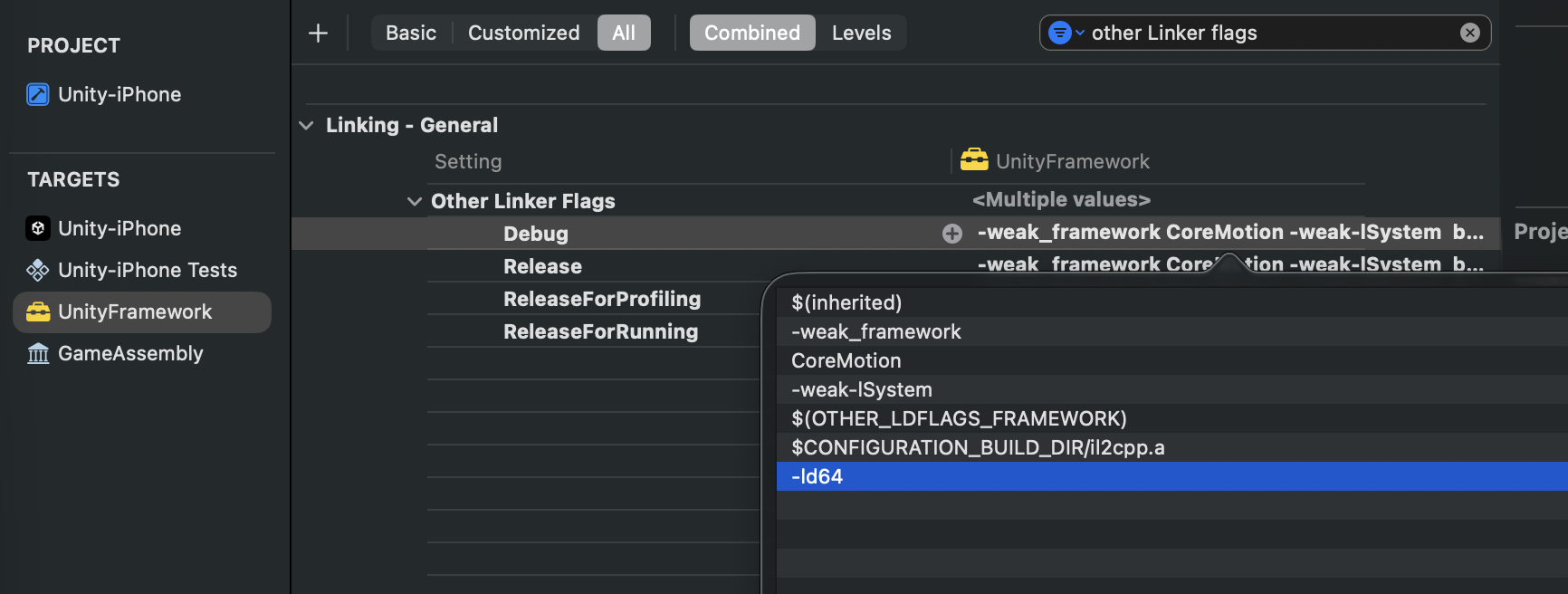
スクリーンショット 2025-10-06 20.29.23.png

-ld64を削除

これでビルド通りました。

1
1
0

Register as a new user and use Qiita more conveniently

  1. You get articles that match your needs
  2. You can efficiently read back useful information
  3. You can use dark theme
What you can do with signing up
1
1

Delete article

Deleted articles cannot be recovered.

Draft of this article would be also deleted.

Are you sure you want to delete this article?