
0
0

Delete article

Deleted articles cannot be recovered.

Draft of this article would be also deleted.

Are you sure you want to delete this article?

Wearableのバイナリの作成手順とインストール手順は次の通りです。

  1. DevEco StudioでWearableのプロジェクトを開く
  2. [Build]→[Build Hap(s)/APP(s)]→[Build Hap(s)]をクリックする
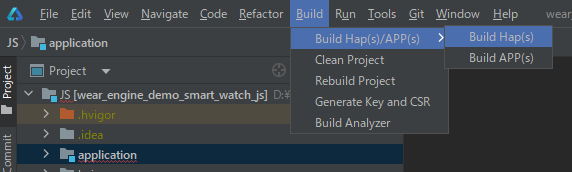
    image.png
    hapファイルが.\entry\build\default\outputs\default\に生成される
  3. Wearableの[設定]→[システム]→[開発者向けオプション]→[Wi-Fi経由でデバッグ]でWearableのIPとポートを確認する
    image.PNG
  4. CMDで次のコマンドを入力し、Wearableに接続する
    hdc tconn {ip}:{port}
  5. CMDで次のコマンドを入力し、Wearableの接続を確認する
    hdc list targets
  6. CMDで次のコマンドを入力し、hapファイルをインストールする
    hdc install {hapファイル}
0
0
0

Register as a new user and use Qiita more conveniently

  1. You get articles that match your needs
  2. You can efficiently read back useful information
  3. You can use dark theme
What you can do with signing up
0
0

Delete article

Deleted articles cannot be recovered.

Draft of this article would be also deleted.

Are you sure you want to delete this article?