
はじめに
自分のウェブサイトをAWS上に構築する過程で、まずは土台となるVPCインフラを整備しました。
この記事では、ECS Fargate で動作するコンテナアプリケーションを安全かつ低コストで運用するための基盤インフラ構築について解説します。
対象読者
- AWS でコンテナアプリケーションを動かしたい方
- Terraform でインフラをコード管理したい方
- コストを抑えながらセキュアな環境を作りたい方
- ECS Fargate の実行環境構築に興味がある方
概要
AWS 上で自分のウェブサイトを構築するための第一歩として、VPC 基盤インフラを Terraform で構築しました。
なぜ Part1 なのか?
本格的なコンテナアプリケーション環境を作るには、以下のステップが必要です:
- Part1(本記事): VPC・ネットワーク基盤の構築 ← 今ここ
- Part2: ECS クラスター・タスク定義・サービスの構築
- Part3: HTTPS 対応・ドメイン設定
- Part4: CI/CD パイプライン構築
今回は Part1 として、土台となるネットワーク環境を整備しました。
開発環境
ローカル環境
| 項目 | バージョン/内容 |
|---|---|
| OS | Windows 10 |
| Terraform | v1.6.0 以上 |
| AWS CLI | v2.13.0 以上 |
| エディタ | VSCode + Terraform 拡張機能 |
| Git | バージョン管理 |
| docker | terraform実行環境 |
AWS 環境
| 項目 | 内容 |
|---|---|
| リージョン | ap-northeast-1(東京) |
| アカウント | 個人アカウント |
構成図
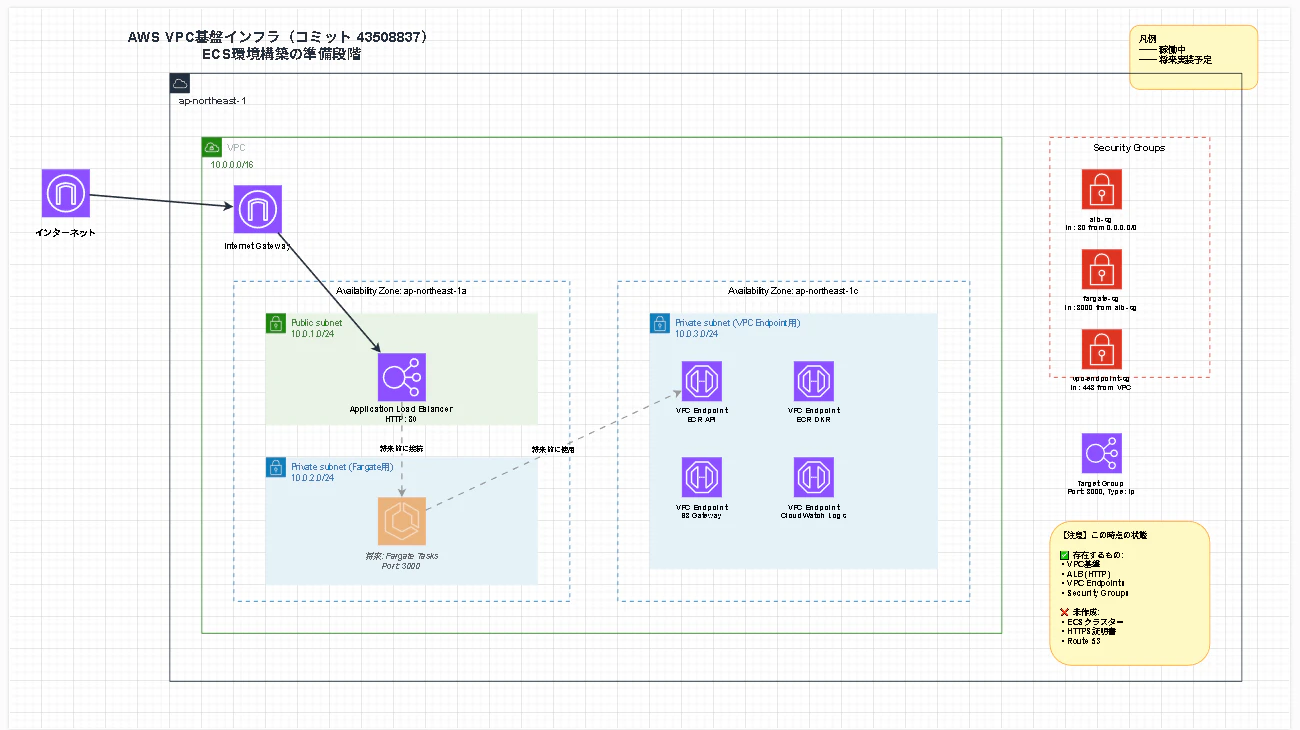
構成要素
ネットワーク層:
- VPC: 10.0.0.0/16
- Internet Gateway
- Public Subnet (1a): 10.0.1.0/24 - ALB 配置用
- Private Subnet (1a): 10.0.2.0/24 - Fargate タスク配置用(将来)
- Private Subnet (1c): 10.0.3.0/24 - VPC Endpoint 配置用
ロードバランサー:
- Application Load Balancer (HTTP:80)
- Target Group (Port:3000, Type:ip)
VPC Endpoints:
- ECR API Endpoint
- ECR DKR Endpoint
- S3 Gateway Endpoint(無料)
- CloudWatch Logs Endpoint
セキュリティ:
- ALB Security Group
- Fargate Security Group
- VPC Endpoint Security Group
今回実現したこと
1. Private Subnet + VPC Endpoints によるセキュアな構成
VPC Endpoints で NAT Gateway 不要化
従来の構成:
Fargate Task (Private) → NAT Gateway ($32/月) → Internet → ECR/CloudWatch
今回の構成:
Fargate Task (Private) → VPC Endpoints ($7.3/月 × 3) → ECR/CloudWatch
コスト削減効果: 月額約 $10 削減(NAT Gateway $32 vs VPC Endpoints $22)
# ECR API Endpoint
resource "aws_vpc_endpoint" "ecr_api" {
  vpc_id              = aws_vpc.main.id
  service_name        = "com.amazonaws.ap-northeast-1.ecr.api"
  vpc_endpoint_type   = "Interface"
  subnet_ids          = [aws_subnet.private_vpc_endpoint.id]
  security_group_ids  = [aws_security_group.vpc_endpoint.id]
  private_dns_enabled = true
}

# S3 Gateway Endpoint(無料)
resource "aws_vpc_endpoint" "s3" {
  vpc_id            = aws_vpc.main.id
  service_name      = "com.amazonaws.ap-northeast-1.s3"
  vpc_endpoint_type = "Gateway"
  route_table_ids   = [aws_route_table.private.id]
}
2. Multi-AZ 構成の基盤
将来的に複数 AZ に Fargate タスクを分散配置できるよう、事前に基盤を整備:
- AZ 1a: Public Subnet (ALB) + Private Subnet (Fargate)
- AZ 1c: Private Subnet (VPC Endpoints)
3. セキュリティグループによる最小権限の原則
resource "aws_security_group" "fargate" {
  name        = "fargate-sg"
  vpc_id      = aws_vpc.main.id

  ingress {
    description     = "Allow app traffic from ALB"
    from_port       = 3000
    to_port         = 3000
    protocol        = "tcp"
    security_groups = [aws_security_group.alb.id]  # ALBからのみ許可
  }
}
ポイント: Fargate タスクは ALB からのみ アクセス可能
4. Infrastructure as Code (Terraform) による管理
Terraform/aws/
├── provider.tf              # AWS プロバイダー設定
├── vpc.tf                   # VPC、Internet Gateway
├── subnets_and_routes.tf    # サブネット、ルートテーブル
├── vpc_endpoints.tf         # VPC Endpoints
├── security_groups.tf       # セキュリティグループ
├── alb.tf                   # ALB、Target Group、Listener
└── outputs.tf               # 出力値
メリット:
- 再現性: 同じ環境を何度でも作成可能
- バージョン管理: Git で構成変更を追跡
- レビュー: Pull Request でインフラ変更をレビュー
実現しないこと(今後の課題)
この Part1 では、以下は意図的に実装していません(次回以降で実装予定)。
1. ECS クラスター・タスク・サービス
現状: VPC 基盤のみ構築
次回実装予定:
- ECS クラスター
- タスク定義(Node.js / .NET)
- ECS サービス
- FARGATE_SPOT による 70% コスト削減
2. HTTPS 対応
現状: HTTP (80) のみ
次回実装予定:
- ACM で SSL 証明書取得
- Route 53 でドメイン設定
- HTTPS Listener 追加(TLS 1.3)
3. Secrets Manager によるシークレット管理
現状: シークレット管理の仕組みなし
次回実装予定:
- Secrets Manager で API キー・DB 認証情報を管理
- ECS タスク定義で Secrets として注入
4. データベースの構築
現状: データベースなし
次回実装予定:
- Supabase PostgreSQL の統合
5. 監視・アラート基盤
現状: 監視なし
次回実装予定:
- CloudWatch Logs 設定
- CloudWatch Alarms
- SNS 経由でメール/Slack 通知
技術的なポイント
ポイント1: VPC Endpoints によるコスト削減
課題: Private Subnet からインターネットにアクセスするには、通常 NAT Gateway(月額 $32〜)が必要。
解決策: AWS サービスへのアクセスは VPC Endpoints を利用。
| サービス | Endpoint タイプ | 月額コスト |
|---|---|---|
| ECR API | Interface | $7.30 |
| ECR DKR | Interface | $7.30 |
| CloudWatch Logs | Interface | $7.30 |
| S3 | Gateway | 無料 |
| 合計 | $21.90 |
削減額: $32 - $21.90 = $10.10/月
ポイント2: Target Group を事前作成
ALB の Target Group を作成済み:
resource "aws_lb_target_group" "app" {
  name        = "targetgroup"
  port        = 3000
  protocol    = "HTTP"
  target_type = "ip"  # 重要: Fargate は "ip" を使用
  vpc_id      = aws_vpc.main.id
}
なぜ事前作成?
- ECS サービス作成時に Target Group ARN が必要
- インフラ層とアプリケーション層の分離
課題点
1. HTTPS に未対応
現状の問題: HTTP のみで通信
影響:
- 認証情報や API キーが平文で送信される
- セキュリティ要件を満たせない
対策(次回実装):
- ACM で証明書取得
- HTTPS Listener 追加
2. VPC Endpoint のコストが高い
現状: VPC Endpoint (Interface型) が月額 $21.90
課題: 小規模環境では割高に感じる
トレードオフ:
- NAT Gateway ($32) より安い
- セキュリティが向上
- AWS サービス専用(外部 API には使えない)
コスト試算
現時点のコスト(月額)
| サービス | 詳細 | 月額 |
|---|---|---|
| VPC | 無料 | $0 |
| Internet Gateway | 無料 | $0 |
| ALB | 時間料金 + LCU | 約 $20 |
| VPC Endpoint (Interface型) | $7.30 × 3 | $21.90 |
| VPC Endpoint (Gateway型) | S3 は無料 | $0 |
| 合計 | 約 $42/月 |
注: ECS タスクが起動すると追加で Fargate 料金が発生
感想
学んだこと
1. AWS と Terraform の組み合わせの威力
AWS CLI でリソースを確認しながら、Terraform で IaC として管理する手法は非常に効率的でした。
# AWS CLIで確認
aws ec2 describe-vpcs
aws ec2 describe-subnets

# Terraformでコード化
terraform plan
terraform apply
2. コストとセキュリティのトレードオフ
VPC Endpoints vs NAT Gateway の選択では、コスト削減とセキュリティの両立を実現できました。
3. 浅く広く知ることの重要性
今回の構築では、ネットワーク、セキュリティ、コンテナ、IaC、AWS サービスの知識が必要でした。
一つ一つは深くなくても、全体像を把握していることで、適切な設計判断ができました。
苦労した点
-
Security Group の設定ミス
- 最初 Fargate SG に ALB SG を参照し忘れ、通信できず
参考資料
読んだ本
次回予告
Part2: ECS Fargate で Node.js / .NET アプリケーションを動かす
以下を実装予定:
-
ECS クラスター・タスク・サービスの構築
- FARGATE_SPOT による 70% コスト削減
- 最小リソース構成(CPU: 256, Memory: 512MB)
-
時間ベース Auto Scaling
- 22:00 JST: タスク停止
- 05:00 JST: タスク起動
-
Secrets Manager 統合
-
CloudWatch Logs 設定
お楽しみに!
まとめ
この記事で実現したこと
- ✅ Private Subnet + VPC Endpoints によるセキュアな構成
- ✅ NAT Gateway 不要でコスト削減(月額約 $10 削減)
- ✅ Multi-AZ 対応の準備
- ✅ Security Group による最小権限の原則
- ✅ Terraform による完全な IaC 化
次のステップ
- 🔧 HTTPS 対応
- 🔧 ECS クラスター・タスク・サービスの作成
- 🔧 Secrets Manager 統合