
Strata + Qwen3.8-Flash-Next iq2_xs でそこそこのトークン速度が出たが、トークン速度を上げるために自動調整をしてみた
↓昨日の記事
なお、Strata作者が恐ろしい速度で機能改善をし続けているので(感謝!)、バージョンが違うだけで速度が異なるかもしれません
結論
Windowsであれば「START-HERE --calibrate」、Linuxであれば「./setup.sh --calibrate」で、自動調整される
私の環境では67トークン/秒から、85トークン/秒になった
Windows
Strata-main を置いている場所で以下のコマンドを実行する
START-HERE --calibrate
以下のように、パラメータを微妙に変えて最速になるように自動調整が行われる
C:\Strata\Strata-main>START-HERE --calibrate
Strata - Qwen3.8-Flash-Next on a normal PC (a GPU + system RAM + CPU)

  1) qwen3.8-flash-next-iq3_xxs
  2) qwen3.8-flash-next-iq2_xs
Tune which one? [1]: 1

  Tuning Strata for this PC: the output speed is measured with a few engine settings (the PCIe share, the
  draft depth, the CPU threads, the expert cache). It takes roughly 15-30 minutes (3 rounds of each value); the PC is busy meanwhile.
  Loading the model for the measurements ...
[strata] starting the engine: reading the model's weights ...
[strata] loading the experts into RAM (about 47 GB) and locking part of them for the GPU.
         YOUR PC CAN BE SLOW OR STOP RESPONDING FOR 1-3 MINUTES NOW - this is normal.
         Please wait and don't close this window; the browser opens when it is ready.
[strata] experts loaded: 39.97 GiB at 4.59 GiB/s (19 s so far)
[strata] filling the GPU's expert cache (8990 experts, 14.56 GiB of VRAM) ...
[strata] almost ready ...
    round 1/3 PCIe share: 0 63.0  0.2 61.7  0.35 59.4  0.36 58.8  0.55 51.3  0.75 49.9  0.9 45.3  1 41.0
    round 2/3 PCIe share: 0 60.6  0.2 59.4  0.35 56.0  0.36 56.2  0.55 50.0  0.75 48.8  0.9 46.1  1 41.9
    round 3/3 PCIe share: 0 59.5  0.2 59.3  0.35 54.3  0.36 56.6  0.55 47.7  0.75 45.9  0.9 45.7  1 39.7
    PCIe share, median of 3: 0: 60.6 (59.5-63.0), 0.2: 59.4 (59.3-61.7), 0.35: 56.0 (54.3-59.4), 0.36: 56.6 (56.2-58.8), 0.55: 50.0 (47.7-51.3), 0.75: 48.8 (45.9-49.9), 0.9: 45.7 (45.3-46.1), 1: 41.0 (39.7-41.9) -> best 0
    round 1/3 draft floor: 0.3 60.9  0.5 62.4  0.7 60.5
    round 2/3 draft floor: 0.3 58.1  0.5 60.9  0.7 60.0
    round 3/3 draft floor: 0.3 58.2  0.5 58.8  0.7 60.7
    draft floor, median of 3: 0.3: 58.2 (58.1-60.9), 0.5: 60.9 (58.8-62.4), 0.7: 60.5 (60.0-60.7) -> best 0.5
    (以下省略)
なお、調整結果は以下のファイルに保存される
C:\Users[ユーザ名]\AppData\Roaming\Strata\settings.json
なお、昨日の記事ではIQ2_XSで「67トークン/秒」だったが、バージョンアップ&上記の自動調整後で「85トークン/秒」になった

Linux
Ubuntuでも操作方法は全く同じ
以下で自動調整が行われる
./setup.sh --calibrate

IQ3_XXS
IQ2_XSで 85トークン/秒も出たので気をよくしてもう一つ上の量子化で試してみた
IQ3_XSS で上記の自動調整後で 69トークン/秒が出た
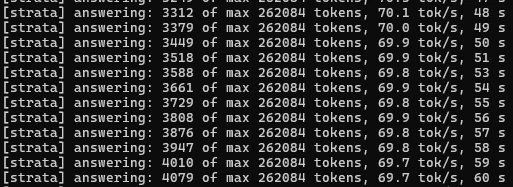
IQ3_S
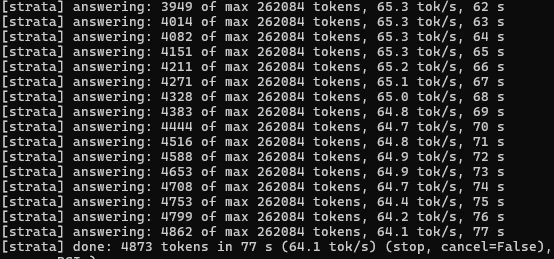
IQ3_Sでは 64トークン/秒でした。
量子化レベルを上げても、自動調整でかなり速度が出るようです
追記:2026/10/11
Strataのバージョンが上がったので、バージョンアップ後にまた calibrate してみました。
IQ3_Sが 64トークン/秒から73トークン/秒に増えました
恐ろしい速度でバージョンアップしている開発者の方、すごい。
