
初めに
今回は画像から点つなぎを自動生成するプログラムを作りました。
方法
①まず画像を用意します。

②線画にします
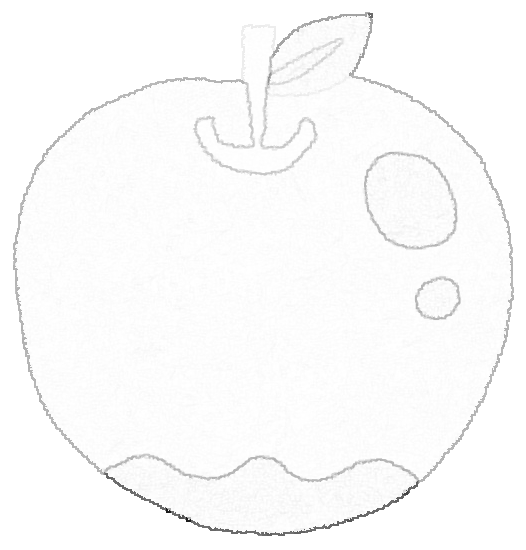
③線画に沿って点を書きます。

④点が近い順に点に番号を振ります。
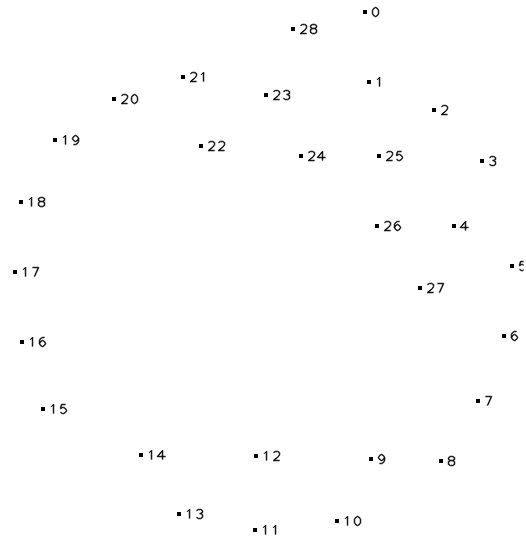
本来ならば近い順ではなくて線に沿って点の番号を振らなければなりませんが、そうすると大変そうなので取り敢えずこの方式で。
ソースコード
pythonで書いていきます。
main.py
import cv2
import numpy as np
import sys
import math
import copy

args=sys.argv


def make_contour_image(path):
    neiborhood24 = np.array([[1, 1, 1, 1, 1],
                             [1, 1, 1, 1, 1],
                             [1, 1, 1, 1, 1],
                             [1, 1, 1, 1, 1],
                             [1, 1, 1, 1, 1]],
                             np.uint8)
    # グレースケールで画像を読み込む.
    gray = cv2.imread(path, cv2.IMREAD_GRAYSCALE)

    # 白い部分を膨張させる.
    dilated = cv2.dilate(gray, neiborhood24, iterations=1)

    # 差をとる.
    diff = cv2.absdiff(dilated, gray)

    # 白黒反転
    contour = 255 - diff
    return contour

rect_size=5

def rect_set_func(image,x,y):
     for ey in range(max(y-rect_size//2,0),min(y+rect_size//2,image.shape[0])):
         for ex in range(max(x-rect_size//2,0),min(x+rect_size//2,image.shape[1])):
             image[ey,ex]=0
     return image

BN=200
N=70

def my_search_func(NX,NY,X,Y):
         if len(X)==0:
               return True
         return len([None for x,y in zip(X,Y) if math.sqrt((NX-x)**2+(NY-y)**2)<N])==0

def my_search_func3(a,d):
         if len(d)==0:return True
         return len([None for e in d if a==e])==0

def my_search_func4(a,x,y,A):
     temp1=copy.copy(x)
     temp2=copy.copy(y)

     for e in A:
         temp1=rm_array_Get(temp1,e)
         temp2=rm_array_Get(temp2,e)
     A=[[i,math.sqrt((a[0]-ex)**2+(a[1]-ey)**2)] for i,ex,ey in zip(range(len(x)),temp1,temp2)]
     A.sort(key=lambda x: x[1])
#     A.reverse()
     return A[0][0]


def my_search_func2(X,Y):
     I=0
     ND=[]
     A=[]
     for i in range(0,len(X)):
          A.append(I)
          I=my_search_func4([X[I],Y[I]],X,Y,A)
     return A

def rm_array_Get(a,I):
     return [e if i!=I else 100000000000 for i,e in enumerate(a)]


def main():
    image_data=make_contour_image(args[1])
    out_image_data=np.full(image_data.shape,255).astype(np.uint8)
    TX=[]
    TY=[]
    ND=[]

    cv2.imwrite("d.png", image_data)

    for ey in range(image_data.shape[0]):
         for ex in range(image_data.shape[1]):
 #             print(image_data[ey,ex])
#              print(my_search_func(ex,ey,TX,TY))
              if my_search_func(ex,ey,TX,TY) and image_data[ey,ex]<BN:
                      out_image_data=rect_set_func(out_image_data,ex,ey)
                      TY.append(ey)
                      TX.append(ex)

    ND=my_search_func2(TX,TY)

    cv2.imwrite("d2.png", out_image_data)


    print(ND)
    I=0
    for i in range(len(ND)):
            cv2.putText(out_image_data, str(i),
                (TX[ND[i]]+rect_size, TY[ND[i]]+rect_size),
                cv2.FONT_HERSHEY_PLAIN, 1,
                (0,0,0), 1, cv2.LINE_AA)


    cv2.imwrite(args[2], out_image_data)

main()
解説等
まず、openCVで線画を作ります。
image_data=make_contour_image(args[1])
その線画に従って点を書いていきます。
    for ey in range(image_data.shape[0]):
         for ex in range(image_data.shape[1]):
 #             print(image_data[ey,ex])
#              print(my_search_func(ex,ey,TX,TY))
              if my_search_func(ex,ey,TX,TY) and image_data[ey,ex]<BN:
                      out_image_data=rect_set_func(out_image_data,ex,ey)
                      TY.append(ey)
                      TX.append(ex)
ただし、点と点との間隔はN(デフォルト70ピクセル)です。
その後、my_search_func2で点ごとに順番を決めて番号を振ります。
ND=my_search_func2(TX,TY)
最後にNDのデータに従って番号を画像に書き込みます。
    I=0
    for i in range(len(ND)):
            cv2.putText(out_image_data, str(i),
                (TX[ND[i]]+rect_size, TY[ND[i]]+rect_size),
                cv2.FONT_HERSHEY_PLAIN, 1,
                (0,0,0), 1, cv2.LINE_AA)
最後に
今回のソースコードだと一応点つなぎは生成できるものの人間が作ったものには遠く及びません。