ただのメモです
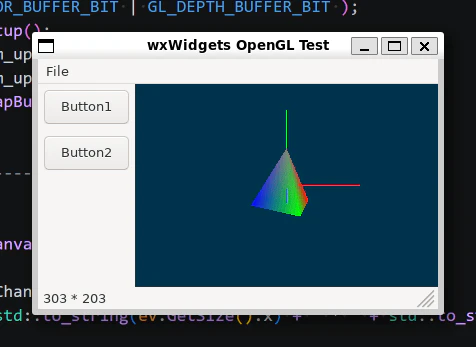
wxWidgets に wxGLCanvas というやつがあって,OpenGL が使えるらしいので試した.
Windows 上で Visual Studio でやってみた感じだと,わりとすぐ動いたのだが,同じコードを WSL2 上に持っていったら動かすまでに苦労したのでメモ.
(ビルド時)いろいろと未解決になる
wxGL から名前が始まるあらゆるものに対して
"undefined reference to
wxGLどうのこうの
と言われて困ったが,これは CMakeLists.txt にて
find_package(wxWidgets REQUIRED COMPONENTS core base gl)
の gl を付けてないのが原因だった.
(実行時)GLのコンテキスト生成に失敗する
(1)実行→即死
実行すると
wxWidgets assert ""tempContext"" failed in wxGLContext(): glXCreateContext failed
とか何とか言われて詰む.
wxGLContext を作って SetCurrent() する処理をフレームのctorでやっていたのが原因みたい.
Windows と違って,wxGLContext 関係の処理は一度ウィンドウが表示された後に実施しないとダメ,という話である模様.
→とりあえず件の処理をタイマイベントのハンドラに移して「初回時にやる」,という形にしてやっつけ仕事的に回避しておく.
(2)「コンテキスト生成無理でした」っていうメッセージボックスが出る
前記(1)の修正を行った結果,今度は
Couldn't create OpenGL context
というメッセージボックスが(勝手に)出てくるように.
wxGLContext のctorに渡す wxGLContextAttrs で .ResetIsolation() というのを(なんとなく)呼んでいたのだが,なんかこれがあるとアウトになる模様.
wxGLContextAttrs Attr;
Attr.CoreProfile().OGLVersion(4,5)
	.Robust()
	//.ResetIsolation()	//←よくわからんが,これがあると失敗する
	.EndList();

m_upGLContext = std::make_unique<wxGLContext>( m_pGLCanvas, nullptr, &Attr );
if( !m_upGLContext->SetCurrent( *m_pGLCanvas ) )
{
	//...(略)
}
(実行時)どう見ても depth が機能してないよねっていう
なんとか動くところまでこぎつけたら,今度は glEnable( GL_DEPTH_TEST ); が全く効かない.
とても残念な描画結果になっている.
wxGLCanvas の ctor に対して適切に設定した wxGLAttributes を渡さないとそうなるらしい.
( Windows 上では,この引数が無い版のctorを使っていて問題無かったのだが)
//この型を用意して…
wxGLAttributes Attr;
Attr.PlatformDefaults()
	.RGBA()
	.DoubleBuffer()
	.Depth(24)	//←こういうのが必要っぽい
	.EndList();

//wxGLCanvas のctorに渡す
m_pGLCanvas = new wxGLCanvas( this, Attr, ID::GLCANVAS );
(その他)
glad
GLFW 使ってたときは, gladLoadGLLoader( (GLADloadproc)glfwGetProcAddress )
とか書いてたんだけど,そしたら GLFW じゃなくなったらどうするのか?
↓
gladLoadGL() で良いらしい.
wxGLContext の SetCurrent() の後あたりでやれば良いっぽい.
wxGLCanvas がどこにも見当たらないと思ったら
Sizer の上に wxGLCanvas を配置したら,実行時に「OpenGL の表示,どこにも無くね?」ってなった.
明示的にサイズ設定しとかないと 1pixel になってしまう模様.
//両方必要なのかはよくわらんけど
m_pGLCanvas->SetMinSize( wxSize(320,240) );
m_pGLCanvas->SetSize( wxSize(320,240) );
とりあえず「ちょっとしたGUI + OpenGL表示」みたいなのが欲しいときに,そこそこ簡単にできるかも感.