0
0

Delete article

Deleted articles cannot be recovered.

Draft of this article would be also deleted.

Are you sure you want to delete this article?

VirtualBox上で動作するParrotOSのマウスがカクカクするときに試してみると良いこと

0
Posted at

はじめに

リソース不足ではないのに、VirtualBox上で動作するParrotOSのマウス操作が異様にカクカクして気になったのでChatGPTと相談しながら原因を調査しました。

根本的な原因はよくわかっていませんが、とりあえず事象の回避ができたので情報共有のため本記事を作成しています。

動作環境

  • Windows 11: 25H2
  • VirtualBox: 7.2.8
  • ゲストOS:
    • ParrotOS: 7.1
    • Kernel: 7.0.9+parrot7-amd64
    • セッション: Wayland
  • VM設定:
    • vCPU: 6
    • ビデオメモリ: 128 MB
    • グラフィックスコントローラー: VMSVGA
    • 3Dアクセラレーション: OFF

問題

表題の通りVirtualBox上で動作するParrotOSのマウスが異様にカクカクする。

対処法

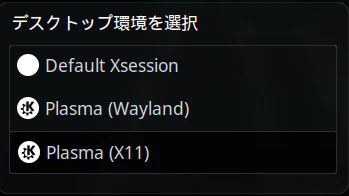
デスクトップ環境を「Wayland」から「X11」に変更する。

ParrotOSの場合の変更手順

  1. ログイン状態の場合は一度ログアウトする
  2. ユーザ名の右側にある歯車マークをクリック
    image.png
  3. 「デスクトップ環境を選択」から「Plasma(X11)」を選択する
    image.png

蛇足

VirtualBox7.2環境ではWayland使用時に入力・描画周りで不安定になるケースがあるらしい。
それらしいイシューがちらほら上がっているのを確認

0
0
0

Register as a new user and use Qiita more conveniently

  1. You get articles that match your needs
  2. You can efficiently read back useful information
  3. You can use dark theme
What you can do with signing up
0
0

Delete article

Deleted articles cannot be recovered.

Draft of this article would be also deleted.

Are you sure you want to delete this article?