
概要
タイトル通りなんですが
- AWS利用料なんか高いなー
- Cost Explorerだと概要はわかるけど、なんでこのサービスが高いかの細かい内容までわかんないなー
- CURみるかー
- CURダウンロードして確認 or Athena使って検索
- 利用料が高い原因が分かったから、次は削除しなきゃ
というプロセスを踏んで利用料対策をしていますが、ちょっと・・ちょっとめんどくさいなーと感じてます。。。
なので、「CURから利用料を調べて、利用料が高い原因の部分を削除するコマンドまでAIエージェントに作成させて、楽できねーかな」と思い、作ってみました。
※ 正直、アプリケーションを作らなくてもIDE/AIエージェント/MCPでも似たようなことはできますが、AgentCoreの知見を深める目的もあり、アプリケーションで提供するという形で試してみました。
構成図
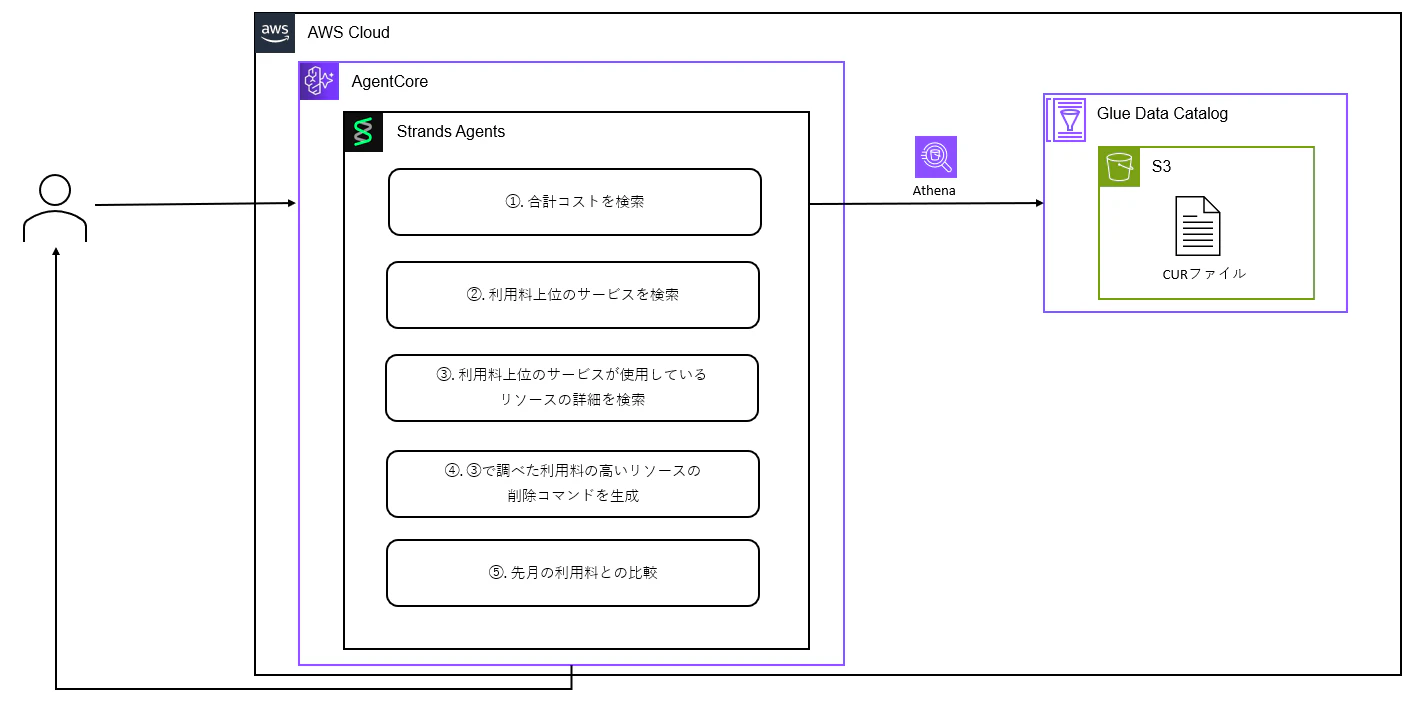
主要処理解説
下記でソースコードも公開してます。
(まだまだ未熟ものなので、イケてない点教えてもらえると嬉しいです。)
-
https://github.com/NiNe090/from-cur-to-delete-public/tree/main/aws-cost-analyzer-agent
- コード全体の流れについて記載しているファイル: CODE_OVERVIEW.md
- デプロイ方法を記載しているファイル: DEPLOYMENT.md
⓪ 処理ハンドリング (cur_analysis_tool.py)
コード: analyze_cur_costs()
以下の順序でAWSコスト分析を実行します:
- 合計コストを取得 → 利用料上位サービスを取得 → 利用料上位サービスのどのリソースでお金がかかっているのか詳細を調査
- Amazon BedrockのAIで高コストリソースの削除コマンドを生成 → 先月との比較分析を実行
cur_analysis_tool.py
def analyze_cur_costs(
    database: Optional[str] = None,
    table: Optional[str] = None,
    limit: int = 10,
    use_ai_for_commands: bool = True,
    top_n_for_commands: int = 5
) -> dict:
    """
    Amazon AthenaでAWS Cost and Usage Report (CUR) データを分析する。
    """
    # 環境変数をデフォルトとして使用
    database = database or settings.athena_database
    table = table or settings.athena_table

    logger.info(
        f"Starting CUR analysis: database={database}, table={table}, limit={limit}"
    )

    try:
        # 入力を検証
        if not database or not database.strip():
            raise ValidationError("Database name cannot be empty")

        if not table or not table.strip():
            raise ValidationError("Table name cannot be empty")

        # アナライザーを初期化
        analyzer = CURAnalyzer(
            database=database,
            table=table
        )

        # 合計コストをクエリ
        total_cost = analyzer.query_total_cost()

        # トップサービスをクエリ
        top_services_df = analyzer.query_top_costs_by_service(limit=limit)

        # トップリソースをクエリ
        top_resources_df = analyzer.query_top_costs_by_resource(limit=limit)

        # 削除コマンドを生成(AI使用)
        ai_model = BedrockModel(...)
        delete_commands = analyzer.generate_delete_commands(
            top_resources_df,
            use_ai=True,
            ai_model=ai_model,
            top_n=top_n_for_commands
        )

        # 先月との比較を実行
        comparison = None
        if include_comparison:
            try:
                comparison = analyzer.compare_with_previous_month()
                logger.info("Month-over-month comparison completed")
            except Exception as e:
                logger.warning(f"Failed to generate comparison: {e}")
                comparison = {"error": f"Comparison failed: {str(e)}"}

        return {
            "success": True,
            "total_cost": float(total_cost),
            "comparison": comparison,
            "top_services": top_services,
            "top_resources": top_resources,
            "delete_commands": delete_commands,
            "error": None
        }
① 合計コストを検索 (cur_analyzer.py)
指定期間(通常は月単位)のAWS総コストを取得します:
- 日付フィルタ構築 → 月の開始日〜終了日でデータを絞り込み
- 月間コスト集計 → その月のすべてのline_item_unblended_costを合計
- 結果返却 → 月のトータルコストをDecimal型で返却(例:$1,234.56)
コード: query_total_cost()
cur_analyzer.py
def query_total_cost(
    self,
    start_date: Optional[datetime] = None,
    end_date: Optional[datetime] = None
) -> Decimal:
    """指定期間の合計コストをクエリする。

    Args:
        start_date: 分析開始日(オプション、パーティションフィルタリング用)
        end_date: 分析終了日(オプション、パーティションフィルタリング用)

    Returns:
        Decimal型の合計コスト

    Raises:
        CostAnalyzerError: クエリが失敗した場合
    """
    logger.info("Querying total cost")

    # WHERE句を構築
    where_conditions = self._build_date_filter(start_date, end_date)
    where_clause = "WHERE " + " AND ".join(where_conditions) if where_conditions else ""

    query = f"""
    SELECT ROUND(SUM(TRY_CAST(NULLIF(line_item_unblended_cost, '') AS DECIMAL(20,10))), 2) AS total_cost
    FROM {self.table}
    {where_clause}
    """

    try:
        df = self.athena_executor.execute_and_get_results(query, self.database)

        if df.empty or df['total_cost'].isna().all():
            logger.warning("No cost data found")
            return Decimal('0.00')

        total_cost = Decimal(str(df['total_cost'].iloc[0]))
        logger.info(f"Total cost: ${total_cost:.2f}")
        return total_cost

    except Exception as e:
        logger.error("=" * 80)
        logger.error(f"[CUR_QUERY_ERROR] Failed to query total cost")
        logger.error(f"[CUR_QUERY_ERROR] Error: {e}")
        logger.error(f"[CUR_QUERY_ERROR] Database: {self.database}, Table: {self.table}")
        logger.error("=" * 80)
        raise CostAnalyzerError(f"Failed to query total cost: {e}")
② 利用料上位のサービスを検索
AWSサービス別のコストランキングを取得します:
- 日付フィルタ構築 → 指定期間でデータを絞り込み
- サービス別集計 → line_item_product_code(サービス名)でグループ化してコスト合計
- 割合計算 → 各サービスが全体コストに占める割合を算出
- ランキング作成 → コスト降順でソートして上位N件を取得
| service_name | total_cost | percentage |
|---|---|---|
| AmazonEC2 | $567.89 | 46.01% |
| AmazonS3 | $234.56 | 19.00% |
| AmazonRDS | $123.45 | 10.00% |
コード: query_top_costs_by_service()
cur_analyzer.py
def query_top_costs_by_service(
    self,
    limit: int = 10,
    start_date: Optional[datetime] = None,
    end_date: Optional[datetime] = None
) -> pd.DataFrame:
    """AWSサービスごとにグループ化されたトップコストをクエリする。"""
    logger.info(f"Querying top {limit} costs by service")

    # WHERE句を構築
    where_conditions = self._build_date_filter(start_date, end_date)
    where_clause = "WHERE " + " AND ".join(where_conditions) if where_conditions else ""

    limit = int(limit)

    query = f"""
    SELECT
        line_item_product_code AS service_name,
        ROUND(SUM(line_item_unblended_cost), 2) AS total_cost,
        ROUND(
            SUM(line_item_unblended_cost) * 100.0 /
            (SELECT SUM(line_item_unblended_cost) FROM {self.table} {where_clause}),
            2
        ) AS percentage
    FROM {self.table}
    {where_clause}
    GROUP BY line_item_product_code
    HAVING SUM(line_item_unblended_cost) > 0
    ORDER BY total_cost DESC
    LIMIT {limit}
    """

    try:
        df = self.athena_executor.execute_and_get_results(query, self.database)
        logger.info(f"Retrieved {len(df)} services")
        return df
③ トップリソースの検索
個別のAWSリソース別のコストランキングを取得します:
- 日付フィルタ + リソースIDフィルタ
- リソース別集計クエリ
| resource_id | service_name | resource_type | total_cost | percentage |
|---|---|---|---|---|
| i-1234567890abcdef0 | AmazonEC2 | BoxUsage:t3.medium | $150.00 | 12.15% |
| arn:aws:s3:::my-bucket | AmazonS3 | TimedStorage-ByteHrs | $89.50 | 7.25% |
| db-instance-1 | AmazonRDS | InstanceUsage:db.t3 | $67.80 | 5.49% |
コード: query_top_costs_by_service()
cur_analyzer.py
def query_top_costs_by_resource(
    self,
    limit: int = 10,
    start_date: Optional[datetime] = None,
    end_date: Optional[datetime] = None
) -> pd.DataFrame:
    """AWSリソースごとにグループ化されたトップコストをクエリする。"""
    logger.info(f"Querying top {limit} costs by resource")

    # WHERE句を構築
    where_conditions = self._build_date_filter(start_date, end_date)

    # 空でないリソースIDのフィルタを追加
    where_conditions.append("line_item_resource_id != ?")
    where_conditions.append("line_item_resource_id IS NOT NULL")
    parameters.append("")

    where_clause = "WHERE " + " AND ".join(where_conditions)

    limit = int(limit)

    query = f"""
    SELECT
        line_item_resource_id AS resource_id,
        line_item_product_code AS service_name,
        line_item_usage_type AS resource_type,
        ROUND(SUM(line_item_unblended_cost), 2) AS total_cost,
        ROUND(
            SUM(line_item_unblended_cost) * 100.0 /
            (SELECT SUM(line_item_unblended_cost) FROM {self.table}
             WHERE line_item_resource_id != ? AND line_item_resource_id IS NOT NULL),
            2
        ) AS percentage
    FROM {self.table}
    {where_clause}
    GROUP BY line_item_resource_id, line_item_product_code, line_item_usage_type
    HAVING SUM(line_item_unblended_cost) > 0
    ORDER BY total_cost DESC
    LIMIT {limit}
    """
④ AI削除コマンドの生成
高コストリソースのAWS CLI削除コマンドを自動生成します:
- コストでソートして上位5件を取得
- 各リソースについてAIで削除コマンドを生成
- _generate_ai_delete_commandにて実施
- 「resource_type」、「usage_type」、「total_cost」を生成AIに渡して削除コマンドを出力
- コマンドをフォーマットして返却
コード: generate_delete_commands()
cur_analyzer.py
def generate_delete_commands(
    self,
    cost_data: pd.DataFrame,
    use_ai: bool = True,
    ai_model=None,
    top_n: int = 5
) -> str:
    """Generate AWS CLI delete commands from cost analysis results using AI."""

    # コストでソートして上位N件を取得
    cost_data_sorted = cost_data.sort_values('total_cost', ascending=False)
    top_resources = cost_data_sorted.head(top_n)
    logger.info(f"Generating AI-powered delete commands for top {top_n} resources")

    commands = []
    commands.append("# AWS CLI Delete Commands (AI Generated)")
    commands.append("# WARNING: Review these commands carefully before execution!")
    commands.append(f"# Showing top {len(top_resources)} most expensive resources")
    commands.append("")

    for idx, (_, row) in enumerate(top_resources.iterrows(), 1):
        resource_id = row['resource_id']
        service_name = row['service_name']

        # AIで削除コマンドを生成 (★この部分については本コードブロックに続いて記載してます)
        command = self._generate_ai_delete_command(
            service_name=service_name,
            resource_id=resource_id,
            ai_model=ai_model,
            row_data=row
        )

        if command:
            cost = row.get('total_cost', 'N/A')
            commands.append(f"# Rank {idx}: Service: {service_name}, Cost: ${cost}")
            commands.append(command)
            commands.append("")

    return "\n".join(commands)
コード: _generate_ai_delete_command()
cur_analyzer.py
def _generate_ai_delete_command(
    self,
    service_name: str,
    resource_id: str,
    ai_model,
    row_data=None
) -> str:
    """Use AI model to generate delete command based on Athena cost analysis results."""

    # Athenaの検索結果から豊富なコンテキストを構築
    context_parts = []
    context_parts.append(f"Service Name: {service_name}")
    context_parts.append(f"Resource ID: {resource_id}")

    if row_data is not None:
        if 'resource_type' in row_data:
            context_parts.append(f"Resource Type: {row_data['resource_type']}")
        if 'usage_type' in row_data:
            context_parts.append(f"Usage Type: {row_data['usage_type']}")
        if 'total_cost' in row_data:
            context_parts.append(f"Total Cost: ${row_data['total_cost']}")

    context_info = "\n".join(context_parts)

    # AIプロンプトを作成
    prompt = f"""あなたはAWSの専門家です。以下のAWS Cost and Usage Report (CUR) の
Athena分析結果に基づいて、AWS CLI削除コマンドを生成してください。

{context_info}

要件:
1. AWS CLIコマンドのみを生成してください
2. 正しいAWS CLIサービス名と削除操作を使用してください
3. 安全な削除に必要なすべてのパラメータを含めてください
4. Athena結果のリソースタイプと使用タイプを考慮してください

コマンドラインのみを1行ずつ返してください。"""

    # AIモデルを呼び出し
    response = ai_model.generate(prompt)

    # レスポンスをクリーンアップ
    command = response.strip()

    # マークダウンコードブロックを削除
    if command.startswith('```'):
        lines = command.split('\n')
        command = '\n'.join([line for line in lines if not line.startswith('```')])

    return command
⑤ 先月のコストとの比較
今月と先月のAWSコストを比較分析します:
- 日付範囲の自動計算
- 両月のCURデータ取得
- 料金の変化率の計算
- サービス別変化確認
- _analyze_service_changesにて実施
- 料金の変化の大きいもののみを抽出
- 生成AIを用いた先月との比較レポートを生成
- _generate_bedrock_insightsにて実施
コード: compare_with_previous_month()
cur_analyzer.py
def compare_with_previous_month(
    self,
    current_month_start: Optional[datetime] = None,
    current_month_end: Optional[datetime] = None
) -> Dict[str, Any]:
    """Compare current month costs with previous month and generate insights.

    Args:
        current_month_start: Start date of current month (default: first day of current month)
        current_month_end: End date of current month (default: last day of current month)

    Returns:
        Dictionary containing:
            - current_month_cost: Total cost for current month
            - previous_month_cost: Total cost for previous month
            - cost_change: Absolute cost change
            - cost_change_percentage: Percentage change
            - insights: Text description of the comparison
            - top_services_current: Top services in current month
            - top_services_previous: Top services in previous month
            - service_changes: Services with significant changes
    """
    logger.info("Comparing current month with previous month")

    # デフォルトの日付範囲を設定
    if not current_month_start or not current_month_end:
        now = datetime.now()
        current_month_start = datetime(now.year, now.month, 1)
        # 今月の最終日を計算
        if now.month == 12:
            next_month = datetime(now.year + 1, 1, 1)
        else:
            next_month = datetime(now.year, now.month + 1, 1)
        current_month_end = next_month - timedelta(days=1)

    # 先月の日付範囲を計算
    if current_month_start.month == 1:
        previous_month_start = datetime(current_month_start.year - 1, 12, 1)
        previous_month_end = datetime(current_month_start.year, 1, 1) - timedelta(days=1)
    else:
        previous_month_start = datetime(current_month_start.year, current_month_start.month - 1, 1)
        previous_month_end = current_month_start - timedelta(days=1)

    try:
        # 今月のコストを取得
        current_cost = self.query_total_cost(current_month_start, current_month_end)
        current_services = self.query_top_costs_by_service(
            limit=10,
            start_date=current_month_start,
            end_date=current_month_end
        )

        # 先月のコストを取得
        previous_cost = self.query_total_cost(previous_month_start, previous_month_end)
        previous_services = self.query_top_costs_by_service(
            limit=10,
            start_date=previous_month_start,
            end_date=previous_month_end
        )

        # 変化を計算
        cost_change = float(current_cost - previous_cost)
        cost_change_percentage = (
            (cost_change / float(previous_cost) * 100)
            if previous_cost > 0
            else 0
        )

        # サービスごとの変化を分析
        service_changes = self._analyze_service_changes(current_services, previous_services)

        # インサイトを生成(BedrockまたはデフォルトのInsights)
        if self.use_bedrock and self.bedrock_client:
            insights = self._generate_bedrock_insights(
                current_cost=float(current_cost),
                previous_cost=float(previous_cost),
                cost_change=cost_change,
                cost_change_percentage=cost_change_percentage,
                service_changes=service_changes,
                current_month_start=current_month_start,
                previous_month_start=previous_month_start
            )
        else:
            # Bedrockが利用できない場合はシンプルなメッセージ
            insights = f"## 📊 先月との比較\n\n今月のコスト: ${float(current_cost):,.2f}\n先月のコスト: ${float(previous_cost):,.2f}\n変化: {cost_change_percentage:+.1f}%"

        logger.info(f"Comparison complete: {cost_change_percentage:+.2f}% change")

            return {
                "current_month_cost": float(current_cost),
                "previous_month_cost": float(previous_cost),
                "cost_change": cost_change,
                "cost_change_percentage": cost_change_percentage,
                "insights": insights,
                "top_services_current": current_services.to_dict('records'),
                "top_services_previous": previous_services.to_dict('records'),
                "service_changes": service_changes,
                "current_month": {
                    "start": current_month_start.strftime("%Y-%m-%d"),
                    "end": current_month_end.strftime("%Y-%m-%d")
                },
                "previous_month": {
                    "start": previous_month_start.strftime("%Y-%m-%d"),
                    "end": previous_month_end.strftime("%Y-%m-%d")
                }
            }

        except Exception as e:
            logger.error(f"Failed to compare with previous month: {e}")
            raise CostAnalyzerError(f"Failed to compare with previous month: {e}")
コード: _analyze_service_changes()
cur_analyzer.py
def _analyze_service_changes(
    self,
    current_services: pd.DataFrame,
    previous_services: pd.DataFrame
) -> List[Dict[str, Any]]:
    """Analyze changes in service costs between two periods.

    Args:
        current_services: DataFrame of current period services
        previous_services: DataFrame of previous period services

    Returns:
        List of dictionaries containing service change information
    """
    changes = []

    # 現在のサービスをディクショナリに変換
    current_dict = {row['service_name']: row for _, row in current_services.iterrows()}
    previous_dict = {row['service_name']: row for _, row in previous_services.iterrows()}

    # すべてのサービスを確認
    all_services = set(current_dict.keys()) | set(previous_dict.keys())

    for service in all_services:
        current_cost = float(current_dict[service]['total_cost']) if service in current_dict else 0.0
        previous_cost = float(previous_dict[service]['total_cost']) if service in previous_dict else 0.0

        cost_change = current_cost - previous_cost
        cost_change_percentage = (
            (cost_change / previous_cost * 100)
            if previous_cost > 0
            else (100 if current_cost > 0 else 0)
        )

        # 大きな変化があるサービスのみ記録(10%以上または$10以上)
        if abs(cost_change_percentage) >= 10 or abs(cost_change) >= 10:
            changes.append({
                "service_name": service,
                "current_cost": current_cost,
                "previous_cost": previous_cost,
                "cost_change": cost_change,
                "cost_change_percentage": cost_change_percentage,
                "status": "new" if previous_cost == 0 else (
                    "removed" if current_cost == 0 else "changed"
                )
            })

    # 変化の大きい順にソート
    changes.sort(key=lambda x: abs(x['cost_change']), reverse=True)

    return changes
コード: _generate_bedrock_insights()
cur_analyzer.py
def _generate_bedrock_insights(
    self,
    current_cost: float,
    previous_cost: float,
    cost_change: float,
    cost_change_percentage: float,
    service_changes: List[Dict[str, Any]],
    current_month_start: datetime,
    previous_month_start: datetime
) -> str:
    """Bedrockを使用してAIによるコスト比較インサイトを生成する。"""

    # データを構造化してプロンプトに含める
    analysis_data = {
        "comparison_period": {
            "previous_month": previous_month_start.strftime("%Y年%m月"),
            "current_month": current_month_start.strftime("%Y年%m月")
        },
        "cost_summary": {
            "previous_cost": previous_cost,
            "current_cost": current_cost,
            "cost_change": cost_change,
            "cost_change_percentage": cost_change_percentage
        },
        "service_changes": service_changes[:10]  # 上位10サービスのみ
    }

    # AIプロンプトを作成
    prompt = f"""あなたはAWSコスト分析の専門家です。以下のAWSコスト比較データを分析して、わかりやすく実用的なレポートを日本語で生成してください。

分析データ:
{json.dumps(analysis_data, ensure_ascii=False, indent=2)}

以下の要件に従ってレポートを作成してください:

1. **概要セクション**: 全体的なコスト変化の要約
2. **主要な変化**: 最も重要なサービスの変化を3-5個ハイライト
3. **推奨アクション**: 具体的で実行可能な推奨事項
4. **注意点**: コスト増加の場合は調査すべき項目、コスト削減の場合は継続すべき取り組み

レポートの特徴:
- ビジネス視点での分析
- 具体的な数値を含める
- 絵文字を適度に使用して読みやすくする
- マークダウン形式で出力
- 技術的すぎず、経営陣にも理解しやすい内容

レポートの長さ: 300-500文字程度で簡潔に"""

    # Bedrock Claude Sonnet 4.5を呼び出し
    response = self.bedrock_client.invoke_model(
        modelId="jp.anthropic.claude-sonnet-4-5-20250929-v1:0",
        body=json.dumps({
            "anthropic_version": "bedrock-2023-05-31",
            "max_tokens": 1000,
            "messages": [{"role": "user", "content": prompt}],
            "temperature": 0.3
        })
    )

    # レスポンスを解析してAIインサイトを返却
    response_body = json.loads(response['body'].read())
    return response_body['content'][0]['text']
実行結果
実行のサンプルとして「test_agent_runtime.py」を実行することで、test_resultsフォルダ内に下記のmdファイルが出力されます。
※ IDとかはマスクしてます。
output_sample.md
# 📊 今月のAWSコスト分析結果

## 💰 コスト概要
**今月の合計コスト: $5.12**

前月(11月)と比較して **$105.29の削減(-95.4%)** を達成しています!🎉

---

## 📈 今月のコスト上位サービス(12月)

| サービス名 | コスト | 割合 |
|-----------|--------|------|
| 1. AWS Elemental MediaLive | $2.99 | 58.4% |
| 2. Amazon VPC | $0.75 | 14.7% |
| 3. AWS KMS | $0.59 | 11.6% |
| 4. AWS Secrets Manager | $0.24 | 4.7% |
| 5. Amazon EC2 | $0.22 | 4.2% |
| 6. Amazon ECR | $0.13 | 2.5% |
| 7. Amazon SageMaker | $0.11 | 2.2% |
| 8. Amazon S3 | $0.06 | 1.1% |
| 9. Amazon Redshift | $0.01 | 0.2% |
| 10. Amazon Bedrock Agent | $0.01 | 0.1% |

---

## 📊 前月(11月)との比較

### 主要な変化トップ5
1. **Amazon EC2**: $39.74 → $0.22 **(-99.4%削減)** ⬇️
   - インスタンスの大幅な削減または停止

2. **AWS Developer Support**: $28.71 → $0.00 **(-100%削減)** ⬇️
   - サポートプランの解約

3. **AWS Elemental MediaLive**: $15.84 → $2.99 **(-81.1%削減)** ⬇️
   - メディアストリーミングの利用削減

4. **AWS ELB**: $9.73 → $0.00 **(-100%削減)** ⬇️
   - ロードバランサーの完全停止

5. **Amazon VPC**: $7.98 → $0.75 **(-90.6%削減)** ⬇️
   - NAT Gatewayやデータ転送の大幅削減

---

## 🔍 全期間のコスト上位リソース

| リソース | サービス | コスト | 割合 |
|---------|---------|--------|------|
| NAT Gateway (nat-xxxxxxxxxxxxxxxxx) | EC2 | $65.66 | 9.8% |
| Amazon Q Developer Pro | Amazon Q | $57.00 | 8.5% |
| EBS Volume (vol-xxxxxxxxxxxxxxxxx) | EC2 | $36.05 | 5.4% |
| MediaLive Input (xxxxxxx) | MediaLive | $28.13 | 4.2% |
| MediaLive Channel (xxxxxxx) | MediaLive | $28.13 | 4.2% |

---

## 💡 削除コマンド(AI生成)

以下は、コストの高いリソースを削除するためのAWS CLIコマンドです。

⚠️ **重要な注意事項:**
- これらのコマンドは**AIが自動生成**したものです
- 実行前に必ず**AWS公式ドキュメント**で確認してください
- 削除は**元に戻せません**
- 本番環境への影響を十分に確認してから実行してください

```bash
# 1. NAT Gateway の削除 (コスト: $65.66)
aws ec2 delete-nat-gateway --nat-gateway-id nat-xxxxxxxxxxxxxxxxx --region ap-northeast-1

# 2. Amazon Q Developer Pro サブスクリプションの解除 (コスト: $57.00)
# 注: サブスクリプションはAWSコンソールまたはOrganizationsで管理されます
aws codewhisperer list-profile-associations --query "profileAssociations[?profileArn.contains(@, 'user/xxxxxxxx-xxxx-xxxx-xxxx-xxxxxxxxxxxx')]"
aws codewhisperer disassociate-profile --profile-arn arn:aws:identitystore:::user/xxxxxxxx-xxxx-xxxx-xxxx-xxxxxxxxxxxx

# 3. EBS Volume の削除 (コスト: $36.05)
aws ec2 delete-volume --volume-id vol-xxxxxxxxxxxxxxxxx

# 4. MediaLive Input の削除 (コスト: $28.13)
# 注: チャンネルにアタッチされている可能性があります。事前確認:
# aws medialive list-channels --query "Channels[?InputAttachments[?InputId=='xxxxxxx']]"
aws medialive delete-input --input-id xxxxxxx

# 5. MediaLive Channel の削除 (コスト: $28.13)
aws medialive stop-channel --channel-id xxxxxxx --region ap-northeast-1
aws medialive wait channel-stopped --channel-id xxxxxxx --region ap-northeast-1
aws medialive delete-channel --channel-id xxxxxxx --region ap-northeast-1

✅ 推奨アクション
🎯 継続すべき取り組み
リソースの適切な停止管理が徹底されています
環境の統廃合による効率化を継続
定期的なコスト監視を維持

⚠️ 注意すべき点
サポート体制: Developer Supportを解約していますが、技術的な問題発生時の対応体制は確保されていますか?
サービス停止の影響: ELBやGlueの完全停止が本番環境に影響していないか確認が必要
一時的な削減: プロジェクト休止による一時的な削減の場合、来月以降の急増に注意
まとめ
自作AIエージェントでAWS利用料の対策をやってみました。
いつか「生成AIの結果100%信じられます!」みたいな時代が来た時には削除まで自動でさせたいと思います。
(いつかそんな時代来るのかなー)