

TL;DR
IBM Bobでコマンド実行の文字化けを解消するのにcmdとPowerShellの文字コード設定が必要だった。
はじめに
IBM Bobで初めてエージェント型を使い始めたのですが、チャット内で実行されるコマンドが文字化けしており、解消に少しハマったので備忘録です。

Custom Instructions for All Modesに「chcp 65001を毎回つける」ように指示してみたりしたんですが上手くいかず…
あーでもないこーでもないしていると以下のように返ってきました。
問題は、Bob AIがexecute_commandでコマンドを実行する際、コマンドプロンプト(cmd.exe)経由でPowerShellを起動しているため、コマンドプロンプトのコードページ(932)が影響しているからです。
だからPowerShellの文字コード指定だけじゃ上手くいかなかったのか!
cmdの文字コード指定
参考: https://qiita.com/Ryokhu/items/37b79a48b625b77c7b39
Windows側の画面が変わっており、
[コントロールパネル] > [地域] > [管理タブ] > [システム ロケールの変更(C)...]
から開くことが可能です。
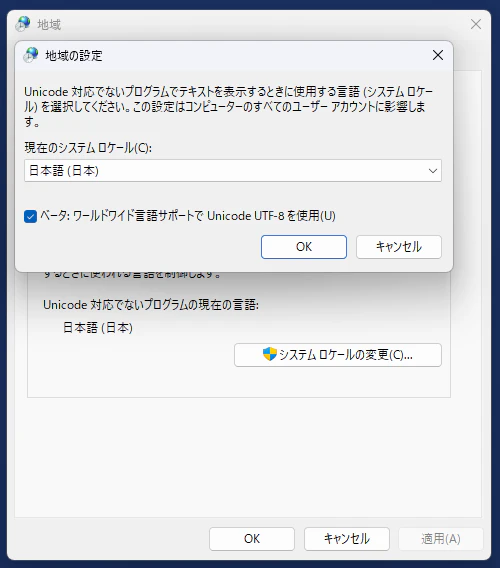
これでcmdがUTF-8になるっぽい。
PowerShellの文字コード指定
参考: https://qiita.com/ji6czd/items/80bfaeba721bd20b9013
notepad $PROFILE
でファイルがねーよって怒られたので、Geminiに助けてもらいました。
1. プロファイル用フォルダとファイルを強制作成する
PowerShell(VS Code内のターミナルでOK)に以下のコマンドをコピー&ペーストして実行してください。
if (!(Test-Path -Path $PROFILE)) {
  New-Item -ItemType File -Path $PROFILE -Force
}
notepad $PROFILE
New-Item ... -Force: 途中のフォルダがなくても強制的に作成し、空のファイルを作ります。
実行後、真っ白なメモ帳が立ち上がります。
2. 設定を書き込む
開いたメモ帳に、以下の3行を貼り付けて保存(Ctrl + S)してください。
$OutputEncoding = [System.Text.Encoding]::UTF8
[Console]::OutputEncoding = [System.Text.Encoding]::UTF8
[Console]::InputEncoding = [System.Text.Encoding]::UTF8
3. 反映を確認する
メモ帳を閉じます。
VS Codeのターミナルのゴミ箱アイコンをクリックして一度閉じ、新しくターミナルを開き直します。
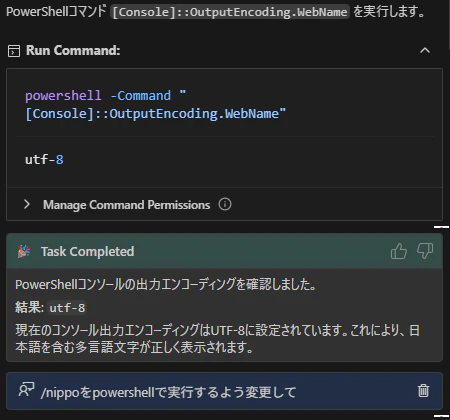
以下のコマンドを打って、True または utf-8 系の表示が出るか確認します。
[Console]::OutputEncoding.WebNameしてみて
さいごに
先にPowerShellを設定し、後でcmdを設定しました。
もしかしたらcmdの設定だけでいいかも。