この記事は備忘録です☺
②では一時停止機能の仕様を追加しました。
休憩中の女の子がかわいかったですね😍
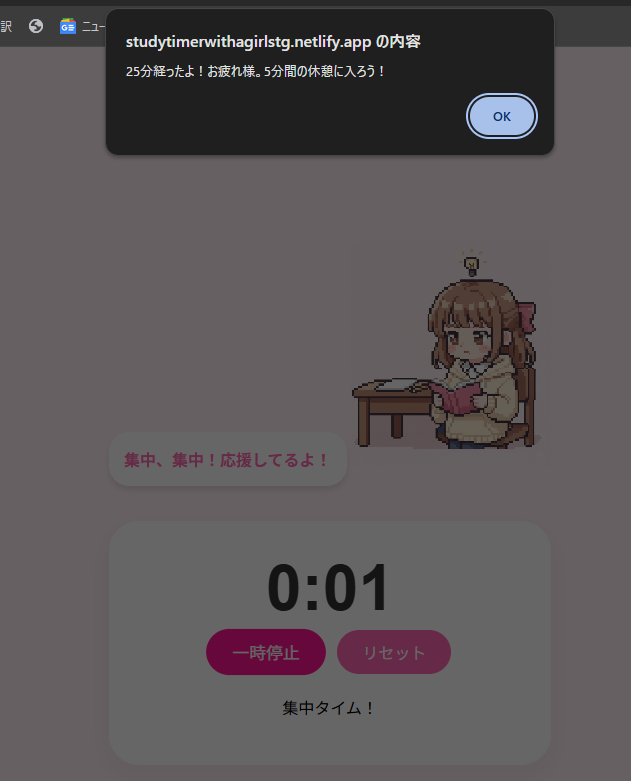
あと、知らぬ間に25分が終わった後に通知ポップアップが表示されるようになっていました。
(テストしてないことがばれちゃうな…(;'∀'))
今回は25分+5分を自動で繰り返す機能を追加しました。
これで二週目にも対応できるようになりますね。
↓完成版はこちら
https://studytimerwithagirlstg.netlify.app/
以下、今回のソースです。
更新したのは、今回もJsだけでした。
html,cssは変更はありませんので①の記事をご覧ください。
↓①の記事
可愛い女の子と一緒に勉強したいからアプリを作る①✊😋
JavaScript
script.js
let timeLeft = 25 * 60;
let timerId = null;
let isWorkMode = true;

const timerDisplay = document.getElementById('timer');
const messageDisplay = document.getElementById('message');
const startBtn = document.getElementById('start-btn');
const charImg = document.getElementById('character');

function updateTimer() {
    const minutes = Math.floor(timeLeft / 60);
    const seconds = timeLeft % 60;
    timerDisplay.textContent = `${minutes}:${seconds.toString().padStart(2, '0')}`;
}

// タイマーの中身(ロジック)を独立させた関数
function runTimer() {
    timerId = setInterval(() => {
        timeLeft--;
        updateTimer();

        if (timeLeft <= 0) {
            clearInterval(timerId);
            timerId = null;

            if (isWorkMode) {
                // 集中終了時
                charImg.src = "girl_rest.png";
                messageDisplay.textContent = "お疲れ様!コーヒータイムだよ。";
                alert("25分経ったよ!5分間の休憩を始めます。");

                // 次の準備(休憩モードへ)
                isWorkMode = false;
                timeLeft = 5 * 60;
                updateTimer();
                runTimer(); // ★自動で休憩タイマーを開始!
            } else {
                // 休憩終了時
                charImg.src = "girl.png";
                messageDisplay.textContent = "さあ、また集中していこう!";
                alert("休憩終了!25分の集中時間を始めます。");

                // 次の準備(集中モードへ)
                isWorkMode = true;
                timeLeft = 25 * 60;
                updateTimer();
                runTimer(); // ★自動で集中タイマーを開始!
            }
        }
    }, 1000);
}

function toggleTimer() {
    if (timerId === null) {
        // --- 【再開】の処理 ---
        startBtn.textContent = "一時停止";

        // 再開した瞬間のモードに合わせて、画像とメッセージを「本来の姿」に戻す
        if (isWorkMode) {
            charImg.src = "girl.png";
            messageDisplay.textContent = "集中、集中!応援してるよ!";
        } else {
            charImg.src = "girl_rest.png";
            messageDisplay.textContent = "休憩中も大切だよ。ゆっくりしてね。";
        }

        runTimer();
    } else {
        // --- 【一時停止】の処理 ---
        clearInterval(timerId);
        timerId = null;
        startBtn.textContent = "再開";
        messageDisplay.textContent = "一休みだね。";
        charImg.src = "girl_rest.png"; // 一時停止中は必ず休憩画像
    }
}

function resetTimer() {
    clearInterval(timerId);
    timerId = null;
    isWorkMode = true;
    timeLeft = 25 * 60;
    updateTimer();
    startBtn.textContent = "スタート";
    messageDisplay.textContent = "リセットしたよ。準備はいい?";
    charImg.src = "girl.png";
}

startBtn.addEventListener('click', toggleTimer);
document.getElementById('reset-btn').addEventListener('click', resetTimer);
まとめ
一時停止をした際に画像とテキストが
元の集中モードの画像に戻らないバグがあったので修正しました。
バグというより、仕様説明が足りなかったのかもですね。
`toggleTimer`部分です。
追記
通知はこのように上からモーダルが下がってきます。
モーダルって名前、合ってるのかな…🤔