

はじめに
背景
LLM はプロンプトにその精度を左右される.しかし,システムプロンプト/ユーザプロンプト共にLLM アプリケーションの設計には組み込まれておらず,各人が手動で調整する場合が多い.例えば,ユーザはタスクごとにプロンプトを作成し,エンジニアはアプリケーションごとにシステムプロンプトを作成する.
手動で作成したプロンプトの管理は困難である.まずユーザ x モデル x タスクの積でプロンプトが作成されるから数が多くなる.また,その精度は数値で評価,監視され逐次更新されることはほとんどない.更にプロンプトエンジニアリングには職人技や手癖が入るため作作成者で設計や精度がばらつく可能性もある.
特にチームにおいて LLM を当たり前に定常タスクに導入するにはプロンプトを一貫して管理し,設計できる対象にする必要がある.つまりプロンプトの管理は LLM アプリケーションの品質やセキュリティ,運用コスト削減に貢献する要素である.
エンジニア目線ではエージェントやワークフローを作っているとコードとプロンプト両方の面倒を見る必要があり非常に面倒である.実行時にはどちらがボトルネックになっているかわからないし,コードの変更に合わせてプロンプトテンプレートを調整するのはやりたくないタスクである.
そこでこれらの課題に有効であろう DSPy の学習と簡単な評価を実施する.後述するが,DSPy は特定タスクやエッジ処理に非常に有効であると考えられる.これらの用途は閉域環境で実行されるケースが多いため,ローカルモデルを対象に検証する.
内容について
やること.
- DSPy の Web ページにある Getting Start の実践
- データセットを利用した課題タスクへの最適化検証(手動プロンプトと自動最適化の精度比較)
やらないこと.
- 最適化アルゴリズムの深掘り
- DSPy の構成要素に関する深掘り
また,既に他の方々が DSPy に関して投稿しているのでぜひ参照してほしい.
DSPy について
DSPy(Declarative Self-improving Python)はスタンフォード NLP チームが開発している LLM のプロンプトと重み最適化ライブラリ 1.コンセプトは LLM の動作をプロンプトエンジニアリングではなく,プログラムとして定義し自動的に最適化される内部状態の結果として扱うことを目的にしている.つまり,人の手ではなく以前の機械学習のように明確な最適化手法と指標で LLM の出力を評価しプロンプトなどを調整する.従って,システムプロンプト (あるいはプロンプトテンプレート)という LLM の性能に影響するにも関わらず,設計対象でも完全に自由な入力でもない存在の管理を可能にする.
ここでは dspy==3.0.4 を利用している.例によって生成モデル系のライブラリは更新が早いので最新版との差分は公式の情報を参照.
ローカルモデルを起動
推論サーバ
まずは推論サーバを用意する.今回は下記の推論エンジン&サーバでスクリプトの動作を確認した.これ以外のサーバであっても基本的に OpenAI API 互換の推論 REST API があればよい.
- vLLM は docker , LMStudio はマシンにインストールなどお好みの公式の方法で実行する.
- プロンプトの自動最適化はコンテキストサイズが必要なので 8192 以上を推奨する.
| # | 推論エンジン&サーバ | GUI | デフォルトのエンドポイント |
|---|---|---|---|
| 1 | vLLM | NO | http://127.0.0.1:8000/v1 |
| 2 | LM Studio | YES | http://127.0.0.1:1234/v1 |
モデル
下記のモデルで動作を確認した.様々なオープンウェイト LLM が公開されているので DSPy は使えるのか,サイズやファミリーが違うと精度は変化するのかなども併せて確認したい.従って,モデルサイズとモデルファミリーでバリエーションが出るように揃えている.
| # | モデル名 |
|---|---|
| 1 | google/gemma-3-4b-it |
| 2 | google/gemma-3-12-it |
| 3 | google/gemma3-27b-it |
| 4 | mistralai/Mnistral-3-14b-Instruct-2512 |
| 5 | openai/gpt-oss-20b |
| 6 | ReaHatAI/Llama-4-Scout-17B-16E-Instruct-quantized.w4a16 |
Getting Start の実行
初めて触るので公式ドキュメントのトップに記載されているサンプルコードで DSPy の動かしかたを理解する. 2
検証とは直接的に関係がないため適宜読み飛ばして欲しい.
サンプルの実行結果は google/gemma-3-12-it を LM Studio で利用したものを記載している.
共通
以降の Example xx を呼び出す場合に共通して必要になる部分.モデルの定義や DSPy の設定を実行しているコードスニペット.
from typing import Literal
import dspy

MODEL_NAME: str = "openai/google/gemma-3-12b-it"
API_BASE: str = "http://127.0.0.1:1234/v1"
# Dummy API key
API_KEY: str = "local"

lm = dspy.LM(MODEL_NAME,
             api_base=API_BASE,
             api_key=API_KEY,
             model_type="chat",
             stream=False,
             temperature=0.1,
             provider="openai")
dspy.configure(lm=lm,
               adapter=dspy.ChatAdapter())

# Disable DSPy's cache
dspy.configure_cache(
    enable_disk_cache=False,
    enable_memory_cache=False,
)
Example 01
ユーザがプロンプトを書かずに,回答フォーマット(構造・型)を宣言できることを示す最もシンプルな例.CoT を定義しつつ,回答に float を指定する. DSPy は変数の型や説明, docstring から自動でタスクを推定する様子.
def exsample_math_inst():
    """Numerical output CoT
    """
    math = dspy.ChainOfThought("question -> answer: float")
    result = math(question="Two dice are tossed. What is the probability that the sum equals two?")

    print(result.answer)

exsample_math_inst()
標準出力
0.027777777777777776
別の書き方で同じ動作になる CoT を定義することもできる.
class MathSignature(dspy.Signature):
    question = dspy.InputField()
    answer = dspy.OutputField(type=float)

math = dspy.ChainOfThought(MathSignature)
Example 02
Docsrting や Literal で選択タスクであることを明示して,分類タスクを実行させる例.
class Classify(dspy.Signature):
		"""Define
		"""
    sentence: str = dspy.InputField()
    sentiment: Literal["positive", "negative", "neutral"] = dspy.OutputField()
    confidence: float = dspy.OutputField()

def exsample_classify():
    classify = dspy.Predict(Classify)
    result = classify(sentence="この本は、最後の章はそうでもなかったが、読むのがとても楽しかった。")

    print(result.sentiment)
    print(result.confidence)

exsample_classify()
標準出力
positive
0.85
Example 03
入力から特定の要素を抽出させるタスク.出力フィールドの名称や説明から抽出すべき値が解釈されている様子が伺える.
class ExtractInfo(dspy.Signature):

    text: str = dspy.InputField()
    title: str = dspy.OutputField()
    headings: list[str] = dspy.OutputField()
    entities: list[dict[str, str]] = dspy.OutputField(desc="a list of entities and their metadata")

def example_extraction():

    text = "Apple Inc. announced its latest iPhone 14 today." \
        "The CEO, Tim Cook, highlighted its new features in a press release."
    module = dspy.Predict(ExtractInfo)
    result = module(text=text)

    print(result.title)
    print(result.headings)
    print(result.entities)

example_extraction()
標準出力
Apple Announces iPhone 14
['Apple Inc.', 'iPhone 14', 'Tim Cook']
[{'entity': 'Apple Inc.', 'type': 'ORG'}, {'entity': 'iPhone 14', 'type': 'PRODUCT'}, {'entity': 'Tim Cook', 'type': 'PERSON'}]
Example 04
受け取った python を評価して実行するツールを LLM に利用させる. (なぜか結果が微妙にずれている)
def tool_evaluate_math(expression: str):

    return dspy.PythonInterpreter().execute(expression)

def example_agent():

    react = dspy.ReAct("question -> answer: float", tools=[tool_evaluate_math])
    pred = react(question="What do you get when you divide 9362158 by 2026?")
    print(pred.answer)

example_agent()
標準出力
4614.6
Example 05
アウトラインを作成してから各本文を生成するパイプラインを定義して,title,section,subsection,text の構造をもつ記事を生成させる例.
class Outline(dspy.Signature):
    """Outline a thorough overview of a topic.
    """

    topic: str = dspy.InputField()
    title: str = dspy.OutputField()
    sections: list[str] = dspy.OutputField()
    section_subheadings: dict[str, list[str]] = dspy.OutputField(desc="mapping from section headings to subheadings")

class DraftSection(dspy.Signature):
    """Draft a top-level section of an article.
    """

    topic: str = dspy.InputField()
    section_heading: str = dspy.InputField()
    section_subheadings: list[str] = dspy.InputField()
    content: str = dspy.OutputField(desc="markdown-formatted section")

class DraftArticle(dspy.Module):
    """multistep pipeline
    """
    def __init__(self):
        self.build_outline = dspy.ChainOfThought(Outline)
        self.draft_section = dspy.ChainOfThought(DraftSection)

    def forward(self, topic):
        """run pipeline
        """
        # Generating outline
        outline = self.build_outline(topic=topic)
        sections = []
        for heading, subheadings in outline.section_subheadings.items():
            section, subheadings = f"## {heading}", [f"### {subheading}" for subheading in subheadings]
            # Generating the subsection text
            section = self.draft_section(topic=outline.title, section_heading=section, section_subheadings=subheadings)
            sections.append(section.content)
        return dspy.Prediction(title=outline.title, sections=sections)

def example_multistep_pipeline():
    draft_article = DraftArticle()
    article = draft_article(topic=" Artificial general intelligence")
    print(article.title)
    print(article.sections)

example_multistep_pipeline()
標準出力
Artificial General Intelligence: An Overview
['## Introduction to AGI\n\n### Defining Artificial General Intelligence, ... "]
個別タスク最適化検証
基礎が理解できたので課題タスクを設定.DSPy でプロンプト最適化をして MLFlow にその結果を登録する.
準備
環境を準備する.
- MLFlow には http (s) で到達可能であること
- コードの MLFlow 設定を消して連携を無効化する場合は不要
-
mlflow server -h 0.0.0.0 -p 5001コマンドが通り,サーバが起動すれば良い
- 所望のモデルを OpenAI 互換 API のサーバで起動すること
- vLLM や LM Studio などで推論サービスを起動
-
curl http://localhost:1234/v1/modelsコマンドが通れば良い
構成イメージ
課題タスク
例えば,金融業でローンの一次審査を担当者にサジェストしたい場面を考えてみる.ここではローンデータセット 3 を利用して,ローン申請を受け入れるべきだったか (Default になったか) の判定を LLM で実行する.
データセットの列情報を示した表を以下に示す. Default が目的変数,それ以外は説明変数に該当する.オリジナルのデータサイズは 1347681行 15列 .サンプルサイズが大きいので,検証ではラベルのクラス分布を維持したランダムサンプリングをして利用する.
| 列名 | 型 | 説明 |
|---|---|---|
| Default | int(0/1) | 返済状態の二値変数.完済 = 0,デフォルト(債務不履行) = 1. |
| id | int | 各ローンに割り当てられた一意な識別子. |
| issue_d | datetime / string | ローンが承認された年月. |
| revenue | float | 申請者が自己申告した年間収入(USD). |
| dti_n | float | 住宅ローンを除いた月次債務支払額を月収で割った比率. |
| loan_amnt | float | 申請されたローン金額(USD). |
| fico_n | float | FICO 信用スコア(300–850). |
| experience_c | int / bool | 過去に借入経験があるかを表す二値変数. |
| emp_length | category / string | 現在の雇用先での勤続年数. |
| purpose | category / string | ローン申請の目的を表すカテゴリ変数. |
| home_ownership_n | category / string | 申請者の住宅所有状況. |
| addr_state | category / string | 申請者の居住州(米国州コード). |
| zip_code | string | 申請者の居住 ZIP コード. |
| title | string | 申請者が入力したローンの簡易説明タイトル. |
| desc | string | 申請者が入力したローンの詳細説明文. |
シード固定のランダムサンプリング後,説明変数が多すぎるのでデータを財務状況/資産状況/ローン情報それぞれにまとめて文字列として整形して LLM に渡す.下記は入力のサンプル.
"financial_status":
 "Annual income: 55000.0, Years of employment: 1 year, FICO Score: 702.0, Debt Ratio: 22.38”

"property":
 "Homeownership Status  (“mortgage”, “rent”, “own”, “other”, “any”, “none”): MORTGAGE”

"loan_info":
 "Loan Title: Cement Lawn Ornament Loan, Loan purpose: other, Loan Explanation:This loan is to buy cement lawn ornament molds to expand our already successful business.”
コード
プロンプト最適化を実行する DSPy のサンプルコードを示す.
optimize.py
"""
Optimize prompts with DSPy,
and have a LLM solve a LLM classification task.
"""

from pathlib import Path
import time
from typing import Any

import dspy
from dspy.adapters.base import Adapter
import pandas as pd
import mlflow

from config import TRACKING_URI, EXPERIMENT_NAME, \
    MODEL_NAME, API_BASE, API_KEY,  LABELS, DSPY_EVAL_OUTPUT
from utils import load_dataset, split_train_val_test

# MLflow setup
mlflow.set_tracking_uri(TRACKING_URI)
mlflow.set_experiment(EXPERIMENT_NAME)
mlflow.dspy.autolog(log_traces=True,
                    log_compiles=True,
                    log_evals=True,
                    log_traces_from_compile=True,
                    log_traces_from_eval=True,)

# DSPy setup
lm = dspy.LM(MODEL_NAME,
             api_base=API_BASE,
             api_key=API_KEY,
             model_type="chat",
             stream=False,
             temperature=0.1,
             provider="openai")

class NoFallbackChatAdapter(dspy.ChatAdapter):
    """Custom adapter

    Countermeasures for Json format errors.
    ``
    [error] litellm.exceptions.BadRequestError:
    litellm.BadRequestError: OpenAIException -
    Error code: 400 - {'error':
    "'response_format.type' must be 'json_schema' or 'text'"}'
    ```
    """
    def __call__(self, lm, lm_kwargs, signature, demos, inputs):
        """Override to call only a simple pipeline (format→lm→parse) instead of
        using the existing ChatAdapter.__call__, which invoke the Json Adapter
        as a fallback.
        """
        return Adapter.__call__(self, lm, lm_kwargs, signature, demos, inputs)

    async def acall(self, lm, lm_kwargs, signature, demos, inputs):
        """Asynchronous version of __call__
        """
        return await Adapter.acall(
            self, lm, lm_kwargs, signature, demos, inputs)

adapter = NoFallbackChatAdapter()
adapter.use_json_adapter_fallback = False
dspy.configure(lm=lm, adapter=adapter)

# DSPy cache
dspy.configure_cache(
    enable_disk_cache=False,
    enable_memory_cache=False,
)

# Server check
print(lm("Say OK."))
prog = dspy.Predict("question -> answer")
print(prog(question="Say OK.").answer)

class BinaryJudge(dspy.Signature):
    """Define inputs and outputs of LLM by DSPy field
    """
    financial_status: str = dspy.InputField(
        desc="Information about the debtor's financial situation")
    property: str = dspy.InputField(
        desc="Information about the debtor's residential assets")
    loan_info: str = dspy.InputField(
        desc="Information about this loan application")
    label: Literal["OK", "NG"] = dspy.OutputField(
        desc="Are there any problems with this loan application?"
             + "Return exactly one of: OK or NG")

class JudgeModule(dspy.Module):
    def __init__(self):
        """Append a simple inference module (Predict)
        """
        super().__init__()
        self.judge_module_predict = dspy.Predict(BinaryJudge)

    def forward(self, financial_status, property, loan_info):
        # Append "return only one token" at the end to improve answer accuracy
        tmp = loan_info + "\n\nReturn only one token: OK or NG."
        return self.judge_module_predict(
                financial_status=financial_status,
                property=property,
                loan_info=tmp)

def to_examples(df: pd.DataFrame) -> list:
    """Convert df to DSPy example object
    """
    examples = []
    for row in df.itertuples(index=False):
        ex = dspy.Example(
            financial_status=row.financial_status,
            property=row.property,
            loan_info=row.loan_info,
            label=row.label).with_inputs(
                "financial_status", "property", "loan_info")
        examples.append(ex)
    return examples

def label_exact_match(example, pred, trace=None):
    """a fuction that return metrics for optimizer
    The renponse is averaged by the optimizer (Evaluate obj)
    """

    gold = str(example.label).strip()
    yhat = str(getattr(pred, "label", "")).strip()

    # Absorb output fluctuations (correct "OK." / "Label: OK")
    yhat = yhat.replace("Label:", "").replace(".", "").strip()
    return (yhat in LABELS) and (yhat == gold)

def placeholder_inputs(signature) -> dict[str, Any]:
    """Convert signature to placeholder string for prompt template creation.

    adapter.format(..., inputs={"question": "{question}", ...})
    """
    xs = {}
    for fname, finfo in signature.fields.items():
        if finfo.json_schema_extra.get("__dspy_field_type") == "input":
            xs[fname] = "{" + fname + "}"
    return xs

def messages_to_text(messages):
    """Convert messages into human readable text.

    [{role, content}, ...] -> readable text
    """
    parts = []
    for m in messages:  # m is dict with {role, content}
        parts.append(f"[{m['role'].upper()}]\n{m['content']}")
    return "\n\n---\n\n".join(parts)

if __name__ == "__main__":
    # dataset preparation
    n_sample = 1000
    df = load_dataset(n_sample)
    print(df)
    examples = to_examples(df)
    train_set, val_set, test_set = \
        split_train_val_test(
            examples,
            val_ratio=0.2,
            test_ratio=0.2)

    # LLM workflow setup
    judge = JudgeModule()

    # An optimizer that optimizes the prompt using an arbitrary metric
    # Metric-Informed Prompt Optimization (version 2)
    # arg: auto light/medium/heavy: A preset that controls the optimization
    #   search intensity (computatinal complexity, search space and number
    #    of trials)
    tp = dspy.MIPROv2(
        metric=label_exact_match,
        auto="medium",
        num_threads=8,
        # log_dir="./optimize/data/miprov2_logs"
    )

    t0 = time.perf_counter()
    # If valset = None, then train_size = int(0.5 * len(trainset))
    # https://dspy.ai/api/optimizers/InferRules/?h=valset#dspy.InferRules.compile
    optimized_judge = tp.compile(judge,
                                 trainset=train_set,
                                 valset=val_set)
    t1 = time.perf_counter()
    print(f"Optimize time [sec]: {t1 - t0:.3f}")

    # Evaluator setup
    evaluator = dspy.evaluate.Evaluate(
        devset=test_set,
        metric=label_exact_match,
        num_threads=1,
        display_progress=True,
        save_as_csv=DSPY_EVAL_OUTPUT
    )

    # Execution of the evaluation
    score = evaluator(optimized_judge)
    print("DEV score:", score)

    # Prompt optimization results
    for name, pred in optimized_judge.named_predictors():
        sig = pred.signature
        print("==", name, "==")
        print("instructions:\n", sig.instructions)
        print("num_demos:", len(pred.demos))

    # Save the prompt as a template. 1 file per predictor (Predict obj)
    adapter = dspy.ChatAdapter()
    out_dir = Path("optimize/data/output/")
    out_dir.mkdir(exist_ok=True)

    for name, pred in optimized_judge.named_predictors():
        sig = pred.signature

        messages = adapter.format(
            signature=sig,
            demos=pred.demos,
            inputs=placeholder_inputs(sig),
        )

        text = messages_to_text(messages)

        path = out_dir / f"prompt-optimize-cls_prompt_{name}.txt"
        path.write_text(text, encoding="utf-8")
utils.py
```python
import random

import dspy
import numpy as np
import pandas as pd

from config import DATASET_CSV_FILE, DATASET_REQUIRED_COLS

def load_dataset(sample_n: int = 1000, seed: int = 2024) -> pd.DataFrame:
    """Format the loan dataset so that it can be easily input into an LLM

    Combine the dataset columns into text fields representing, financal status,
    asset status, and loan information.
    Convert the labels before performing sampling.

    https://doi.org/10.5281/zenodo.11295916
    """
    df = pd.read_csv(DATASET_CSV_FILE, dtype={"desc": "string"})

    # Check if required columns exist
    missing = [c for c in DATASET_REQUIRED_COLS if c not in df.columns]
    if missing:
        raise ValueError(
            f"Missing columns: {missing}." +
            f" Available: {list(df.columns)[:30]} ...")

    # preprocessing
    df = df.dropna(subset=["desc", "title"]).copy()
    df["financial_status"] = "Annual income: " + df["revenue"].astype(str) \
        + ", Years of employment: " + df["emp_length"].astype(str) \
        + ", FICO Score: " + df["fico_n"].astype(str) \
        + ", Debt Ratio: " + df["dti_n"].astype(str)
    df["property"] = \
        "Homeownership Status " \
        + " (“mortgage”, “rent”, “own”, “other”, “any”, “none”): " \
        + df["home_ownership_n"].astype(str)
    df["loan_info"] = "Loan Title: " \
        + df["title"].astype(str) + ", Loan purpose: " \
        + df["purpose"].astype(str) + ", Loan Explanation:" \
        + df["desc"].astype(str)

    # Label:0/1 -> OK/NG
    y = df["Default"]
    df["label"] = np.where(y == 0, "OK", "NG")

    # Execlude empty text
    df = df[df["loan_info"].str.len() > 0].copy()

    # Sampling while preserving class ratio
    if sample_n is not None and sample_n < len(df):
        df_ok = df[df["label"] == "OK"]
        df_ng = df[df["label"] == "NG"]
        n_ok = int(sample_n * len(df_ok) / len(df))
        n_ng = sample_n - n_ok
        df = pd.concat([
            df_ok.sample(n=n_ok, random_state=seed),
            df_ng.sample(n=n_ng, random_state=seed),
        ]).sample(frac=1, random_state=seed).reset_index(drop=True)

    return df[["financial_status", "property", "loan_info", "label"]]

def split_train_val_test(
    examples: list[dspy.Example],
    seed: int = 2024,
    val_ratio: float = 0.1,
    test_ratio: float = 0.1,
):
    """Train/Val/Test split
    """
    assert val_ratio + test_ratio < 1.0

    r = random.Random(seed)
    shuffled = examples.copy()
    r.shuffle(shuffled)

    n = len(shuffled)
    n_test = int(n * test_ratio)
    n_val = int(n * val_ratio)

    test_set = shuffled[:n_test]
    val_set = shuffled[n_test:n_test + n_val]
    train_set = shuffled[n_test + n_val:]

    return train_set, val_set, test_set
config.py
from pathlib import Path

# Dataset config
DATASET_CSV_FILE = \
    Path("./LC_loans_granting_model_dataset.csv")
DATASET_REQUIRED_COLS = \
    ["purpose", "home_ownership_n", "desc", "title", "Default"]
LABELS = {"OK", "NG"}

# Human prompt config
PROMPT_TEMPLATE_FILE = Path("./human-prompt.md")

# Output config
DSPY_EVAL_OUTPUT = \
    Path("./output/prompt-optimize-cls_output.csv")
HUMAN_EVAL_OUTPUT = Path("./output/prompt-human-cls_output.csv")

# LLM Config
#  If you cannot connect to the OpenAI compatible server in LM Studio,
# add `openai/` to the begginning of the model name
#  It is recommended that the LLM contextsize be >= 8192
MODEL_NAME: str = "openai/google/gemma-3-12b"
API_BASE: str = "http://127.0.0.1:1234/v1"
API_KEY: str = "local"

# MLflow config
TRACKING_URI = "http://127.0.0.1:5001"
EXPERIMENT_NAME = "dspy-miprov2-okng-001"
結果
下記はタスクを実行させるために作成した(された)プロンプトのサンプルである.今回は MLFlow に保存していないがデータセットやプロンプト, 最適化したオブジェクトを登録しておけば再現性が確保できる.
手動で作成したプロンプト(Human prompt)
You are responsible for the initial screening in a loan review process. The input consists of only three fields of application information (strings). Your role is to determine whether there are any issues and return only one final output: either OK or NG.

# Input
## financial_status
{financial_status}

## property
{property}

## loan_info
{loan_info}

# Evaluation Policy (Examples of general reference thresholds. However, do not apply rigid threshold-based judgments; make a final decision based on an overall assessment.)
- Creditworthiness (FICO) guideline: 760+ Excellent, 700–759 Generally good, 660–699 Caution, 620–659 High caution, <620 Risky
- Debt-to-Income ratio (DTI, treated as a percentage): <20 Low risk, 20–35 Acceptable, 35–43 Caution, >43 High risk
- Income and stability: Lower income tends to reduce repayment capacity even at the same DTI; short employment duration (<2 years) is a risk factor for instability
- Housing status: OWN/MORTGAGE tends to be a stabilizing factor, but may also create financial pressure, so evaluate in combination with other indicators
- Loan purpose and description: debt_consolidation / credit_card are common purposes, but if the description contains red flags such as “signs of inability to repay,” “unstable income,” “gambling/speculative use,” “falsehoods or inconsistencies,” “extreme vagueness,” or “urgent distress (foreclosure, near bankruptcy, etc.),” lean toward NG

# Procedure (Important)
1. Extract annual income, employment duration, FICO score, and DTI from financial_status, and assess their strengths and weaknesses against the guideline examples.
2. Consider the housing status from property.
3. Check for red flags (fraud, inconsistencies, urgency, risky use) in the purpose and description within loan_info.
4. Perform exactly one internal reflection as a prompt engineering step: reconsider the tentative judgment for any oversights, excessive reliance on thresholds, or possible alternative interpretations, and revise the conclusion if necessary. (Do not output the content of this reflection.)
5. Finally, decide: if there are no issues, output OK; if there are issues, output NG.

# Output Constraints (Strict)
- Output only one of: OK or NG
- Do not include any extra characters, reasons, line breaks, punctuation, or explanations
自動最適化で得たプロンプトの例(DSPy prompt)
[SYSTEM]
Your input fields are:
1. `financial_status` (str): Information about the debtor's financial situation
2. `property` (str): Information about the debtor's residential assets
3. `loan_info` (str): Information about this loan application
Your output fields are:
1. `label` (str): Are there any problems with this loan application? Return exactly one of: OK or NG
All interactions will be structured in the following way, with the appropriate values filled in.

[[ ## financial_status ## ]]
{financial_status}

[[ ## property ## ]]
{property}

[[ ## loan_info ## ]]
{loan_info}

[[ ## label ## ]]
{label}

[[ ## completed ## ]]
In adhering to this structure, your objective is:
        You are an expert loan application judge. Your task is to determine whether to approve or reject a loan application based on the applicant's financial status, property ownership, and the loan details provided. Consider factors like income, years of employment, FICO score, debt ratio, homeownership status, loan purpose, and the applicant's explanation. A well-justified loan explanation can positively influence your decision, even with borderline financial metrics. Your response must be concise and return *only one* of the following tokens: "OK" to approve the loan, or "NG" to reject the loan.

        Here's the applicant's information:

        Financial Status: {financial_status}
        Property: {property}
        Loan Info: {loan_info}

        Return only one token: OK or NG.
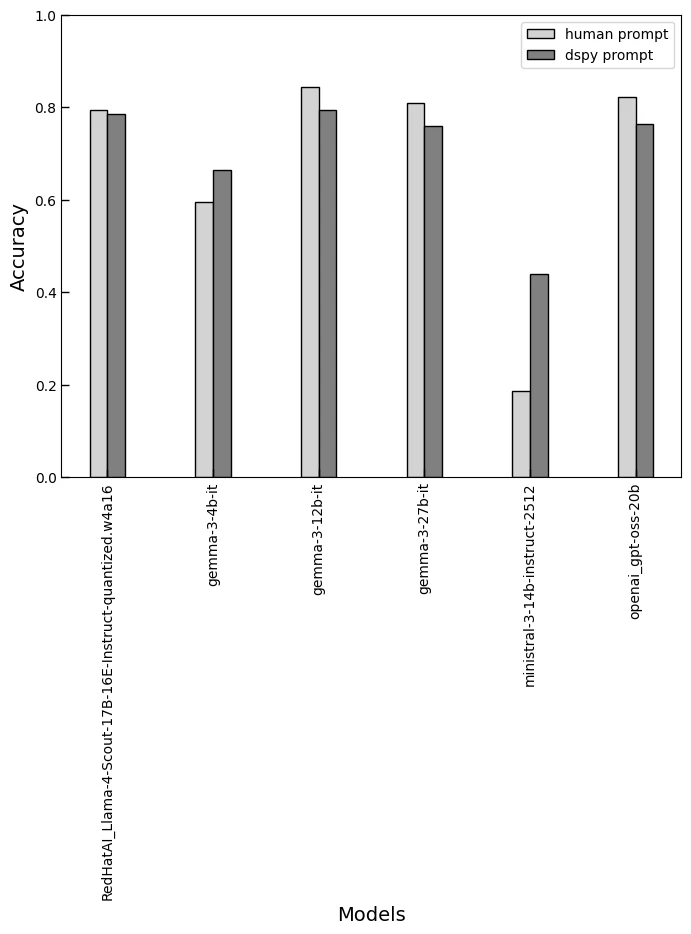
各プロンプトでタスクを実行した時の正解率をモデルごとに可視化したグラフを下図に示す.DSPy prompt はモデルごとに最適化されるためそれぞれでプロンプトは異なるが,Human prompt は同一のものを利用している.
全体的に手動で作成したプロンプトを自動最適化に置き換えても大きく精度が劣化することはない.つまり,手動プロンプトの作成を丸ごと自動最適化に置換すると精度は維持しつつ,時間コストを削減できる可能性があるといえる.精度が劣化した部分は探索パラメータやアルゴリズムの調整など設計を精緻化することで改善できるかもしれない.
今回,精度が低い小さめのモデル (gemma3-4b/ministral) が観測された.これは使いまわした手動プロンプトが適合しなかった為と予想している.つまり,モデルごとにプロンプトの調整が必要である可能性を示している.これらに対して自動最適化のプロンプトはより優れた精度を提供する.特に SLM はプロンプト調整が難しいためロジックに基づく自動最適化が有効であり,エッジコンピューティングにおける SLM 活用が期待できると思われる.
タスクの正解率と最適化に要した時間を表に示す. 利用しているインフラは NVIDIA H100.その他の GPU や Apple silicon でも最適化を実行できるが相応の時間を要するので参考値である. 体感として,H100 では最適化は 10分 程度, Apple M4 Pro での実行なら数時間かかる.
| Human | DSPy | Opmization Time [sec] | |
|---|---|---|---|
| RedHatAI_Llama-4-Scout-17B-16E-Instruct-quantized.w4a16 | 0.795 | 0.785 | 572.32 |
| gemma-3-4b-it | 0.595 | 0.665 | 142.737 |
| gemma-3-12b-it | 0.845 | 0.795 | 228.258 |
| gemma-3-27b-it | 0.81 | 0.76 | 421.866 |
| ministral-3-14b-instruct-2512 | 0.185 | 0.44 | 266.684 |
| openai_gpt-oss-20b | 0.823232 | 0.765 | 613.064 |
最後にMLFlow でどのように可視化されるか参考情報を示す.
評価時のメトリクスの推移.最適化の過程でメトリクス(正解率)がどのように推移しているかを確認できる.

DSPy で実行したワークフローのトレースを可視化.ボトルネックになっている箇所の特定や入力を監視できる.

各トレースの一覧と最終応答がラベルと一致して正解したか.最適化の実験全体を俯瞰して調査することができる.

まとめ
DSPy での最適化は下記への有効性を確認できた。
- 手動プロンプトを脱却し,プロンプトを設計可能なコードにする
- プロンプトの精度監視や管理を可能にする
- 小さいモデル (Small Language Model: SLM) をエッジで利用する際の調整
- 特定ドメインのタスクに自動で特化させる機能を LLM アプリケーションに与える
- 複雑な LLM アプリケーション開発でプロンプトの調整から解放される
-
Ariza-Garzón, M. J., Sanz-Guerrero, M., Arroyo Gallardo, J., & Lending Club. (2024). Lending Club loan dataset for granting models (0.1) [Data set]. Universidad Complutense de Madrid. https://doi.org/10.5281/zenodo.11295916 ↩