0
0

Delete article

Deleted articles cannot be recovered.

Draft of this article would be also deleted.

Are you sure you want to delete this article?

この記事は、資産管理製品「Tanium」についての操作手順です。
Taniumでは、特定端末に対し、レジストリキーの変更できる機能があります。その内容を記載します。

コンソールの画面キャプチャを載せていますが、変わる可能性が大いにあります。
キャプチャは2025/12/1 時点です。

1.Questionを実行する

Get Computer Name and "Registry Key Value Names with Data"[レジストリキーのパス] from all entities

ここでエンドポイント名を条件に入れてもOK。

2.変更したいエンドポイント(PC)名にチェックを入れ、[Deploy Action]をクリック。

3.設定したいキー情報を入力する

・「Deploymetn Package」:[Registry - Set Value]を選択。
・「OS Architecture」:OSを選択。
・ レジストリキーの情報を入力
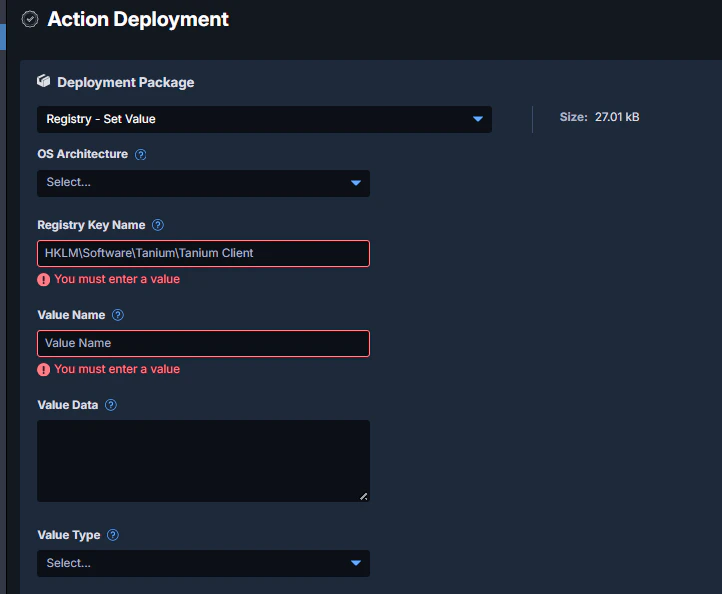
image.png

4.ジョブ名やスケジュールを設定する。

5.[Show Preview To Continue]をクリックし、対象端末を確認。

image.png

6.問題なければ、[Deploy Action]をクリック。

7.変更結果を確認します。

0
0
0

Register as a new user and use Qiita more conveniently

  1. You get articles that match your needs
  2. You can efficiently read back useful information
  3. You can use dark theme
What you can do with signing up
0
0

Delete article

Deleted articles cannot be recovered.

Draft of this article would be also deleted.

Are you sure you want to delete this article?