
まず、ユーザースニペットとは
スニペット
スニペットとは、特定の言葉を使って決まった形のテキストが入力できるようになったものです。

ユーザースニペット
ユーザースニペットはスニペットを自分で作ることができる機能のことです。
↓詳しい内容などはこちらを
本題
1. HTML系
labelの中のinput
「<label>要素の中の<input>のやつを簡単に書きたいよー
そんなあなたに、このユーザースニペットをどうぞ。
"inputLabel": {
	"prefix": ["inputLabel","labelInput"],
	"body": [
		"<label>$1",
		"\t<input type=\"$2\">",
		"</label>"
	],
	"description": "It's useful to enter input element in label element"
}
このスニペットは、<label>属性の中にある<input>を簡単に入力することができます。

tableとその中身
「<table>」をいちいち書くのはめっちゃ面倒くさいよー
そんなあなたに、このユーザースニペットを。
"tableSnippet": {
	"prefix": ["tableSnippet","snippetTable"],
	"body": [
		"<table>",
		"\t<tbody>",
		"\t\t<tr>",
		"\t\t\t<${1|th,td|}>$2</${1|th,td|}>",
		"\t\t\t$3",
		"\t\t</tr>",
		"\t</tbody>",
		"</table>"
	],
	"description": "It's useful to enter table element"
}
このスニペットは、<table>要素とその中身をすぐに入力することができます。

2. CSS系
borderプロパティのやつ
「border」プロパティをもっと書きやすくしたいよー
そんなあなたに、このユーザースニペットをどうぞ。
{
	"border snippet": {
		"prefix": ["borderSnippet","snippetBorder"],
		"body": "border: ${1:width} ${2|style,none,hidden,dotted,dashed,solid,double,groove,ridge,inset,outset|} ${3:color};",
		"description": "It's useful to enter border property"
	}
}
このスニペットは、borderプロパティを入力するのに便利です。

値の数によって適用される位置が違うようになるやつ(上下左右)
「marginは値の数によってそれぞれの値の役割が変わるのを覚えるの面倒くさいよー」
そんなあなたに、このユーザースニペットたちをどうぞ。
{
    "2 Values property": {
        "prefix": "2Values",
        "body": "${1:top,bottom} ${2:left,right}",
        "description": "It's useful to enter 2 value property"
    },
    "3 Values property": {
		"prefix": "3Values",
		"body": "${1:top} ${2:left,right} ${3:bottom}",
		"description": "It's useful to enter 3 value property"
	},
	"4 Values property": {
    	"prefix": "4Values",
		"body": "${1:top} ${2:right} ${3:bottom} ${4:left}",
		"description": "It's useful to enter 4 value property"
	}
}
このスニペットたちは、例えばmarginやpaddingなど、複数の値を入力するときに役割が変わるプロパティを入力するのに使う事ができます。
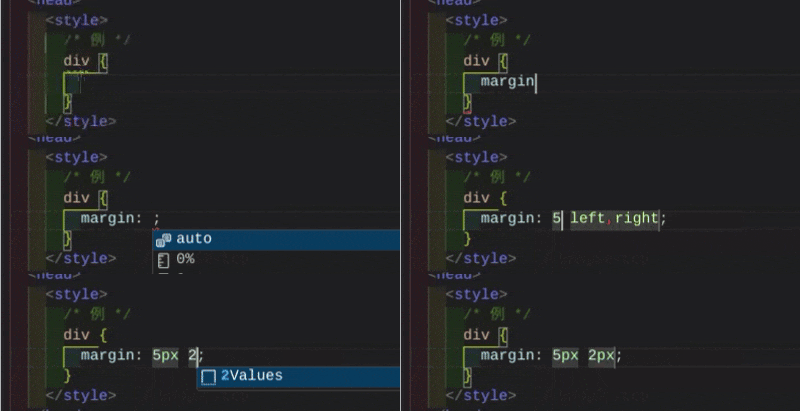
値の数によって適用される位置が違うようになるやつ(角)
「border-radiusとかもわかりやすくできるようになりたいよー」
そんなあなたに、このユーザースニペットたちをどうぞ。
{
	"2 values corner property": {
		"prefix": ["2ValuesCorner", "2CornerValues"],
		"body": "${1:left-top,right-bottom} ${2:right-top,left-bottom}",
		"description": "It's useful to enter 2 value corner property"
	},
	"3 values corner property": {
		"prefix": ["3ValuesCorner", "3CornerValues"],
		"body": "${1:left-top} ${2:right-top,left-bottom} ${3:right-bottom}",
		"description": "It's useful to enter 3 value corner property"
	},
	"4 values corner property": {
		"prefix": ["4ValuesCorner", "4CornerValues"],
		"body": "${1:left-top} ${2:right-top} ${3:left-bottom} ${4:right-bottom}",
		"description": "It's useful to enter 4 value corner property"
	}
}
このスニペットたちは、例えばborder-radiusなど1、角に関係があって複数の値を入力するときに役割が変わるプロパティを入力するのに使う事ができます。

(画質悪くてすいません)
3.JS系
try...catch文のcatchのところ
catchをいちいち書くの面倒くさいよー
そんなあなたに、このユーザースニペットをどうぞ。
{
    "catchErrorName": {
		"prefix": "catchErrorName",
		"body": "catch(error) {alert(`${error.name}\\n${error.stack}`)}",
        "description": "It's useful to catch error in JS"

	}
}
このスニペットは、tryブロック内でエラーが発生したとき、そのエラーの名前と詳細を見ることができます。

(また画質悪くてすいません)
最後に
もし新しいユーザースニペットが思いつけばその都度更新していくのでよろしくお願いします。
みなさんのVSCoder(?)ライフがより良いものになりますように
-
とは言いながら使えるのはおそらく
border-radiusのみ ↩