

国立国会図書館が提供しているOCRプログラムの軽量版「NDLOCR-Lite」が公開され、従来のモデルNDLOCRはGPUが必要な所を、Lite版はノートPCのCPU環境でも実用的な速度で動作するように最適化されているという噂です
Macローカル環境でNDLOCR-Liteを動かして、多様な日本語文書の画像データセットに対して、どの程度の読み取り精度(CER)と処理速度が出るのか計測してみました。
1. 検証用データセット
今回はKaggleのデータセットを使用しました。
- データセット: OCR image data of Japanese documents
- 選定理由: 論文(活字)、手書きノート、レシート、標識、名刺など、様々な種類の日本語画像がカテゴリ別に収録されています。※会員登録が必要
-
データセットの例
以下のようなjpegイメージと
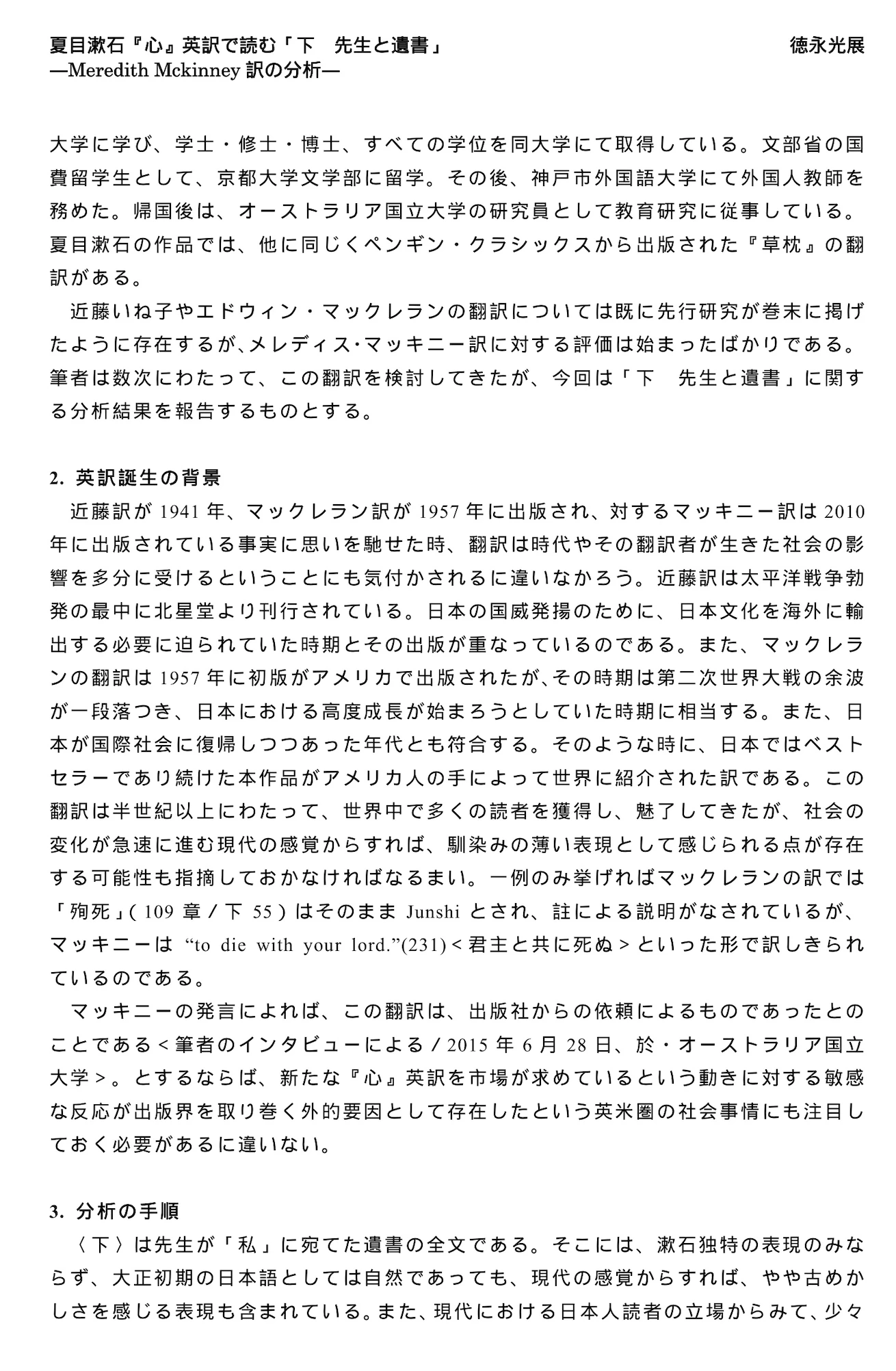
解答と位置情報を持つJsonデータで構成されています
{
    "version": "4.5.6",
    "flags": {},
    "shapes": [
        {
            "label": "夏目漱石『心』 英訳で読む 「下 先生と遺書」",
            "points": [
                [
                    201.443183,
                    124.797632
                ],
                [
                    874.481307,
                    166.619347
                ]
            ],
            "group_id": null,
            "shape_type": "rectangle",
            "flags": {}
        },
        ...
2. Macでの環境構築
仮想環境を作成し、必要なライブラリをインストールします。
# 仮想環境の作成と有効化
python3 -m venv ndlocr-env
source ndlocr-env/bin/activate

# リポジトリのクローン
git clone https://github.com/ndl-lab/ndlocr-lite.git
cd ndlocr-lite

# 依存パッケージのインストール
pip install -r requirements.txt

# ベンチマーク評価用の追加ライブラリ(CER計算用など)
pip install Levenshtein pandas tqdm
Kaggleからダウンロード・解凍したデータセットは、ndlocr-lite フォルダ直下に配置
3. ベンチマーク実行スクリプト
NDLOCR-Liteのフォルダ一括処理機能(--sourcedir)を利用し、「カテゴリごとの文字誤り率(CER)」と「画像1枚あたりの平均処理時間」を計測するスクリプト(benchmark.py)をGeminiに作ってもらいました。
NDLOCR-Liteがプレーンなtxtで出力されるが、KaggleデータセットはJSONに座標データがあり、順序が入れ違って読み取り失敗判定されることがあるので簡易に対策を入れています(結果的にはあまり効果がなかった)。
Pythonimport os
import glob
import pandas as pd
import Levenshtein
from tqdm import tqdm
import subprocess
import json
import time

BASE_DIR = os.path.abspath('.')
DATASET_DIR = os.path.join(BASE_DIR, 'IMG_OCR_JP_CN')
TMP_OUT_DIR = os.path.join(BASE_DIR, 'tmp_out')

def calculate_cer(reference, hypothesis):
    """文字誤り率 (Character Error Rate) を計算"""
    ref_clean = reference.replace(' ', '').replace('\n', '').replace('\u3000', '')
    hyp_clean = hypothesis.replace(' ', '').replace('\n', '').replace('\u3000', '')
    if len(ref_clean) == 0:
        return 0.0 if len(hyp_clean) == 0 else 1.0
    return Levenshtein.distance(ref_clean, hyp_clean) / len(ref_clean)

def main():
    results = []
    category_times = {}
    categories = [d for d in os.listdir(DATASET_DIR) if os.path.isdir(os.path.join(DATASET_DIR, d))]

    for category in categories:
        print(f"\n--- Processing: {category} ---")
        cat_dir = os.path.join(DATASET_DIR, category)
        cat_out_dir = os.path.join(TMP_OUT_DIR, category)
        os.makedirs(cat_out_dir, exist_ok=True)

        image_paths = []
        for ext in ('*.png', '*.jpg', '*.jpeg'):
            image_paths.extend(glob.glob(os.path.join(cat_dir, ext)))
        if not image_paths: continue

        # NDLOCRの一括実行と時間計測
        start_time = time.time()
        src_dir = os.path.join(BASE_DIR, 'src')
        cmd = ['python', 'ocr.py', '--sourcedir', cat_dir, '--output', cat_out_dir]
        subprocess.run(cmd, cwd=src_dir, capture_output=True, text=True, check=True)
        category_times[category] = (time.time() - start_time) / len(image_paths)

        for img_path in tqdm(image_paths, desc="精度評価中"):
            base_name = os.path.splitext(os.path.basename(img_path))[0]
            gt_path = os.path.join(cat_dir, base_name + '.json')
            pred_path = os.path.join(cat_out_dir, base_name + '.txt')
            if not os.path.exists(gt_path): continue

            try:
                with open(gt_path, 'r', encoding='utf-8') as f:
                    shapes = json.load(f).get('shapes', [])

                    # 縦書き・横書きの簡易判定
                    v_count = 0
                    valid_shapes = []
                    for shape in shapes:
                        points = shape.get('points', [])
                        if len(points) >= 2:
                            w = max(p[0] for p in points) - min(p[0] for p in points)
                            h = max(p[1] for p in points) - min(p[1] for p in points)
                            if h > w * 1.2: v_count += 1
                            valid_shapes.append(shape)

                    is_vertical = v_count > (len(valid_shapes) / 2)

                    # 座標順にソート
                    def get_sort_key(shape):
                        points = shape.get('points', [])
                        if not points: return (0, 0)
                        min_x = min(p[0] for p in points)
                        min_y = min(p[1] for p in points)
                        return (-(min_x // 30), min_y) if is_vertical else (min_y // 20, min_x)

                    labels = [s.get('label', '') for s in sorted(valid_shapes, key=get_sort_key)]
                    ground_truth = '\n'.join(labels)
            except Exception:
                continue

            prediction = ""
            if os.path.exists(pred_path):
                with open(pred_path, 'r', encoding='utf-8') as f:
                    prediction = f.read().strip()

            results.append({'Category': category, 'CER': calculate_cer(ground_truth, prediction)})

    # 結果出力
    df = pd.DataFrame(results)
    summary = df.groupby('Category').agg(CER=('CER', 'mean')).reset_index()
    summary['Time/Image(sec)'] = summary['Category'].map(category_times).round(2)
    print(summary.sort_values('CER').to_string(index=False))

if __name__ == '__main__':
    main()
4. 実行結果まとめ
| Category | 文字誤り率 | 処理時間 |
|---|---|---|
| PAPERS (論文・書類) | 0.016 (約1.6%の誤り) | 2.12 |
| BADGES AND PASSES (名札) | 0.190 | 1.66 |
| BOOK CONTENTS... (書籍) | 0.323 | 2.05 |
| NOTES (手書きノート) | 0.336 | 1.65 |
| CONTRACTS (契約書) | 0.354 | 3.24 |
| BILLS (レシート・請求書) | 0.406 | 2.07 |
| IDENTITY CARDS (身分証) | 0.495 | 4.35 |
| FORMS (帳票・フォーム) | 0.660 | 3.21 |
| TRADE DOCUMENTS (貿易書類) | 0.709 | 4.96 |
| WHITEBOARD (黒板/白板) | 0.811 | 1.61 |
| NEWSPAPERS (新聞) | 1.026 | 2.76 |
5. まとめ
① 得意領域では精度がかなり高い
PAPERS(論文や標準的な書類)では CER 0.016 (誤り率 1.6%) で実用充分でした。
「書籍・印刷物」に近いフォーマットであれば、Lite版であっても実用に全く問題ないと思います
② 処理速度も早い
画像1枚あたりの処理時間がおおよそ1.5秒〜5秒程度に収まり、用途によっては充分実用性がありそうです。
③ 不得意領域は無理に使わなくても良さげ
使用したデータセットには「Reading Order(読み順)」を測定するための位置情報が含まれており、OCRの出したテキストとデータセットで順序が合わずCERが低く出ました。(スクリプトのチューニングもあまりしていない)
また、以下のような高難易度のデータだと難しいものがあるので、素直に別のOCRを検討するで良いと思いました
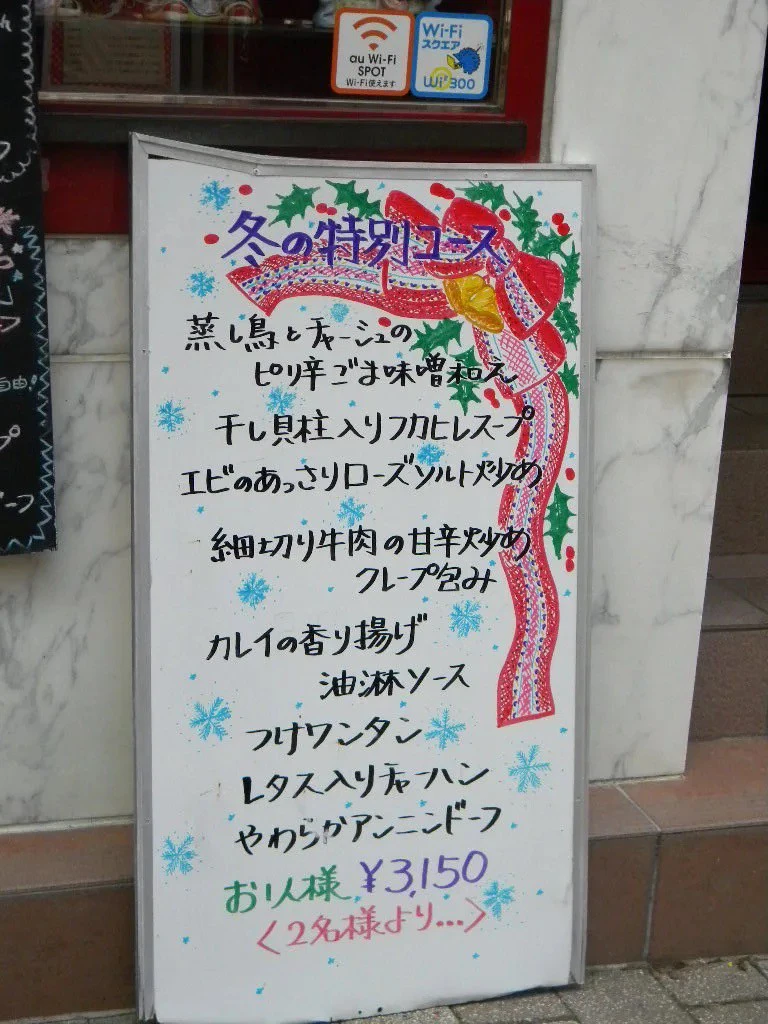
# NDLOCR-Liteの処理結果
冬の特別コース
蒸湯と赤シの
ヒやリ半ごま味噌ねえ
千レ具柱入リフカヒレスープ
エヒ"のあっさリローズ"ソルトやア
細切り牛肉の甘辛犬少女
クレープ包み
カレイの香リ揚げ”
油淋ソース
フォワンタン
Lタス入リモハン
やわちジアンーンドーフ
おい様\3150
2名様より…〉

# Geminiの処理結果
冬の特別コース

蒸し鳥とチャーシュの
 ピリ辛ごま味噌和え
干し貝柱入りフカヒレスープ
エビのあっさりローズソルト炒め
細切り牛肉の甘辛炒め
 クレープ包み
カレイの香り揚げ
 油淋ソース
つけワンタン
レタス入りチャーハン
やわらかアンニンドーフ

お1人様 ¥3,150
<2名様より...>