

こんにちは、Luncoです。
この記事は カバー株式会社 Advent Calendar 2025 22日目の記事です。
はじめに
リアルタイムでレンダリングする3D映像には、ガベージコレクションによるフレームの停止は大敵です
ガベージコレクションが発生しないためには、解放されるメモリ領域を作られないようにする最適化が必要です
GCAlloc(ヒープ領域からのメモリ確保)が頻繁に行われる場合は、その領域がすぐに未使用になってる場合が多く、リアルタイムで3Dレンダリングを行うソフトにおいて、レンダリング中のGCAllocをゼロにすることは、非常に重要な課題です
遭遇した例
今回遭遇したGCAllocはこのようなコードになります
public class SampleClass
{
    private bool _isRun = false;

    public void Main()
    {
        Hoge();
    }

    private void Hoge()
    {
        var piyo = 0;
        if (_isRun) // _isRunの状態によってFuga()を実行する
        {
            Fuga();
        }

        async void Fuga()
        {
            var foo = 0 + piyo;
        }
    }
}
Hoge() の中で _isRun の状態に応じて Fuga() を実行しています
_isRun には false を入れているので Fuga()は実行されません
下記のコードを実行してプロファイリングしてみましょう
using UnityEngine;

public class Runner : MonoBehaviour
{
    private SampleClass _instance = new SampleClass();

    private void Update()
    {
        _instance.Main();

    }
}
プロファイリング結果は画像のようになりました

Hoge() 内は以下のようになっているため
var piyo = 0;
if (_isRun) // falseなので実行されない
{
    Fuga();
}
var piyo = 0; しか実行されていないように見えますが、SampleClass.Hoge() 内で20BのGCAllocが発生していることがわかります
Profiler.BeginSampleを使って位置の特定を試してみましょう
using UnityEngine.Profiling; // Profilerを使うために追加

public class SampleClass
{
    private bool _isRun = false;

    public void Main()
    {
        Hoge();
    }

    private void Hoge()
    {
        Profiler.BeginSample("Profiling In Hoge()"); // Profilerのサンプル開始
        var piyo = 0;
        if (_isRun)
        {
            Fuga();
        }

        async void Fuga()
        {
            var foo = 0 + piyo;
        }
        Profiler.EndSample(); // Profilerのサンプル停止
    }
}
実行してプロファイリングした結果がこちら
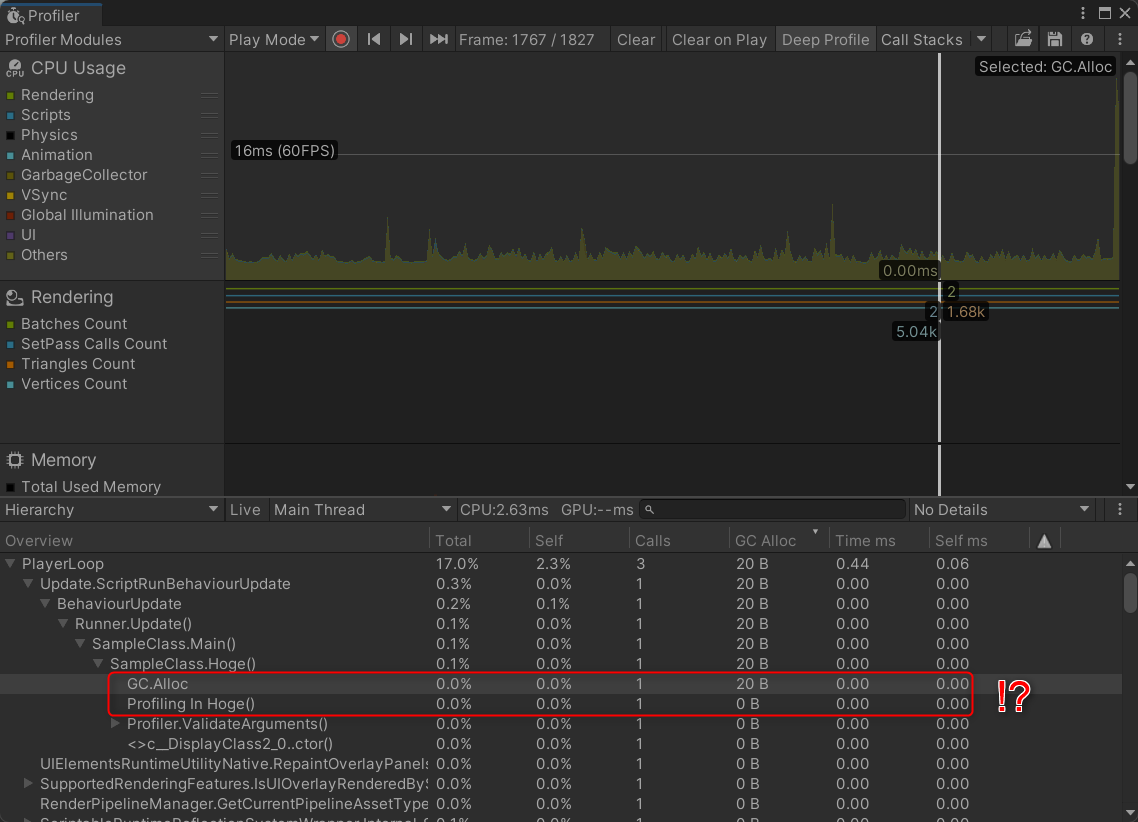
Profiler.BeginSample() と Profiler.EndSample の間では何も発生しておらず SampleClass.Hoge() の中で何か発生しているようです...
.
..
...
....
.....
......
.......プロファイリングできない...ってコト!?
SharpLabを使ってコンパイル結果を見てみる
こういうときは大体見えてないところで何かが起きています
先ほどのコードをSharpLabに入れて、コンパイル結果をC#にデコンパイルしてみてみましょう
みんな大好きSharpLabはこちらから -> https://sharplab.io/
以下のようになります
全部は長いので折り畳みます
using System;
using System.Diagnostics;
using System.Reflection;
using System.Runtime.CompilerServices;
using System.Security;
using System.Security.Permissions;

[assembly: CompilationRelaxations(8)]
[assembly: RuntimeCompatibility(WrapNonExceptionThrows = true)]
[assembly: Debuggable(DebuggableAttribute.DebuggingModes.Default | DebuggableAttribute.DebuggingModes.IgnoreSymbolStoreSequencePoints | DebuggableAttribute.DebuggingModes.EnableEditAndContinue | DebuggableAttribute.DebuggingModes.DisableOptimizations)]
[assembly: SecurityPermission(SecurityAction.RequestMinimum, SkipVerification = true)]
[assembly: AssemblyVersion("0.0.0.0")]
[module: UnverifiableCode]
[module: RefSafetyRules(11)]

public class SampleClass
{
    [CompilerGenerated]
    private sealed class <>c__DisplayClass2_0
    {
        private sealed class <<Hoge>g__Fuga|0>d : IAsyncStateMachine
        {
            public int <>1__state;

            public AsyncVoidMethodBuilder <>t__builder;

            public <>c__DisplayClass2_0 <>4__this;

            private int <foo>5__1;

            private void MoveNext()
            {
                int num = <>1__state;
                try
                {
                    <foo>5__1 = <>4__this.piyo;
                }
                catch (Exception exception)
                {
                    <>1__state = -2;
                    <>t__builder.SetException(exception);
                    return;
                }
                <>1__state = -2;
                <>t__builder.SetResult();
            }

            void IAsyncStateMachine.MoveNext()
            {
                //ILSpy generated this explicit interface implementation from .override directive in MoveNext
                this.MoveNext();
            }

            [DebuggerHidden]
            private void SetStateMachine([Nullable(1)] IAsyncStateMachine stateMachine)
            {
            }

            void IAsyncStateMachine.SetStateMachine([Nullable(1)] IAsyncStateMachine stateMachine)
            {
                //ILSpy generated this explicit interface implementation from .override directive in SetStateMachine
                this.SetStateMachine(stateMachine);
            }
        }

        public int piyo;

        [AsyncStateMachine(typeof(<<Hoge>g__Fuga|0>d))]
        [DebuggerStepThrough]
        internal void <Hoge>g__Fuga|0()
        {
            <<Hoge>g__Fuga|0>d stateMachine = new <<Hoge>g__Fuga|0>d();
            stateMachine.<>t__builder = AsyncVoidMethodBuilder.Create();
            stateMachine.<>4__this = this;
            stateMachine.<>1__state = -1;
            stateMachine.<>t__builder.Start(ref stateMachine);
        }
    }

    private bool _isRun = false;

    public void Main()
    {
        Hoge();
    }

    private void Hoge()
    {
        <>c__DisplayClass2_0 <>c__DisplayClass2_ = new <>c__DisplayClass2_0();
        <>c__DisplayClass2_.piyo = 0;
        if (_isRun)
        {
            <>c__DisplayClass2_.<Hoge>g__Fuga|0();
        }
    }
}
Hoge() の部分に注目すると以下のようになっています
    private void Hoge()
    {
        <>c__DisplayClass2_0 <>c__DisplayClass2_ = new <>c__DisplayClass2_0();
        <>c__DisplayClass2_.piyo = 0;
        if (_isRun)
        {
            <>c__DisplayClass2_.<Hoge>g__Fuga|0();
        }
    }
なんと!
Fuga() の実行有無に関わらず Fuga() を実装している c__DisplayClass2_0 が必ず生成されています!!!!
c__DisplayClass2_0 の実装を見てみると以下のようになっています
    [CompilerGenerated]
    private sealed class <>c__DisplayClass2_0
    {
        private sealed class <<Hoge>g__Fuga|0>d : IAsyncStateMachine
        {
        }
    }
c__DisplayClass2_0 はclassになっているので、classの生成が行われてることになります
classの生成を行うとGCAllocが発生するので、これが今回のGCAllocの原因となります
何が起こっているのか
今回のケースでは原因が2つあります
- 変数のキャプチャが必要なローカル関数を作成したこと
- asyncを使用したこと
それぞれShapLabを使って見てみましょう
変数のキャプチャが必要なローカル関数を作成したこと
変数のキャプチャを行わないよう、ローカル関数に引数を指定して実行するように変更してみます
public class SampleClass
{
    private bool _isRun = false;

    public void Main()
    {
        Hoge();
    }

    private void Hoge()
    {
        var piyo = 0;
        if (_isRun)
        {
            Fuga(piyo);
        }

        async void Fuga(int bar)
        {
            var foo = 0 + bar;
        }
    }
}
SharpLabでの変換結果は以下のようになります
全部は長いので折り畳みます
using System;
using System.Diagnostics;
using System.Reflection;
using System.Runtime.CompilerServices;
using System.Security;
using System.Security.Permissions;

[assembly: CompilationRelaxations(8)]
[assembly: RuntimeCompatibility(WrapNonExceptionThrows = true)]
[assembly: Debuggable(DebuggableAttribute.DebuggingModes.Default | DebuggableAttribute.DebuggingModes.IgnoreSymbolStoreSequencePoints | DebuggableAttribute.DebuggingModes.EnableEditAndContinue | DebuggableAttribute.DebuggingModes.DisableOptimizations)]
[assembly: SecurityPermission(SecurityAction.RequestMinimum, SkipVerification = true)]
[assembly: AssemblyVersion("0.0.0.0")]
[module: UnverifiableCode]
[module: RefSafetyRules(11)]

public class SampleClass
{
    [CompilerGenerated]
    private sealed class <<Hoge>g__Fuga|2_0>d : IAsyncStateMachine
    {
        public int <>1__state;

        public AsyncVoidMethodBuilder <>t__builder;

        public int bar;

        private int <foo>5__1;

        private void MoveNext()
        {
            int num = <>1__state;
            try
            {
                <foo>5__1 = bar;
            }
            catch (Exception exception)
            {
                <>1__state = -2;
                <>t__builder.SetException(exception);
                return;
            }
            <>1__state = -2;
            <>t__builder.SetResult();
        }

        void IAsyncStateMachine.MoveNext()
        {
            //ILSpy generated this explicit interface implementation from .override directive in MoveNext
            this.MoveNext();
        }

        [DebuggerHidden]
        private void SetStateMachine([Nullable(1)] IAsyncStateMachine stateMachine)
        {
        }

        void IAsyncStateMachine.SetStateMachine([Nullable(1)] IAsyncStateMachine stateMachine)
        {
            //ILSpy generated this explicit interface implementation from .override directive in SetStateMachine
            this.SetStateMachine(stateMachine);
        }
    }

    private bool _isRun = false;

    public void Main()
    {
        Hoge();
    }

    private void Hoge()
    {
        int bar = 0;
        if (_isRun)
        {
            <Hoge>g__Fuga|2_0(bar);
        }
    }

    [AsyncStateMachine(typeof(<<Hoge>g__Fuga|2_0>d))]
    [DebuggerStepThrough]
    [CompilerGenerated]
    internal static void <Hoge>g__Fuga|2_0(int bar)
    {
        <<Hoge>g__Fuga|2_0>d stateMachine = new <<Hoge>g__Fuga|2_0>d();
        stateMachine.<>t__builder = AsyncVoidMethodBuilder.Create();
        stateMachine.bar = bar;
        stateMachine.<>1__state = -1;
        stateMachine.<>t__builder.Start(ref stateMachine);
    }
}
Hoge() の実行部分だけに着目すると...
private void Hoge()
    {
        int bar = 0;
        if (_isRun)
        {
            <Hoge>g__Fuga|2_0(bar); // _isRunがtrueの時のみ実行されている
        }
    }

    [AsyncStateMachine(typeof(<<Hoge>g__Fuga|2_0>d))]
    [DebuggerStepThrough]
    [CompilerGenerated]
    internal static void <Hoge>g__Fuga|2_0(int bar)
    {
        // 実行時に生成が走っている
        <<Hoge>g__Fuga|2_0>d stateMachine = new <<Hoge>g__Fuga|2_0>d();
        stateMachine.<>t__builder = AsyncVoidMethodBuilder.Create();
        stateMachine.bar = bar;
        stateMachine.<>1__state = -1;
        stateMachine.<>t__builder.Start(ref stateMachine);
    }
async用のclassが実行時に生成されるようになったことにより、Fuga() の実行によってclassの生成が行われるかどうかが決まるようになりました
どうやらローカル関数で変数のキャプチャを行うと、ローカル関数の実行の有無に関わらずローカル関数に受け渡すための構造を生成してしまうようです
asyncを使用したこと
asyncをやめてみます
public class SampleClass
{
    private bool _isRun = false;

    public void Main()
    {
        Hoge();
    }

    private void Hoge()
    {
        var piyo = 0;
        if (_isRun)
        {
            Fuga();
        }

        void Fuga()
        {
            var foo = 0 + piyo;
        }
    }
}
SharpLabでの変換結果は以下のようになります
全部は長いので折り畳みます
using System.Diagnostics;
using System.Reflection;
using System.Runtime.CompilerServices;
using System.Runtime.InteropServices;
using System.Security;
using System.Security.Permissions;

[assembly: CompilationRelaxations(8)]
[assembly: RuntimeCompatibility(WrapNonExceptionThrows = true)]
[assembly: Debuggable(DebuggableAttribute.DebuggingModes.Default | DebuggableAttribute.DebuggingModes.IgnoreSymbolStoreSequencePoints | DebuggableAttribute.DebuggingModes.EnableEditAndContinue | DebuggableAttribute.DebuggingModes.DisableOptimizations)]
[assembly: SecurityPermission(SecurityAction.RequestMinimum, SkipVerification = true)]
[assembly: AssemblyVersion("0.0.0.0")]
[module: UnverifiableCode]
[module: RefSafetyRules(11)]

public class SampleClass
{
    [StructLayout(LayoutKind.Auto)]
    [CompilerGenerated]
    private struct <>c__DisplayClass2_0
    {
        public int piyo;
    }

    private bool _isRun = false;

    public void Main()
    {
        Hoge();
    }

    private void Hoge()
    {
        <>c__DisplayClass2_0 <>c__DisplayClass2_ = default(<>c__DisplayClass2_0);
        <>c__DisplayClass2_.piyo = 0;
        if (_isRun)
        {
            <Hoge>g__Fuga|2_0(ref <>c__DisplayClass2_);
        }
    }

    [CompilerGenerated]
    private static void <Hoge>g__Fuga|2_0(ref <>c__DisplayClass2_0 P_0)
    {
        int piyo = P_0.piyo;
    }
}
Hoge() の部分と c__DisplayClass2_0 に着目すると
    [StructLayout(LayoutKind.Auto)]
    [CompilerGenerated]
    private struct <>c__DisplayClass2_0 // classではなくstructになってる
    {
        public int piyo;
    }

    private void Hoge()
    {
        // `_isRun` の結果に関わらず生成する
        <>c__DisplayClass2_0 <>c__DisplayClass2_ = default(<>c__DisplayClass2_0);
        <>c__DisplayClass2_.piyo = 0;
        if (_isRun)
        {
            <Hoge>g__Fuga|2_0(ref <>c__DisplayClass2_);
        }
    }
変数のキャプチャはしているので、_isRun に関わらず値を渡すための構造が生成されているものの
値を渡すための構造がstructになっているためGCAllocしていません
どうすれば解決するのか
状況によってさまざまな手段がとれるなと思いつつ今回のケースでは個人的には以下のように考えます
基本的には高頻度で実行する場合の話で、パフォーマンスを求められない画面で実行する分にはそこまで気にしなくていいかもしれません
変数をキャプチャしない
まず、関数の中でローカル関数を必ず実行するのでなければ、変数のキャプチャをやめたいです
引数にすることで解決できるので、かなり手軽に修正できると思います
高頻度で呼ばれるものにはclassを生成するものは実行しない
asyncやUniTaskなどのclassを生成するものは、必要なタイミングのみに使用するようにしたいです
実装上、asyncやUniTaskを使わなければいけないタイミングは存在しますが
毎フレームに近い頻度で使用する場合は、他の方法を考えるべきかもしれません
さいごに
C#のコンパイル結果によって、思いもよらぬところでGCAllocが発生してしまうケースを紹介しました
今回紹介した例に限らず、いろんなケースがあると思いますが、困った時も困ってない時もぜひSharpLabでコンパイル後どのような結果になるのか見てみましょう
コンパイルによる最適化結果なども見れたりする場合があるので、結構面白いと思います
明日の カバー株式会社 Advent Calendar 2025 は @lain_xr さんが記事を公開予定です
お楽しみに!!