
概要
バイブコーディングでPing Pongゲームを作った場合、どのくらいの時間で完成するのか気になったため、実際に試してみました。
結果として、完成までにかかった時間はわずか15分でした。
↓ゲーム画面
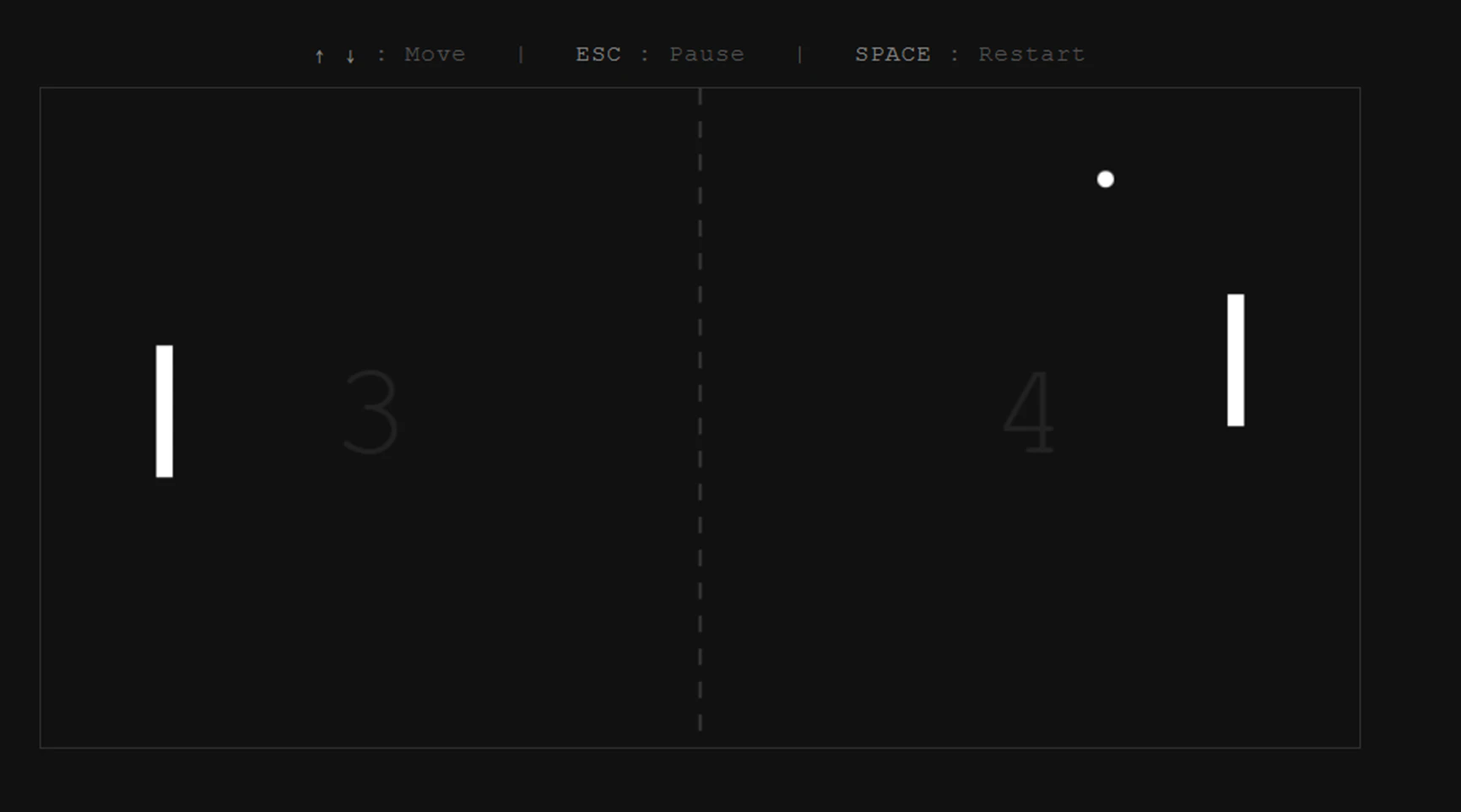
AIへの指示は合計2回だけでした。
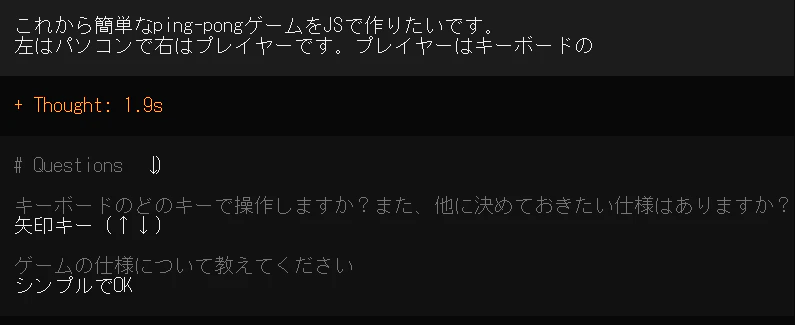
1回目
これから簡単なping-pongゲームをJSで作りたいです。
左はパソコンで右はプレイヤーです。プレイヤーはキーボードの
ちなみに、途中で誤ってEnterキーを押してしまいましたが、AIから追加の質問が返ってきました。
2回目
操作説明の追加、距離短縮、得点表示を各プレイヤーの中央に移動、
ボールを円形に変更していただけますでしょうか。
↓ぜひ、デスクトップで以下のファイルを作成してゲームを楽しんでください!
pingpong.html
<!DOCTYPE html>
<html lang="ja">
<head>
<meta charset="UTF-8">
<meta name="viewport" content="width=device-width, initial-scale=1.0">
<title>Ping Pong</title>
<style>
* { margin: 0; padding: 0; box-sizing: border-box; }
body {
background: #111;
display: flex;
justify-content: center;
align-items: center;
height: 100vh;
font-family: 'Courier New', monospace;
overflow: hidden;
flex-direction: column;
}
.controls {
color: #555;
font-size: 14px;
margin-bottom: 12px;
letter-spacing: 1px;
user-select: none;
}
.controls span { color: #888; }
canvas { border: 1px solid #333; }
</style>
</head>
<body>
<div class="controls">
<span>↑</span> <span>↓</span> : Move | <span>ESC</span> : Pause | <span>SPACE</span> : Restart
</div>
<canvas id="game" width="800" height="400"></canvas>
<script>
const canvas = document.getElementById('game');
const ctx = canvas.getContext('2d');
const W = 800, H = 400;
const PW = 10, PH = 80;
const BALL_R = 5;
const PS = 5;
const AS = 3.5;
//先取の点数設定
const WS = 5;
const MARGIN = 70;
let playerY = H / 2 - PH / 2;
let comY = H / 2 - PH / 2;
let ballX, ballY;
let ballSpeedX, ballSpeedY;
let playerScore = 0, comScore = 0;
let gameState = 'playing';
let keys = {};
function resetBall(dir) {
ballX = W / 2;
ballY = H / 2;
const a = (Math.random() * Math.PI / 3) - Math.PI / 6;
const s = 4;
ballSpeedX = dir * s * Math.cos(a);
ballSpeedY = s * Math.sin(a);
ballSpeedY = Math.max(-6, Math.min(6, ballSpeedY));
}
function draw() {
ctx.fillStyle = '#111';
ctx.fillRect(0, 0, W, H);
ctx.strokeStyle = '#333';
ctx.lineWidth = 2;
ctx.setLineDash([10, 10]);
ctx.beginPath();
ctx.moveTo(W / 2, 0);
ctx.lineTo(W / 2, H);
ctx.stroke();
ctx.setLineDash([]);
ctx.fillStyle = '#fff';
ctx.fillRect(MARGIN, comY, PW, PH);
ctx.fillRect(W - MARGIN - PW, playerY, PW, PH);
ctx.beginPath();
//ボールは円形
ctx.arc(ballX, ballY, BALL_R, 0, Math.PI * 2);
ctx.fill();
ctx.font = '80px "Courier New", monospace';
ctx.textAlign = 'center';
ctx.textBaseline = 'middle';
ctx.fillStyle = '#222';
ctx.fillText(comScore, W / 4, H / 2);
ctx.fillText(playerScore, 3 * W / 4, H / 2);
if (gameState === 'paused') {
ctx.fillStyle = 'rgba(0,0,0,0.5)';
ctx.fillRect(0, 0, W, H);
ctx.fillStyle = '#fff';
ctx.font = '30px "Courier New", monospace';
ctx.textBaseline = 'middle';
ctx.fillText('PAUSED', W / 2, H / 2);
ctx.font = '14px "Courier New", monospace';
ctx.fillText('Press ESC to resume', W / 2, H / 2 + 28);
}
if (gameState === 'gameover') {
ctx.fillStyle = 'rgba(0,0,0,0.6)';
ctx.fillRect(0, 0, W, H);
ctx.fillStyle = '#fff';
ctx.font = '40px "Courier New", monospace';
ctx.textBaseline = 'middle';
ctx.fillText(playerScore > comScore ? 'YOU WIN!' : 'YOU LOSE...', W / 2, H / 2 - 16);
ctx.font = '14px "Courier New", monospace';
ctx.fillText('Press SPACE to restart', W / 2, H / 2 + 20);
}
}
function update() {
if (gameState !== 'playing') return;
if (keys['ArrowUp'] && playerY > 0) playerY -= PS;
if (keys['ArrowDown'] && playerY < H - PH) playerY += PS;
//COMラケットの中心座標を取得
const comCenter = comY + PH / 2;
//ボールがCOM側へ向かっているか判定 ballSpeedX マイナスは左へ移動、プラスは右へ移動
if (ballSpeedX < 0) {
//ボールより上なら下へ移動
if (comCenter < ballY - 10) comY += AS;
//ボールより下なら上へ移動
else if (comCenter > ballY + 10) comY -= AS;
//ボールが離れているときは中央へ戻る
} else {
if (comCenter < H / 2 - 5) comY += AS * 0.4;
else if (comCenter > H / 2 + 5) comY -= AS * 0.4;
}
comY = Math.max(0, Math.min(H - PH, comY));
ballX += ballSpeedX;
ballY += ballSpeedY;
if (ballY - BALL_R <= 0 || ballY + BALL_R >= H) {
ballSpeedY = -ballSpeedY;
ballY = Math.max(BALL_R, Math.min(H - BALL_R, ballY));
}
if (ballX - BALL_R <= MARGIN + PW && ballY + BALL_R > comY && ballY - BALL_R < comY + PH && ballSpeedX < 0) {
const hitPos = ballY - (comY + PH / 2);
const norm = hitPos / (PH / 2);
const angle = norm * Math.PI / 4;
const speed = Math.hypot(ballSpeedX, ballSpeedY) + 0.3;
ballSpeedX = speed * Math.cos(angle);
ballSpeedY = speed * Math.sin(angle);
ballX = MARGIN + PW + BALL_R + 1;
}
if (ballX + BALL_R >= W - MARGIN - PW && ballY + BALL_R > playerY && ballY - BALL_R < playerY + PH && ballSpeedX > 0) {
const hitPos = ballY - (playerY + PH / 2);
const norm = hitPos / (PH / 2);
const angle = norm * Math.PI / 4;
const speed = Math.hypot(ballSpeedX, ballSpeedY) + 0.3;
ballSpeedX = -speed * Math.cos(angle);
ballSpeedY = speed * Math.sin(angle);
ballX = W - MARGIN - PW - BALL_R - 1;
}
if (ballX < 0) {
playerScore++;
if (playerScore >= WS) { gameState = 'gameover'; return; }
resetBall(-1);
}
if (ballX > W) {
comScore++;
if (comScore >= WS) { gameState = 'gameover'; return; }
resetBall(1);
}
}
function restart() {
playerScore = 0;
comScore = 0;
playerY = H / 2 - PH / 2;
comY = H / 2 - PH / 2;
gameState = 'playing';
resetBall(Math.random() < 0.5 ? 1 : -1);
}
document.addEventListener('keydown', (e) => {
keys[e.key] = true;
//ESCキーで一時停止
if (e.key === 'Escape') {
if (gameState === 'playing') gameState = 'paused';
else if (gameState === 'paused') gameState = 'playing';
}
//ゲーム終了後にスペースキーを押すと再スタートできる
if (e.key === ' ' && gameState === 'gameover') {
e.preventDefault();
restart();
}
if (['ArrowUp', 'ArrowDown', ' '].includes(e.key)) {
e.preventDefault();
}
});
document.addEventListener('keyup', (e) => {
keys[e.key] = false;
});
resetBall(Math.random() < 0.5 ? 1 : -1);
function loop() {
update();
draw();
requestAnimationFrame(loop);
}
loop();
</script>
</body>
</html>
作ってみた感想
バイブコーディングを利用することで、短時間でゲームを作成できた。
ただし、コードを理解せずに終わるのではなく、自分でもコードレビューを実施した。
例えば、COMがどのようにボールを追いかける処理を実装しているのかを確認したり、実際にプレイしたユーザ視点で改善点を考えたりしながら、機能も追加した。