
TL;DR
AIエージェントが実行するpytestやcargoなどのCLI出力は長くなりがちで、大量のトークンを消費します。h5iはその出力を構造化・圧縮しつつ、生ログもGit/LFS/S3で復元可能な形で管理することで、トークン削減と監査性を両立します。
背景
ClaudeやCodexは、lsやpytest・cargoといった様々なコマンドラインツール (CLI)を使いながらプログラムを実装しますが、そのツールの出力は時に極めて長くなり、大量のトークンを消費することにつながります。
そのため、rtkやheadroomといったツール・スキルを使い、ツールの出力から本当に重要な部分のみを取り出してエージェントに与えることでトークンの消費を節約するという方法がトレンドになってきています。
しかし、出力のフィルタリングは基本的に事前に決めたルールによって行われるため、本当は重要だった部分が誤って捨てられてしまう場合も多く、結果的にもう一度同じコマンドを実行するはめになることもあります。また近年はコマンドラインツールの出力を介したコマンドインジェクションによるエージェントへの攻撃も増えており、攻撃発覚後の監査のために、AIがどのようなツールを実行し、どの情報を受け取ったのかを記録しておくことが重要になりつつあります。
次世代AI特化型バージョン管理ツール: h5i
概要
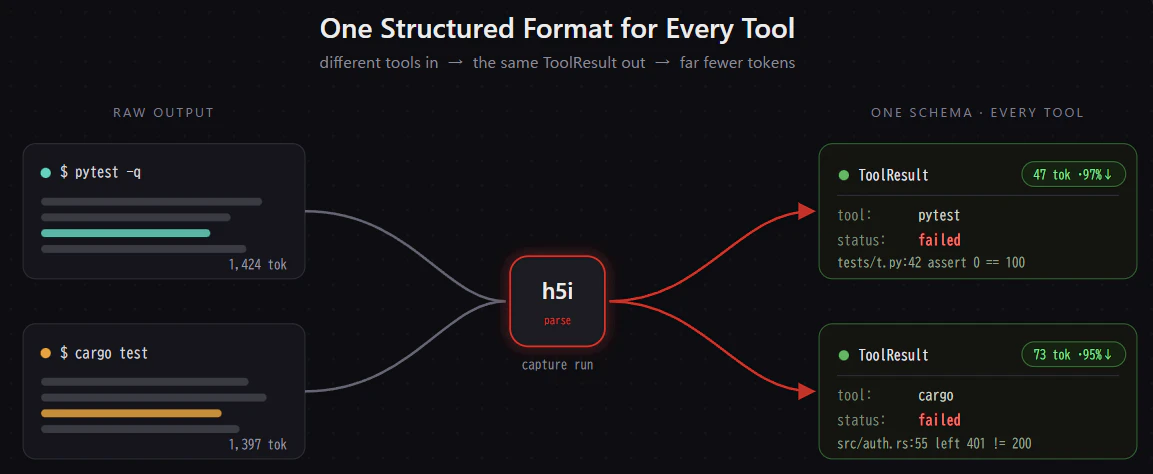
このような問題を解決するために最近注目を浴びているのが、次世代AI特化型バージョン管理ツールのh5iです。このh5iは様々なコマンドラインツールの出力から重要な部分を抜き出して、共通のjson形式のフォーマットに成形します。元の生ログおよびフィルタリング・成形後のjsonはgitで自動管理され、jsonをGitHubでチームメイトと共有したり、生ログをs3やGit-LFSで保存することも可能です。CodexやClaudeは、このjsonをさらに単純にしたYAMLを受け取ることで、有用な情報を維持したまま、トークン量を削減することが可能になっています。
例えばpytestの複雑で冗長なログは以下のような構造化されたYAMLに変換・圧縮された上でエージェントに渡されます。
# One Schema for Every Tool
tool: pytest
kind: test            # test | lint | typecheck | build | vcs | generic
status: failed        # passed | ok | failed | error | unknown
exit_code: 1
counts: { failed: 1, passed: 120 }
parser_confidence: parsed     # parsed | heuristic | generic
raw_oid: sha256:934f…         # the full output, always recoverable
findings:
  - kind: test_failure        # test_failure | diagnostic | build_error | panic | generic
    severity: failure
    id: tests/test_auth.py::test_refresh
    message: assert 0 == 100
    location: tests/test_auth.py:42
    fingerprint: 0bb827e4e61a  # stable across line shifts → dedupe / track
pytestやcargo test・npmなど様々なCLIツールにおいて95%以上のトークンを削減することができます。
インストール・セットアップ
最新版のh5iは以下のコマンドでインストールできます。
curl -fsSL https://raw.githubusercontent.com/h5i-dev/h5i/main/install.sh | sh
そのあと、自分のレポジトリの中でh5i initを打つだけでセットアップが完了し、あとはClaudeやCodexが自動でトークンを削減するようになります。
cd Repository
h5i init
生ログ・フィルター後の要約ファイルの管理
h5iを用いて圧縮・要約されたツールの出力の一覧はh5i recall objectsによって表示することができます。
$ h5i recall objects
1 object captured (newest first)
● c33325010d12fc1e tool-output 2149 bytes · 26 lines ⎇ main
$ python3 -m pytest -q
⊞ .claude/h5i.md, AGENTS.md, CLAUDE.md, __pycache__/conftest.cpython-312-pytest-9.0.3.pyc +24
Pytest: 1 failed, 48 passed, 1 warning in 0.24s
● = raw present locally · ○ = absent (rehydrate from a remote)
さらに、エージェントに実際に送信された、YAMLフォーマットの要約もh5i recall object hash --format yamlで確認することができます。
$ h5i recall object c33325010d12fc1e --format yaml
tool: pytest
kind: test
status: failed
counts: { failed: 1, passed: 48 }
raw_oid: sha256:c33325010d12fc1ef73cd08cca1ea3c7c43ad71876a6da7e2aa0b205700e32ba
findings:
- kind: test_failure
severity: failure
id: tests/test_functional.py::test_gelu_monotonic_and_zero_at_zero
message: asser...
location: tests/test_functional.py
fingerprint: 3720afea8a93
また、生ログも同じハッシュ値に紐づく形でしっかりと管理されており、Git-LFSやS3にアップロードすることも可能です。
$ h5i recall object c33325010d12fc1e
................F................................ [100%]
=================================== FAILURES ===================================
_____________________ test_gelu_monotonic_and_zero_at_zero _____________________
def test_gelu_monotonic_and_zero_at_zero():
assert gelu(np.array([0.0]))[0] == pytest.approx(0.0, abs=1e-12)
x = np.linspace(-3, 3, 50)
y = gelu(x)
> assert np.all(np.diff(y) > 0) # strictly increasing on this range
^^^^^^^^^^^^^^^^^^^^^^^^^^^^^
E assert np.False_
E + where np.False_ = <function all at 0xf9ee359c62b0>(array([-0.00167886, -0.00229558, -0.00307054, -0.00401858, -0.00514635,\n -0.00644844, -0.00790321, -0.00946868, ...352783, 0.13191766, 0.13035219, 0.12889742, 0.12759533,\n 0.12646756, 0.12551952, 0.12474456, 0.12412784]) > 0)
E + where <function all at 0xf9ee359c62b0> = np.all
E + and array([-0.00167886, -0.00229558, -0.00307054, -0.00401858, -0.00514635,\n -0.00644844, -0.00790321, -0.00946868, ...352783, 0.13191766, 0.13035219, 0.12889742, 0.12759533,\n 0.12646756, 0.12551952, 0.12474456, 0.12412784]) = <function diff at 0xf9ee358edaf0>(array([-0.00363739, -0.00531625, -0.00761184, -0.01068238, -0.01470096,\n -0.01984731, -0.02629575, -0.03419897, ...674052, 2.10865818, 2.23901037, 2.36790779,\n 2.49550312, 2.62197068, 2.74749021, 2.87223477, 2.99636261]))
E + where <function diff at 0xf9ee358edaf0> = np.diff
tests/test_functional.py:56: AssertionError
=============================== warnings summary ===============================
tests/test_attention.py::test_sdpa_fully_masked_row_does_not_nan
/home/koukyosyumei/Experiment/TRF/transformer/functional.py:21: RuntimeWarning: invalid value encountered in subtract
shifted = x - x_max
-- Docs: https://docs.pytest.org/en/stable/how-to/capture-warnings.html
=========================== short test summary info ============================
FAILED tests/test_functional.py::test_gelu_monotonic_and_zero_at_zero - asser...
1 failed, 48 passed, 1 warning in 0.24s
また、h5iはツール出力の要約を同じフォーマットで構造化するため、極めて簡単に検索を行うことができます。たとえばh5i recall objectsコマンドのtoolオプションを使えば、特定のツールの出力結果を検索できます。
$ h5i recall objects --tool pytest
1 object matched (newest first)
● c33325010d12fc1e tool-output 2149 bytes · 26 lines ⎇ main
$ python3 -m pytest -q
⊞ .claude/h5i.md, AGENTS.md, CLAUDE.md, __pycache__/conftest.cpython-312-pytest-9.0.3.pyc +24
Pytest: 1 failed, 48 passed, 1 warning in 0.24s
● = raw present locally · ○ = absent (rehydrate from a remote)
ほかにもExist Codeやbranch名、対象のファイルなどによる検索も可能です。
まとめ
h5iは、AIエージェント時代における「ツール出力のバージョン管理」と「トークン削減」を同時に実現するGit sidecarです。単にログを短くするだけでなく、後から検索・共有・監査できる形で残せる点が、既存の出力フィルタリング系ツールとの大きな違いです。
レポジトリ: https://github.com/h5i-dev/h5i
公式ドキュメント: https://h5i.dev/