
概要
下記記事にて紹介されていた内容をすこーしだけ拡張しました。
基本的な内容は、先行記事でほとんど紹介されているので、そちらをご参照ください。
やったこと
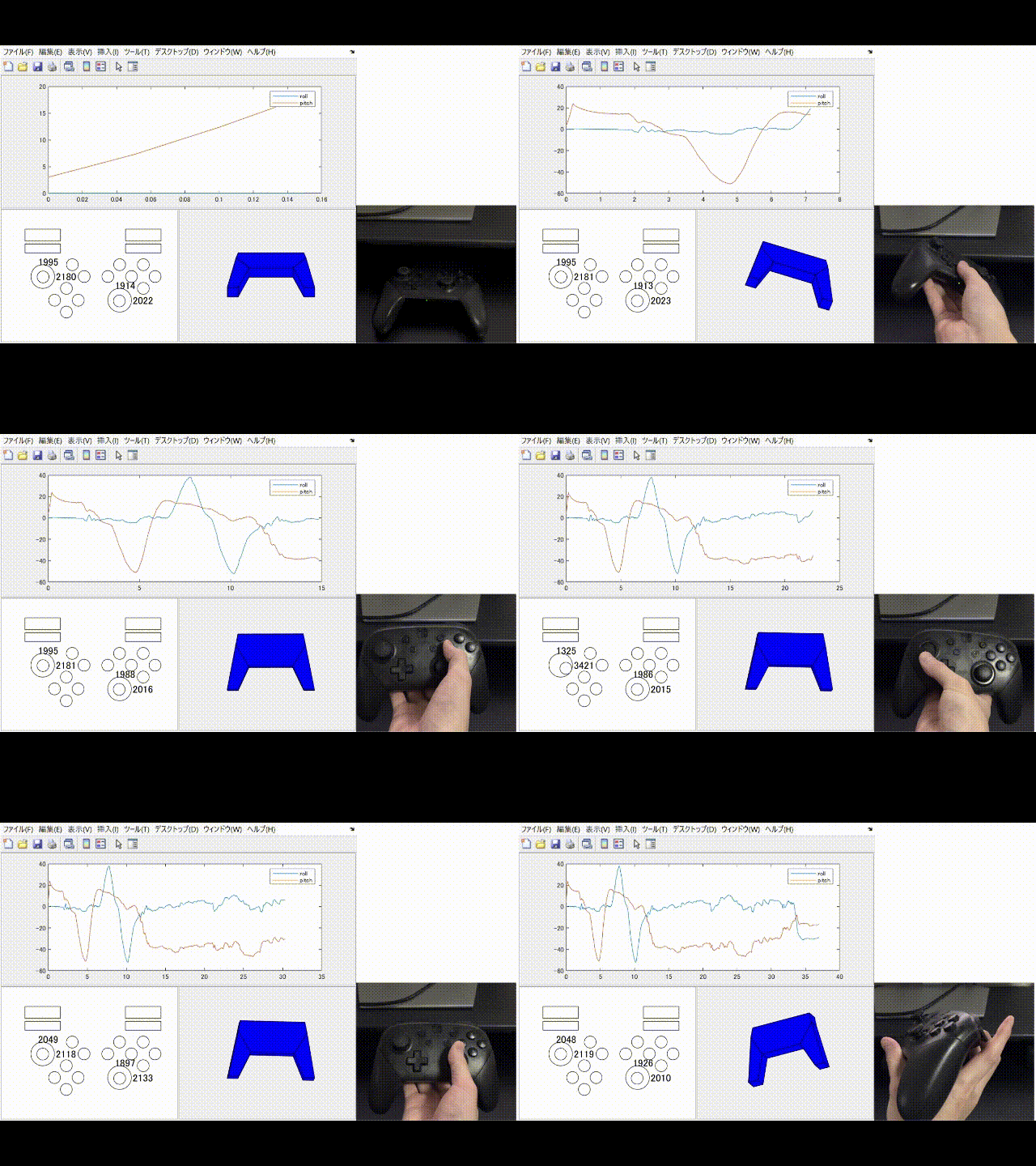
- プロコンを接続し全ボタン操作とスティック操作を取得および可視化した
-
patchで簡易的なプロコンモデルを作り、それを回転させてみた
追記:ぜひ、ラグについてのお手当 についてもご覧ください。
環境
ソフトバージョン
- Windows 11 Home
- MATLAB R2024b (Home)
ファイル構成
📁 My Project
┣ 📁 matlab-hidapi-master
┃ ┣ hidapi.h
┃ ┣ hidapi.m
┃ ┣ (以下略)
┣ Button.m
┣ Controller.m
┗ main.m
matlab-hidapi-masterは下記ページよりダウンロードできます。
注意
ダウンロードしたままの状態では、enumerate メソッドにバグがあるとされています。先行記事 を参考に、下記の通り修正した上でご使用ください。
早速この hidapi オブジェクトを使って Joy-Con(L) が認識されているか確認します。接続デバイスの確認は hidapi の enumerate メソッドで行います。ただし、この enumerate メソッドは一か所バグがあり、事前に修正しておく必要があります。397行目を以下のように修正します。
修正前:
str = calllib(u.slib,'hid_enumerate',uint16(vendorID),uint16(productID));修正後:
str = calllib(hid.slib,'hid_enumerate',uint16(vendorID),uint16(productID));(入力引数のところに突然 u という変数が出てきてしまっているので、正しい変数名 hid に修正しただけです)
コード紹介
clear
close
clc

% パス追加
propDoc = matlab.desktop.editor.getActive;                              % エディタ情報を取得
pathThisDir = erase(propDoc.Filename, 'main.m');                        % ファイル名を削除して現在ディレクトリのパスとする
pathHidApiDir = fullfile(pathThisDir, filesep, 'matlab-hidapi-master'); % 追加したいサブフォルダの名前を追加する
addpath(pathHidApiDir);                                                 % サブフォルダを追加したパスに対してaddpath

% Figure
fig = figure;
pnlPlot = uipanel(fig, 'Units','Normalized', 'Position',[0 1/2 1 1/2]);                             % Roll & Pitchのグラフプロット用
pnlBtn = uipanel(fig, 'Units','Normalized', 'Position',[0 0 1/2 1/2], 'BackgroundColor',[1 1 1]);   % ボタン&スティックの操作情報出力用
pnlRoPi = uipanel(fig, 'Units','Normalized', 'Position',[1/2 0 1/2 1/2]);                           % Roll & Pitchのプロコンモデル描画用

% Axes
axPlot = axes(pnlPlot);
xlabel("Time [sec]");
ylabel("Angle [deg]");

axBtn = axes(pnlBtn);
axis(axBtn, 'equal');
axis(axBtn, "off");

axRoPi = axes(pnlRoPi);
view(axRoPi, 3)
view(axRoPi, 0, 45)
axis (axRoPi, 'vis3d')
axis(axRoPi, 'equal');
axis(axRoPi, "off");

% パラメータ
t = 0;
dt = 0.05;

% オブジェクト
p = plot(axPlot, NaN,NaN, NaN,NaN); % Roll & Pitchのグラフプロット用
legend(axPlot, "roll", "pitch");
btn = Button(axBtn);                % ボタン&スティック
ctrl = Controller(axRoPi, dt);      % プロコン

%% Joy-Con接続
isDebug = 0;
vendorID = 0x57E;   % Nintendo Co., Ltd
productID = 0x2009; % 0x2006: Joy-Con L / 0x2007: Joy-Con R / 0x2009: Switch Pro Controller
nReadBuffer = 64;
nWriteBuffer = 64;

hid = hidapi(isDebug, vendorID, productID, nReadBuffer, nWriteBuffer);
str = hid.enumerate(vendorID, productID);

%% Main Loop
if ~isempty(str.Value.serial_number) % Connected
    hid.open
    pause(0.050);
    hid.sendSubCommand(0x40, 1, 1);  % 6軸IMUセンサの有効化
    pause(0.050);
    hid.sendSubCommand(3, 0x30, 1);  % 操作情報を60Hzで送信させるコマンド
    pause(0.050);

    tic % Timer start
    while isgraphics(fig)

        % 操作情報の取得
        rmsg = hid.read;

        % ボタンとスティック操作の反映
        btn = btn.updatedButtonState(rmsg);

        elapsedTime = toc;
        if elapsedTime > dt
            % ボタンとスティック操作の反映
            ctrl = ctrl.estimatedEulerAngle(rmsg, dt);

            % Roll & Pitchのグラフプロット
            p(1).XData(end+1) = t;
            p(1).YData(end+1) = ctrl.roll*180/pi;
            p(2).XData(end+1) = t;
            p(2).YData(end+1) = ctrl.pitch*180/pi;
            t = t + dt;

            tic % Timer reset
        end

        drawnow limitrate
    end

    hid.sendSubCommand(0x40, 0, 1); %6軸IMUセンサの無効化
    hid.close
end
classdef Button

    properties
        recsRight;
        recsLeft;
        recsShared;

        valHorLeft;
        valVerLeft;
        valHorRight;
        valVerRight;
    end

    methods
        function obj = Button(ax)
            obj.recsRight = gobjects(1,8);
            obj.recsRight(1) = rectangle(ax, 'Position',[17 6 2 2], 'Curvature',[1 1]);    % Y
            obj.recsRight(2) = rectangle(ax, 'Position',[19 8 2 2], 'Curvature',[1 1]);    % X
            obj.recsRight(3) = rectangle(ax, 'Position',[19 4 2 2], 'Curvature',[1 1]);    % B
            obj.recsRight(4) = rectangle(ax, 'Position',[21 6 2 2], 'Curvature',[1 1]);    % A
            obj.recsRight(5) = rectangle(ax, 'Position',[0 0 0 0], 'Curvature',[0 0]);     % Dummy
            obj.recsRight(6) = rectangle(ax, 'Position',[0 0 0 0], 'Curvature',[0 0]);     % Dummy
            obj.recsRight(7) = rectangle(ax, 'Position',[17 11 6 1.5], 'Curvature',[0 0]); % R
            obj.recsRight(8) = rectangle(ax, 'Position',[17 13 6 2], 'Curvature',[0 0]);   % ZR

            obj.recsLeft = gobjects(1,6);
            obj.recsLeft(1) = rectangle(ax, 'Position',[6 0 2 2], 'Curvature',[1 1]);      % Down
            obj.recsLeft(2) = rectangle(ax, 'Position',[6 4 2 2], 'Curvature',[1 1]);      % Up
            obj.recsLeft(3) = rectangle(ax, 'Position',[8 2 2 2], 'Curvature',[1 1]);      % Right
            obj.recsLeft(4) = rectangle(ax, 'Position',[4 2 2 2], 'Curvature',[1 1]);      % Left
            obj.recsLeft(5) = rectangle(ax, 'Position',[0 0 0 0], 'Curvature',[0 0]);      % Dummy
            obj.recsLeft(6) = rectangle(ax, 'Position',[0 0 0 0], 'Curvature',[0 0]);      % Dummy
            obj.recsLeft(7) = rectangle(ax, 'Position',[0 11 6 1.5], 'Curvature',[0 0]);   % L
            obj.recsLeft(8) = rectangle(ax, 'Position',[0 13 6 2], 'Curvature',[0 0]);     % ZL

            obj.recsShared = gobjects(1,6);
            obj.recsShared(1) = rectangle(ax, 'Position',[7 8 2 2], 'Curvature',[1 1]);    % Minus
            obj.recsShared(2) = rectangle(ax, 'Position',[15 8 2 2], 'Curvature',[1 1]);   % Plus
            obj.recsShared(3) = rectangle(ax, 'Position',[15 2 2 2], 'Curvature',[1 1]);   % Right Stick
            obj.recsShared(4) = rectangle(ax, 'Position',[2 6 2 2], 'Curvature',[1 1]);    % Left Stick
            obj.recsShared(5) = rectangle(ax, 'Position',[13 6 2 2], 'Curvature',[1 1]);   % Home
            obj.recsShared(6) = rectangle(ax, 'Position',[9 6 2 2], 'Curvature',[1 1]);    % Capture
            obj.recsShared(7) = rectangle(ax, 'Position',[1 5 4 4], 'Curvature',[1 1]);    % Dummy
            obj.recsShared(8) = rectangle(ax, 'Position',[14 1 4 4], 'Curvature',[1 1]);   % Dummy

            obj.valHorLeft = text(ax, 5.2,7, sprintf('%d',0), fontsize=12);
            obj.valVerLeft = text(ax, 2.2,9.5, sprintf('%d',0), fontsize=12);
            obj.valHorRight = text(ax, 18.2,3, sprintf('%d',0), fontsize=12);
            obj.valVerRight = text(ax, 15.2,5.5, sprintf('%d',0), fontsize=12);
        end

        function obj = updatedButtonState(obj, rmsg)

            % 右側ボタンY/X/B/A/R/ZRの解析:受信データの4 byte目(Byte 3)
            for nBit = 1:8
                if bitget(rmsg(4), nBit) == 1
                    obj.recsRight(nBit).FaceColor = 'r';
                else
                    obj.recsRight(nBit).FaceColor = 'none';
                end
            end

            % 中央ボタンMinus/Plus/RightStickPush/LeftStickPush/Home/Captureの解析:受信データの5 byte目(Byte 4)
            for nBit = 1:6
                if bitget(rmsg(5), nBit) == 1
                    obj.recsShared(nBit).FaceColor = 'r';
                else
                    obj.recsShared(nBit).FaceColor = 'none';
                end
            end

            % 左側ボタンDown/Up/Right/Left/L/ZLの解析:受信データの6 byte目(Byte 5)
            for nBit = 1:8
                if bitget(rmsg(6), nBit) == 1
                    obj.recsLeft(nBit).FaceColor = 'r';
                else
                    obj.recsLeft(nBit).FaceColor = 'none';
                end
            end

            % Left Stickの解析:受信データの7~9 byte目(Byte 6~8)
            rowData(1) = uint16(rmsg(7)); % Left 1st Byte
            rowData(2) = uint16(rmsg(8)); % Left 2nd Byte
            rowData(3) = uint16(rmsg(9)); % Left 3rd Byte
            horLeft = bitor(rowData(1), bitshift(bitand(rowData(2), uint16(0xF)), 8)); % 2ndByteの下位4bit+1stByteで左右方向を表す12bitを作る
            verLeft = bitor(bitshift(rowData(2), -4), bitshift(rowData(3), 4));        % 3rdByte+2ndByteの上位4bitで上下方向を表す12bitを作る
            obj.recsShared(4).Position = [2 + (single(horLeft)-2100)/1500 ...
                                          6 + (single(verLeft)-2100)/1500 ...
                                          2 2];
            obj.valHorLeft.String = sprintf('%d', horLeft);
            obj.valVerLeft.String = sprintf('%d', verLeft);

            % Right Stickの解析:受信データの10~12 byte目(Byte 9~11)
            rowData(1) = uint16(rmsg(10)); % Right 1st Byte
            rowData(2) = uint16(rmsg(11)); % Right 2nd Byte
            rowData(3) = uint16(rmsg(12)); % Right 3rd Byte
            horRight = bitor(rowData(1), bitshift(bitand(rowData(2), uint16(0xF)), 8)); % 2ndByteの下位4bit+1stByteで左右方向を表す12bitを作る
            verRight = bitor(bitshift(rowData(2), -4), bitshift(rowData(3), 4));        % 3rdByte+2ndByteの上位4bitで上下方向を表す12bitを作る
            obj.recsShared(3).Position = [15 + (single(horRight)-2100)/1500 ...
                                          2 + (single(verRight)-2100)/1500 ...
                                          2 2];
            obj.valHorRight.String = sprintf('%d', horRight);
            obj.valVerRight.String = sprintf('%d', verRight);
        end
    end
end
classdef Controller

    properties
        objPatch;
        h;

        roll;
        pitch;
        yaw;

        xEst;
        PEst;
    end

    methods
        function obj = Controller(ax, dt)
            % Patchモデル
            vertices = [0 0 0
                        1 0 0
                        1 0 1
                        0 0 1
                        2 2 1
                        2 2 2
                        6 2 1
                        6 2 2
                        7 0 0
                        7 0 1
                        8 0 0
                        8 0 1
                        7.2 4 1
                        7.2 4 2
                        7 5 1
                        7 5 2
                        1 5 1
                        1 5 2
                        0.8 4 1
                        0.8 4 2];

            faces = [1 2 3 4 NaN NaN
                     2 5 6 3 NaN NaN
                     5 7 8 6 NaN NaN
                     7 9 10 8 NaN NaN
                     9 11 12 10 NaN NaN
                     11 13 14 12 NaN NaN
                     13 15 16 14 NaN NaN
                     15 17 18 16 NaN NaN
                     17 19 20 18 NaN NaN
                     19 1 4 20 NaN NaN
                     1 2 5 19 NaN NaN
                     7 9 11 13 NaN NaN
                     4 3 6 20 NaN NaN
                     8 10 12 14 NaN NaN
                     5 7 13 15 17 19
                     6 8 14 16 18 20];

            obj.objPatch = patch(ax, [0 1 1 0], [0 1 1 0], [0 0 1 1], 'b');
            obj.objPatch.Vertices = vertices;
            obj.objPatch.Faces = faces;

            obj.h = hgtransform(ax);
            set(obj.objPatch, "Parent",obj.h);
            obj.h.Matrix = makehgtform("translate",[-4 -2.5 -1]);

            % カルマンフィルター
            obj.roll = 0;
            obj.pitch = 0;
            obj.yaw = 0;

            obj.xEst = [obj.roll ; obj.pitch];
            obj.PEst = eye(2)*0.0174*dt^2;
        end

        function obj = estimatedEulerAngle(obj, rmsg, dt)
            % パラメータ
            Q = eye(2)*0.0174*dt^2;
            R = eye(2)*dt^2;
            H = eye(2);

            % 加速度情報の解析:受信データの14~19 byte目(Byte 13~18)
            % X
            hByteBe = uint16(rmsg(14));
            lByteBe = uint16(rmsg(15));
            uint16Le = bitor(bitshift(lByteBe,8),hByteBe);
            int16Le = typecast(uint16Le,'int16')-350;
            accelX = double(int16Le)*0.000244*9.8;
            % Y
            hByteBe = uint16(rmsg(16));
            lByteBe = uint16(rmsg(17));
            uint16Le = bitor(bitshift(lByteBe,8),hByteBe);
            int16Le = typecast(uint16Le,'int16');
            accelY = double(int16Le)*0.000244*9.8;
            % Z
            hByteBe = uint16(rmsg(18));
            lByteBe = uint16(rmsg(19));
            uint16Le = bitor(bitshift(lByteBe,8),hByteBe);
            int16Le = typecast(uint16Le,'int16');
            accelZ = double(int16Le)*0.000244*9.8;
            % 加速度から角度を計算(観測値)
            rollAcc = atan2(accelY,accelZ);
            pitchAcc = -atan2(accelX, sqrt(accelY^2+accelZ^2));
            y = [rollAcc;pitchAcc];

            % ジャイロ情報の解析:受信データの14~19 byte目(Byte 13~18)
            % X
            hByteBe = uint16(rmsg(20));
            lByteBe = uint16(rmsg(21));
            uint16Le = bitor(bitshift(lByteBe,8),hByteBe);
            int16Le = typecast(uint16Le,'int16');
            gyroX = double(int16Le)*0.06103/180*pi;
            % Y
            hByteBe = uint16(rmsg(22));
            lByteBe = uint16(rmsg(23));
            uint16Le = bitor(bitshift(lByteBe,8),hByteBe);
            int16Le = typecast(uint16Le,'int16');
            gyroY = double(int16Le)*0.06103/180*pi;
            % Z
            hByteBe = uint16(rmsg(24));
            lByteBe = uint16(rmsg(25));
            uint16Le = bitor(bitshift(lByteBe,8),hByteBe);
            int16Le = typecast(uint16Le,'int16');
            gyroZ = double(int16Le)*0.06103/180*pi;

            % ジャイロから角度を計算(予測値)
            droll = gyroX + sin(obj.roll)*tan(obj.pitch)*gyroY + cos(obj.roll)*tan(obj.pitch)*gyroZ;
            dpitch = cos(obj.roll)*gyroY - sin(obj.roll)*gyroZ;
            dyaw = sin(obj.roll)/cos(obj.pitch)*gyroY + cos(obj.roll)/cos(obj.pitch)*gyroZ;
            rollGyro = obj.roll + droll*dt;
            pitchGyro = obj.pitch + dpitch*dt;
            yawGyro = obj.yaw + dyaw*dt;

            xPred = [rollGyro;pitchGyro];

            % ヤコビ行列の計算
            F = zeros(2,2);
            F(1,1) = 1 + (gyroY*cos(obj.roll)*tan(obj.pitch)-gyroZ*sin(obj.roll)*tan(obj.pitch))*dt;
            F(1,2) = (gyroY*sin(obj.roll)/(cos(obj.pitch)^2)+gyroZ*cos(obj.roll)/(cos(obj.pitch)^2))*dt;
            F(2,1) = (-gyroY*sin(obj.roll)+gyroZ*cos(obj.roll))*dt;
            F(2,2) = 1;

            % 更新
            PPred = F*obj.PEst*F'+Q;
            K = PPred*H'/(H*PPred*H'+R);
            obj.xEst = xPred + K*(y-H*xPred);
            obj.PEst = (eye(2)-K*H)*PPred;

            obj.roll = obj.xEst(1);
            obj.pitch = obj.xEst(2);

            % Roll & Pitchのプロコンモデル回転
            obj.h.Matrix = makehgtform("xrotate",-obj.pitch, "yrotate",obj.roll);
        end
    end
end
補足説明
ボタンの押下判定については、参照するByteやbitを変えただけで、あまり先行記事から変わったことはしていません。カルマンフィルターを用いた姿勢推定とグラフプロットについても同様です。
強いて補足をするならば、patchで作ったモデルの回転にhgtransformを使用したことと、スティック操作についてです。
ボタンの押下については当該bitの0/1で素直に判定できましたが、スティック状態についてはアナログ値のため解読にひと手間必要でした。とある3 byteを使って操作量を表現しており、1 Byte目と2 Byte目の下位4bitで左右方向、2 Byte目の上位4bitと3 Byte目で上下方向を表す12bitがそれぞれ作られていました。なので、bitshiftとbitandで2 Byte目の上位/下位を抽出し、さらにbitshiftとbitorで12 bit信号として結合させています。
追記_ラグ解消
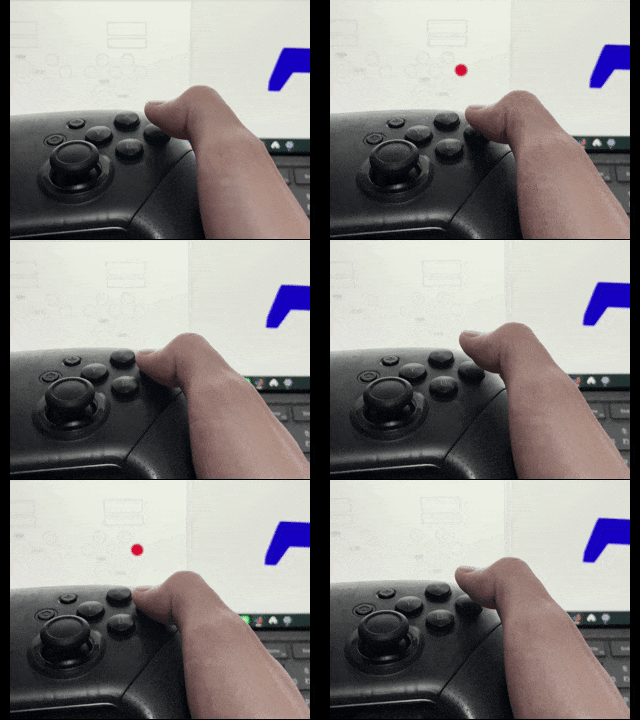
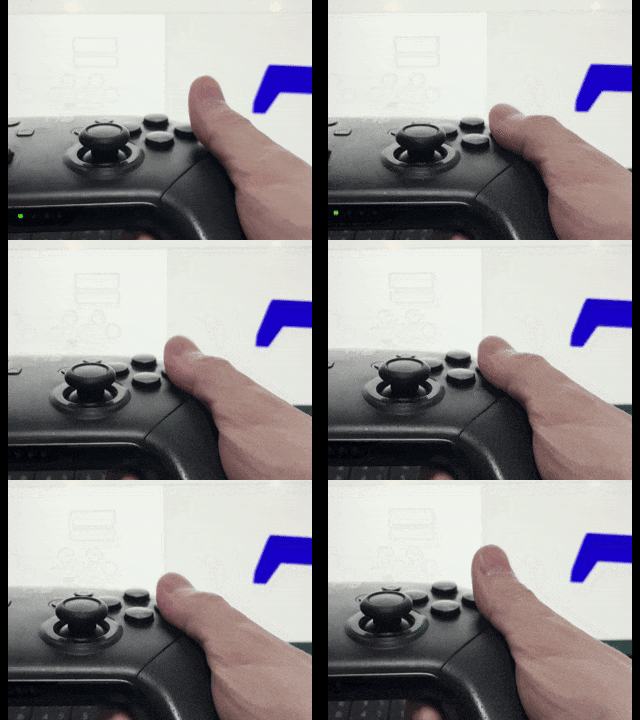
なんかボタンとスティック操作の反映がラグいなあ…と悩んでましたが、無限ループでポーズ入れてたらそりゃ情報取得のタイミングは遅れるよな~というしょうもないオチでした。下記のように無限ループの組み方を修正することで、ラグなくボタンやスティックのオブジェクトが動くようになりました。多分タイマー使った方がきれいな気もするんですが、インスタントに作ってます…。
冒頭の動画は、修正前のコードで撮影しました。
比較 (直撮りですみません…)
修正前
修正後
コード
    while isgraphics(fig)

        % 操作情報の取得
        rmsg = hid.read;

        % ボタンとスティック操作の反映
        btn = btn.updatedButtonState(rmsg);

        % ボタンとスティック操作の反映
        ctrl = ctrl.estimatedEulerAngle(rmsg, dt);

        % Roll & Pitchのグラフプロット
        p(1).XData(end+1) = t;
        p(1).YData(end+1) = ctrl.roll*180/pi;
        p(2).XData(end+1) = t;
        p(2).YData(end+1) = ctrl.pitch*180/pi;

        t = t + dt;
        pause(dt);
    end
    tic % Timer start
    while isgraphics(fig)

        % 操作情報の取得
        rmsg = hid.read;

        % ボタンとスティック操作の反映
        btn = btn.updatedButtonState(rmsg);

        elapsedTime = toc;
        if elapsedTime > dt
            % ボタンとスティック操作の反映
            ctrl = ctrl.estimatedEulerAngle(rmsg, dt);

            % Roll & Pitchのグラフプロット
            p(1).XData(end+1) = t;
            p(1).YData(end+1) = ctrl.roll*180/pi;
            p(2).XData(end+1) = t;
            p(2).YData(end+1) = ctrl.pitch*180/pi;

            t = t + dt;
            tic % Timer reset
        end

        drawnow limitrate
    end
参考リンク
Qiita
hidapi
Nintendo_Switch_Reverse_Engineering
Master
Subcommands
HID Information (Byteごとの情報レイアウトについて)