
はじめに
streamlitアプリを作成していると、オンライン上に公開して使えるようにしたいと思うことがある。
ただ、AWSや自宅サーバだとお金が掛かったり、ネットワーク環境の設定の問題があるので一番簡単かつ無料の方が良いと思う。
そこで、「Streamlit Community Cloud」を利用して、オンライン上に公開する手順を紹介する。
前提
- githubにリポジトリが公開されている
今回の例では、GitHub のリポジトリは以下として紹介
- リポジトリ:
killinneko/circle_visualizer - ブランチ:
main - 主なファイル:
-
circle_visualizer.py(Streamlit アプリ本体) -
requirements.txt(依存ライブラリ)
-
- Streamlit Community Cloudのアカウントがある
手順
1. Streamlit Community Cloudにログインする
2. 右上の「Create app」を選択する

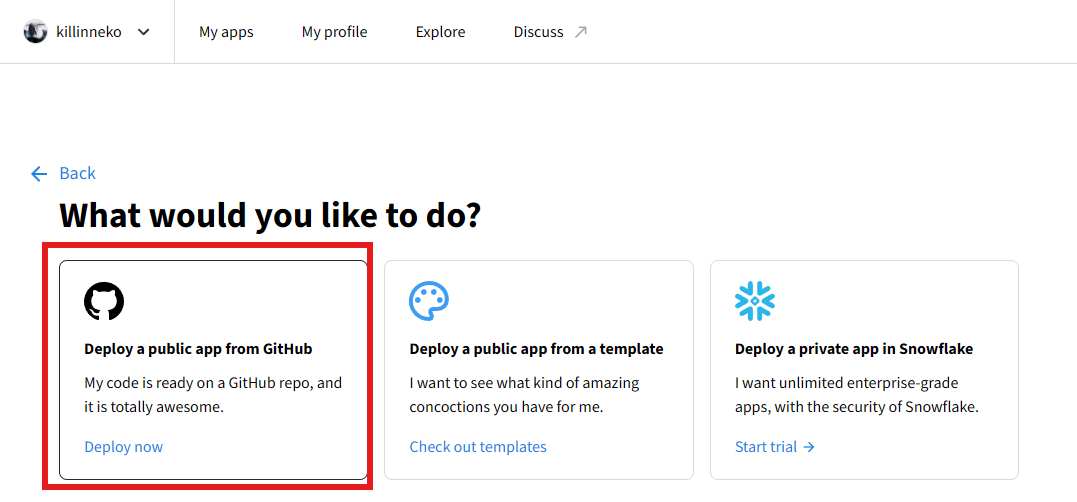
3.今回はgithubにアップロードしたアプリケーションなので「Deploy Now」を選択
4.デプロイ情報を入力
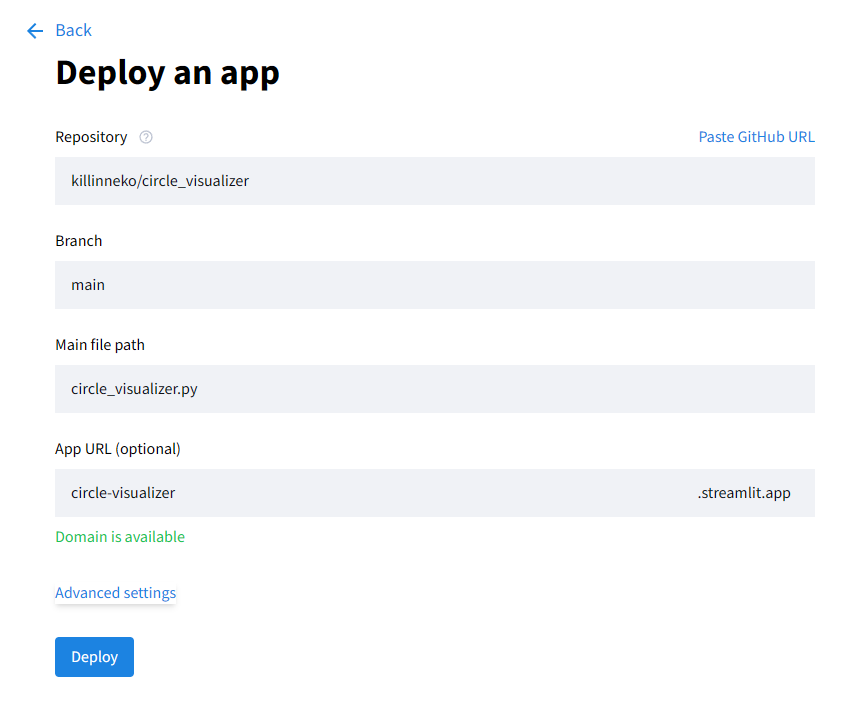
Repositoryには、streamlitのアプリケーションをアップロードしたリポジトリを選択
(ログインしていると自分のリポジトリ一覧が出てくる)
Mainfilepathには、メインとなるアプリケーションファイルを選択
AppURLにはオンライン上でアクセスする際のドメイン名を入力
a-z,0-9,-(ハイフン)のみで、63文字まで利用できる。
もしpythonのバージョンに縛りがあったり、DB連携を行う際にAPIキーなどを入力する場合は、Advanced settingから指定できる
(今回は利用しないので空白のまま)

全て記入したらDeployボタンを押す
すると、先ほど作成したURLにジャンプするのでstreamlitのアプリがオンライン上から確認できるようになる。
もしエラーが出たら
エラーが出た場合は、アプリ画面の右下に「Manage app」という項目がある。
そこを見ると、アプリ起動時のログを見ることができる。

自分の場合は、ライブラリが足りてない旨のエラーが出ていた。
githubを見てみるとrequirement.txtというファイル名になっておりうまく依存ライブラリを参照することができていなかったのでrequirements.txtに修正することで問題なく動くようになった。
修正の反映はgitにプッシュして、再度画面を読み込めば反映される。
[10:37:32] 📦 Processed dependencies!
cat: /mount/admin/install_path: No such file or directory

2025-12-11 10:37:40.835 Uncaught app execution
Traceback (most recent call last):
  File "/home/adminuser/venv/lib/python3.13/site-packages/streamlit/runtime/scriptrunner/exec_code.py", line 129, in exec_func_with_error_handling
    result = func()
  File "/home/adminuser/venv/lib/python3.13/site-packages/streamlit/runtime/scriptrunner/script_runner.py", line 671, in code_to_exec
    exec(code, module.__dict__)  # noqa: S102
    ~~~~^^^^^^^^^^^^^^^^^^^^^^^
  File "/mount/src/circle_visualizer/circle_visualizer.py", line 4, in <module>
    import plotly.graph_objects as go
ModuleNotFoundError: No module named 'plotly'
[10:39:40] 🐙 Pulling code changes from Github...
[10:39:40] 📦 Processing dependencies...
[10:39:40] 📦 Processed dependencies!
[10:39:41] 🔄 Updated app!

2025-12-11 10:40:04.624 Uncaught app execution
Traceback (most recent call last):
  File "/home/adminuser/venv/lib/python3.13/site-packages/streamlit/runtime/scriptrunner/exec_code.py", line 129, in exec_func_with_error_handling
    result = func()
  File "/home/adminuser/venv/lib/python3.13/site-packages/streamlit/runtime/scriptrunner/script_runner.py", line 671, in code_to_exec
    exec(code, module.__dict__)  # noqa: S102
    ~~~~^^^^^^^^^^^^^^^^^^^^^^^
  File "/mount/src/circle_visualizer/circle_visualizer.py", line 4, in <module>
    import plotly.graph_objects as go
ModuleNotFoundError: No module named 'plotly'