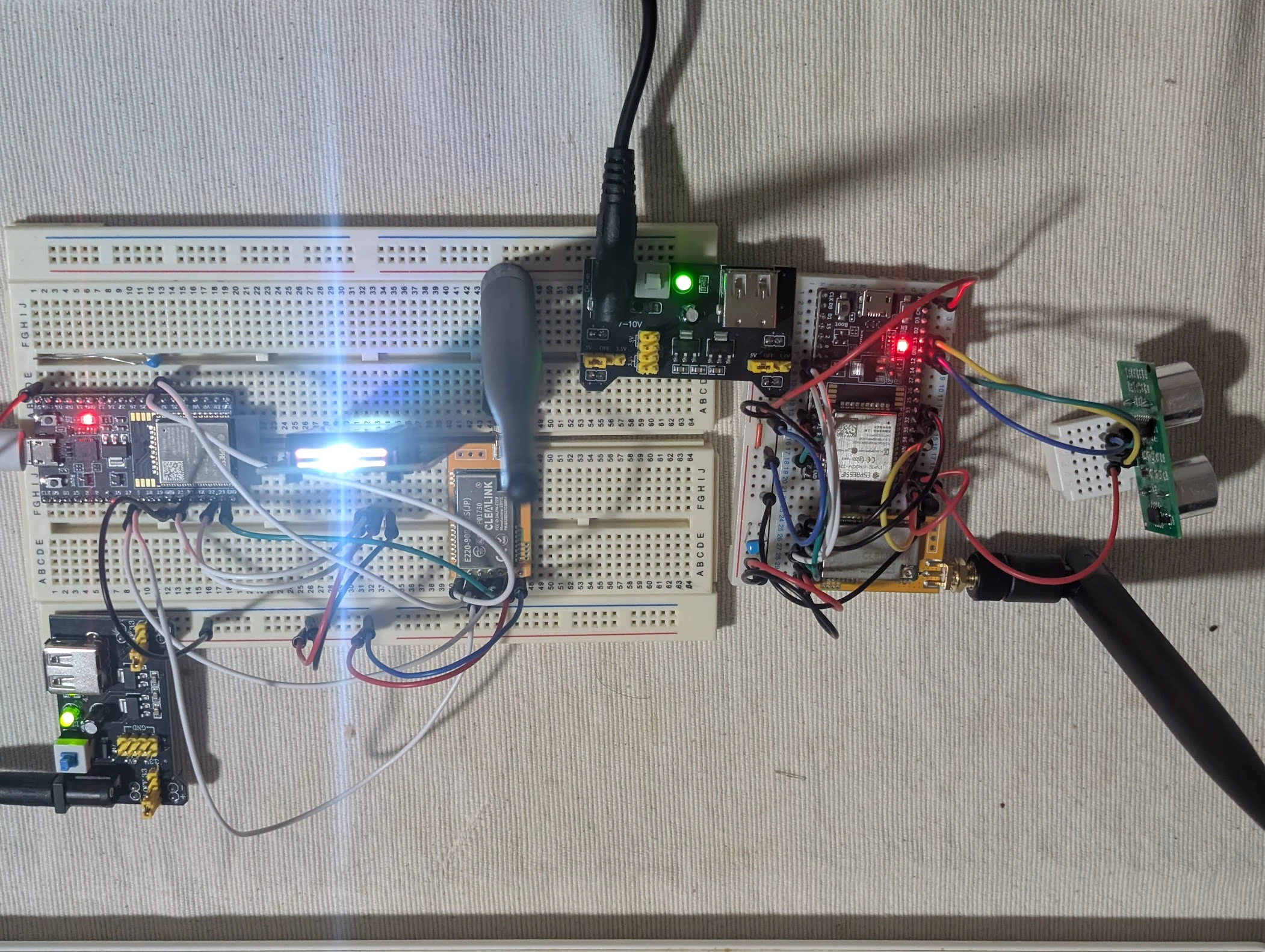
前回は部品を組み立てる所まで進んだ!
やっとコードを作り始められるよ。
先ずは子機のコードから
// ESP32-WROOM-32E用 LoRa子機
#include <Arduino.h>
#define ID 1
#define RXD2 16
#define TXD2 17
#define TEMP 34
#define TRIG 13
#define ECHO 12
#define VOLT 4.1
unsigned int count = 0;
int numOndo = 0;
int numDist = 0;;


void setup() {
  Serial.begin(115200);

  pinMode(TRIG, OUTPUT);
  pinMode(ECHO, INPUT);

  delay(1000);
  Serial2.begin(9600, SERIAL_8N1, RXD2, TXD2);
  Serial.println("LoRa Sender Initialized!");
}

void Thermo(void){
  int rawValue = analogRead(TEMP);
  float voltage = (rawValue * VOLT) / 4095.0;
  numOndo = (voltage - 0.5) * 100.0;
  Serial.print("Temp: ");
  Serial.print(numOndo);
  Serial.println(" C");
}
void Sonic(void){
  float soundSpeed = (331.5 + 0.6 * numOndo) / 1000.0;
  digitalWrite(TRIG, LOW);
  delayMicroseconds(2);
  digitalWrite(TRIG, HIGH);
  delayMicroseconds(10);
  digitalWrite(TRIG, LOW);

  long duration = pulseIn(ECHO, HIGH);
  numDist = (int)(duration * soundSpeed / 2.0);

  if (numDist > 4000 || numDist < 20) {
    Serial.println("Out of range");
  } else {
    Serial.print("Distance: ");
    Serial.print(numDist);
    Serial.println(" mm");
  }
}
void LoraSend(void){
  String message = "ID:" + String(ID) + " Dist:" + String(numDist); // 送信メッセージ
  Serial2.println(message); // LoRaモジュールへ書き込み(送信)

  Serial.print("Sending: ");
  Serial.println(message);

  count++;
}
void loop() {
  Thermo();
  Sonic();
  LoraSend();
  delay(5000);
}
結果
Temp: 31 C
Distance: 53 mm
Sending: ID:1 Dist:53
Temp: 33 C
Out of range
Sending: ID:1 Dist:0
Temp: 32 C
Distance: 46 mm
Sending: ID:1 Dist:46
Temp: 19 C
Out of range
Sending: ID:1 Dist:0
Out of range
Sending: ID:1 Dist:11980
Temp: 18 C
Distance: 221 mm
Sending: ID:1 Dist:221
Temp: 19 C
Distance: 253 mm
Sending: ID:1 Dist:253
Temp: 19 C
Distance: 218 mm
Sending: ID:1 Dist:218
Temp: 18 C
Out of range
Sending: ID:1 Dist:11959
Temp: 19 C
Out of range
Sending: ID:1 Dist:11979
Temp: 19 C
Distance: 221 mm
Sending: ID:1 Dist:221
Temp: 19 C
Distance: 65 mm
Sending: ID:1 Dist:65
Temp: 19 C
Distance: 681 mm
Sending: ID:1 Dist:681
Temp: 19 C
Out of range
Sending: ID:1 Dist:11978
Temp: 19 C
Distance: 680 mm
Sending: ID:1 Dist:680
Temp: 18 C
Distance: 667 mm
Sending: ID:1 Dist:667
Temp: 19 C
Distance: 681 mm
Sending: ID:1 Dist:681
Temp: 19 C
Distance: 663 mm
Sending: ID:1 Dist:663
Temp: 19 C
Out of range
Sending: ID:1 Dist:11978
Temp: 19 C
Distance: 682 mm
Sending: ID:1 Dist:682
Temp: 19 C
Distance: 647 mm
Sending: ID:1 Dist:647
Temp: 18 C
Out of range
Sending: ID:1 Dist:11957
Temp: 19 C
Distance: 681 mm
Sending: ID:1 Dist:681
なんか、すごいブレブレな結果を出力しました。
室温は30度もないし。後半は19度で妥当な気温を出してたけどさ。
でも距離が0とか53mmとか119cmとか返してるんです。
1m以上も離れてないよ。
そういえば超音波センサーは電波を出す時に電圧変化するらしいね。
じゃあセラミックコンデンサでパスコンを作れば安定するんじゃないかな。
やってみようか。
パスコン噛ました結果
Temp: 19 C
Distance: 146 mm
Sending: ID:1 Dist:146
Temp: 19 C
Distance: 187 mm
Sending: ID:1 Dist:187
Temp: 19 C
Distance: 149 mm
Sending: ID:1 Dist:149
Temp: 19 C
Distance: 149 mm
Sending: ID:1 Dist:149
Temp: 19 C
Distance: 149 mm
Sending: ID:1 Dist:149
Temp: 19 C
Distance: 152 mm
Sending: ID:1 Dist:152
Temp: 19 C
Distance: 58 mm
Sending: ID:1 Dist:58
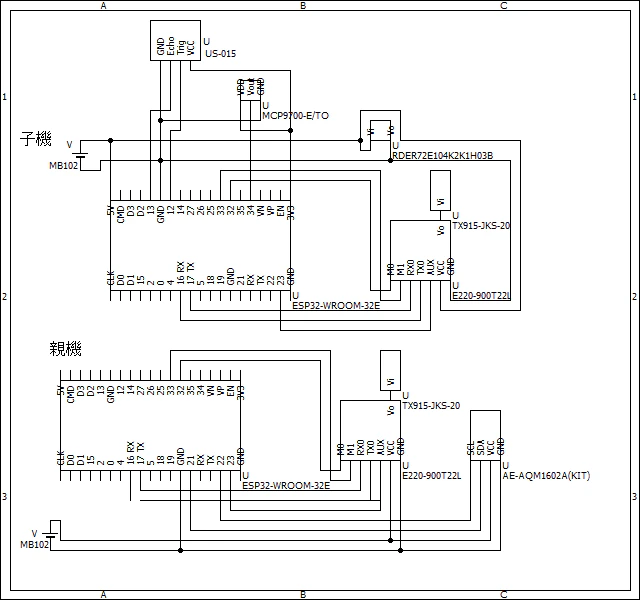
現在の回路図はこんな感じ。
次は親機
コードはこんな感じ。
// ESP32-WROOM-32E用 LoRa親機
#include "esp32_e220900t22s_jp_lib_v2.h"
#include <Wire.h>
#include <LiquidCrystal_I2C.h>
#define M0_PIN 32
#define M1_PIN 33
#define RXD2 16
#define TXD2 17
char msg[16] = "";
LiquidCrystal_I2C lcd(0x27, 16, 2);
CLoRa lora;

void setup() {
  Serial.begin(115200);

  lcd.init();
  lcd.backlight();
  lcd.print("Waiting...");

  if (lora.InitLoRaModule(lora.config)) {
    Serial.println("LoRa Init Success!");
  } else {
    Serial.println("LoRa Init Failed... Check Wiring.");
  }
}

void LcdUpdate(String message) {
  lcd.clear();
  lcd.setCursor(0, 0);
  lcd.print("Received Data:");
  lcd.setCursor(0, 1);
  lcd.print(message);
}

void loop() {
  if (Serial2.available()) {
    String receivedMsg = Serial2.readStringUntil('\n');
    receivedMsg.trim();
    Serial.print("Recv: ");
    Serial.println(receivedMsg);
    LcdUpdate(receivedMsg);
  }
}
結果
# Command Response
0x00
LoRa Init Success!
# Command Response
0x00
LoRa Init Success!
初期化は成功してるんだけど、子機から受信してないっぽい。
picでも親機の受信で手間取ったもんなあ。
やっぱ親機は大変なんだな。
次回
以前、通信に成功した筈。
なので一旦コードも回路もその時に戻してみよう。
そんで正常に送受信できたなら、こっちのコードの問題。
戻しても正常に送受信できないなら、前回の成功が気のせいだったのかも。
はぁ。前途多難だなあ。