
とうとうメールが来ました
Salesforce は Summer '27 リリースをもって、API バージョン 31.0 ~ 64.0 の SOAP API login() を廃止し、サポートを終了します。それまでに外部クライアントアプリケーションおよび OAuth に移行して、外部アプリケーションを認証することをお勧めします
Bulk APIを使ってデータ処理をしている部分で使っていたなぁ。
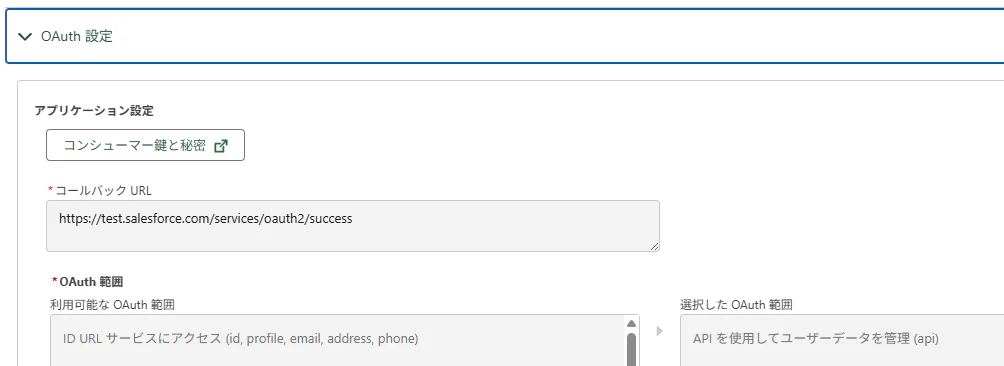
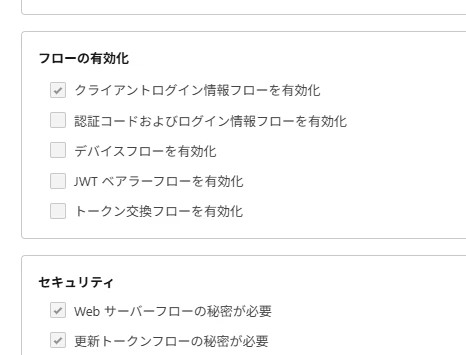
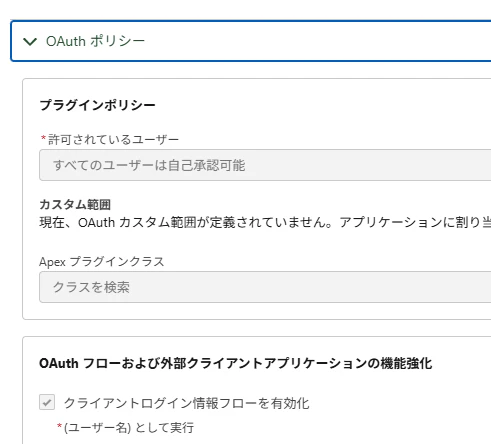
まずは以下を参考にして外部クライアントアプリケーションを設定します。
OAuthの設定
OAuthポリシー
呼び出し部分 Linuxのシェルで使っているのでXMLのフォーマットで処理を進めます
$mycurl https://xxxxx.sandbox.my.salesforce.com/services/oauth2/token
-d 'grant_type=client_credentials'
-d'client_id=??????????'
-d 'client_secret=????????'
-d 'format=xml' |
この続きではアクセストークンを取得してます。
$tools/sfdc-tag2.php   |
cat > $tmp-loginInfo
access_token=$(nameread access_token $tmp-loginInfo)
instance_url=$(nameread instance_url $tmp-loginInfo)
my_access_token=`echo $access_token | sed -e 's/!/\\\!/g'`
my_instance_url=`echo $instance_url | sed -e 's,/, ,g' | self 1 2 | sed -e 's, ,//,g'`
実際にトークンを使った処理は以下になります
curl_com="$my_instance_url/services/data/v64.0/limits -H \"Authorization: Bearer $access_token\" "
アクセストークンはこんな感じ
<?xml version="1.0" encoding="UTF-8"?>
<OAuth>
<access_token>???????????</access_token>
<signature>???????</signature>
<scope>api</scope>
<instance_url>https://xxxx.sandbox.my.salesforce.com</instance_url>
<id>https://test.salesforce.com/id/00Dyyyyyy/005rrrrr</id>
<token_type>Bearer</token_type>
<issued_at>0000000</issued_at>
</OAuth>
sfdc-tag2.phpでシェルで扱えるようにXMLのファイルをユニケージのTAG形式に変換する
#!/usr/bin/php -q
<?php
//############################################
//# XMLを読んでユニケージ用のファイルをつくる
//# シングルレベルのアイテムタイプ用
//# TAG形式に変換します
//############################################

//$stdin = trim(fgets(STDIN));
//var_dump($stdin);

$stdins = array();
$tmp    = array();

#$cmd = $argv[1];  //コマンド

    $stdins = array();
    $aaa = array();


# <CustomObject xmlns="http://soap.sforce.com/2006/04/metadata">
#    <actionOverrides>
#       <actionName>Accept</actionName>
#        <type>Default</type>
#    </actionOverrides>
# </CustomObject>

    function sxiToArray($sxi){
        $a = true;
        if ($sxi->count() == 0) {
            echo $sxi->getName(). " ".$sxi->__toString() ."\n";
        }

        foreach ( $sxi as $key => $value ) {
            ## ここは1階層目が表示されている <actionOverrides>
            echo $key ." ". $value . "\n";
            if ($value->count() > 0) {
                foreach ($value->children() as $child) {
                    $a = sxiToArray($child);
                }//end of foreach 2
            }//end of if
        } //end of foreach
        return $a;
    }//end of function

    while(true)
    {
        #$stdin = fgets(STDIN);
        $stdin = trim(fgets(STDIN));
        if ($stdin === '')
        {
            #### 最終行まで読んだら、ここでまとめて処理する
            $xmlstr = join(' ', $stdins);
            $xml = new SimpleXMLElement($xmlstr);
            //$xml = simplexml_load_string($xmlstr, NULL, NULL, "http://schemas.xmlsoap.org/soap/envelope/");
            $aaa = sxiToArray($xml);

            return;
       }

        ### 1行ずつのデータを配列に格納する
        $stdins[] = $stdin;
        $stdins[] = $stdin;

    }//end of while


?>
TAG形式の結果
access_token ????????
signature ????????
scope api
instance_url https://xxxxx.sandbox.my.salesforce.com
id https://test.salesforce.com/id/00Dyyyyyy/005rrrrr
token_type Bearer
issued_at 0000000
Apexでもアクセストークンを取得してみる
public static String getToken() {

        Http http = new Http();
        String path ='https://xxxxx.sandbox.my.salesforce.com/services/oauth2/token';
        HttpRequest req = new HttpRequest();
        req.setEndpoint(path);
        req.setMethod('POST');
        String ClientId = '';
		String ClientSecret = '';

		req.setBody('grant_type=client_credentials' +
              '&client_id=' + ClientId +
              '&client_secret=' + ClientSecret

           );
		HttpResponse res = http.send(req);
        BodyToken t = (BodyToken)JSON.deserializeStrict(res.getBody(),BodyToken.class);
        return t.access_token;

    }

    public class BodyToken {
        public String access_token;
        public String instance_url;
        public String scope; //外部クライアントアプリケーションではこれが増えている感じ
        public String id;
        public String token_type;
        public String issued_at;
        public String signature;
    }
外部接続の時はscopeがなかったな