では、どうしてもGraylogの初期設定ができなかったのでdebian12で再挑戦です。
残念ながらMongoDB 8.0 → OpenSearch 2.19.5 → Graylog 6.3.xでも構成できなかったです。
Graylog 6.3.xがOpenSearch 2.19.5にアクセスできません。
何故だろうか? 本当にGraylogは使えるのか?
今度の構成は、この3つ。この順番でインストールしたいと思います。
MongoDB 8.0 → OpenSearch 2.19.5 → Graylog 6.3.x
MongoDB 8.0 のインストール
curlをインストール
apt update
apt install -y gnupg curl
curl -fsSL https://www.mongodb.org/static/pgp/server-8.0.asc | gpg --dearmor -o /usr/share/keyrings/mongodb-server-8.0.gpg
echo "deb [ signed-by=/usr/share/keyrings/mongodb-server-8.0.gpg ] https://repo.mongodb.org/apt/debian bookworm/mongodb-org/8.0 main" > /etc/apt/sources.list.d/mongodb-org-8.0.list
apt update
apt install -y mongodb-org
systemctl enable --now mongod
インストールできたかの確認
systemctl status mongod
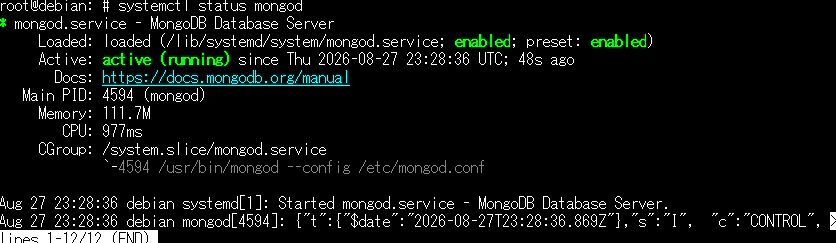
mongosh --eval "db.version()"
8.0.31
OpenSearch 2.19.5のインストール
javaの確認から
java -version
-bash: java: command not found
当然ないので、javaをインストール
apt update
apt install -y openjdk-21-jdk
インストールできなかった。
Debian 12 の標準は OpenJDK 17のようですね
apt install -y openjdk-17-jdk
java -version
openjdk version "17.0.20.1" 2026-08-18
OpenJDK Runtime Environment (build 17.0.20.1+1-1-deb12u1-Debian)
OpenJDK 64-Bit Server VM (build 17.0.20.1+1-1-deb12u1-Debian, mixed mode, sharing)
パッケージ(.deb)をダウンロードして取得する
wget https://artifacts.opensearch.org/releases/bundle/opensearch/2.19.5/opensearch-2.19.5-linux-x64.deb
パッケージをインストール
dpkg -i opensearch-2.19.5-linux-x64.deb
エラーのようです
cat /var/log/opensearch/install_demo_configuration.log

No custom admin password found.
Please provide a password via the environment variable
OPENSEARCH_INITIAL_ADMIN_PASSWORD
OpenSearch 2.12以降は 初期管理者パスワードが必須?
export OPENSEARCH_INITIAL_ADMIN_PASSWORD='*****'
しかし、エラーですね。何で?
Weak password と警告が... もっとパスワードの強度を上げろということ?
パスワードを変えたらインストールできたようです
systemctl daemon-reload

systemctl enable opensearch

systemctl start opensearch
起動の確認
systemctl status opensearch
Aug 27 23:52:47 debian systemd-entrypoint[5802]: WARNING: System::setSecurityManager has been called by org.o>
Aug 27 23:52:47 debian systemd-entrypoint[5802]: WARNING: Please consider reporting this to the maintainers o>
Aug 27 23:52:47 debian systemd-entrypoint[5802]: WARNING: System::setSecurityManager will be removed in a fut>
Aug 27 23:52:47 debian systemd-entrypoint[5802]: 8 27, 2026 11:52:47 <8D><88><8C> sun.util.locale>
Aug 27 23:52:47 debian systemd-entrypoint[5802]: WARNING: COMPAT locale provider will be removed in a future >
Aug 27 23:52:48 debian systemd-entrypoint[5802]: WARNING: A terminally deprecated method in java.lang.System >
Aug 27 23:52:48 debian systemd-entrypoint[5802]: WARNING: System::setSecurityManager has been called by org.o>
Aug 27 23:52:48 debian systemd-entrypoint[5802]: WARNING: Please consider reporting this to the maintainers o>
Aug 27 23:52:48 debian systemd-entrypoint[5802]: WARNING: System::setSecurityManager will be removed in a fut>
Aug 27 23:52:59 debian systemd[1]: Started opensearch.service - OpenSearch.
Java 21系との互換性に関する警告があるけどとりあえず、このまま
graylog-6.3のインストール
wget https://packages.graylog2.org/repo/packages/graylog-6.3-repository_latest.deb
dpkg -i graylog-6.3-repository_latest.deb
apt update
apt install -y graylog-server
パスワードジェネレータをインストール
apt install -y pwgen
長いパスワードを作成
pwgen -N 1 -s 96
パスワードのハッシュを作成
echo -n 'graylog*****' | sha256sum
これらを設定します
/etc/graylog/server/server.conf
- password_secret
- root_password_sha2
- mongodb_uri = mongodb://127.0.0.1:27017/graylog
- http_bind_address = 0.0.0.0:9000
- http_publish_uri = http://192.168.x.x:9000/
設定を変えたら起動
systemctl enable --now graylog-server
やっぱり使えない。初期設定画面をセットしたらつながらなくなった