
背景となる面接テーマの原文: リアルタイムチャットシステムの設計
この記事では、その中の「メッセージ処理が失敗したらどうするか」を取り出し、DLQ(Dead Letter Queue)の実装に絞って再構成します。元記事の文章は再利用していません。
結論
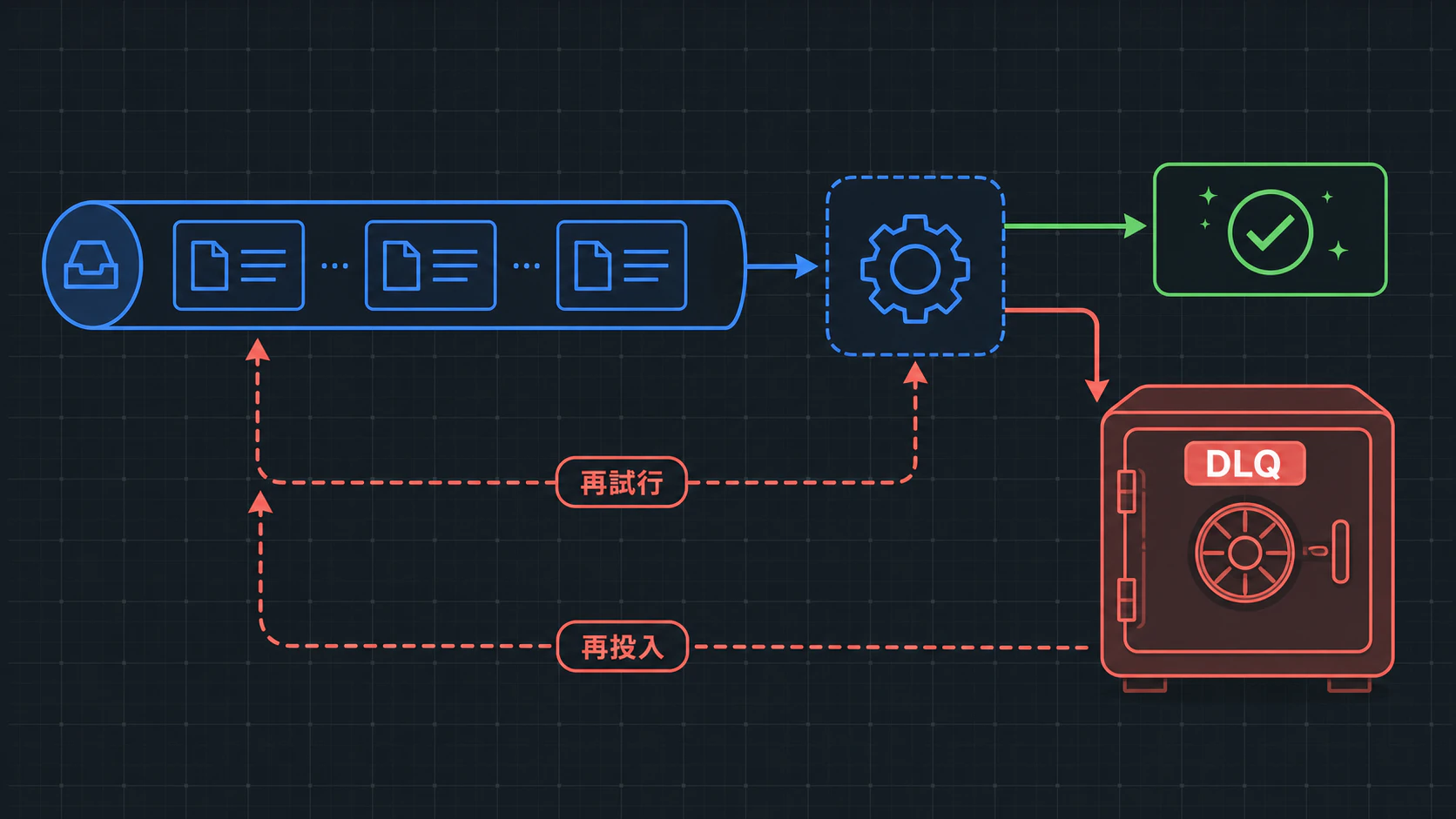
DLQは「失敗したメッセージを捨てる場所」ではありません。通常キューの進行を止めないために、原因調査が必要な失敗を隔離する場所です。
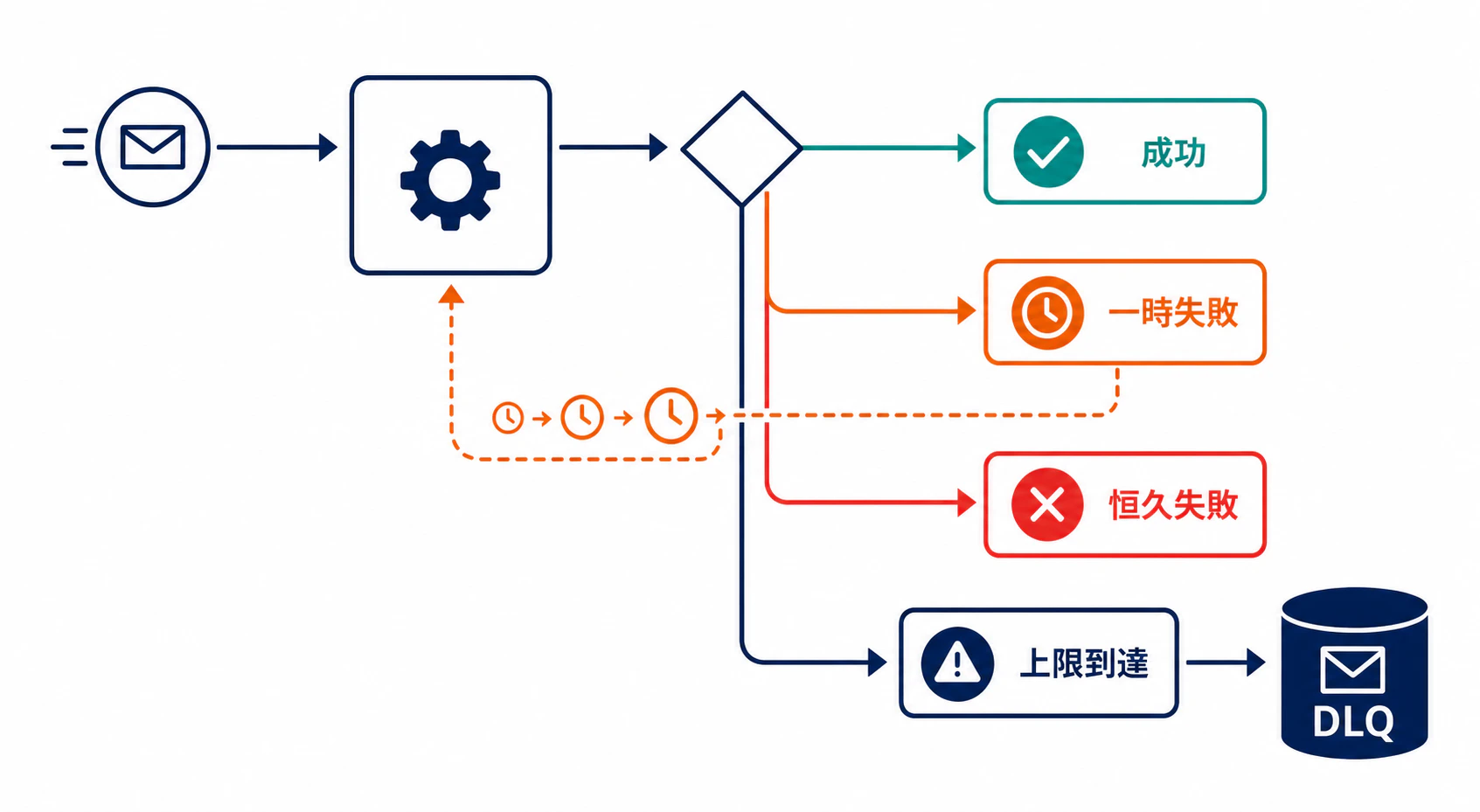
面接予定のリマインダ送信を例にすると、次の三つを混ぜない設計が要点になります。
- 一時失敗: タイムアウトや一過性の 5xx。間隔を空けて再試行します。
- 恒久失敗: 宛先不正や壊れたペイロード。再試行せず DLQ に送ります。
- 上限到達: 一時失敗でも、決めた回数を超えたら DLQ に送ります。
この分離がないと、壊れた1件が無限再試行でワーカーを占有し、正常な面接通知まで遅延します。
まず守る不変条件
実装の前に、状態遷移を三つに固定します。
- attempt は配送失敗ごとに一度だけ増える。
- 再試行してよいのは一時失敗だけで、最大回数を超えたメッセージは通常キューへ戻さない。
- DLQ から再投入するときは、元のイベントIDを残しつつ attempt とエラー情報を明示的に初期化する。
3番目は見落とされがちです。イベントIDを変えると重複排除が壊れ、失敗状態のまま戻すと再投入直後にまた上限へ到達します。
最小の TypeScript 実装
ここではキュー製品のAPIを隠し、配送結果から次の行き先を決める部分だけを実装します。now を注入しているため、バックオフも決定的に確認できます。
type InterviewReminder = {
  id: string;
  attempt: number;
  payload: { interviewId: string };
  lastError?: string;
};

type DeliveryResult =
  | { kind: "ok" }
  | { kind: "transient"; reason: string }
  | { kind: "permanent"; reason: string };

type Route =
  | { kind: "done" }
  | { kind: "retry"; message: InterviewReminder; retryAt: number }
  | { kind: "dead-letter"; message: InterviewReminder };

class DeadLetterRouter {
  constructor(
    private readonly maxAttempts: number,
    private readonly now: () => number,
  ) {}

  route(message: InterviewReminder, result: DeliveryResult): Route {
    if (result.kind === "ok") return { kind: "done" };

    const failed = {
      ...message,
      attempt: message.attempt + 1,
      lastError: result.reason,
    };

    if (result.kind === "permanent" || failed.attempt >= this.maxAttempts) {
      return { kind: "dead-letter", message: failed };
    }

    return {
      kind: "retry",
      message: failed,
      retryAt: this.now() + this.backoffMs(failed.attempt),
    };
  }

  redrive(message: InterviewReminder): InterviewReminder {
    return { ...message, attempt: 0, lastError: undefined };
  }

  private backoffMs(attempt: number): number {
    return Math.min(30_000, 1_000 * 2 ** attempt);
  }
}
このコードで、3回目の一時失敗はDLQへ、宛先不正は1回目でもDLQへ進みます。指数バックオフの上限を置く理由は、長時間障害で待機時刻が非現実的に伸びるのを防ぐためです。実運用ではここにジッターも加え、同時復旧時の集中再試行を避けます。
実行して状態遷移を確認する
次の短い検証を末尾に足すと、ルータの契約をそのまま実行できます。
const assert = (condition: unknown, message: string): asserts condition => {
  if (!condition) throw new Error(message);
};

const router = new DeadLetterRouter(3, () => 10_000);
const base: InterviewReminder = {
  id: "evt-42",
  attempt: 0,
  payload: { interviewId: "i-7" },
};

const first = router.route(base, { kind: "transient", reason: "gateway timeout" });
assert(first.kind === "retry", "first transient failure must be retried");
assert(first.message.attempt === 1 && first.retryAt === 12_000, "retry state must advance once");

const exhausted = router.route(
  { ...base, attempt: 2 },
  { kind: "transient", reason: "gateway timeout" },
);
assert(exhausted.kind === "dead-letter" && exhausted.message.attempt === 3, "attempt limit must go to DLQ");

const invalid = router.route(base, { kind: "permanent", reason: "invalid destination" });
assert(invalid.kind === "dead-letter" && invalid.message.attempt === 1, "permanent failure must skip retry");

const replay = router.redrive(exhausted.message);
assert(replay.id === base.id && replay.attempt === 0 && replay.lastError === undefined, "redrive must preserve identity and reset retry state");

console.log("ok: retry, DLQ, permanent failure, and redrive invariants hold");
Bunで実行すると、四つの状態遷移を通って次のように終わります。
ok: retry, DLQ, permanent failure, and redrive invariants hold
DLQに入れれば終わり、ではない
DLQに置くメッセージには、少なくともイベントID、失敗回数、最後のエラー、初回受信時刻を残します。これがないと、再投入の対象を絞れず、障害の原因も追えません。
再投入は「DLQの全件を元のキューへ戻す」操作にしない方が安全です。まず恒久失敗の原因を直し、対象を選び、イベントIDを保ったまま attempt をリセットしてから戻します。消費側は同じIDを重複実行しない設計にしておく必要があります。
システム設計面接では、DLQを答えとして置くだけでは足りません。何を再試行し、いつ隔離し、どの情報を残し、どう再投入するかまで状態遷移として説明できると、障害時の運用まで含めた設計になります。