1
0

Delete article

Deleted articles cannot be recovered.

Draft of this article would be also deleted.

Are you sure you want to delete this article?

AIが起動するとpnpm devが起動できなくなった?

1
Last updated at Posted at 2026-03-27

概要

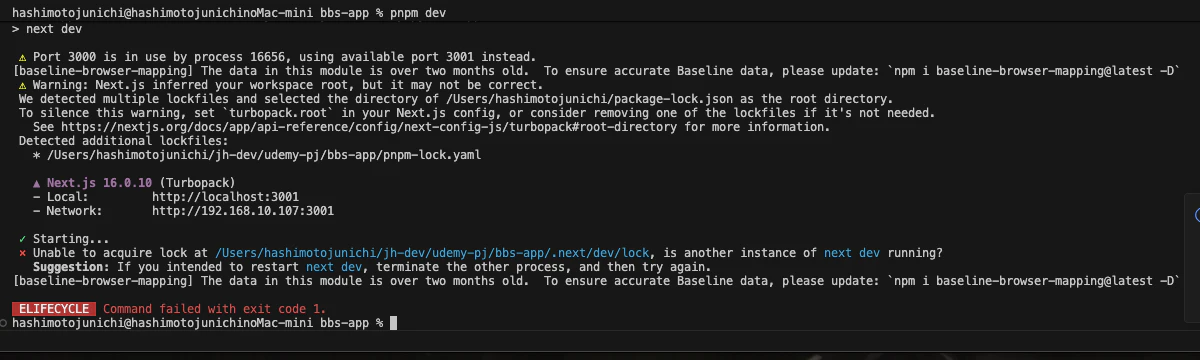
Claude Code/Cursorを使用して開発をしているときに、AIがローカルサーバーを起動すると、ターミナルでpnpm devnpm run devした時にhttp://localhost:3001と表示されていることがある。

AI側がhttp://localhost:3000で起動しているからである。VSCodeを閉じれば停止されると思ったが今回はされてなかった。
CleanShot 2026-03-27 at 08.05.39.png

確認・停止方法はどうするのか?

ローカルホストで起動中のプロセスを確認

ポート3000で起動中のプロセスを確認

lsof -i :3000

実行した時の動作

CleanShot 2026-03-27 at 08.16.02.png

3001の時はlsof -i :3001で実行

全ポートのリスニング状態を確認

lsof -i -P | grep LISTEN

または netstat で確認

netstat -an | grep LISTEN

開発サーバーを停止

ポート3000を使用しているプロセスを停止

kill $(lsof -t -i :3000)

Next.js の dev サーバーを直接停止

pkill -f "next dev"

強制終了が必要な場合

kill -9 $(lsof -t -i :3000)

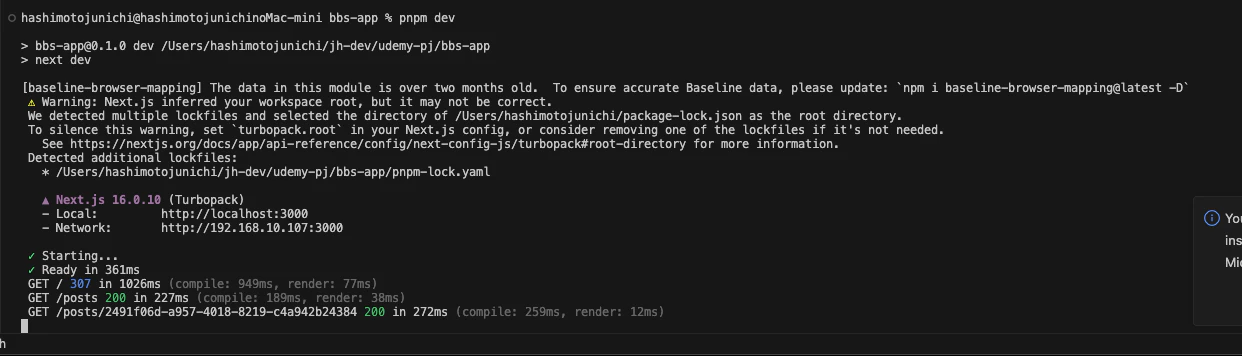
3001を指定して停止後にpnpm devすると起動できた。
CleanShot 2026-03-27 at 08.06.05.png

感想

AIがローカルサーバーまで起動してしまい3001で起動したり、そもそも起動できない場面がある。まずは、3000で起動しているプロセスを停止しよう。

1
0
0

Register as a new user and use Qiita more conveniently

  1. You get articles that match your needs
  2. You can efficiently read back useful information
  3. You can use dark theme
What you can do with signing up
1
0

Delete article

Deleted articles cannot be recovered.

Draft of this article would be also deleted.

Are you sure you want to delete this article?