#1.はじめに
「Openshift VirtulizationでIBM FlashSystem Storageを使用する」という記事で、3つの方法があることを紹介しましたが、この記事では、FiberChannel Diskについて、導入方法等をご紹介します。
#2. 導入手順
(1)前提条件
・ストレージ・ボリュームを作成し、仮想マシンが動くWorkerノードにマッピング済みであること。
(2)導入手順
- PVの作成
下記のようなyamlでPVを作成します。
apiVersion: v1
kind: PersistentVolume
metadata:
  name: pv-rhel9-rdm
spec:
  capacity:
    storage: 100Gi
  accessModes:
    - ReadWriteMany
  fc:
    targetWWNs: ['500507680d7abd53','500507680d7abd53']
    lun: 63
    fsType: xfs
※wwnとlunは、ホスト上で認識している/dev/disk/by-path/pci--fc-0x-lun-のWWNとLUN#を指定
※fstypeは使用するファイルシステムを指定
- PVCの作成
上記PVを参照するPVCを下記のようなyamlで作成します。
apiVersion: v1
kind: PersistentVolumeClaim
metadata:
  name: pvc-rhel9-rdm
  namespace: vm-on-rdm
spec:
  accessModes:
    - ReadWriteMany
  resources:
    requests:
      storage: 100Gi
  volumeName: pv-rhel9-rdm
  storageClassName: ""
#3. 仮想マシン作成手順
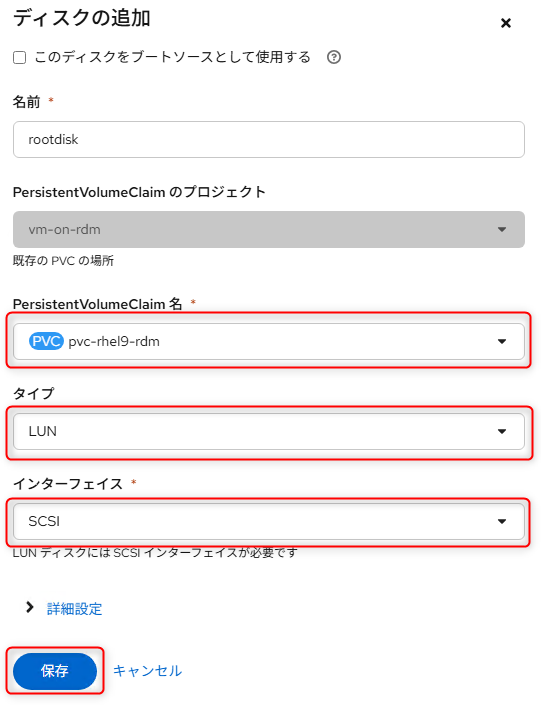
上記で作成したPVCを使用するように、仮想マシンのディスクを構成します。
タイプに「LUN」を指定するところがポイントになります。