

1.はじめに
Openshiftでは、Migaration Toolkit for Virtulization(MTV)という仮想マシンを移行するツールが用意されていますが、移行元のハイパーバイザーとしてHyper-Vを選択することは現状できません。
そこで、virt-v2vを使用して、仮想ハードディスクを変換して、変換後のハードディスクを使用して仮想マシンを作成する方法を試してみました。
仮想マシンのGuestOSはWindows Server 2016で、第2世代形式の仮想マシンを移行してみました。
2.手順(概要)
(1) Hyper-Vマネージャーで仮想マシンを停止し、エクスポートを実施。
(2) エクスポートした仮想ハーディスクのファイル(vhdx)をkvm、virt-v2v、httpdが導入されたRHELにコピー
(3) RHEL上で以下のコマンドを実行
# virt-v2v -i disk <vhdxファイルのパス> -o local -os <変換後出力先フォルダー> -of qcow2
[実行例]
# virt-v2v   -i disk ws2026-on-hv.vhdx   -o local   -os /tmp/converted   -of qcow2
[   0.3] Setting up the source: -i disk ws2026-on-hv.vhdx
[   1.5] Opening the source
[  95.1] Inspecting the source
[ 127.7] Checking for sufficient free disk space in the guest
[ 127.7] Converting Windows Server 2016 Standard Evaluation (win2k16) to run on KVM

** (process:5593): WARNING **: 08:49:58.020: Entity http://pcisig.com/pci/1af4/1012 referenced but not defined
virt-v2v: This guest has virtio drivers installed.
[ 375.1] Setting a random seed
virt-v2v: warning: random seed could not be set for this type of guest
[ 375.3] SELinux relabelling
[ 376.2] Mapping filesystem data to avoid copying unused and blank areas
[ 389.0] Closing the overlay
[ 389.8] Assigning disks to buses
[ 389.8] Checking if the guest needs BIOS or UEFI to boot
virt-v2v: This guest requires UEFI on the target to boot.
[ 389.8] Setting up the destination: -o disk -os /tmp/converted
[ 390.8] Copying disk 1/1
█ 100% [****************************************]
[ 453.4] Creating output metadata
[ 453.4] Finishing off

# ls /tmp/converted/
ws2026-on-hv.vhdx-sda  ws2026-on-hv.vhdx.xml
(4) 作成されたファイルはqcow2の拡張子がついていないので、リネームし、WEBサーバーのDocumentRootディレクトリに移動します。
[実行例]
# mv /tmp/converted/ws2026-on-hv.vhdx-sda /tmp/converted/ws2026-on-hv.qcow2
# cp /tmp/converted/ws2026-on-hv.qcow2 /var/www/html/
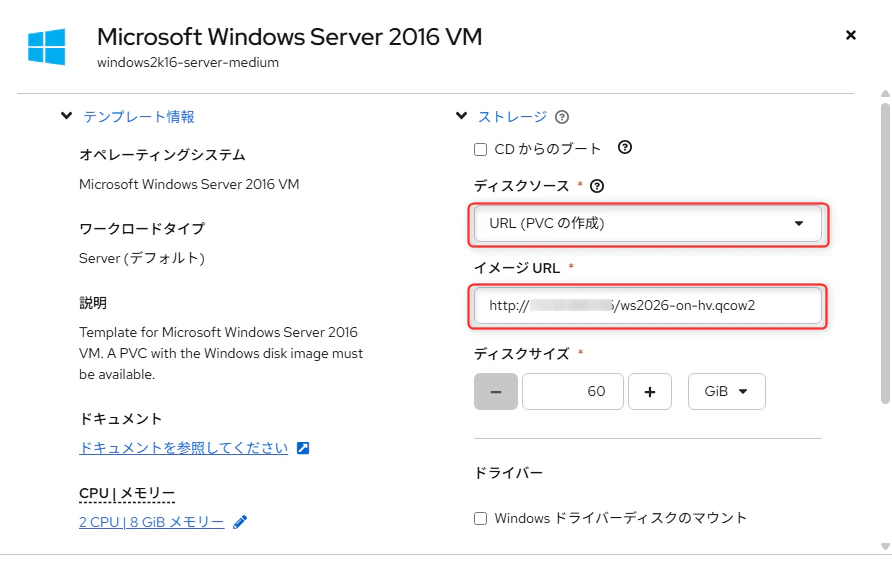
(5) OpenshiftのWebコンソールでテンプレートから新規仮想マシンを作成し、起動
作成する際に、ディスクソースを「URL(PVCの作成)」にし、イメージURLに変換したファイルを置いたURLを指定
(6) OS上でIPアドレスを再設定