
Chromeの新UIが邪魔過ぎる
先日Chromeを開いたらなんかUIが変わっていました。それだけならまぁよくあることなんですけどコイツ、検索ワードをいつものノリでTab補完しようとすると

これが

こんな感じになって
アドレスバーがAIモードとかいうゴミ新機能のせいでTab→ Enterでそのまま飛べなくなり、代わりにAIモードに飛ばされます。邪魔です。
あと検索バーのUIも変更されていて使いにくいです。
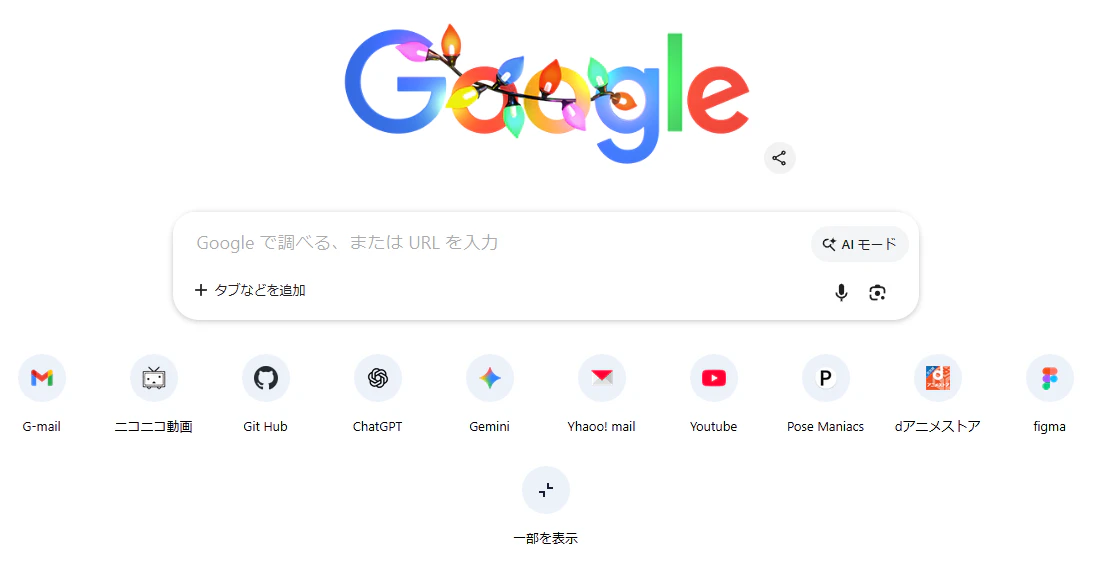
UXとメモリとSSDを犠牲にしてユーザーにAIの使用を強要するのをやめませんかGoogleさん?
AIモードの消し方
文句ばっか言っていても仕方がないのでどうにかします。
- chrome://flags/ にアクセスしてください
- ページ内の検索バー(Search flags)に「AI mode」と入力してください
- こんな感じで「AI Mode Omnibox entrypoint」,「AI Entrypoint Disabled on User Input」,「Omnibox Allow AI Mode Matches」という3つのフラグが出てくるのですべてDisabledにします
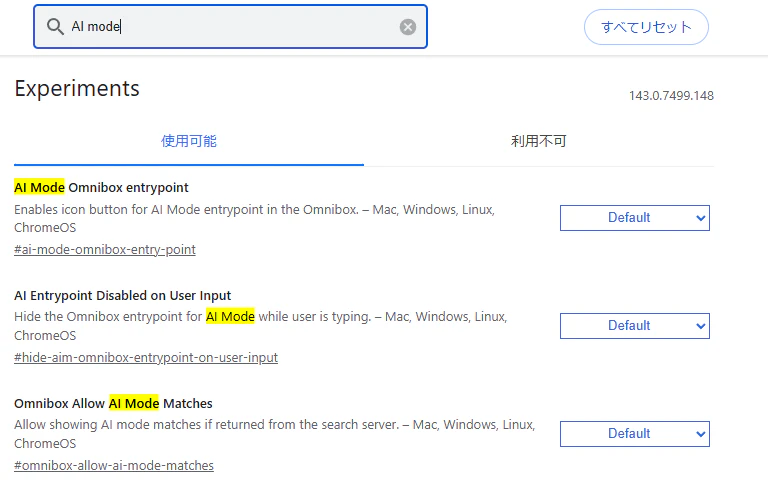
これでアドレスバーのAIモードボタンを消すことができます - 次に検索バーのUIを元に戻します。同様に「NTP」と入力してください
- 検索結果のうち「NTP Compose Entrypoint」,「NTP Composebox」,「NTP Realbox Next」の3つをDisabledにします
- 最後に右下に出てくる 「再起動」 を押すことで今までの設定が適用され、昔のUIが返ってきます

おまけ
検索画面のタブに出てくるAIモードタブをおみくじに変える拡張機能もあります。
ChromeのAI要約を占いに変えるChrome拡張機能を作りました
— 浅香 ひなた (@akira__okumura) July 10, 2025
これでAIによる雑な要約を視界からシャットアウトできます!!!!https://t.co/ZGq6X0Tpwo https://t.co/TtOXFchIjP pic.twitter.com/eFn5NpkznY