
今回の内容
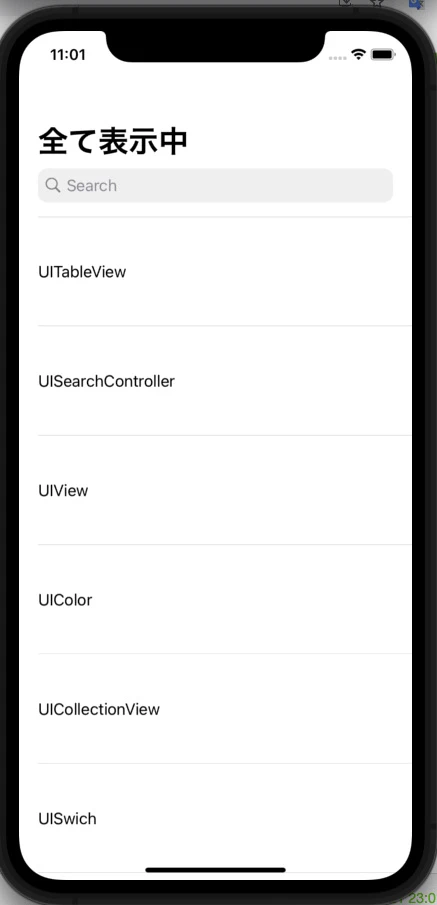


コードと簡単解説
- Main.storyboardで
NavigationControllerとtableViewの作成をします。
navigationItemにUISearchControllerを表示
-
navigationItem.searchController = searchControllerでUISearchControllerをnavigationItemに表示することができます。 -
navigationItem.hidesSearchBarWhenScrolling = falseでは、スクロール時にSearchBarが表示された状態を維持します。
           ~~~~~~~~~~省略~~~~~~~~~~

    let searchController = UISearchController()

    override func viewDidLoad() {
        super.viewDidLoad()

        navigationItem.searchController = searchController
        navigationItem.hidesSearchBarWhenScrolling = false

        title = "全て表示中"
        tableView.delegate = self
        tableView.dataSource = self
        searchController.searchBar.delegate = self
    }
UISearchBarDelegate (検索機能作成)
-
func searchBar(_ searchBar: UISearchBar, textDidChange searchText: String) {}内では、searchBarに文字が入力された時、削除された時などにcellContentsArrayの値からsearchTextの値が一文字でも含まれている値だけをsearchResultArrayに入れていきます。 -
func searchBarCancelButtonClicked(_ searchBar: UISearchBar) {}内では、CancelButtonが押された時に、searchResultArrayを空にして、tableViewにcellContentsArrayの全ての値を表示出来る様にします。
extension ViewController:UISearchBarDelegate{

    func searchBar(_ searchBar: UISearchBar, textDidChange searchText: String) {

        searchResultArray = []
        cellContentsArray.forEach { cellContent in

            if cellContent.contains(searchText) == true {

                searchResultArray.append(cellContent)
                title = "”\(searchText)”で検索中"
                tableView.reloadData()

            }else if searchText == ""{

                tableView.reloadData()
            }
        }
    }

    func searchBarCancelButtonClicked(_ searchBar: UISearchBar) {

        searchResultArray = []
        title = "全て表示中"
        tableView.reloadData()
    }

}
全てのコード
import UIKit

class ViewController: UIViewController {

    @IBOutlet weak var tableView: UITableView!

    let searchController = UISearchController()

    let cellContentsArray = ["UITableView",
                             "UISearchController",
                             "UIView",
                             "UIColor",
                             "UICollectionView",
                             "UISwich",
                             "UIKit",
                             "UITextField",
                             "UIViewController",
                             "UILabel"]

    var searchResultArray = [String]()

    override func viewDidLoad() {
        super.viewDidLoad()

        navigationItem.searchController = searchController
        navigationItem.hidesSearchBarWhenScrolling = false

        title = "全て表示中"
        tableView.delegate = self
        tableView.dataSource = self
        searchController.searchBar.delegate = self
    }

}

extension ViewController:UISearchBarDelegate{

    func searchBar(_ searchBar: UISearchBar, textDidChange searchText: String) {

        searchResultArray = []
        cellContentsArray.forEach { cellContent in

            if cellContent.contains(searchText) == true {

                searchResultArray.append(cellContent)
                title = "”\(searchText)”で検索中"
                tableView.reloadData()

            }else if searchText == ""{

                tableView.reloadData()
            }
        }
    }

    func searchBarCancelButtonClicked(_ searchBar: UISearchBar) {

        searchResultArray = []
        title = "全て表示中"
        tableView.reloadData()
    }

}

extension ViewController:UITableViewDelegate,UITableViewDataSource {

    func tableView(_ tableView: UITableView, heightForRowAt indexPath: IndexPath) -> CGFloat {

        return tableView.frame.size.height / 7
    }

    func numberOfSections(in tableView: UITableView) -> Int {

        return 1
    }

    func tableView(_ tableView: UITableView, numberOfRowsInSection section: Int) -> Int {

        return {() -> Int in

            switch searchResultArray.count > 0{

            case true: return searchResultArray.count

            case false: return cellContentsArray.count

            }
        }()
    }

    func tableView(_ tableView: UITableView, cellForRowAt indexPath: IndexPath) -> UITableViewCell {

        let cell = tableView.dequeueReusableCell(withIdentifier: "Cell", for: indexPath)

        cell.textLabel?.text = {() -> String in

            switch searchResultArray.count > 0{

            case true: return searchResultArray[indexPath.row]

            case false: return cellContentsArray[indexPath.row]
            }
        }()

        return cell
    }

}
終わり
ご指摘、ご質問などありましたら、コメントまでお願い致します。