
0.はじめに
本記事は学習の一環として、
NestJSをバックエンドでアプリ作成をしまして、
NestJSの環境構築の記事をアウトプットとして、
書こうと思った次第です。
1.プロジェクト作成
1.1 NestJS環境構築条件
- Node.jsのバージョンが20以上
1.2 NestJSプロジェクト作成
今回はパッケージ管理にyarnを使っております。
# パッケージ管理でyarnをインストール
npm install -g yarn

# NestJS CLIをグローバルにインストール
npm install -g @nestjs/cli

# 新しいNestJSプロジェクトを作成
nest new nest-backend
#使用するパッケージマネージャーを聞かれるので、yarnを選択
プロジェクト初期ディレクトリ構成
nest-backend/
├── src/                           # ソースコードディレクトリ
│   ├── app.controller.ts          # ルートコントローラー(基本的なHTTPエンドポイント)
│   ├── app.controller.spec.ts     # app.controllerのユニットテスト
│   ├── app.module.ts              # ルートモジュール(アプリケーションの起点)
│   ├── app.service.ts             # ルートサービス(ビジネスロジック)
│   └── main.ts                    # エントリーポイント(アプリケーション起動)
├── test/                          # E2Eテストディレクトリ
│   ├── app.e2e-spec.ts           # End-to-Endテストファイル
│   └── jest-e2e.json             # E2EテストのJest設定
├── dist/                          # (初期未生成)TypeScriptコンパイル後のJavaScriptファイル
├── node_modules/                  # npmパッケージ依存関係
├── eslint.confing.mjs                 # ESLint設定ファイル
├── .gitignore                     # Git無視ファイル設定
├── .prettierrc                    # Prettier設定ファイル
├── nest-cli.json                  # Nest CLI設定ファイル
├── package.json                   # プロジェクト設定とnpm依存関係
├── package-lock.json              # npm依存関係のロックファイル
├── README.md                      # プロジェクト説明ファイル
├── tsconfig.build.json            # TypeScriptビルド設定
└── tsconfig.json                  # TypeScript設定ファイル
1.3 TypeScript設定ファイルの更新
tsconfig.jsonをプロジェクトの設定に合わせて更新する。
{
  "compilerOptions": {
    "module": "commonjs",
    "declaration": true,
    "removeComments": true,
    "emitDecoratorMetadata": true,
    "experimentalDecorators": true,
    "allowSyntheticDefaultImports": true,
    "target": "ES2023",
    "sourceMap": true,
    "outDir": "./dist",
    "baseUrl": "./",
    "incremental": true,
    "skipLibCheck": true,
    "strictNullChecks": true,
    "forceConsistentCasingInFileNames": true,
    "noImplicitAny": false,
    "strictBindCallApply": false,
    "noFallthroughCasesInSwitch": false,
    "strict": true
  }
}
■tsconfig.jsonの設定項目
| 設定項目 | 値 | 役割・説明 |
|---|---|---|
module |
"commonjs" |
モジュールシステム。Node.js環境ではCommonJS(require/module.exports)を使用 |
declaration |
true |
型定義ファイル(.d.ts)を生成。ライブラリ作成時に有用 |
removeComments |
true |
コンパイル後のJavaScriptからコメントを削除してファイルサイズを削減 |
emitDecoratorMetadata |
true |
デコレーター使用時にメタデータを出力。NestJSの依存性注入で必須 |
experimentalDecorators |
true |
実験的なデコレーター機能を有効化。@Injectable, @Controllerなどで必要 |
allowSyntheticDefaultImports |
true |
ES6モジュールのdefaultインポートを許可(import express from 'express') |
target |
"ES2023" |
コンパイル対象のECMAScriptバージョン。最新機能を使用可能 |
sourceMap |
true |
デバッグ用のソースマップファイルを生成 |
outDir |
"./dist" |
コンパイル後のファイル出力先ディレクトリ |
baseUrl |
"./" |
相対パスの基準ディレクトリ(プロジェクトルート) |
incremental |
true |
増分コンパイルを有効化。変更されたファイルのみ再コンパイル |
skipLibCheck |
true |
型定義ファイルの型チェックをスキップしてコンパイル速度向上 |
strictNullChecks |
true |
null と undefined の厳密なチェックを有効化。変数が null や undefined になる可能性がある場合に明示的な型注釈やチェックを要求する |
forceConsistentCasingInFileNames |
true |
TypeScriptコンパイラのオプションで、ファイル名の大文字小文字の一貫性を強制する |
noImplicitAny |
true |
暗黙的な any 型を禁止。型が推論できない場合に明示的な型注釈を要求してコードの型安全性を向上させる |
strictBindCallApply |
false |
bind, call, applyメソッドの厳密な型チェックを無効化 |
noFallthroughCasesInSwitch |
false |
switch文のfall-throughケースの警告を無効化 |
strict |
true |
厳密な型チェックを有効化して型安全性を向上 |
1.4 main.ts
NestJSアプリケーションの起動の起点となるファイル
import { NestFactory } from '@nestjs/core';
import { AppModule } from './app.module';

async function bootstrap() {
  // NestJSアプリケーションのインスタンスを作成
  const app = await NestFactory.create(AppModule);
  // サーバー起動(この下に処理を記述しないこと)
  await app.listen(process.env.PORT ?? 3003);
}

// 初期生成時ではvoidが付いてないのですが、lintで警告が発生するので、voidを追記してます。
void bootstrap();
1.5 app.module.ts
NestJSアプリケーションのルートモジュール。
アプリケーション全体の構成を定義。
import { Module } from '@nestjs/common';
import { AppController } from './app.controller';
import { AppService } from './app.service';

// モジュールの設定を行うためのデコレータ
@Module({
  imports: [],  // 他のモジュールをインポートする配列
  controllers: [AppController],  // モジュールが管理するコントローラーを登録
  providers: [AppService],  // モジュールが提供するサービスを登録
})
export class AppModule {}
1.6 app.controller.ts
NestJSアプリケーションのメインコントローラーで、
HTTPリクエストを受け取り、適切なレスポンスを返す役割を担う。
import { Controller, Get } from '@nestjs/common';
import { AppService } from './app.service';

// このクラスがコントローラーであることを宣言
// 引数が空なので、ルートパス(/)でのリクエストを処理
@Controller()
export class AppController {
  // 依存性注入(DI)※AppServiceをコンストラクタで注入
  // NestJSが自動的にAppServiceのインスタンスを提供
  constructor(private readonly appService: AppService) {}

  // HTTP GETリクエストを処理(パスはルートパス)
  // サービス側のgetHelloを呼び出し、結果を返却
  @Get()
  getHello(): string {
    return this.appService.getHello();
  }
}
1.7 app.service.ts
NestJSアプリケーションのメインサービスで、
ビジネスロジックを処理する役割を担う。
import { Injectable } from '@nestjs/common';

// クラスを依存性注入可能なサービスとして定義するデコレータ
// サービス(プロバイダー)であることを宣言
@Injectable()
export class AppService {
  getHello(): string {
    return 'Hello World!';
  }
}
2.NestJSアプリケーション起動
# NestJSアプリケーション起動(開発モードで起動)
yarn start:dev
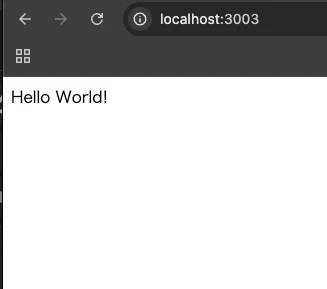
localhost:3003を起動すると画面に「Hello World!」が表示される。
3.まとめ
今回はプロジェクト生成のみの記事としました。
現在進行中のプロジェクトはAuth系などの処理も実装しているのですが、
全部書くと大量になってしまうため、別記事で投稿しようと思います。