
中学生のK君が作ったプログラムに再登場再登場してもらいます。
実行結果はこんな感じ
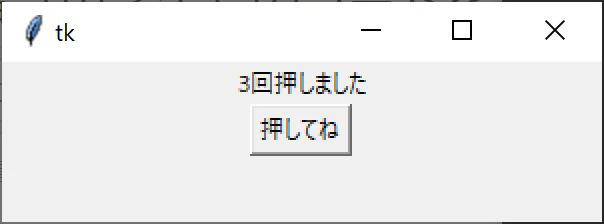
ボタンを押すと数値がカウントアップしていきます。
初めてのtk使ったプログラム、よくできてますね。
思った動作をするプログラムを実現できていて、よいと思います。
import tkinter as tk

count = 0

def dispLabel():
    global count
    count = count + 1
    lbl.configure(text = str(count) + "回押しました")


root = tk.Tk()
root.geometry("300x80")

lbl = tk.Label(text="数えるボタン")
btn = tk.Button(text="押してね", command = dispLabel)

lbl.pack()
btn.pack()
tk.mainloop()
しかし、カウンターの値を、global変数で保存していて、初心者のお手本のようなプログラム。
実際のプログラムでは、処理内容がもっと複雑だったり、同じ様な処理が何個もでてきたりします。オブジェクト指向を導入すると、プログラムを効率よく作れます。
K君のプログラムは数字がカウントアップしていくボタンがあるだけでしたが、これに、他のボタンを追加することを想定して、オブジェクト指向のプログラムに魔改造してみます
K君のプログラム方式だと、ボタン追加で問題になるのは、ボタン追加に、count1, count2などのglobal変数を追加していく必要がある点。
TKで表示する処理とカウントアップの処理が一体になっていて分離されてない事。
数を数えるオブジェクトを作って、このオブジェクトの中に、count変数を持たせるのが良さそうです。
class Counter():
    def __init__(self):
        self.count = 0

    def get_next_value(self):
        self.count +=1
        return str(self.count)
__init__()でcountを初期化して、get_next_value()を呼びさす度に、カウントアップします。
DownCounterとCounterAlphabetも作ってみました。
Applicationクラスはボタンやラベルを表示や、ボタンが押された時の表示を更新するオブジェクトにしました。
Applicationクラスは、Tcl/Tkcl/Tkの説明を参考にしてマネしてみました。
import tkinter as tk

class Counter():
    def __init__(self):
        self.count = 0

    def get_next_value(self):
        self.count +=1
        return str(self.count)

class DownCounter(Counter):
    def __init__(self):
        self.count = 99

    def get_next_value(self):
        self.count -=1
        return str(self.count)

class CounterAlphabet(Counter):
    word_list = ["zero", "one", "two", "three"]
    def get_next_value(self):
        self.count +=1
        try:
            return self.word_list[self.count]
        except IndexError:
            return "many"

class Application(tk.Frame):
    def __init__(self, master):
        super().__init__(master)
        self.master = master
        self.master.geometry("300x160")
        self.pack()

    def add_button(self, counter, label="数えるボタン", msg="回押しました"):
        lbl = tk.Label(text=label)
        def update_label():
            str = counter.get_next_value()
            lbl.configure(text = str + msg )
        btn = tk.Button(text="押してね", command = update_label)
        lbl.pack()
        btn.pack()

root = tk.Tk()
app = Application(root)
counter1 = Counter()
counter2 = DownCounter()
counter3 = CounterAlphabet()
app.add_button(counter1, "数えるボタン")
app.add_button(counter2, "カウントダウンボタン","回")
app.add_button(counter3, "数えるボタン(英語)"," times")
app.mainloop()
実行結果
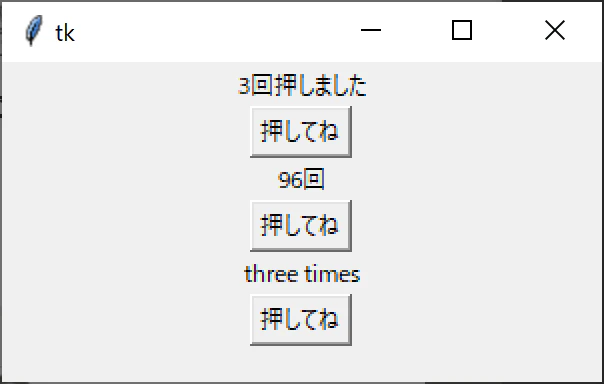
K君、プログラム提供してくれてありがとう。
コメントにいただいたプログラム
shiracamusさんから、より洗練された例をコメントいただきました。
コメント欄をご参照下さい。
さらなる魔改造も歓迎です。