

Azure Virtual Desktop上にWindowsでのPython開発環境を作成しました。ただ、AVD固有のものはなく、通常のWindowsでも同じ手順でできるはずです。
以下の記事の(WSLでなく)Windows開発版です。
手順
1. AVD環境デプロイとAVD接続
以下の手順の「1. AVD環境デプロイ」と「2. デスクトップに接続」と同じです。当記事では省略。
2. App Installer(WinGet) のインストール
Microsoft Storeの以下のURLからApp Installer(WinGet)をインストール
3. PowerShell インストール
デフォルトでInstallされている古いPowerShellを使い、新しいPowerShellをインストール。
最新バージョンの PowerShell を検索
> winget search Microsoft.PowerShell
The `msstore` source requires that you view the following agreements before using.
Terms of Transaction: https://aka.ms/microsoft-store-terms-of-transaction
The source requires the current machine's 2-letter geographic region to be sent to the backend service to function properly (ex. "US").

Do you agree to all the source agreements terms?
[Y] Yes  [N] No: Y
Name               Id                           Version Source
---------------------------------------------------------------
PowerShell         Microsoft.PowerShell         7.5.4.0 winget
PowerShell Preview Microsoft.PowerShell.Preview 7.6.0.5 winget
id パラメーターを使用して PowerShell をインストール
> winget install --id Microsoft.PowerShell --source winget
Found PowerShell [Microsoft.PowerShell] Version 7.5.4.0
This application is licensed to you by its owner.
Microsoft is not responsible for, nor does it grant any licenses to, third-party packages.
Downloading https://github.com/PowerShell/PowerShell/releases/download/v7.5.4/PowerShell-7.5.4-win-x64.msi
  ██████████████████████████████   107 MB /  107 MB
Successfully verified installer hash
Starting package install...
Successfully installed
4. pyenv-win インストール
最新のPowerShellでpyenv-win をインストール
Invoke-WebRequest -UseBasicParsing -Uri "https://raw.githubusercontent.com/pyenv-win/pyenv-win/master/pyenv-win/install-pyenv-win.ps1" -OutFile "./install-pyenv-win.ps1"; &"./install-pyenv-win.ps1"

Directory: C:\Users\SystemAdministrator

Mode                 LastWriteTime         Length Name
----                 -------------         ------ ----
d----          11/21/2025  1:51 PM                .pyenv
pyenv-win is successfully installed. You may need to close and reopen your terminal before using it.
5. Python インストール
インストール可能なPythonバージョンを確認。
pyenv install -l
今回は3.13系の最新をインストール。
> pyenv install 3.13.7
:: [Info] ::  Mirror: https://www.python.org/ftp/python
:: [Info] ::  Mirror: https://downloads.python.org/pypy/versions.json
:: [Info] ::  Mirror: https://api.github.com/repos/oracle/graalpython/releases
:: [Downloading] ::  3.13.7 ...
:: [Downloading] ::  From https://www.python.org/ftp/python/3.13.7/python-3.13.7-amd64.exe
:: [Downloading] ::  To   C:\Users\SystemAdministrator\.pyenv\pyenv-win\install_cache\python-3.13.7-amd64.exe
:: [Installing] ::  3.13.7 ...
:: [Info] :: completed! 3.13.7
グローバルのバージョンを設定。
pyenv global 3.13.7
バージョンを確認。
> pyenv versions
* 3.13.7 (set by C:\Users\SystemAdministrator\.pyenv\pyenv-win\version)
6. VS Code インストール
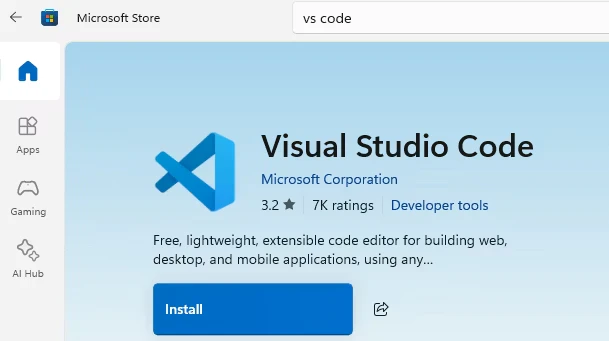
Microsoft Store で、 VS Codeをインストール。
VS Code でPython開発基本のExtensionをインストール。
必要に応じて、Azure開発のExtensionをインストール。
7. Azure CLI をインストール
WinGetで Azure CLI パッケージをインストール
> winget install --exact --id Microsoft.AzureCLI
Found Microsoft Azure CLI [Microsoft.AzureCLI] Version 2.80.0
This application is licensed to you by its owner.
Microsoft is not responsible for, nor does it grant any licenses to, third-party packages.
Downloading https://azcliprod.blob.core.windows.net/msi/azure-cli-2.80.0-x64.msi
  ██████████████████████████████  65.6 MB / 65.6 MB
Successfully verified installer hash
Starting package install...
Successfully installed
Notes: Winget installs the 64-bit CLI on 64-bit OS by default now. If you have used the 32-bit CLI before, please follow this guide to migrate to 64-bit version: https://learn.microsoft.com/cli/azure/install-azure-cli-windows#migrate-to-64-bit-azure-cli
任意の手順
Azure Core Toolsのインストール
Azure Functions 開発をするのであれば、Azure Core Toolsをインストール。
> winget install Microsoft.Azure.FunctionsCoreTools
Found Azure Functions Core Tools [Microsoft.Azure.FunctionsCoreTools] Version 4.5.0
This application is licensed to you by its owner.
Microsoft is not responsible for, nor does it grant any licenses to, third-party packages.
Downloading https://github.com/Azure/azure-functions-core-tools/releases/download/4.5.0/func-cli-4.5.0-x64.msi
  ██████████████████████████████   374 MB /  374 MB
Successfully verified installer hash
Starting package install...
Successfully installed