0
0

Delete article

Deleted articles cannot be recovered.

Draft of this article would be also deleted.

Are you sure you want to delete this article?

【初投稿】SD card copierでバックアップをしてみた

0
Last updated at Posted at 2026-01-05

Raspberry piでは、標準にマイクロSDカードを書き込みに使うため、SSDにくらべて壊れやすいのでバックアップは必須です
今回はSD card copierを使ってバックアップをします

必要なもの

・Raspberry pi本体
・SDカードリーダー
・コピー先のマイクロSDカード

実践しよう

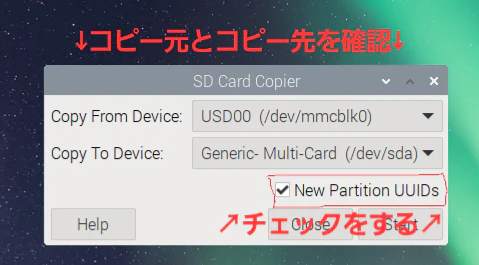
まずホームメニューを選択し、アクセサリからSD card copierを選択します。
コピー元のデバイスが分からない時がありますがその時は、コピー先の接続を外したら選択肢が一つしか出てこないのでそれを選択します(この環境ではUSB00を指定します)
aaaa.png
そして、かならずNew partition UUIDsにチェックをします
カードリーダーなどに予め、SDカードを差し込んだ状態で接続します
そうすると選択肢が1つ増えます

コピー先とコピー元の入れ違いに注意してください!!

確認でき次第Startボタンを押します。Screenshot7.png
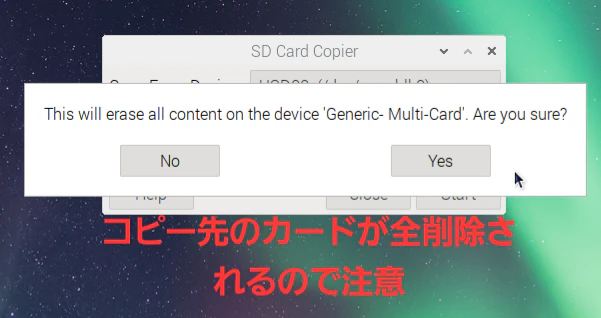
より強い警告
コピー先のSDカードのデータが全削除されます
新品またはいらないSDカードを使いましょう

コピーが完了したら終了です!

0
0
0

Register as a new user and use Qiita more conveniently

  1. You get articles that match your needs
  2. You can efficiently read back useful information
  3. You can use dark theme
What you can do with signing up
0
0

Delete article

Deleted articles cannot be recovered.

Draft of this article would be also deleted.

Are you sure you want to delete this article?