

はじめに
NetApp ONTAPには、ランサムウェア対策機能としてAutonomous Ransomware Protection(ARP)が搭載されています。ARPはランサムウェアの可能性がある異常なアクティビティを検知し、データ保護につなげる機能ですが、
「検知すると何が起こるのか?」
「設定方法や必要な対応は何か?」
「本当にランサムウェアなのか、どう判断するのか?」
など、気になる点がいくつかありました。
そこで今回は、ARPの概要について整理したうえで、実際に検知させた際の挙動や、検知後の流れについてご紹介します。
ARPとは
ARP(Autonomous Ransomware Protection:自律型ランサムウェア対策)は、NetApp ONTAPに組み込まれているランサムウェア対策機能です。
ストレージ上のファイル操作やデータエントロピー(ランダム性)、ファイルの拡張子の種類などを分析し、ランサムウェア攻撃の可能性を示す異常なアクティビティを検知して警告するとともに、Snapshotを利用してデータの保護を行います。
従来のARPとARP/AI
ARPについて調べる際に注意したいのが、ONTAPのバージョンによってARPの仕組みが異なるという点です。
ONTAP 9.10.1から9.15.1までは従来のARPモデルが使用されますが、ONTAP 9.16.1以降では、事前学習済みの機械学習モデルを使用するARP/AIが導入されています。
従来のARPでは、実際のワークロードから通常時のファイル操作などを把握するため、アクティブな保護を開始する前に「Learning Mode(学習モード)」が必要でした。
一方、ARP/AIでは事前学習済みの機械学習モデルを利用するため、NAS FlexVolボリュームであれば従来ARPのような学習期間を必要とせず、対応するボリュームでは有効化後すぐにアクティブな保護を開始できます。
NAS FlexGroupボリュームはONTAP 9.18.1以降、SAN FlexVol ボリュームはONTAP 9.17.1 以降が対象です。
ONTAP 9.18.1以降のARP/AI
さらにONTAP 9.18.1以降は、ライセンスがインストールされている場合、AFF A-series、AFF C-series、ASA、およびASA r2システムで新規に作成されるボリュームは自動的にARP/AIが有効になります。
ARP/AIが有効になると、Snapshotポリシーに従って取得されるSnapshotとは別に、ARP/AI用のSnapshotが定期的に自動取得されます。
取得されるSnapshotは簡単に削除することができないため、機能が不要な場合、無効化が必要となります。
検証してみた
今回はNetApp Lab On Demand を使用し、ランサムウェア攻撃を検知した際のARP/AIの挙動を確認します。
Lab On Demandとは?という方は以下の記事をご覧ください。
使用環境
ラボ環境にて、既に作成済みのSVMとボリュームを使用し検証します。
ARP/AIを有効化したボリューム上の検証用ファイルを使用し、ファイルの変更に対してどのように異常検知・動作するのか確認します。
| 項目 | 内容 |
|---|---|
| 使用ラボ | Ransomware Protection for NAS Workloads |
| ONTAPバージョン | ONTAP 9.18.1 |
| SVM | svm1 |
| 検証用ボリューム | svm1_marketing |
本検証はCLIにて操作します。
状態確認
はじめに、ARP/AIの自動有効化設定を確認します。
クラスタレベルで自動有効化がtrueになっており、この状態で新規にボリュームを作成すると、ARP/AIが自動的に有効化されます。
cluster1::> security anti-ransomware auto-enable show
 New Volume Auto-Enable
 ----------------------
true
次に、ボリューム単位でARP/AIの状態を確認します。
今回使用する「svm1_marketing 」は無効化されています。
cluster1::> security anti-ransomware volume show -vserver svm1 -volume svm1_marketing

                      Vserver Name: svm1
                       Volume Name: svm1_marketing
                             State: disabled
                Attack Probability: -
                   Attack Timeline: -
                 Number of Attacks: -
                Attack Detected By: -
     Block Device Detection Status: -
Block Device Evaluation Start-time: -
ARP/AIを有効にすると、ARP/AI用のSnapshotが定期的に取得されます。
分かりやすいように、今回はSnapshotポリシーでのSnapshot取得はなしとします。
cluster1::> volume show -volume svm1_marketing -fields snapshot-policy
vserver volume         snapshot-policy
------- -------------- ---------------
svm1    svm1_marketing none
ARP/AI有効化
ARP/AIを有効化します。
cluster1::> security anti-ransomware volume enable -vserver svm1 -volume svm1_marketing
ボリュームのstateがenabledに変更され、ARP/AIが有効になりました。
cluster1::> security anti-ransomware volume show -vserver svm1 -volume svm1_marketing

                      Vserver Name: svm1
                       Volume Name: svm1_marketing
                             State: enabled
                Attack Probability: none
                   Attack Timeline: -
                 Number of Attacks: -
                Attack Detected By: -
     Block Device Detection Status: -
Block Device Evaluation Start-time: -
有効化後、数分経つとARP/AI用の定期Snapshotが取得されました。
デフォルトでは4時間おきに取得する設定となっています。
cluster1::> volume snapshot show -volume svm1_marketing
                                                                 ---Blocks---
Vserver  Volume   Snapshot                                  Size Total% Used%
-------- -------- ------------------------------------- -------- ------ -----
svm1     svm1_marketing
                  Anti_ransomware_periodic_backup.2026-10-13_0038 160KB 0% 0%
定期Snapshotの接頭辞は Anti_ransomware_periodic_backupで表示されます。
攻撃開始
今回はラボ環境に準備されているスクリプトファイルを実行し、ボリューム内のファイルの暗号化と、暗号化されたファイルに拡張子“lckd”を追加するという攻撃のデモを行います。
スクリプトファイルを実行し、数分経過後に状態確認をすると、「Attack Probability」が「Moderate」(中程度)、「Attack Detected By」が「file_analysis」となっており、ファイルアクティビティの分析から攻撃を検知していることがわかります。
その他、攻撃の時刻や件数も表示されています。
cluster1::> security anti-ransomware volume show -vserver svm1 -volume svm1_marketing

                      Vserver Name: svm1
                       Volume Name: svm1_marketing
                             State: enabled
                Attack Probability: moderate
                   Attack Timeline: 10/13/2026 00:49:07
                 Number of Attacks: 1
                Attack Detected By: file_analysis
     Block Device Detection Status: -
Block Device Evaluation Start-time: -
Snapshotを確認すると、攻撃前に取得した定期Snapshotに加え、攻撃検知時に取得されたSnapshotが存在することがわかります。
cluster1::> volume snapshot show -volume svm1_marketing
                                                                 ---Blocks---
Vserver  Volume   Snapshot                                  Size Total% Used%
-------- -------- ------------------------------------- -------- ------ -----
svm1     svm1_marketing
                  Anti_ransomware_periodic_backup.2026-10-13_0038 4.17MB 0% 0%
                  Anti_ransomware_attack_backup.2026-10-13_0100 4.36MB 0%  0%
2 entries were displayed.
攻撃検知時のSnapshotの接頭辞は Anti_ransomware_attack_backupで表示されます。
ONTAP System Manager からも警告を確認できました。
※タイムゾーンの違いによりCLIと検知時刻が異なっています。
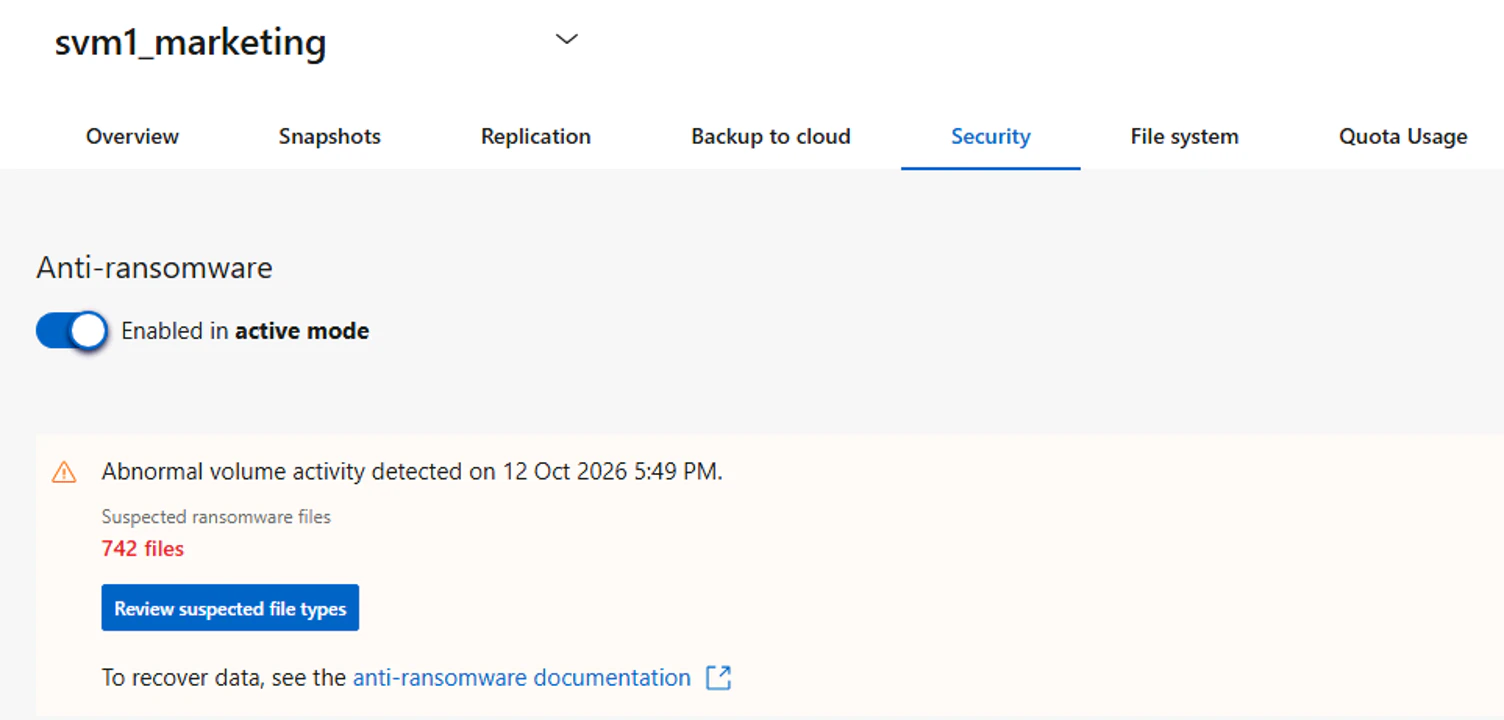
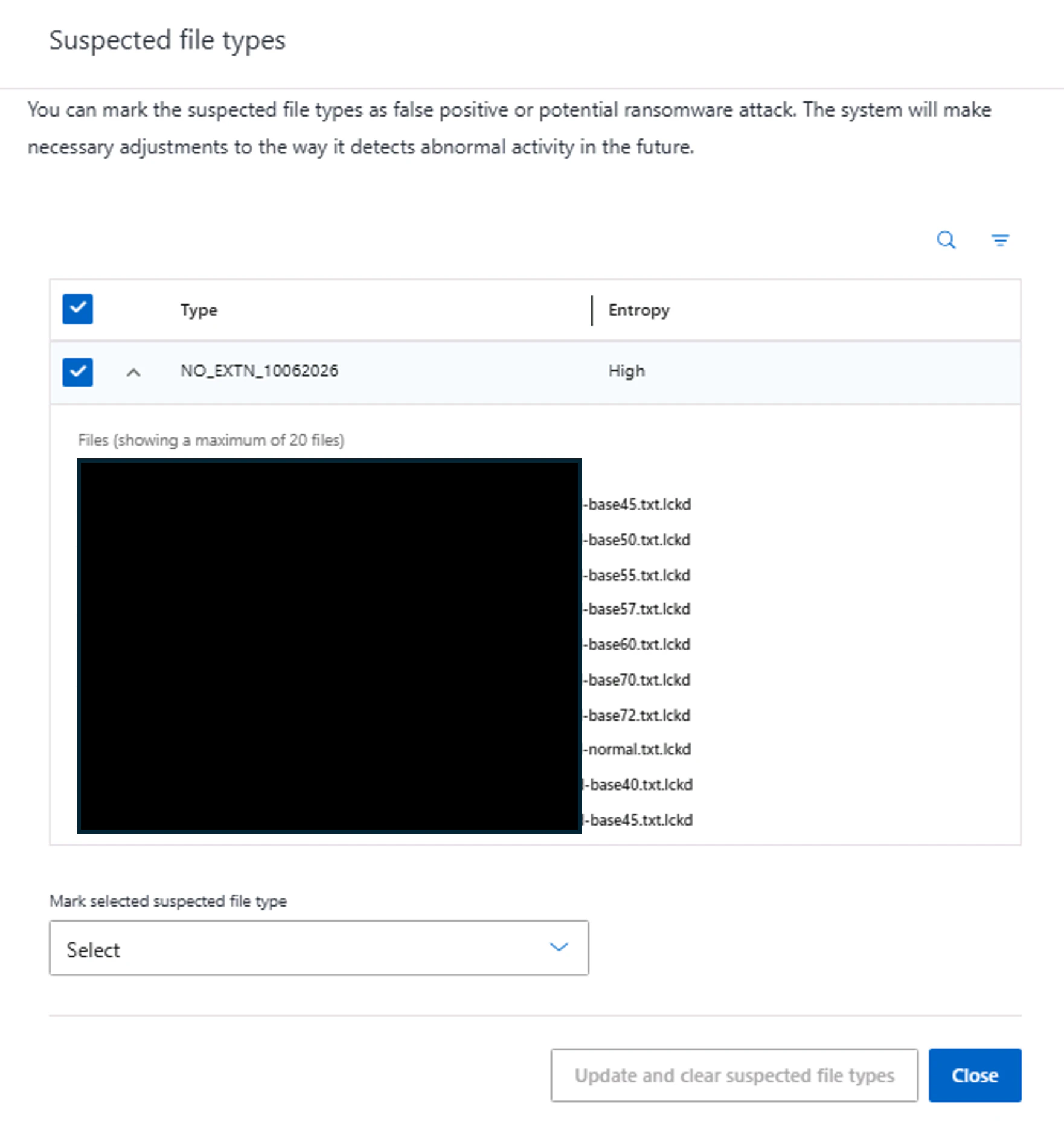
「Review suspected file types」をクリックすると、攻撃の可能性があると疑われるファイルの一覧(一部)を確認することができます。
より詳細に知りたい場合は、レポートを生成すると、攻撃の可能性のあるすべてのファイルの一覧を確認できます。
cluster1::> security anti-ransomware volume attack generate-report -vserver svm1 -volume svm1_marketing -dest-path svm1:svm1_marketing
Report "report_file_svm1_svm1_marketing_13-10-2026_01-16-17" available at path "svm1:svm1_marketing".
イベントログを確認すると、アラートが記録されていることを確認できました。
cluster1::> event log show -message-name callhome.arw.activity.seen
Time                Node             Severity      Event
------------------- ---------------- ------------- ---------------------------
10/13/2026 01:00:45 cluster1-01      ALERT         callhome.arw.activity.seen: Call home message for "POSSIBLE RANSOMWARE ACTIVITY DETECTED", Volume: "svm1_marketing" (UUID: "xxxxxxxx-xxxx-xxxx-xxxx-xxxxxxxxxxxx") in Vserver: "svm1" (UUID: "xxxxxxxx-xxxx-xxxx-xxxx-xxxxxxxxxxxx")
攻撃検知後の流れ
ARP/AIが異常アクティビティを検出したのち、実際の攻撃か誤検知かを分類し、警報をクリアします。
アクティビティを分類することで、ARP/AIはその評価を記録し、以降の監視に利用されます。
- 攻撃として分類する場合
security anti-ransomware volume attack clear-suspect -vserver <svm_name> -volume <vol_name> [<extension_identifiers>] -false-positive false
- 誤検知として分類する場合
security anti-ransomware volume attack clear-suspect -vserver <svm_name> -volume <vol_name> [<extension_identifiers>] -false-positive true
今回は実際の攻撃として分類し、警報をクリアします。
cluster1::> security anti-ransomware volume attack clear-suspect -vserver svm1 -volume svm1_marketing -false-positive false

Warning: All suspect details will be cleared.
Do you want to continue? {y|n}: y
Clear suspect started on volume "svm1_marketing" in Vserver "svm1". Run "security anti-ransomware volume show -clear-suspect-status -volume svm1_marketing -vserver svm1" to see the status of this operation.
ONTAP 9.18.1以降であれば、警報クリアの操作ステータスを確認できます。
cluster1::> security anti-ransomware volume show -clear-suspect-status -vserver svm1 -volume svm1_marketing
Vserver    Volume    Clear Suspect Start Time  Clear Suspect Phase
---------- --------- ------------------------- --------------------
svm1       svm1_marketing 10/13/2026 01:17:27  done
ボリュームの状態確認をすると、警報がクリアされていることが分かります。
cluster1::> security anti-ransomware volume show -vserver svm1 -volume svm1_marketing

                      Vserver Name: svm1
                       Volume Name: svm1_marketing
                             State: enabled
                Attack Probability: none
                   Attack Timeline: -
                 Number of Attacks: -
                Attack Detected By: -
     Block Device Detection Status: -
Block Device Evaluation Start-time: -
Snapshotからのリストア
攻撃前の状態に戻すため、Snapshotからリストアします。
ボリューム内に、攻撃前の定期Snapshotと、攻撃検知後に取得したSnapshotがそれぞれ1つずつ存在します。
cluster1::> volume snapshot show -vserver svm1 -volume svm1_marketing
                                                                 ---Blocks---
Vserver  Volume   Snapshot                                  Size Total% Used%
-------- -------- ------------------------------------- -------- ------ -----
svm1     svm1_marketing
                  Anti_ransomware_periodic_backup.2026-10-13_0038 4.17MB 0% 0%
                  Anti_ransomware_attack_backup.2026-10-13_0100 6.23MB 0%  0%
2 entries were displayed.
今回は、攻撃前の定期Snapshotからリストアします。
コマンド実行時にはいくつか警告が表示されましたが、今回はすべてyを入力して処理を続行します。
※リストアを実行すると、リストア対象のSnapshotより後に取得されたSnapshotは削除されます。
実運用において「Anti_ransomware_attack_backup.XXXX-XX-XX_XXXX」Snapshotを調査用として残しておきたい場合は、FlexCloneを使用して復元するなど、別の方法を検討する必要があります。
cluster1::> volume snapshot restore -vserver svm1 -volume svm1_marketing -snapshot Anti_ransomware_periodic_backup.2026-10-13_0038 -force true

Warning: Snapshot "Anti_ransomware_periodic_backup.2026-10-13_0038" is not the most recent copy. Promoting this snapshot will delete all copies made after it.
Do you want to continue? {y|n}: y

Warning: Quota rules currently enforced on volume "svm1_marketing" might change during this operation. If the currently enforced quota rules are different from those in snapshot "Anti_ransomware_periodic_backup.2026-10-13_0038", you
         might have to resize or reinitialize quotas on this volume after this operation.
Do you want to continue? {y|n}: y

Warning: Export policies currently enforced on the qtrees of volume "svm1_marketing" will not change during this operation. If the currently enforced export policies are different from those in snapshot
         "Anti_ransomware_periodic_backup.2026-10-13_0038", reassign the export policies of the qtrees on this volume after this operation.
Do you want to continue? {y|n}: y

Warning: File system analytics is currently turned on for volume "svm1_marketing". It will be turned off for the volume during this operation. Use the "volume analytics on -vserver svm1 -volume svm1_marketing" command to turn file
         system analytics back on for the volume after the operation is complete.
Do you want to continue? {y|n}: y
リストア後、エクスプローラーからファイルを確認したところ、ボリューム内のファイルが暗号化前の状態に復元できていることを確認できました。
おわりに
今回は、NetApp ONTAPのAutonomous Ransomware Protection(ARP)について、概要やランサムウェア検知時の動作、検知後の流れについてご紹介しました。
実際の挙動を確認してみて、ランサムウェア対策を検討する際には、単にARPを有効化するだけではなく、検知後の確認や復旧までを含めた運用をあらかじめ考えておくことが大切だと感じました。
ご興味のある方は、ぜひ実際に触って試していただければと思います。
参考リンク
https://docs.netapp.com/ja-jp/ontap/anti-ransomware/index.html
https://docs.netapp.com/ja-jp/ontap/anti-ransomware/learn-about-arpai.html
https://docs.netapp.com/ja-jp/ontap/anti-ransomware/default-enable-change-arpai.html
https://docs.netapp.com/ja-jp/ontap/anti-ransomware/respond-arpai.html
https://docs.netapp.com/ja-jp/ontap/anti-ransomware/recover-arpai.html
https://labondemand.netapp.com/node/1716
BIPROGYグループの技術への取り組み
We Are Hiring!