
朗報!
Unity6.6から、Dictionary<>をInspectorに表示することができるようになりました。
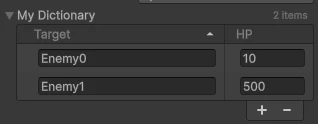
        [SerializeField]
        [DictionaryDisplay(keyLabel="Target", valueLabel="HP", keyColumnFraction=0.7f, layout=DictionaryLayout.TwoColumns)]
        Dictionary<string, int> myDictionary = new Dictionary<string, int>()
        {
            { "Enemy0", 10 },
            { "Enemy1", 500 },
        };
Attribute
[DictionaryDisplay]Attributeを使用することで Keyとvalueのラベル等を指定することができます。
| DictionaryDisplayAttribute | 説明 |
|---|---|
| keyLabel | キーのラベル |
| valueLabel | 値のラベル |
| layout | Inspector上でのレイアウト |
| keyColumnFraction | KeyとValueの表示幅比率(左右に表示時のみ) |
また、keyColumnFractionを指定することでkeyとvalueの幅比率を変更することができます
| layout | 機能 | 表示 |
|---|---|---|
| TwoColumns | 左右に表示(default) |  |
| OneColumnWithValueFoldout | Keyの下にValueを折りたたんで表示 |  |
| DictionaryLayout.OneColumnWithValueVisible | Keyの下にValueを表示 |  |
これは便利!
関連:その他の Attributes