0
0

Delete article

Deleted articles cannot be recovered.

Draft of this article would be also deleted.

Are you sure you want to delete this article?

【Zed Editor】Zed Editorの環境構築手順

0
Last updated at Posted at 2026-06-28

Zed Editorのインストール手順

  1. Zedからファイルをダウンロード
  2. インストールしたファイルを開く
    Zedのインストールファイル.png
  3. 使用する言語を選択して、OKをクリック
    Zed_使用言語選択.png
  4. I accept the agreementを選択して、Nextをクリック
    Zed_規約.png
  5. ダウンロード先を選択して、Nextをクリック
    Zed_ダウンロードロード先の設定.png
  6. インストール時に追加するオプション項目を選択して、Nextをクリック
    項目としては以下が追加可能
    • デスクトップにショートカットアイコンを作成する
    • ファイルの右クリックメニューに「Zedで開く」を追加する
    • Zed Editorが対応しているファイルをZed Editorで開くように設定する
    • コマンドラインでZedコマンドが実行できるように設定され、コマンドからZed Editorを開けるように
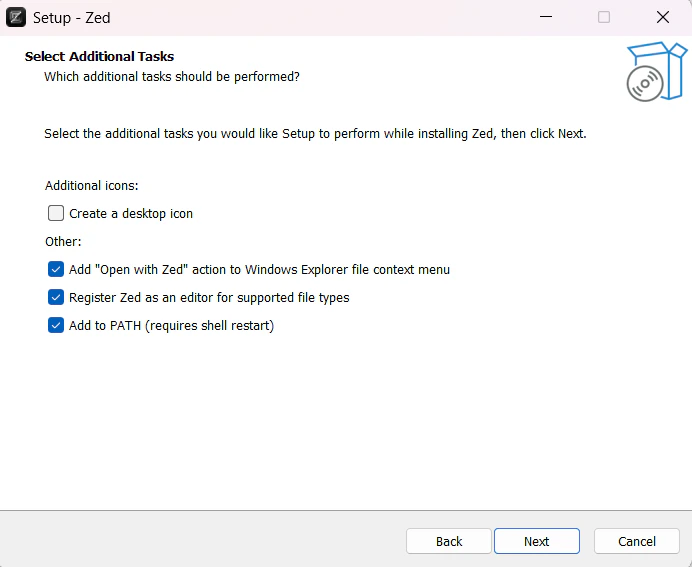
      Zed_オプション選択.png

Zed EditorをUnityで使用するための導入手順

近日中に更新

Zed EditorをUnreal Engineで使用するための導入手順(※コンパイル実行に制限あり)

近日中に更新

0
0
0

Register as a new user and use Qiita more conveniently

  1. You get articles that match your needs
  2. You can efficiently read back useful information
  3. You can use dark theme
What you can do with signing up
0
0

Delete article

Deleted articles cannot be recovered.

Draft of this article would be also deleted.

Are you sure you want to delete this article?