
Power Platformの管理者をしているとテナント内の各環境でどの程度Dataverseの容量が使用されているかを把握しなければいけません。テナントで事前購入している容量が枯渇してしまえば大惨事。
Power Platform管理センター>ライセンス から各種Dataverseの種類ごとの残量と使用状況をグラフとCSVダウンロードで確認できます。グラフで見られるのはありがたいけれど、実数も把握したい。ダウンロードできるけれども手作業は忘れそう。

そこで、Dataverseの容量と利用状況を取得できるAPIは無いのか情報を探して、このあたりを見つけました。
Power Platform APIというのを使えば、Dataverseのキャパシティレポートを取得できるという内容です。
できるとわかれば、実装してみるしかありません。
いろいろ試行錯誤はしたのですが、今回はうまくいった方法をご紹介します。
残念ながら、CSVでダウンロードするような環境ごとの使用容量は今回取得できませんでした。テナントレベルの容量だけです。期待させてごめんなさい。
サービスプリンシパルの作成
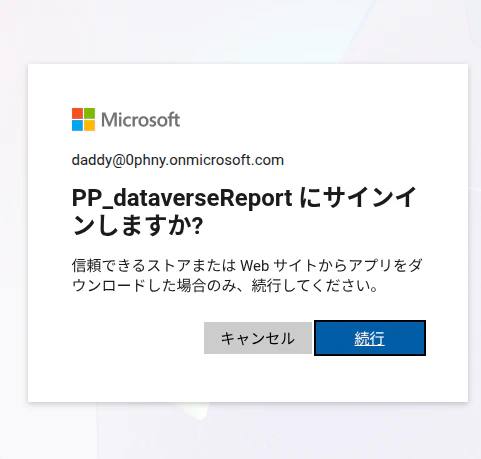
Entra ID>アプリ登録 から適当な名前をつけたアプリケーション登録を行います。ここで付けた名前は、後で管理者の認証を行うときに表示されるので、何を行うものなのかがわかるよう命名しておいたほうが良いでしょう。
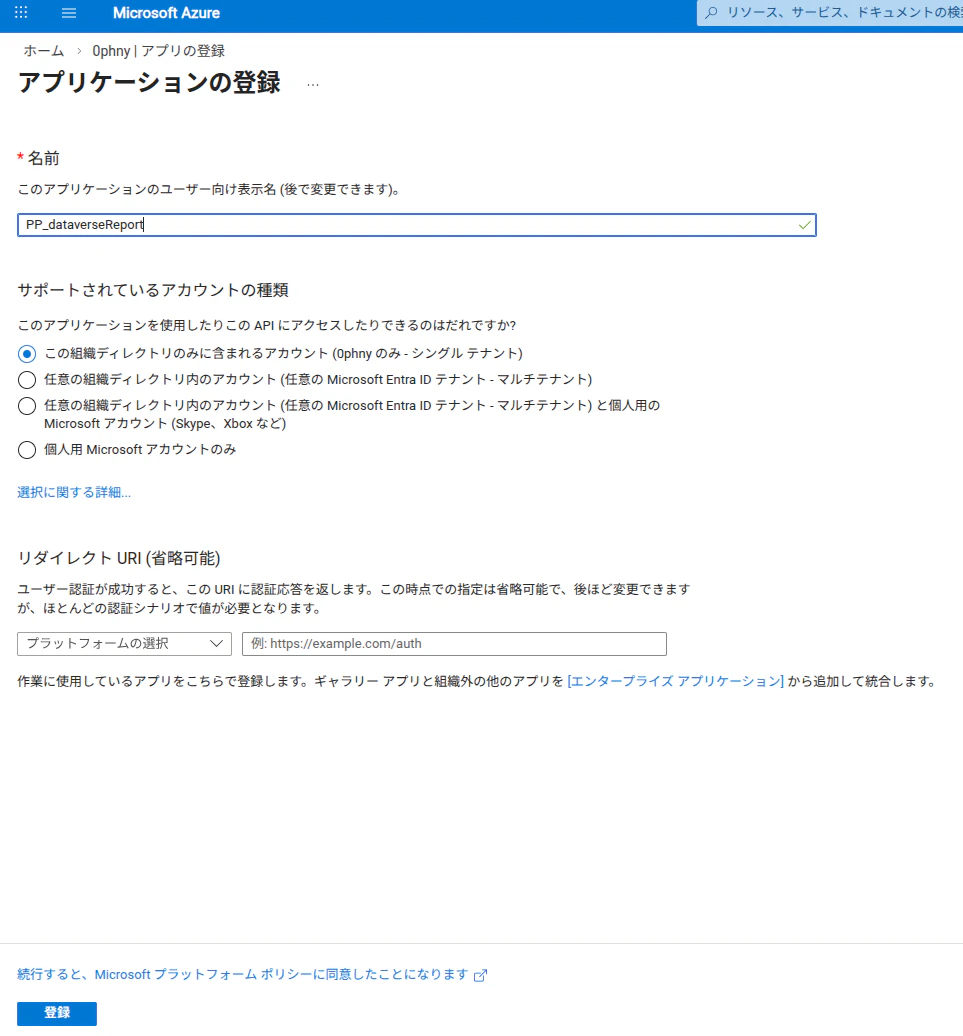
APIのアクセス許可(委任)でPower Platform APIを利用する
APIのアクセス許可>アクセス許可の追加 から、「所属する組織で使用しているAPI」をクリックし、「Power Platform API」を検索してクリックします。

「所属する組織で使用しているAPI」の中にPower Platform APIが見つからない場合があります。このAPIはMicrosoftのものですが、テナントの初期状態では導入されていないようです。Power Shellを使って手動で導入する必要があります。
便利には違いありませんが、導入についてはセキュリティの観点を含め検討と判断を行ってから行ってください。
「委任されたアクセス許可」を選択したあと、「EnvironmentManagement.Environments.Read」を選択して「アクセス許可の追加」をクリックします。
委任というのは、それを使おうとするユーザーに与えられた権限のおよぶ範囲で、指定されたアクセス許可をアプリが持つというものです。
これまでQiitaではなんどかGraph APIを利用するためにサービスプリンシパルをPower Automateで使う例を紹介してきましたが、いずれも「アプリケーション」権限で使っていました。正直Power Automateでどうやってユーザーにサインインを求めてユーザーのトークンを取得するんだろう? と思っていたのですが、今回はそのあたりが実装できた点がブレークスルーです。

管理者同意を与えました。

Power Platform serviceの方は今回の場合は不要です。
パブリッククライアントフローを許可する
今回この設定を初めて使いました。
Authentication (Preview)>設定>「パブリッククライアントフローを許可する」の項目を「有効」に切り替えて保存をクリックします。

シークレットは?
サービスプリンシパルを使うには、パスワードにあたるシークレットを取得するのが定番ですが、今回は不要です。なぜなら委任のため、APIを使う際にユーザーへサインインをもとめてるからです。
クラウドフロー
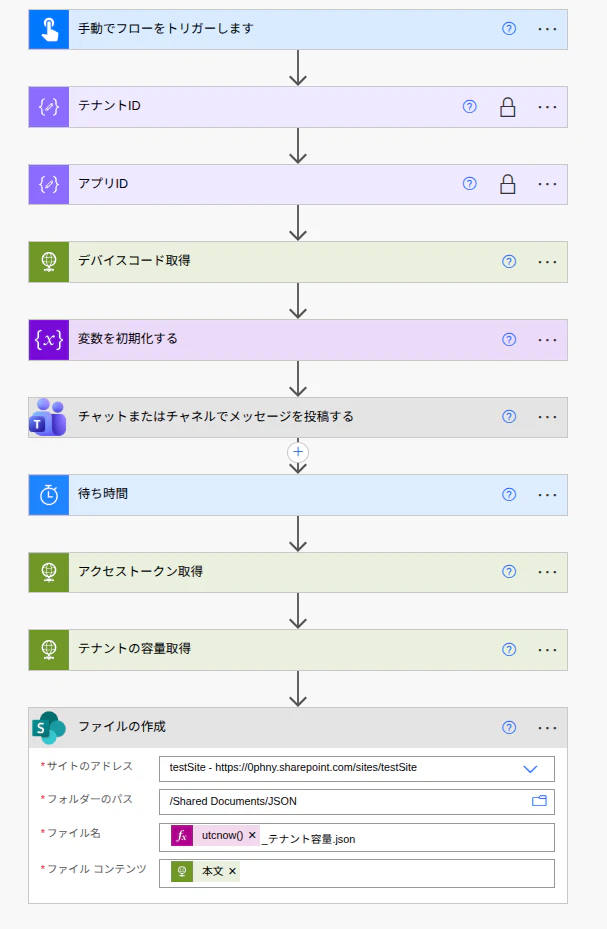
デバイスコード取得
今回のように委任を使うには、ユーザーがサインインをして取得した自身のトークンをクラウドフローに渡してやる必要があり、ワンタムパスワードのような実装が必要です。
この仕組みを簡単に作れるエンドポイントが用意されています。OAuth 2.0デバイス認証付与です。
クラウドフローから、管理者によるAPI利用の承認が必要なさいに、Teamsで以下のようなメッセージを送ってやります。
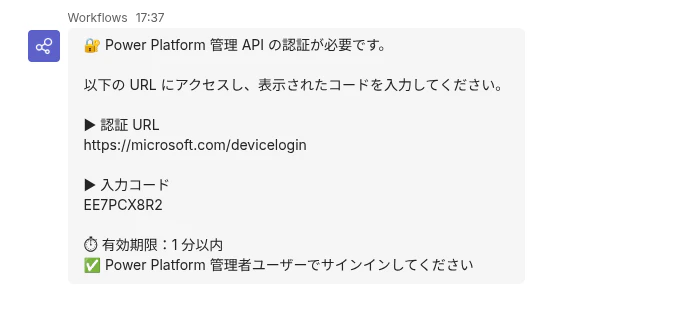
メッセージを受け取った管理者は、書かれているURLにアクセスして、入力コードを貼り付けます。
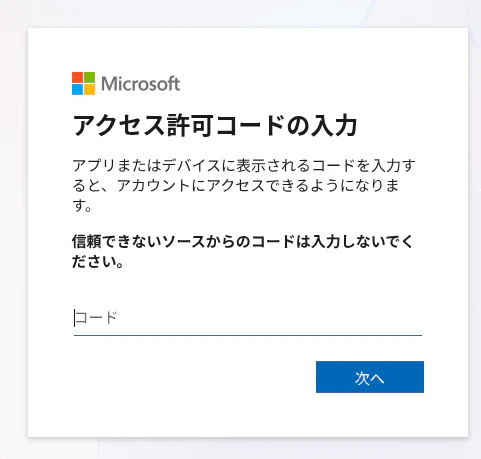
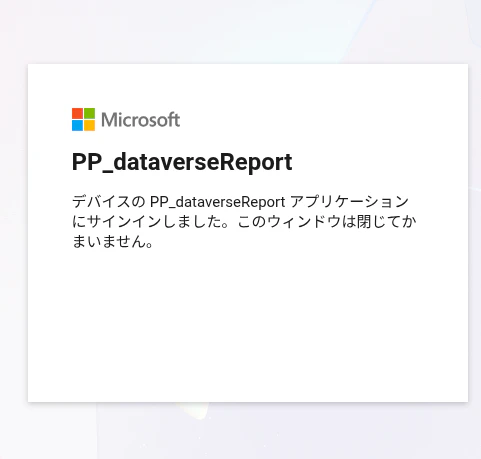
その後サインインが求められ、通ると以下のような確認画面が表示されます。ここにサービスプリンシパルの名前が表示されるので、命名には気を使ったほうがよさそうです。
おらワクワクするぞ!
上記を実装します。テナントIDとアプリIDは、Entra IDの作成したアプリ登録画面の「概要」に表示されているものを「作成」アクションにコピーしています。「作成」アクションの「設定」のなかのセキュリティタブを有効にしておくと、鍵マークのようなものが付きます。鍵付きのなかに入力されている内容は他のアクションで使われた歳に隠されるので安心です。
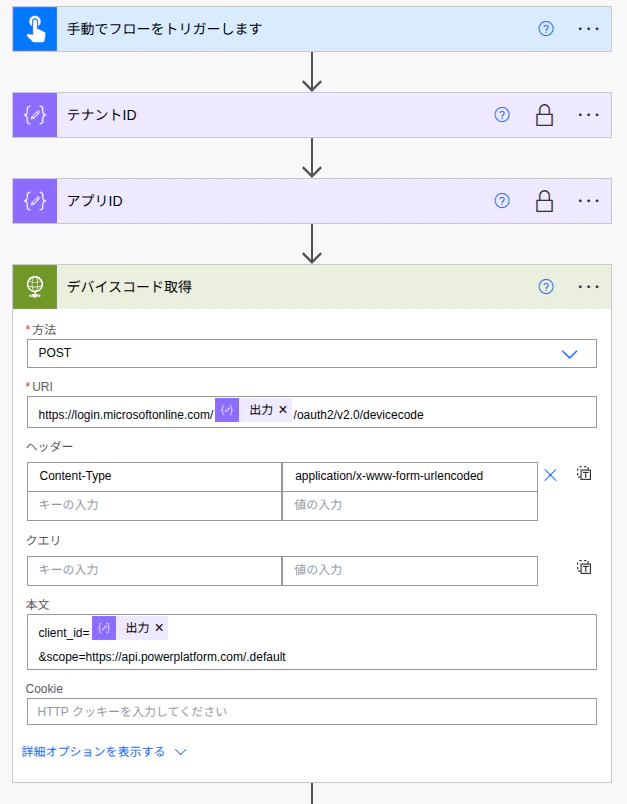
| 項目 | 値 |
|---|---|
| 方法 | POST |
| URI | https://login.microsoftonline.com/@{outputs('テナントID')}/oauth2/v2.0/devicecode |
| Content-Type | application/x-www-form-urlencoded |
| 認証 | なし |
client_id=@{outputs('アプリID')}
&scope=https://api.powerplatform.com/.default
ここで大切なのは、スコープの指定です。今回は Power Platform APIをつかうので、スコープがこのようになっています。Graph APIとかPower Apps Serviceとか別のエンドポイントを使う場合にはこちらを変更するとよいのだと思います。
テスト実行してみる
ここまで実装できたらテスト実行してみます。
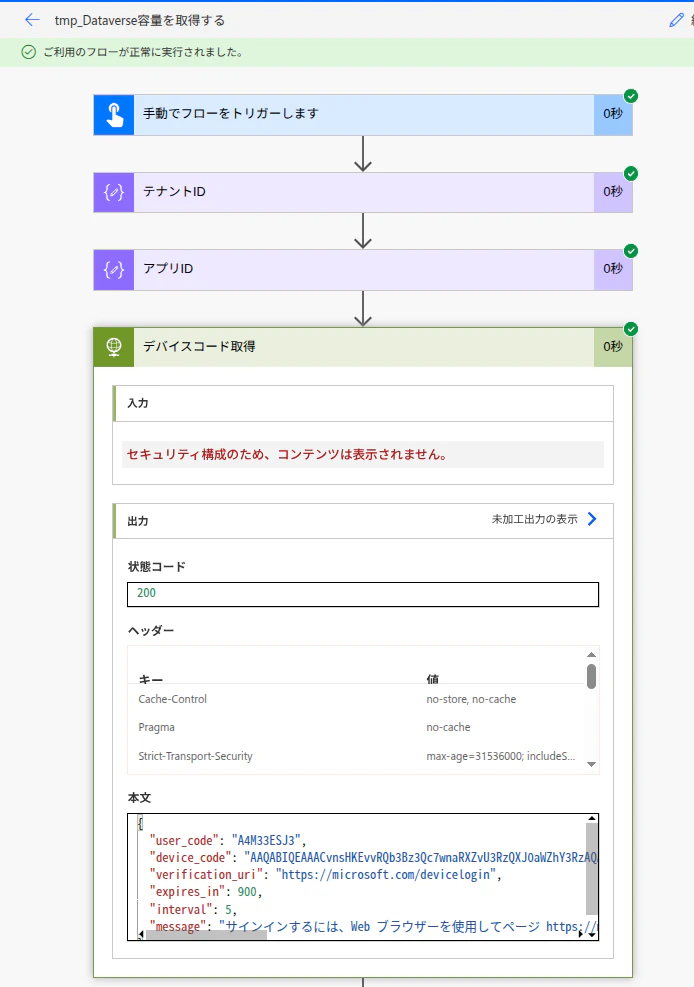
デバイスコード取得が興味深い本文を返してきます。
つまり、verification_uriに書かれているアドレスを開いて、user_codeの文字列を入力してもらえばよいということ。ワンタイムパスワードじゃないですか! 900秒間のうちに認証を行えばよいようです。

承認がおこなわれたあと、APIはすでに本文のなかで与えられているdevice_codeによってトークンを渡してくれるようになるので、再利用しやすいように文字列変数に取り出してキープしておきます。
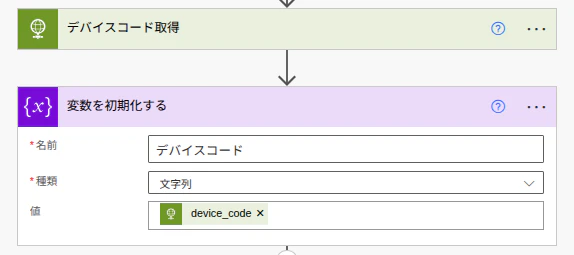
@{body('デバイスコード取得')?['device_code']}
Teamsチャットで承認を要求する
承認をもらう管理者はPower Platform管理者です。
Recipientには要求先の管理者のUPNを入れておきます。今回はTeamsチャットを使いましたが、もちろんメールでの実装もできます。
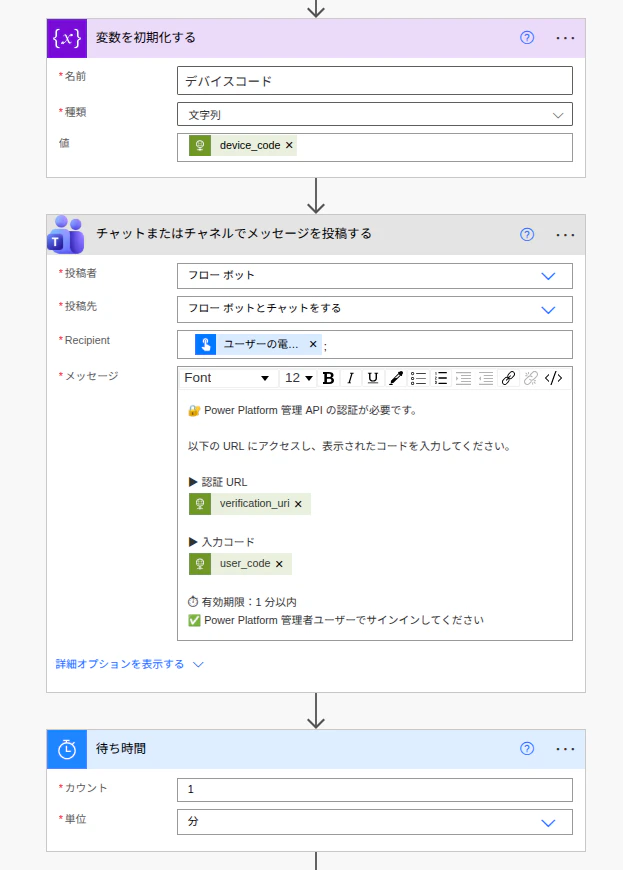
🔐 Power Platform 管理 API の認証が必要です。

以下の URL にアクセスし、表示されたコードを入力してください。

▶ 認証 URL
@{body('デバイスコード取得')?['verification_uri']}

▶ 入力コード
@{body('デバイスコード取得')?['user_code']}

⏱ 有効期限:1 分以内
✅ Power Platform 管理者ユーザーでサインインしてください
本来なら900秒間の間に承認できればよいので、処理まちループを入れればよいのですが、とりあえず早く試したいので「待ち時間」でウェイトを入れています。
アクセストークン取得
トークン取得の処理はこのように outh2/v2.0/token エンドポイントに対してアプリIDと予め取得済みのデバイスコードを与えています。
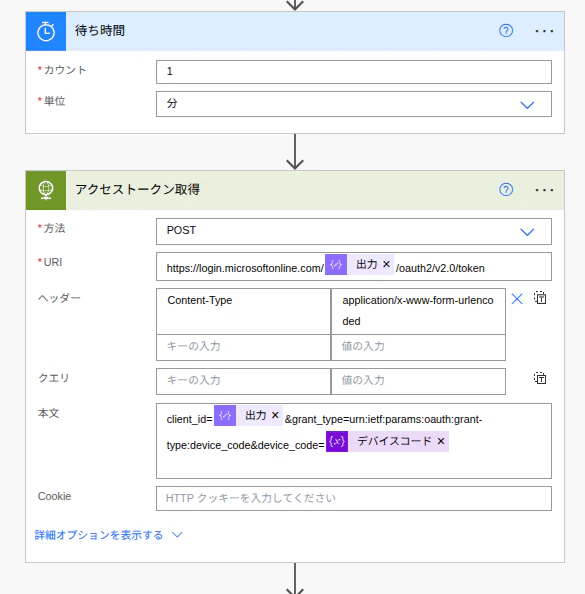
https://login.microsoftonline.com/@{outputs('テナントID')}/oauth2/v2.0/token
{
  "Content-Type": "application/x-www-form-urlencoded"
}
client_id=@{outputs('アプリID')}&grant_type=urn:ietf:params:oauth:grant-type:device_code&device_code=@{variables('デバイスコード')}
トークン取得のテスト
あえてTeamsチャットに表示されているURLにアクセスせず1分間待って「アクセストークン取得」がどうなるかを見ると、状態コード400、「authorization_pending」 が返ってきます。
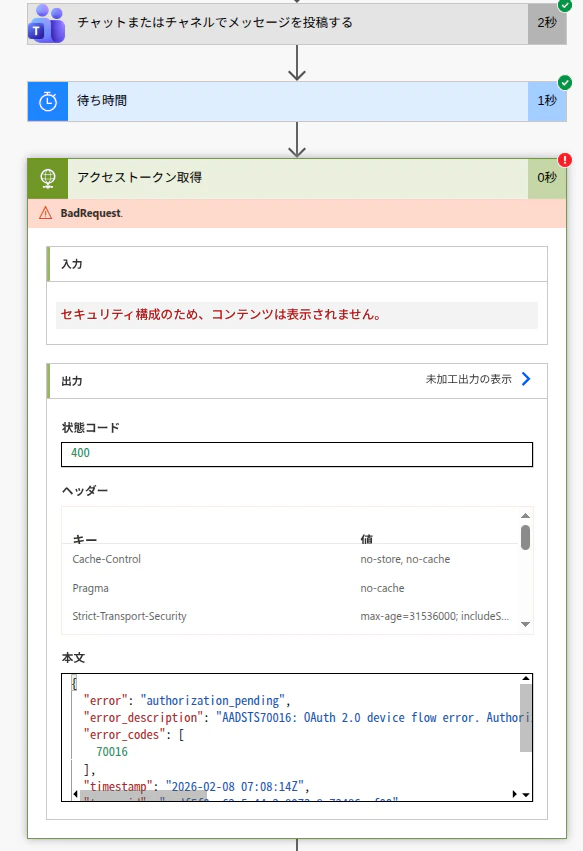
これはまだ時間切れではないけれど、ユーザーの承認はまだですよ、ということになります。

今度は、URLにアクセスして、指定されたコードを入力します。
承認が成功すると、「アクセストークン取得」には以下のような出力が返ってきます。サービスプリンシパルに指定したスコープに対して、とても長いアクセストークン文字列が返ってきました。ベアラートークンというやつです。
{
  "token_type": "Bearer",
  "scope": "https://api.powerplatform.com/EnvironmentManagement.Environments.Read",
  "expires_in": 5324,
  "ext_expires_in": 5324,
  "access_token": "eyJ0eXAiOiJKV1QiLCJub25jZSI6..."
}
ここまでできたら、あとはトークンをAPIに渡して取得するだけです。
テナント容量の取得(/licensing/tenantCapacity)
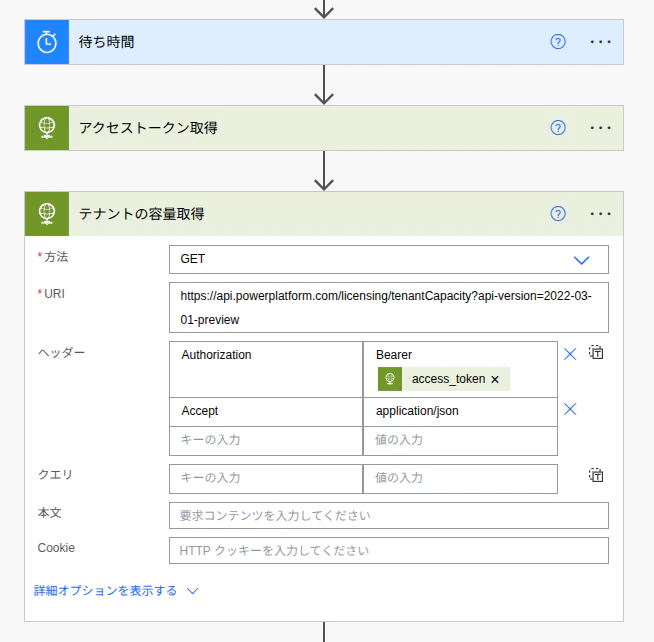
https://api.powerplatform.com/licensing/tenantCapacity?api-version=2022-03-01-preview
{
  "Authorization": "Bearer @{body('アクセストークン取得')?['access_token']}",
  "Accept": "application/json"
}
これを実行してみるとこのような出力が取得できました。
{
"tenantId": "<テナントID>",
"licenseModelType": "StorageDriven",
"capacitySummary": {
"status": "Available",
"statusMessage": "You have available capacity across all storage types.",
"statusMessageCode": "AllCapacityAvailable",
"finOpsStatus": "None",
"finOpsStatusMessage": "Finance and Operations Storage Capacity Usage reporting is in preview and for information only.",
"finOpsStatusMessageCode": "FinOpsNotAvailable"
},
"tenantCapacities": [
{
"capacityType": "Database",
"capacityUnits": "MB",
"totalCapacity": 5120,
"maxCapacity": 0,
"consumption": {
"actual": 3375.2830000000004,
"rated": 0,
"actualUpdatedOn": "2026-02-07T08:36:26.1055043+00:00",
"ratedUpdatedOn": "2026-02-07T08:36:26.1055043+00:00"
},
"status": "Available",
"overflowCapacity": [],
"capacityEntitlements": [
{
"capacityType": "Database",
"capacitySubType": "DatabaseBase",
"totalCapacity": 0,
"licenses": []
},
{
"capacityType": "Database",
"capacitySubType": "DatabaseIncremental",
"totalCapacity": 0,
"licenses": []
},
{
"capacityType": "Database",
"capacitySubType": "DatabaseAddOn",
"totalCapacity": 5120,
"licenses": [
{
"entitlementCode": "LOCAL_PAYGO_SEEDED_DATAVERSE",
"displayName": "Local PayGo Seeded Dataverse",
"isTemporaryLicense": true,
"temporaryLicenseExpiryDate": "2124-12-24T10:45:51+00:00",
"servicePlanId": "8c2b2e28-5770-406e-8647-860e0edbff4c",
"skuId": "7188bc2d-3274-4c35-a370-30e87bcfff0f",
"paid": {
"enabled": 1,
"warning": 0,
"suspended": 0
},
"trial": {
"enabled": 0,
"warning": 0,
"suspended": 0
},
"totalCapacity": 5120,
"capabilityStatus": "Enabled"
}
]
}
]
},
{
"capacityType": "File",
"capacityUnits": "MB",
"totalCapacity": 20480,
"maxCapacity": 0,
"consumption": {
"actual": 1628.6731,
"rated": 0,
"actualUpdatedOn": "2026-02-07T08:36:26.1055043+00:00",
"ratedUpdatedOn": "2026-02-07T08:36:26.1055043+00:00"
},
"status": "Available",
"overflowCapacity": [],
"capacityEntitlements": [
{
"capacityType": "File",
"capacitySubType": "FileBase",
"totalCapacity": 0,
"licenses": []
},
{
"capacityType": "File",
"capacitySubType": "FileIncremental",
"totalCapacity": 0,
"licenses": []
},
{
"capacityType": "File",
"capacitySubType": "FileAddOn",
"totalCapacity": 20480,
"licenses": [
{
"entitlementCode": "LOCAL_PAYGO_SEEDED_DATAVERSE",
"displayName": "Local PayGo Seeded Dataverse",
"isTemporaryLicense": true,
"temporaryLicenseExpiryDate": "2124-12-24T10:45:51+00:00",
"servicePlanId": "8c2b2e28-5770-406e-8647-860e0edbff4c",
"skuId": "7188bc2d-3274-4c35-a370-30e87bcfff0f",
"paid": {
"enabled": 1,
"warning": 0,
"suspended": 0
},
"trial": {
"enabled": 0,
"warning": 0,
"suspended": 0
},
"totalCapacity": 20480,
"capabilityStatus": "Enabled"
}
]
}
]
},
{
"capacityType": "Log",
"capacityUnits": "MB",
"totalCapacity": 2048,
"maxCapacity": 0,
"consumption": {
"actual": 0.003316879,
"rated": 0,
"actualUpdatedOn": "2026-02-07T08:36:26.1055043+00:00",
"ratedUpdatedOn": "2026-02-07T08:36:26.1055043+00:00"
},
"status": "Available",
"overflowCapacity": [],
"capacityEntitlements": [
{
"capacityType": "Log",
"capacitySubType": "LogBase",
"totalCapacity": 0,
"licenses": []
},
{
"capacityType": "Log",
"capacitySubType": "LogAddOn",
"totalCapacity": 2048,
"licenses": [
{
"entitlementCode": "LOCAL_PAYGO_SEEDED_DATAVERSE",
"displayName": "Local PayGo Seeded Dataverse",
"isTemporaryLicense": true,
"temporaryLicenseExpiryDate": "2124-12-24T10:45:51+00:00",
"servicePlanId": "8c2b2e28-5770-406e-8647-860e0edbff4c",
"skuId": "7188bc2d-3274-4c35-a370-30e87bcfff0f",
"paid": {
"enabled": 1,
"warning": 0,
"suspended": 0
},
"trial": {
"enabled": 0,
"warning": 0,
"suspended": 0
},
"totalCapacity": 2048,
"capabilityStatus": "Enabled"
}
]
},
{
"capacityType": "Log",
"capacitySubType": "LogIncremental",
"totalCapacity": 0,
"licenses": []
}
]
},
{
"capacityType": "TrialDatabase",
"capacityUnits": "MB",
"totalCapacity": 1024000,
"maxCapacity": 0,
"consumption": {
"actual": 0,
"rated": 0,
"actualUpdatedOn": "2026-02-07T08:36:26.1055043+00:00",
"ratedUpdatedOn": "2026-02-07T08:36:26.1055043+00:00"
},
"status": "None",
"overflowCapacity": [],
"capacityEntitlements": [
{
"capacityType": "TrialDatabase",
"capacitySubType": "TrialDatabaseBase",
"totalCapacity": 1024000,
"licenses": [
{
"entitlementCode": "D365_cds_Viral",
"displayName": "",
"servicePlanId": "17ab22cd-a0b3-4536-910a-cb6eb12696c0",
"skuId": "f30db892-07e9-47e9-837c-80727f46fd3d",
"paid": {
"enabled": 10000,
"warning": 0,
"suspended": 0
},
"trial": {
"enabled": 0,
"warning": 0,
"suspended": 0
},
"totalCapacity": 1024000,
"capabilityStatus": "Enabled"
}
]
}
]
},
{
"capacityType": "TrialFile",
"capacityUnits": "MB",
"totalCapacity": 0,
"maxCapacity": 0,
"consumption": {
"actual": 0,
"rated": 0,
"actualUpdatedOn": "2026-02-07T08:36:26.1055043+00:00",
"ratedUpdatedOn": "2026-02-07T08:36:26.1055043+00:00"
},
"status": "Available",
"overflowCapacity": [],
"capacityEntitlements": [
{
"capacityType": "TrialFile",
"capacitySubType": "TrialFileBase",
"totalCapacity": 0,
"licenses": []
}
]
},
{
"capacityType": "TrialLog",
"capacityUnits": "MB",
"totalCapacity": 0,
"maxCapacity": 0,
"consumption": {
"actual": 0,
"rated": 0,
"actualUpdatedOn": "2026-02-07T08:36:26.1055043+00:00",
"ratedUpdatedOn": "2026-02-07T08:36:26.1055043+00:00"
},
"status": "Available",
"overflowCapacity": [],
"capacityEntitlements": [
{
"capacityType": "TrialLog",
"capacitySubType": "TrialLogBase",
"totalCapacity": 0,
"licenses": []
}
]
},
{
"capacityType": "SubscriptionTrialDatabase",
"capacityUnits": "MB",
"totalCapacity": 0,
"maxCapacity": 0,
"consumption": {
"actual": 0,
"rated": 0,
"actualUpdatedOn": "2026-02-07T08:36:26.1055043+00:00",
"ratedUpdatedOn": "2026-02-07T08:36:26.1055043+00:00"
},
"status": "None",
"overflowCapacity": [],
"capacityEntitlements": [
{
"capacityType": "SubscriptionTrialDatabase",
"capacitySubType": "SubscriptionTrialDatabaseBase",
"totalCapacity": 0,
"licenses": []
}
]
},
{
"capacityType": "SubscriptionTrialFile",
"capacityUnits": "MB",
"totalCapacity": 0,
"maxCapacity": 0,
"consumption": {
"actual": 0,
"rated": 0,
"actualUpdatedOn": "2026-02-07T08:36:26.1055043+00:00",
"ratedUpdatedOn": "2026-02-07T08:36:26.1055043+00:00"
},
"status": "Available",
"overflowCapacity": [],
"capacityEntitlements": [
{
"capacityType": "SubscriptionTrialFile",
"capacitySubType": "SubscriptionTrialFileBase",
"totalCapacity": 0,
"licenses": []
}
]
},
{
"capacityType": "SubscriptionTrialLog",
"capacityUnits": "MB",
"totalCapacity": 0,
"maxCapacity": 0,
"consumption": {
"actual": 0,
"rated": 0,
"actualUpdatedOn": "2026-02-07T08:36:26.1055043+00:00",
"ratedUpdatedOn": "2026-02-07T08:36:26.1055043+00:00"
},
"status": "Available",
"overflowCapacity": [],
"capacityEntitlements": [
{
"capacityType": "SubscriptionTrialDatabase",
"capacitySubType": "SubscriptionTrialLogBase",
"totalCapacity": 0,
"licenses": []
}
]
},
{
"capacityType": "SubscriptionTrialEnvironmentCount",
"capacityUnits": "Unit",
"totalCapacity": 0,
"maxCapacity": 0,
"consumption": {
"actual": 0,
"rated": 0,
"actualUpdatedOn": "2026-02-07T08:36:26.1055043+00:00",
"ratedUpdatedOn": "2026-02-07T08:36:26.1055043+00:00"
},
"status": "None",
"overflowCapacity": [],
"capacityEntitlements": [
{
"capacityType": "SubscriptionTrialEnvironmentCount",
"capacitySubType": "SubscriptionTrialEnvironmentCountBase",
"totalCapacity": 0,
"licenses": []
},
{
"capacityType": "SubscriptionTrialEnvironmentCount",
"capacitySubType": "SubscriptionTrialEnvironmentCountIncremental",
"totalCapacity": 0,
"licenses": []
}
]
},
{
"capacityType": "M365Database",
"capacityUnits": "MB",
"totalCapacity": 10240,
"maxCapacity": 0,
"consumption": {
"actual": 781.1797,
"rated": 781.1797,
"actualUpdatedOn": "2026-02-07T08:36:26.1055043+00:00",
"ratedUpdatedOn": "2026-02-07T08:36:26.1055043+00:00"
},
"status": "None",
"overflowCapacity": [],
"capacityEntitlements": [
{
"capacityType": "M365Database",
"capacitySubType": "M365DatabaseBase",
"totalCapacity": 10240,
"maxNextLifecycleDate": "2026-03-29T23:59:59+00:00",
"licenses": [
{
"entitlementCode": "CDS_O365_P3",
"displayName": "Common Data Service Lite_P3",
"servicePlanId": "afa73018-811e-46e9-988f-f75d2b1b8430",
"skuId": "c42b9cae-ea4f-4ab7-9717-81576235ccac",
"paid": {
"enabled": 0,
"warning": 0,
"suspended": 0
},
"trial": {
"enabled": 25,
"warning": 0,
"suspended": 0
},
"totalCapacity": 10240,
"nextLifecycleDate": "2026-03-29T23:59:59+00:00",
"capabilityStatus": "Enabled"
}
]
},
{
"capacityType": "M365Database",
"capacitySubType": "M365DatabaseIncremental",
"totalCapacity": 0,
"licenses": []
}
]
},
{
"capacityType": "M365EnvironmentCount",
"capacityUnits": "Unit",
"totalCapacity": 5,
"maxCapacity": 0,
"consumption": {
"actual": 0,
"rated": 1,
"actualUpdatedOn": "2026-02-07T08:36:26.1055043+00:00",
"ratedUpdatedOn": "2026-02-07T08:36:26.1055043+00:00"
},
"status": "None",
"overflowCapacity": [],
"capacityEntitlements": [
{
"capacityType": "M365EnvironmentCount",
"capacitySubType": "M365EnvironmentCountBase",
"totalCapacity": 5,
"maxNextLifecycleDate": "2026-03-29T23:59:59+00:00",
"licenses": [
{
"entitlementCode": "CDS_O365_P3",
"displayName": "Common Data Service Lite_P3",
"servicePlanId": "afa73018-811e-46e9-988f-f75d2b1b8430",
"skuId": "c42b9cae-ea4f-4ab7-9717-81576235ccac",
"paid": {
"enabled": 0,
"warning": 0,
"suspended": 0
},
"trial": {
"enabled": 25,
"warning": 0,
"suspended": 0
},
"totalCapacity": 5,
"nextLifecycleDate": "2026-03-29T23:59:59+00:00",
"capabilityStatus": "Enabled"
}
]
},
{
"capacityType": "M365EnvironmentCount",
"capacitySubType": "M365EnvironmentCountIncremental",
"totalCapacity": 0,
"licenses": []
}
]
},
{
"capacityType": "CapacityPass",
"capacityUnits": "Unit",
"totalCapacity": 0,
"maxCapacity": 1,
"consumption": {
"actual": 0,
"rated": 0,
"actualUpdatedOn": "0001-01-01T00:00:00+00:00",
"ratedUpdatedOn": "0001-01-01T00:00:00+00:00"
},
"status": "None",
"overflowCapacity": [],
"capacityEntitlements": [
{
"capacityType": "CapacityPass",
"capacitySubType": "CapacityPassBase",
"totalCapacity": 0,
"licenses": []
}
]
},
{
"capacityType": "ApiCallCount",
"capacityUnits": "None",
"totalCapacity": 25000,
"maxCapacity": 10000000,
"consumption": {
"actual": 0,
"rated": 0,
"actualUpdatedOn": "0001-01-01T00:00:00+00:00",
"ratedUpdatedOn": "0001-01-01T00:00:00+00:00"
},
"status": "Available",
"overflowCapacity": [],
"capacityEntitlements": [
{
"capacityType": "ApiCallCount",
"capacitySubType": "ApiCallCountBase",
"totalCapacity": 25000,
"licenses": [
{
"entitlementCode": "D365_cds_Viral",
"displayName": "",
"servicePlanId": "17ab22cd-a0b3-4536-910a-cb6eb12696c0",
"skuId": "f30db892-07e9-47e9-837c-80727f46fd3d",
"paid": {
"enabled": 10000,
"warning": 0,
"suspended": 0
},
"trial": {
"enabled": 0,
"warning": 0,
"suspended": 0
},
"totalCapacity": 25000,
"capabilityStatus": "Enabled"
},
{
"entitlementCode": "D365_cds_Dev_Viral",
"displayName": "",
"servicePlanId": "d8c638e2-9508-40e3-9877-feb87603837b",
"skuId": "5b631642-bd26-49fe-bd20-1daaa972ef80",
"paid": {
"enabled": 10000,
"warning": 0,
"suspended": 0
},
"trial": {
"enabled": 0,
"warning": 0,
"suspended": 0
},
"totalCapacity": 25000,
"capabilityStatus": "Enabled"
}
]
},
{
"capacityType": "ApiCallCount",
"capacitySubType": "ApiCallCountIncremental",
"totalCapacity": 0,
"licenses": []
}
]
},
{
"capacityType": "FinOpsDatabase",
"capacityUnits": "MB",
"totalCapacity": 0,
"maxCapacity": 0,
"consumption": {
"actual": 0,
"rated": 0,
"actualUpdatedOn": "2026-02-07T08:36:26.1055043+00:00",
"ratedUpdatedOn": "2026-02-07T08:36:26.1055043+00:00"
},
"status": "Available",
"overflowCapacity": [],
"capacityEntitlements": [
{
"capacityType": "FinOpsDatabase",
"capacitySubType": "FinOpsDatabaseBase",
"totalCapacity": 0,
"licenses": []
},
{
"capacityType": "FinOpsDatabase",
"capacitySubType": "FinOpsDatabaseIncremental",
"totalCapacity": 0,
"licenses": []
}
]
},
{
"capacityType": "FinOpsFile",
"capacityUnits": "MB",
"totalCapacity": 0,
"maxCapacity": 0,
"consumption": {
"actual": 0,
"rated": 0,
"actualUpdatedOn": "2026-02-07T08:36:26.1055043+00:00",
"ratedUpdatedOn": "2026-02-07T08:36:26.1055043+00:00"
},
"status": "Available",
"overflowCapacity": [],
"capacityEntitlements": [
{
"capacityType": "FinOpsFile",
"capacitySubType": "FinOpsFileBase",
"totalCapacity": 0,
"licenses": []
},
{
"capacityType": "FinOpsFile",
"capacitySubType": "FinOpsFileIncremental",
"totalCapacity": 0,
"licenses": []
}
]
}
]
}
盛りだくさんなので、CopilotにJSONを渡して内容を解析してもらうとこんな感じです。
1. テナント基本情報
-
テナント ID
- Entra ID(Azure AD)上の一意なテナント識別子
-
ライセンスモデル
StorageDriven- ストレージ容量を基準とした課金・管理モデル
2. テナント全体の容量ステータス(Capacity Summary)
- 全体ステータス: Available
-
意味:
- Database / File / Log すべてのストレージ種別で空き容量あり
-
メッセージコード:
AllCapacityAvailable
-
Finance and Operations(FinOps)容量:
- プレビュー機能
- 参考情報のみ(課金・制限には未反映)
3. Dataverse 標準ストレージ容量
Database(Dataverse データベース)
- 総容量: 5,120 MB
- 使用量(Actual): 約 3,375 MB
- 状態: Available
- 主な供給元:
- Local PayGo Seeded Dataverse(一時ライセンス)
File(添付ファイル・ドキュメント)
- 総容量: 20,480 MB
- 使用量(Actual): 約 1,629 MB
- 状態: Available
Log(Dataverse ログ)
- 総容量: 2,048 MB
- 使用量(Actual): ほぼ未使用
- 状態: Available
4. 使用量(Consumption)として分かること
各容量タイプ共通で以下を把握可能:
-
Actual
- 実データとして消費されている容量
-
Rated
- 課金・評価対象となる使用量
-
最終更新日時
- 容量情報がいつ計測されたか(UTC)
5. ライセンス由来の容量内訳(Capacity Entitlements)
-
容量の内訳種別
- Base(基本)
- Incremental(増分)
- AddOn(追加購入・付与)
-
ライセンス単位で把握できる情報
- SKU ID / Service Plan ID
- 提供容量
- 有償 / 試用 / 一時ライセンスの別
- 有効期限(Temporary License の場合)
6. Trial(試用)関連容量
-
Trial Database
- 大容量(約 1 TB 相当)が割り当て可能
- 現在は未使用
-
Trial File / Trial Log
- 割り当てなし、または未使用
-
Subscription Trial 系容量
- 試用サブスクリプション向け
- 現在は実質未使用
7. Microsoft 365 由来の Dataverse 容量
M365 Database
- 総容量: 10,240 MB
- 使用量: 約 781 MB
- 有効期限(ライフサイクル日)あり
M365 Environment Count
- 作成可能な環境数: 5
- 消費状況を Unit 単位で把握可能
8. API 使用量(重要指標)
ApiCallCount
- 基本割当: 25,000
- 最大上限: 10,000,000
- 現在の使用量: 0
- 用途:
- Power Automate
- カスタムコネクタ
- Dataverse API 呼び出し管理
9. その他の管理情報
- Environment 数関連の容量管理
- Capacity Pass(将来拡張用の枠)
- FinOps Database / File 容量(将来利用想定)
10. この JSON から得られる実務的価値
- テナント全体の 容量逼迫の予兆検知
- どのライセンスが容量を供給しているか の可視化
- 追加容量購入やライセンス見直しの判断材料
- Power Platform 管理センター相当の情報を API で自動取得
- Power BI / Excel による定期レポート化
特定の環境のDataverse情報取得
環境IDを与えて、環境ごとの容量を取得したいと考えましたが、リファレンスにはこのあたりの記述がありませんでした。
どうやら各環境URLに対してDatavase Web APIを叩いて取得する必要があるみたい。これは今回のPower Platform APIとは別系統です。このあたりで潮時か。
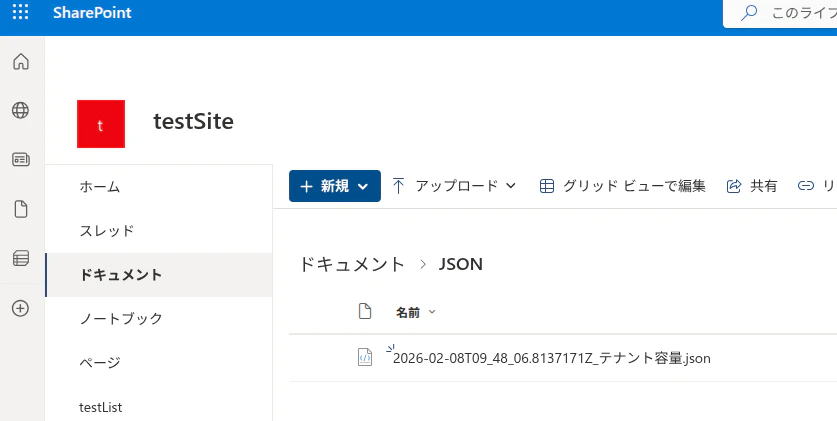
ここまでできたら、あとはExcelテーブルなりSPOリストなり。JSONのままで良いならば、ファイル名にutcnow()関数で日付をつけて、SharePointにファイル作成するなりすればよいでしょう。
まとめ
Power Platform APIを使ってテナントのDataverse容量を取得することができました。
しかし、最初に目論んだ環境ごとの使用済み容量は取得できず。残念。
推移を得るには毎日定期的に取得する必要があるので、こういうフローは利用できるのですが、いかんせん管理者による承認が必要なのは面倒ですね。
トークンについてはペンディング担っている間には待ちをいれたり、取得したトークンは実行アカウントのOneDriveに一時保存するなども手かと思います。このあたりは時間があるときに取り組んでみます。
とりいそぎ、やってみたご報告でした。