
HTMLファイル編集支援用に、Webページに「クリックするとHTMLタグをクリップボードにコピーするボタン」を追加するTampermonkeyスクリプトを書きました (下図)。このスクリプトの機能は以下です。
- ページ左下に Toggle HTML Tag Copier というリンクを設置します。このリンクをクリックするとボタン群の表示・非表示が切り替わります。
- ボタンをクリックすると、クリップボードにHTMLタグがコピーされます。
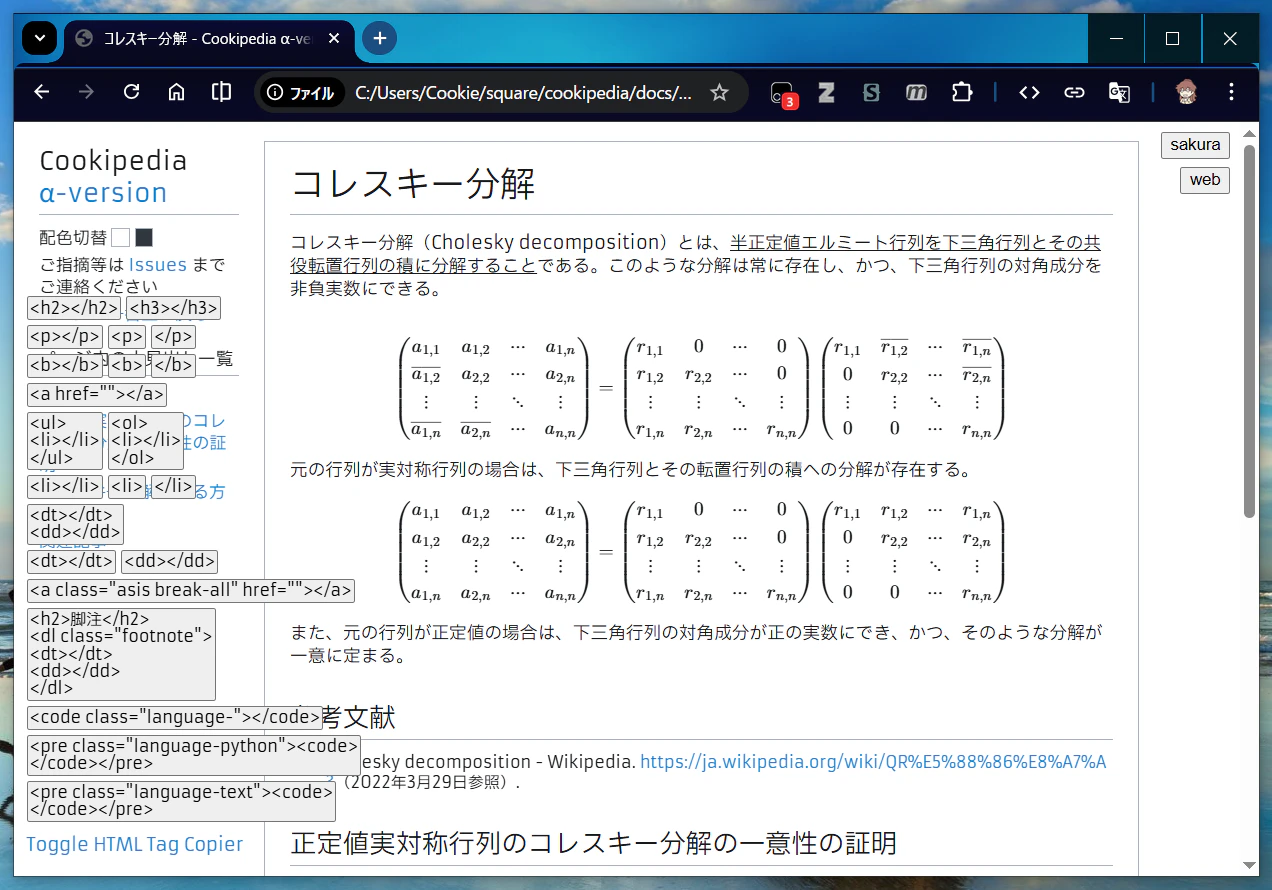
ご利用のブラウザに Tampermonkey が必要です。仕組みや注意点を理解の上でインストールし、「ユーザー スクリプトを許可する」をオンにする (ローカルHTMLが対象ならば「ファイルの URL へのアクセスを許可する」もオンにする) 必要があります。
ユーザスクリプトは下記コードブロックです。もし利用される場合は以下を変更ください。
-
@nameと@namespaceに、わかりやすい名前と名前空間名を付けてください (このペアがご利用の他のユーザスクリプトと衝突しなければ何でもよいです)。 -
@matchの*.htmlより前の部分を、ボタンを設置したいURLのパスにしてください。- 以下ではローカルURLにしていますが、Web上のURLでも構いません (ローカルURLの場合は、Tampermonkeyの詳細設定で追加の許可を忘れないでください)。
- コンテナの設置場所を左下にしていますが、追加やすい位置にしてください。
- ボタンのボックスをデフォルト非表示にしていますが、デフォルト表示の方がよければ
// デフォルト非表示の行は削ってください。 -
// ボックスにタグコピーボタンを入れていくの箇所を、コピーしたいHTMLタグに編集してください。// (以下はかなり個人用のボタン)は参考に残していますが適宜編集・削除してください。
html-tag-copier.user.js
// ==UserScript==
// @name         HTML Tag Copier
// @namespace    CookieBox26
// @version      2026-04-08
// @description  Adds a button to copy HTML tags.
// @author       Chihiro Mihara
// @match        file:///C:/Users/Cookie/square/*.html
// @grant        none
// @noframes
// ==/UserScript==
(function() {
  'use strict';

  // ページ左下にコンテナを追加
  const container = document.createElement('div');
  Object.assign(container.style, {
    position: 'fixed', bottom: '8px', left: '8px', zIndex: '999999',
  });
  document.body.appendChild(container);

  // タグコピーボタンを入れる用のボックスをコンテナに追加
  const box = document.createElement('div');
  Object.assign(box.style, {display: 'none'}); // デフォルト非表示
  container.appendChild(box);

  // タグコピーボタン追加用便利関数を用意
  const createBtn = (clipboard, text = '') => {
    let btn = document.createElement('button');
    Object.assign(btn.style, {
      margin: '2px', padding: '1px', textAlign: 'left',
      whiteSpace: 'pre-line', fontFamily: 'inherit',
      fontSize: '90%', lineHeight: '1.1', cursor: 'pointer',
    });
    btn.textContent = text || clipboard;
    btn.onclick = (e) => navigator.clipboard.writeText(clipboard);
    return btn;
  };
  const appendBtn = (clipboard, text = '') => {
    box.appendChild(createBtn(clipboard, text));
  };
  const appendBtns = (tagname) => {
    appendBtn(`<${tagname}></${tagname}>`);
    appendBtn(`<${tagname}>`);
    appendBtn(`</${tagname}>`);
  };
  const appendBr = () => box.appendChild(document.createElement('br'));

  // ボックスにタグコピーボタンを入れていく
  appendBtn('<h2></h2>'); appendBtn('<h3></h3>'); appendBr();
  appendBtns('p'); appendBr();
  appendBtns('b'); appendBr();
  appendBtn('<a href=""></a>'); appendBr();
  appendBtn('<ul>\n<li></li>\n</ul>'); appendBtn('<ol>\n<li></li>\n</ol>'); appendBr();
  appendBtns('li'); appendBr();
  appendBtn('<dt></dt>\n<dd></dd>'); appendBr();
  appendBtn('<dt></dt>'); appendBtn('<dd></dd>'); appendBr();
  // (以下はかなり個人用のボタン)
  appendBtn('<a class="asis break-all" href=""></a>'); appendBr();
  appendBtn('<h2>脚注</h2>\n<dl class="footnote">\n<dt></dt>\n<dd></dd>\n</dl>'); appendBr();
  appendBtn('<code class="language-"></code>'); appendBr();
  appendBtn('<pre class="language-python"><code>\n</code></pre>'); appendBr();
  appendBtn('<pre class="language-text"><code>\n</code></pre>'); appendBr();

  // ボックスの表示・非表示を切り替えるリンクを追加
  const toggle = document.createElement('a');
  toggle.textContent = 'Toggle HTML Tag Copier';
  Object.assign(toggle.style, {display: 'block', cursor: 'pointer', margin: '8px 2px'});
  toggle.onclick = (e) => {
    e.preventDefault();
    box.style.display = (box.style.display === 'none') ? '' : 'none';
  };
  container.appendChild(toggle);
})();