
はじめに
Quest 3の無線フルトラ用に、昔入れた GitHub版 Space Calibrator を Steam版 Space Calibrator に置き換えたところ、エラーが発生して起動できなかった...
同じ問題で困っている人がいるかもしれないので、解決方法を残しておきます!
(あーしは、コレ以降問題なく動いてますが、一応自己責任でお願いします...)
発生した問題(あーしの場合)
GitHub版をアンインストールした後Steam版を入れ直してSteamVRを起動したら、以下のようなエラーメッセージが表示されSpace Calibratorが起動しない...
- 起動したときにエラーが出て終了するパターン
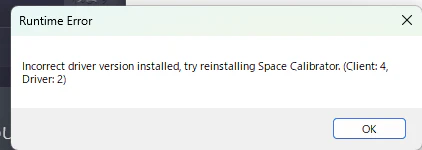
Incorrect driver version installed, try reinstalling Space Calibrator. (Client: 4, Driver: 2)
原因
以前、GitHubなどからインストールしたSpace Calibratorの内部ドライバーが、ちゃんと削除しきれていない事が原因で起動しないっぽい???
解決方法
1. Space Calibratorを全部アンインストール
インストール済みのSpace Calibrator (Steam版・GitHub版 両方)をアンインストール
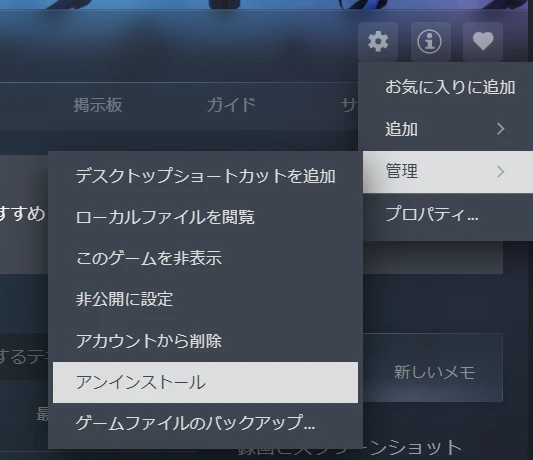
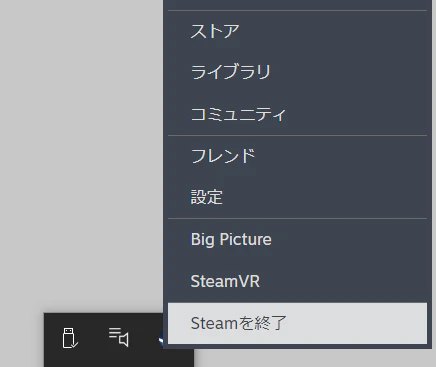
2. Steamを終了
Steamが起動していると、問題のファイルが「使用中で~す」と表示され削除できない!!!
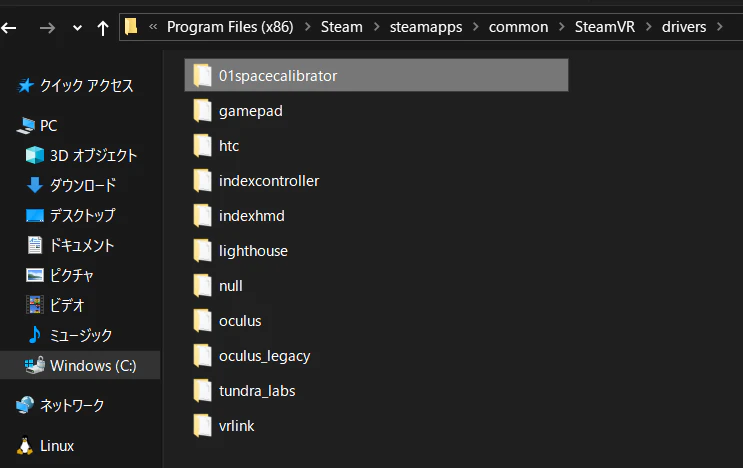
3. 問題のフォルダを削除
以下のフォルダを削除します。
C:\Program Files (x86)\Steam\steamapps\common\SteamVR\drivers\01spacecalibrator
エクスプローラーでこのパスに移動し、
01spacecalibrator をフォルダごと削除してください。
4. Steamを再起動
5. 改めて Space Calibrator をインストール
最後にリンクとか
- Space_Calibrator
- Redditでもこのファイルが原因で不具合出てるのを見つけた