
はじめに
Power Automateの Excelの「テーブルを作成」 アクションは、テーブルが設定されていないExcelからデータを読み取る際に利用します。
一見すると A1:D20 のように固定範囲しか指定できないように見えますが、実は Excel関数を使って動的に範囲指定することも可能です。
これを利用すると、追加データに応じて自動で広がるテーブルを作成できます。
設定例
「テーブルを作成」アクションでは、Table rangeという範囲指定の項目があります。
ここに直接Excel関数を書き込むことができます。
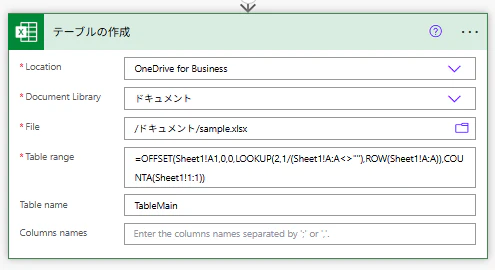
下記を入力ください。
書き方
=OFFSET(Sheet1!A1,0,0,LOOKUP(2,1/(Sheet1!A:A<>""),ROW(Sheet1!A:A)),COUNTA(Sheet1!1:1))
数式の意味
Sheet1
シート名を想定
OFFSET(Sheet1!A1, … )
A1セルを基点に、可変的な範囲を返す
LOOKUP(2,1/(Sheet1!A:A<>""),ROW(Sheet1!A:A))
A列の最終行番号を取得
COUNTA(Sheet1!1:1)
1行目の列数をカウント → 列数を自動で決定
注意
アクションが実行された後反映まで少し時間がかかります。
まとめ
・Excelテーブルを動的に指定する方法はある
・OFFSET + LOOKUP + COUNTA の組み合わせで、追加データにも対応できる!
...
色々調べていて、上記にたどり着いたので共有(更新昨年ぶりですね、ハイ)…