
0. 概要
AWSを勉強したいと考えているものの、個人利用ではコストが気になる方も多いのではないでしょうか。
私も勉強を始めたときはそうでした。
AWSはクラウドのサービスなので、必要な時に必要なリソースを作成できることがメリットとしてあります。
ただ、毎回手動でリソースを削除することは、手間がかかるだけでなく、削除漏れによる想定外のコスト発生というリスクもあります。
そこで、CloudFormationを使用し、必要なタイミングでリソース作成・不要なタイミングで削除をすることで、無駄なコスト削減を実現しております。
プライベートサブネット内のEC2にSSMで接続する環境構築のYAMLを使用してますので、興味あれば参考にしてください。
1. AWS CloudFormation概要
AWS CloudFormationとは、YAML形式のファイルやプログラミング言語からAWSリソースを自動構築するサービスです。
テンプレートを作成することで、同じ構成のリソースを何度も構築可能なので、管理が楽になります。
詳しくは、AWSの公式ドキュメントをご参照ください。
2. 前提
- AWSのマネージドコンソールにアクセスできること
- EC2のキーペアが事前に存在していること
- EC2に付与するためのIAMロールが存在していること
(AmazonSSMManagedInstanceCoreのポリシー)
3. サンプルのYAMLファイル
環境概要:
VPC内にプライベートサブネットを用意し、その中にEC2を配置。
EC2に対しては、SSMでのアクセスを想定。
今回作成するリソース:
- EC2
- VPC
- プライベートサブネット
- セキュリティグループ
- VPCエンドポイント
本来であれば、リソース費用が発生しないものについてはテンプレートに含める必要はありませんが、
本記事では個人学習を目的として、あえてYAMLに記載しています。
AWSTemplateFormatVersion: '2010-09-09'

Parameters:
  EnvironmentName:
    Type: String
    Default: test-environment
  TagValue:
    Type: String
    Default: CreatedByCloudformation

Resources:
  VPCCFn:
    Type: AWS::EC2::VPC
    Properties:
      CidrBlock: 10.0.0.0/16
      EnableDnsSupport: true
      EnableDnsHostnames: true
      Tags:
        - Key: Name
          Value: !Ref TagValue

  EC2CFn:
    Type: AWS::EC2::Instance
    Properties:
      InstanceType: t3.micro
      ImageId: "使用したいイメージ"
      KeyName: "作成したキーペア名に変更"
      SubnetId: !Ref SubnetCFn
      SecurityGroupIds:
        - !Ref EC2SgCFn
      IamInstanceProfile: "事前作成のインスタンスロール付与"
      UserData:
        Fn::Base64: |
          #!/bin/bash
          systemctl enable amazon-ssm-agent
          systemctl start amazon-ssm-agent
      Tags:
        - Key: Name
          Value: !Ref TagValue

  EC2SgCFn:
    Type: AWS::EC2::SecurityGroup
    Properties:
      GroupDescription: EC2 Outbound
      VpcId: !Ref VPCCFn
      SecurityGroupIngress: []
      SecurityGroupEgress:
        - IpProtocol: tcp
          FromPort: 443
          ToPort: 443
          CidrIp: 0.0.0.0/0
      Tags:
        - Key: Name
          Value: !Ref TagValue

  VPCEndPointSgCFn:
    Type: AWS::EC2::SecurityGroup
    Properties:
      GroupDescription: Endpoint Inbound
      VpcId: !Ref VPCCFn
      SecurityGroupIngress:
        - IpProtocol: tcp
          FromPort: 443
          ToPort: 443
          SourceSecurityGroupId: !Ref EC2SgCFn
      SecurityGroupEgress: []
      Tags:
        - Key: Name
          Value: !Ref TagValue

  SubnetCFn:
    Type: AWS::EC2::Subnet
    Properties:
      VpcId: !Ref VPCCFn
      CidrBlock: 10.0.1.0/24

  VPCEndpointSSM:
    Type: AWS::EC2::VPCEndpoint
    Properties:
      ServiceName: !Sub com.amazonaws.${AWS::Region}.ssm
      VpcId: !Ref VPCCFn
      SubnetIds:
        - !Ref SubnetCFn
      SecurityGroupIds:
        - !Ref VPCEndPointSgCFn
      VpcEndpointType: Interface
      PrivateDnsEnabled: true

  VPCEndpointSSMMessages:
    Type: AWS::EC2::VPCEndpoint
    Properties:
      ServiceName: !Sub com.amazonaws.${AWS::Region}.ssmmessages
      VpcId: !Ref VPCCFn
      SubnetIds:
        - !Ref SubnetCFn
      SecurityGroupIds:
        - !Ref VPCEndPointSgCFn
      VpcEndpointType: Interface
      PrivateDnsEnabled: true

  VPCEndpointEC2Messages:
    Type: AWS::EC2::VPCEndpoint
    Properties:
      ServiceName: !Sub com.amazonaws.${AWS::Region}.ec2messages
      VpcId: !Ref VPCCFn
      SubnetIds:
        - !Ref SubnetCFn
      SecurityGroupIds:
        - !Ref VPCEndPointSgCFn
      VpcEndpointType: Interface
      PrivateDnsEnabled: true
4. 作成手順
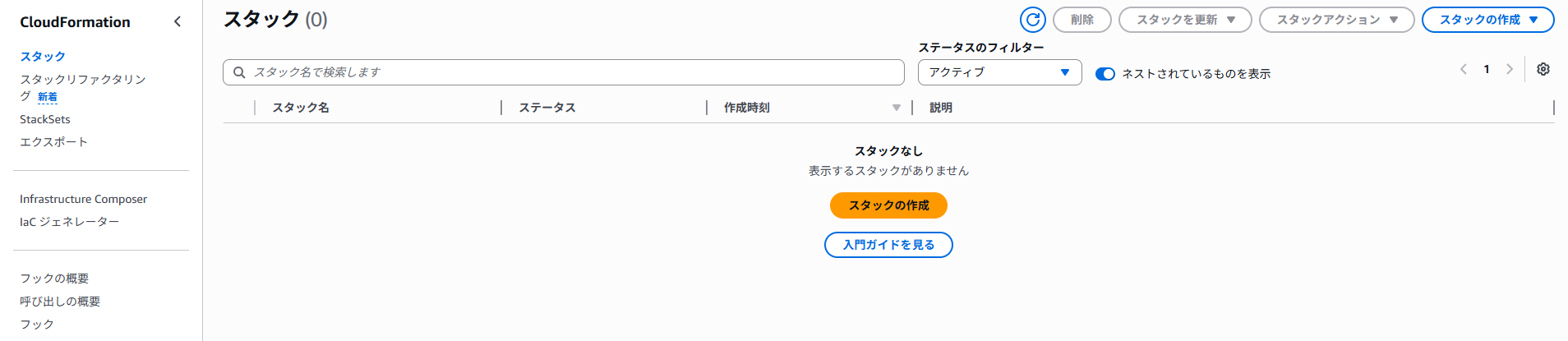
① CloudFormationを開き、「スタックの作成」を押下
② 「テンプレートファイルのアップロード」を選択し、YAMLファイルを添付

③ 任意のスタック名を入力
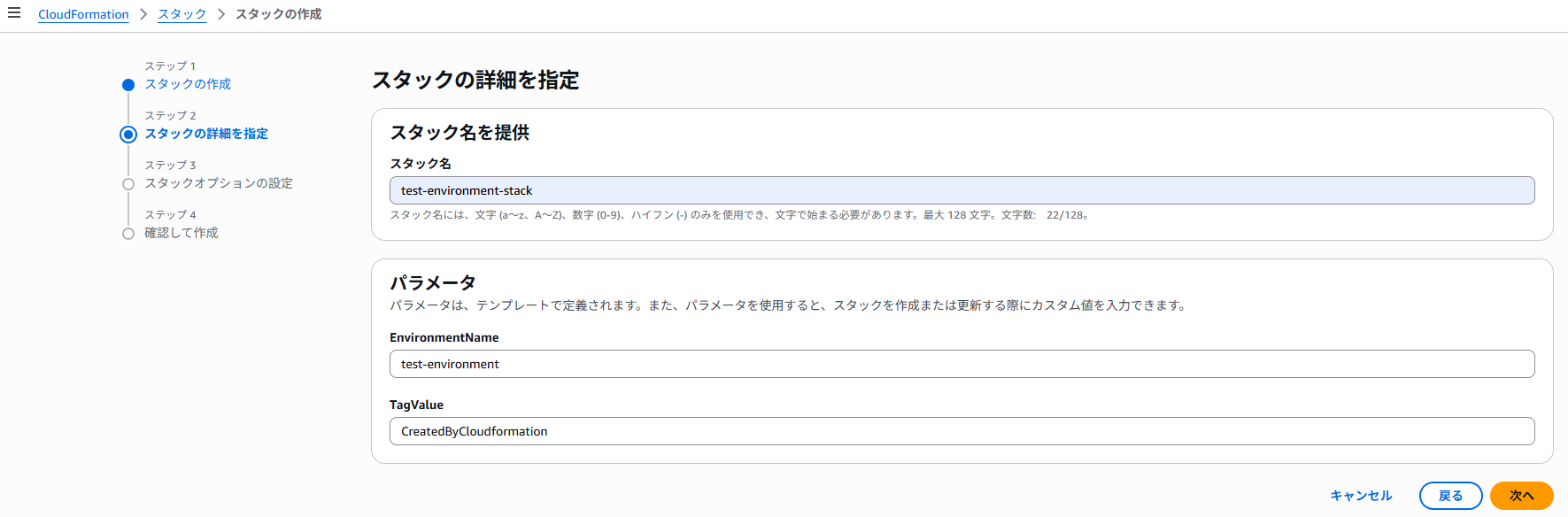
④ デフォルトのまま次へ

⑤ 内容を確認後、画面一番下の「送信」を押下

⑥ ステータスに「CREATE_COMPLETE」が表示されれば、作成完了です
5. 削除手順
① 対象のスタックを選択後、「削除」を押下し、ステータスが「DELETE_IN_PROGRESS」であれば削除中

※ 削除完了まで数分かかる場合があります。
※ VPCエンドポイントを含む場合、削除が遅く見えることがあります。
6. 最後に
今回はCloudFormationを使用して、AWSのコスト削減をテーマとしました。
今後も何かあれば記事を投稿していきます!