
Laravel 配列の中身をテストする際のメソッドについて
今回利用するテストコード
class LaravaelTest extends TestCase
{
    /**
     * 配列の中身をテストする
     * @test
     * @dataProvider test2Data
     * @param array $testCase
     * @return void
     */
    public function test2(array $expect): void
    {
        $actual = ['1', '2', '3', '4', '5'];

        /** 検証1 assertEquals */
        $this->assertEquals($expect, $actual);

        /** 検証2 assertEqualsCanonicalizing */
        $this->assertEqualsCanonicalizing($expect, $actual);
    }

    public static function test2Data(): array
    {
        return [
            'ケース1/同値/順番も同じ' => [
                ['1', '2', '3', '4', '5']
            ],
            'ケース2/同値/順不同' => [
                ['4', '3', '2', '1', '5']
            ],
        ];
    }
}
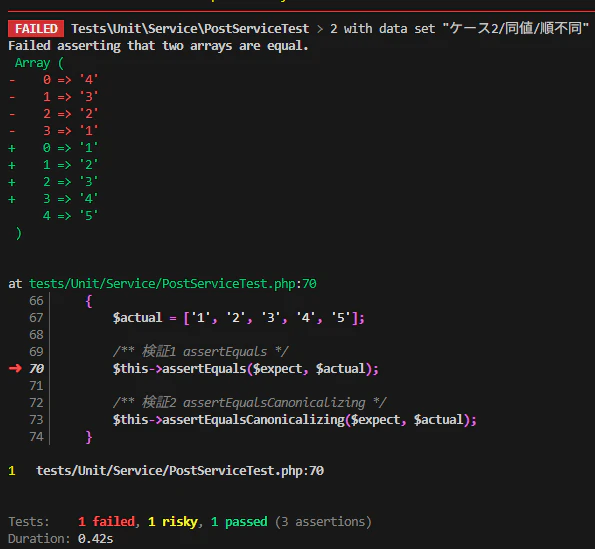
検証結果
■ 検証1 assertEquals
■ 検証2 assertEqualsCanonicalizing
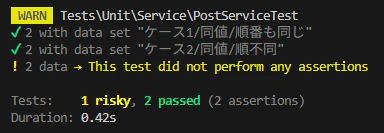
配列の中身が意図する値であるかをテストしたい場合は assertEqualsCanonicalizing() を利用する