

本記事はQualiArts Advent Calender 2025の15日目の記事になります。
はじめに
ノベルゲームで、回想シーン、よくありますよね。
画像をセピア加工くらいでもいいですが、折角なら、もう少しだけ演出をモリモリにしたいですよね。
シェーダー
Unity 6000.0.58f1で動作確認をしています。
Shader "UI/Recollection"
{
    Properties
    {
        [PerRendererData] _MainTex ("Sprite", 2D) = "white" {}
        _Color("Tint", Color) = (1,1,1,1)

        // --- Vignette ---
        _VignetteIntensity("Vignette Intensity", Range(0,1)) = 0.6
        _VignetteSoftness("Vignette Softness", Range(0.001,1)) = 0.35
        _VignetteRoundness("Vignette Roundness", Range(0.5,4)) = 1.6
        _VignetteCenter("Vignette Center (UV)", Vector) = (0.5, 0.5, 0, 0)
        _VignetteColor("Vignette Color", Color) = (0,0,0,1)

        // --- Film Grain / Noise ---
        _NoiseIntensity("Noise Intensity", Range(0,1)) = 0.25
        _NoiseScale("Noise Scale", Range(16,1024)) = 220
        _NoiseSpeed("Noise Speed", Range(0,10)) = 3.0

        // --- Desaturate ---
        _Desaturate("Desaturate", Range(0,1)) = 0.4

        // UI standard stuff
        [HideInInspector]_StencilComp ("Stencil Comparison", Float) = 8
        [HideInInspector]_Stencil ("Stencil ID", Float) = 0
        [HideInInspector]_StencilOp ("Stencil Operation", Float) = 0
        [HideInInspector]_StencilWriteMask ("Stencil Write Mask", Float) = 255
        [HideInInspector]_StencilReadMask ("Stencil Read Mask", Float) = 255
        [HideInInspector]_ColorMask ("Color Mask", Float) = 15
        [HideInInspector]_UseUIAlphaClip ("Use Alpha Clip", Float) = 0

        [HideInInspector]_ClipRect ("Clip Rect", Vector) = (-32767,-32767,32767,32767)
    }

    SubShader
    {
        Tags
        {
            "Queue"="Transparent"
            "IgnoreProjector"="True"
            "RenderType"="Transparent"
            "PreviewType"="Plane"
            "CanUseSpriteAtlas"="True"
        }

        Stencil
        {
            Ref [_Stencil]
            Comp [_StencilComp]
            Pass [_StencilOp]
            ReadMask [_StencilReadMask]
            WriteMask [_StencilWriteMask]
        }

        Cull Off
        Lighting Off
        ZWrite Off
        ZTest Always
        Blend SrcAlpha OneMinusSrcAlpha
        ColorMask [_ColorMask]

        Pass
        {
            Name "Default"
            CGPROGRAM
            #pragma vertex vert
            #pragma fragment frag
            #pragma multi_compile __ UNITY_UI_CLIP_RECT
            #pragma multi_compile __ UNITY_UI_ALPHACLIP

            #include "UnityCG.cginc"
            #include "UnityUI.cginc"

            struct appdata_t
            {
                float4 vertex : POSITION;
                float4 color  : COLOR;
                float2 texcoord : TEXCOORD0;
                float4 clipPos : TEXCOORD1;
            };

            struct v2f
            {
                float4 vertex : SV_POSITION;
                float4 color  : COLOR;
                float2 uv     : TEXCOORD0;
                float4 worldPosition : TEXCOORD1;
            };

            sampler2D _MainTex;
            float4 _MainTex_ST;
            fixed4 _Color;

            float4 _ClipRect;

            // Vignette
            float _VignetteIntensity;
            float _VignetteSoftness;
            float _VignetteRoundness;
            float4 _VignetteCenter;   // xy only
            fixed4 _VignetteColor;

            // Noise
            float _NoiseIntensity;
            float _NoiseScale;
            float _NoiseSpeed;

            // Desaturate
            float _Desaturate;

            v2f vert (appdata_t v)
            {
                v2f o;
                o.vertex = UnityObjectToClipPos(v.vertex);
                o.uv = TRANSFORM_TEX(v.texcoord, _MainTex);
                o.color = v.color * _Color;
                o.worldPosition = v.vertex;
                return o;
            }

            // Small hash-based noise (fast pseudo-random)
            float hash21(float2 p)
            {
                // shift to reduce visible tiling
                p = frac(p);
                float3 p3 = frac(float3(p.xyx) * 0.1031);
                p3 += dot(p3, p3.yzx + 33.33);
                return frac((p3.x + p3.y) * p3.z);
            }

            fixed4 frag (v2f i) : SV_Target
            {
                fixed4 col = tex2D(_MainTex, i.uv) * i.color;

                #ifdef UNITY_UI_CLIP_RECT
                col.a *= UnityGet2DClipping(i.worldPosition.xy, _ClipRect);
                #endif

                #ifdef UNITY_UI_ALPHACLIP
                if (col.a <= 0.001) discard;
                #endif

                // --- Desaturate mix ---
                float luminance = dot(col.rgb, float3(0.299, 0.587, 0.114));
                col.rgb = lerp(col.rgb, luminance.xxx, _Desaturate);

                // --- Add film grain ---
                float t = _Time.y * _NoiseSpeed;
                float2 nUV = i.uv * _NoiseScale + float2(t, t*1.37);
                float n = hash21(nUV) * 2.0 - 1.0; // [-1,1]
                col.rgb = saturate(col.rgb + n * (_NoiseIntensity * 0.15)); // subtle additive grain

                // --- Vignette ---
                // Screen-aspect aware UV (approx using _ScreenParams)
                float2 uv = i.uv;
                float2 center = _VignetteCenter.xy;
                float2 p = uv - center;

                // correct aspect so circle looks round
                float aspect = _ScreenParams.x / _ScreenParams.y;
                p.x *= aspect;

                // Roundness controls how quickly it ramps near corners
                float d = pow(length(p), _VignetteRoundness);
                // Soft edge
                float vig = smoothstep(1.0 - _VignetteIntensity, 1.0, d / max(_VignetteSoftness, 0.001));

                // Blend towards vignette color
                col.rgb = lerp(col.rgb, _VignetteColor.rgb, vig * _VignetteColor.a);

                return col;
            }
            ENDCG
        }
    }

    FallBack "UI/Default"
}
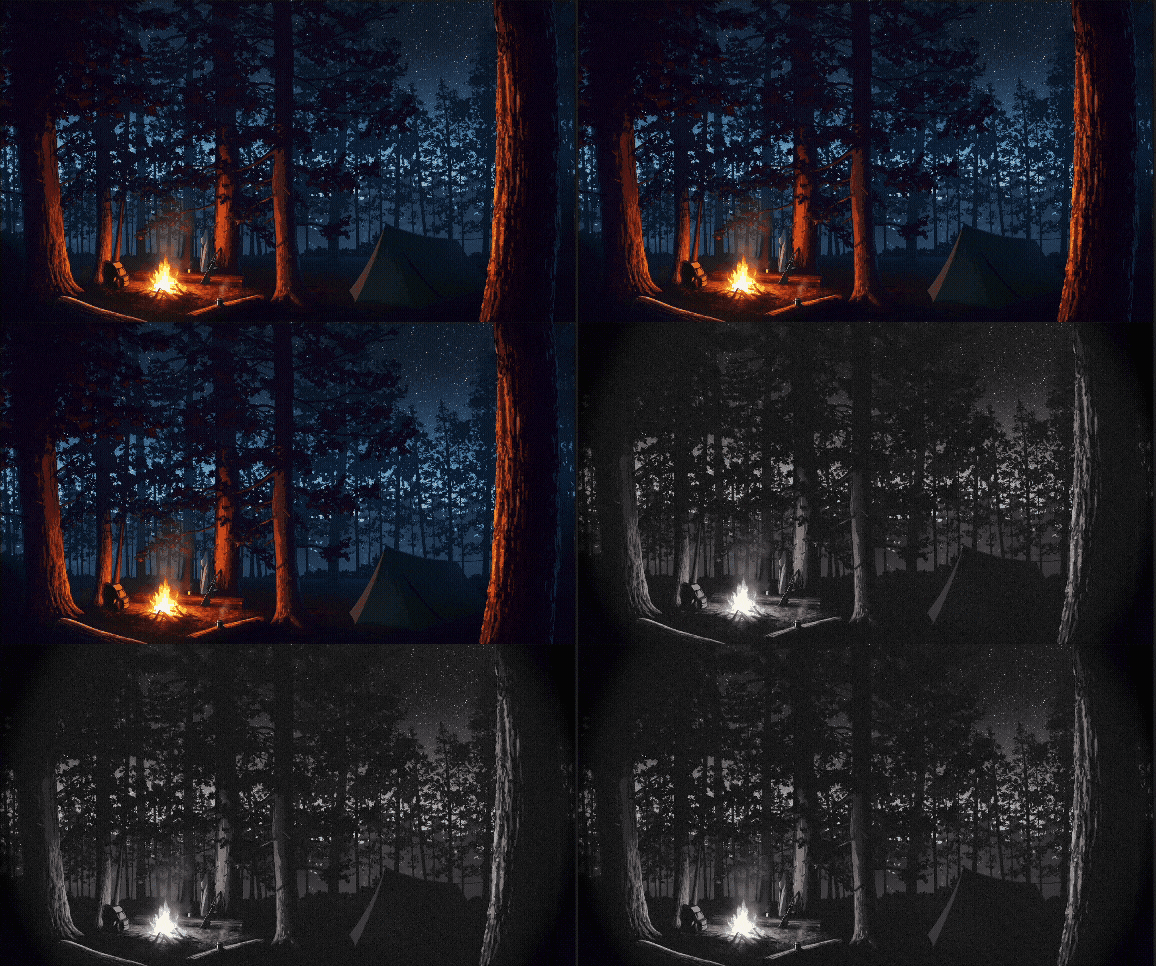
以下の効果の複合で回想っぽさを再現しています。
ビネット効果(周辺減光)
- _VignetteIntensityと_VignetteSoftnessのパラメータを使用して、中心座標からグラデーションのビネットカラーを生成、画像とlerp
フィルムグレイン(ノイズ)
- ノイズを生成、斜めのUVアニメーションをかけて加算、フィルム感を出す
デサチュレーション(彩度低下)
- lerpで元の色とグレースケールを_Desaturateの割合でlerpしている
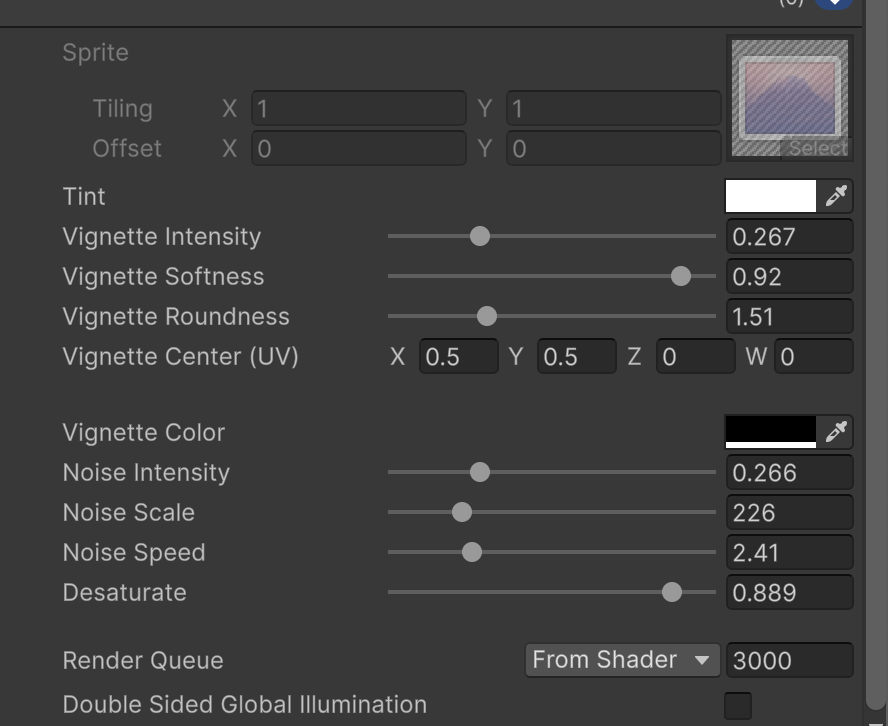
サンプルの動画のパラメータは以下
回想はエモいので、どんどん回想していきましょう
終わり。