Flutter のソースコードは画面右上のアイコンをクリックすることで見ることができる。

Flutter の公式サイト を中心に InheritedWidget を理解したい。
※ この記事に記載している Flutter SDK のソースコードは、学習のために一部を削除、編集しています
はじめに
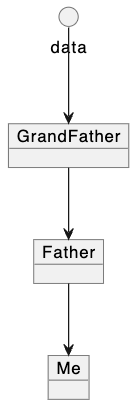
アプリケーションや Widget が何らかの状態(state、データ)を持つとき、Widget ツリー全体でその「一つの state」を共有するためには、 Widget クラスのコンストラクタを介して、ツリーの上層から下層に state をリレーをする必要がある。
class GrandFather extends StatefulWidget {
  const GrandFather({super.key, required this.data 👈 });

  final int data;

  @override
  State<GrandFather> createState() => _GrandFatherState();
}

class _GrandFatherState extends State<GrandFather> {
  _GrandFatherState();

  @override
  Widget build(BuildContext context) {
    return Father(data: widget.data 👈 );
  }
}
class Father extends StatefulWidget {
  const Father({super.key, required this.data 👈 });

  final int data;

  @override
  State<Father> createState() => _FatherState();
}

class _FatherState extends State<Father> {
  @override
  Widget build(BuildContext context) {
    return Me(data: widget.data 👈 );
  }
}
class Me extends StatefulWidget {
  const Me({super.key, required this.data 👈 });

  final int data;

  @override
  State<Me> createState() => _MeState();
}

class _MeState extends State<Me> {
  @override
  Widget build(BuildContext context) {
    return Text(widget.data.toString()); 👈
  }
}
state は時間経過によって変化する可能性があり、UI に影響を持つデータのことを指す。
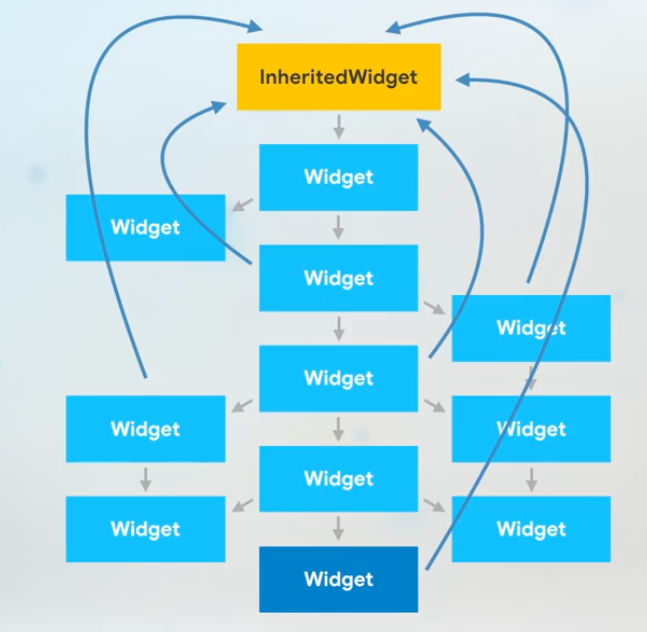
InheritedWidget はこの「コンストラクタによる state のリレー」による煩わしさを解消する。
https://www.youtube.com/watch?v=Zbm3hjPjQMk
前提知識
依存性の注入(DI)
dependency injection
依存性の注入(いぞんせいのちゅうにゅう、英: Dependency injection)とは、あるオブジェクトや関数が、依存する他のオブジェクトや関数を受け取るデザインパターンである。英語の頭文字からDIと略される。DIは制御の反転の一種で、オブジェクトの作成と利用について関心の分離を行い、疎結合なプログラムを実現することを目的としている。
dependencyを「依存性」と訳すのは本来の意味[1] から外れているため「依存オブジェクト注入」の用語を採用する文献も複数存在する[2][3]。
https://ja.wikipedia.org/wiki/%E4%BE%9D%E5%AD%98%E6%80%A7%E3%81%AE%E6%B3%A8%E5%85%A5
convariant キーワード
型の互換性には以下のタイプが存在する。
- 不変性
- invariance
- 宣言時に指定された特定の型以外を許容しない性質
- 例:ジェネリクス
-
共変性
- covariant
- ある型がその型のサブタイプに対して互換性を持つ性質
- スーパークラスの型で宣言した変数に対してサブクラスのオブジェクトが代入できる
- 反変性
- contravariance
- ある型がその型のスーパータイプに対して互換性を持つ性質
- サブクラスの型で宣言した変数に対してスーパークラスのオブジェクトが代入できる
dart における convariant キーワードは、共変性を実現するために利用される。
class Super {
  bool notify(Super param) => false;
}

class Sub extends Super {
  // コンパイルエラー(サブタイプを許容しない)
  @override
  bool notify(Sub param) => false;
}
class Super {
  bool notify(covariant Super param) => false;
}

class Sub extends Super {
  // OK(サブタイプを許容する)
  @override
  bool notify(Sub param) => false;
}
共変性や反変性があることは、サブタイプやスーパータイプを許容するための 柔軟性 を持つことを意味する。
ただし一方で、コンパイル時の型安全の制約を緩める 危険性 も併せ持つ(開発者が気を遣う領域が増える)。
Flutter のアーキテクチャ
Ephemeral state vs App state
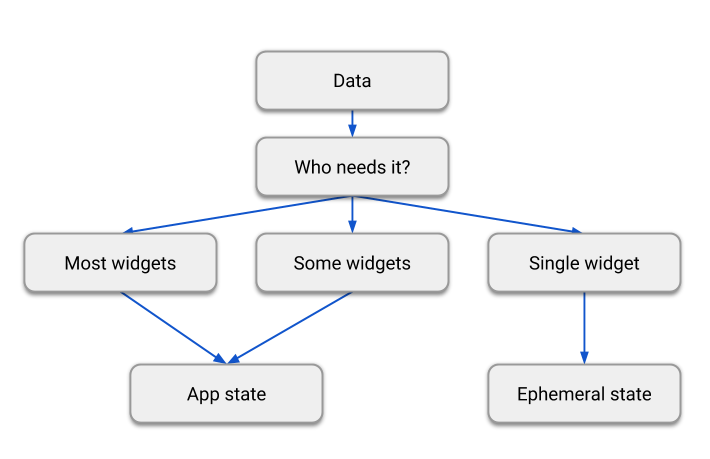
アプリケーションで扱う state が Ephemeral state なのか、App state なのかについては明確なルールは存在しない。
https://docs.flutter.dev/data-and-backend/state-mgmt/ephemeral-vs-app
Ephemeral state
ephemeral = 一時的な
単一のウィジェット内でのみ使用される state。
自身以外のウィジェットから参照されないような情報。StatefulWidget で実装することが多い。
-
PageViewのページインデックス - アニメーションで使用する進行度
t(0.0~1.0) - 選択中のタブ
Ephemeral state は StatefulWidget で実現することができる。
App state
アプリ内の複数の箇所から参照される state。
Prodiver を使って実装することが多い。
- ユーザ設定
- ログイン情報
- EC サイトのショッピングカート情報
IngeritedWidget とは
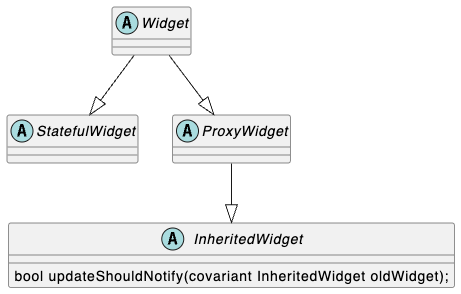
state をツリー上層から下層に伝える ための抽象クラス。
ソースコードを見ると、非常にシンプルなクラスであることがわかる。
abstract class InheritedWidget extends ProxyWidget {
  const InheritedWidget({super.key, required super.child});

  @override
  InheritedElement createElement() => InheritedElement(this);

  @protected
  bool updateShouldNotify(covariant InheritedWidget oldWidget);
}
InheritedWidget の機能の多くは InheritedElement に委譲されている。
InheritedWidget 自体は immutable(Widget は immurtable)。
InheritedWidget は immutable であり、時間経過と共に変わっていく「状態」を保持し続けることはできない
BuildContext.dependOnInheritedWidgetOfExactType<T extends InheritedWidget>(abstract method)
抽象クラス BuildContext で定義された抽象メソッド。
abstract class BuildContext {
  T? dependOnInheritedWidgetOfExactType<T extends InheritedWidget>({Object? aspect});}
依存性の登録 を行うために利用される。
慣習的に static of() 内で使用される。
Returns the nearest widget of the given type T and creates a dependency on it, or null if no appropriate widget is found.
指定されたタイプTの最も近い Widget を返し、それへの依存関係を作成します。適切な Widget が見つからない場合は null になります。
The widget found will be a concrete InheritedWidget subclass, and calling dependOnInheritedWidgetOfExactType registers this build context with the returned widget.
このメソッドによって見つかる Widget は InheritedWidget(抽象)を継承したサブクラス(具象)です。
そしてdependOnInheritedWidgetOfExactType()を呼ぶと、その Widget に対して「このBuildContextは依存している」という登録が行われます。。
-
StatefulWidgetのinitState()内で呼ぶべきではない -
StatefulWidgetのdispose()内で呼ぶべきではない -
build()内は OK -
didChangeDependencies()内は OK
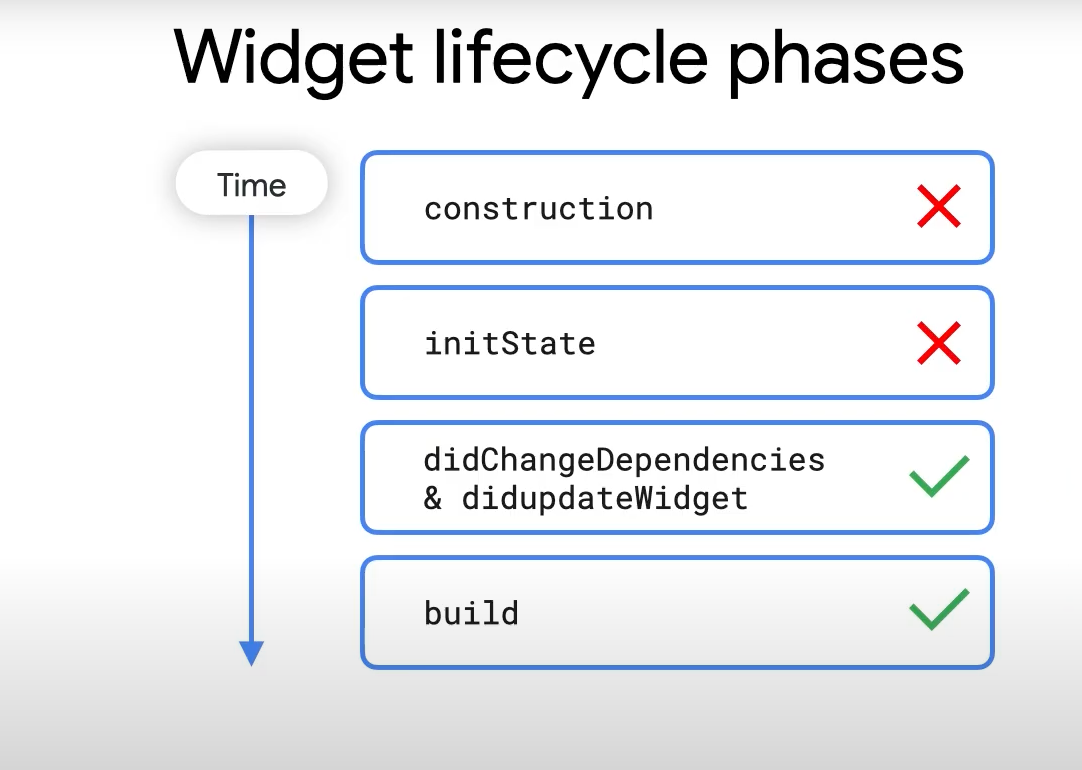
https://api.flutter.dev/flutter/widgets/InheritedWidget-class.html
SomeWidget が dependOnInheritedWidgetOfExactType<MyWidget> を使用して MyWidget が持つ状態にアクセスした場合、
@override
Widget build(BuildContext context) {
  final state = dependOnInheritedWidgetOfExactType<MyWidget>();
SomeWidget が MyWidget に依存しているという 依存性の登録が行われた ことになるため、それ以降は MyWidget が変更される度に SomeWidget に対して変更が通知すされる(つまり 再 build() させることができる)。
BuildContext.getElementForInheritedWidgetOfExactType<T extends InheritedWidget>()(abstract method)
SomeWidget が getElementForInheritedWidgetOfExactType<MyWidget>() を使用して MyWidget が持つ状態にアクセスした場合、
@override
Widget build(BuildContext context) {
  final state = getElementForInheritedWidgetOfExactType<MyWidget>();
依存性の登録は行われない ため MyWidget の状態が変更される度に SomeWidget に対して変更は通知されない(再 build() させることができない)。
dependOnInheritedWidgetOfExactType() vs getElementForInheritedWidgetOfExactType()
Provider.of() のパラメータ listen を true にするか false のするかの違い。
-
listen: true- 内部的に
dependOnInheritedWidgetOfExactType()が実行される - 依存性の登録が行われる
-
Tの変更時にbuild()が呼ばれる
- 内部的に
-
listen: false- 内部的に
getElementForInheritedWidgetOfExactType()が呼ばれる - 依存性の登録は行われない
-
Tの変更時にbuild()が呼ばれない
- 内部的に
static T of<T>(BuildContext context, {bool listen = true}) {

  final inheritedElement = _inheritedElementOf<T>(context);

  if (listen) {
    context.dependOnInheritedWidgetOfExactType<_InheritedProviderScope<T?>>();
  }

  final value = inheritedElement?.value;

  return value as T;
}
InheritedWidget を使うには(供給側)
IngeritedWidgetを継承したクラス(MyState)を定義するstatic MyState? maybeOf()/static MyState MyState of()を定義するbool updateShouldNotify()をオーバーライドする
IngeritedWidget を継承した MyState クラスを定義する
MyState クラスは「ウィジェット」であり「state」でもある。
パラメータとして受け取った child は、スーパークラスである InheritedWidget に横流しされる。
MyState は 見た目を持たない Widget であり、child を持つことによって Widget tree を構成する能力が備わる。
class MyState extends InheritedWidget {
  const MyState({
    super.key,
    required this.data,
    required super.child, // スーパークラスに横流し
  });

  final String data; // 👈 state の実体
}

class MyData {
  const MyData({required this.data});

  final String data;
}
static MyState? maybeOf() / static MyState MyState of() を定義する
of() / mabeOf() は MyState が「state の実体」を返すためのインターフェースとして利用される。
メソッド名は慣例的なものであるが、特別な理由がない限り、踏襲しておいたほうが Flutter 開発者によって馴染みやすい。
-
maybeOf()の実体はdependOnInheritedWidgetOfExactType() -
of()の実体はmaybeOf() -
dependOnInheritedWidgetOfExactType()によって、of()を実行したウィジェットがMyStateに 依存していることを登録する 役割がある
static MyState? maybeOf(BuildContext context) =>
  context.dependOnInheritedWidgetOfExactType<MyState>();
static MyState of(BuildContext context) {
  final result = maybeOf(context);
  if (result == null) {
    return const MyState(
      data: 'no data',
      child: SizedBox.shrink(),
    );
  }

  return result;
}
of() vs maybeOf()
MyState を定義する際の of() と maybe0f() は、Flutter SDK によってメソッド名やメソッドの中身が強制されるものではないが、一般的に nullable かどうかで使い分けがなされる。
-
of()- null 非許容
-
maybe0f()- null 許容
updateShouldNotify() をオーバーライドする
InheritedWidget で抽象メソッドとして定義された updateShouldNotify() をオーバーライドする。
updateShouldNotify() はウィジェットに対して、再描画が必要な条件を bool 値で返却する。
// UI では data を表示している想定なので、「更新時は再描画が必要」ということを伝える
@override
bool updateShouldNotify(MyState oldWidget) => data != oldWidget.data;
data が変わった場合にのみ、下層ウィジェットを再描画させる。
InheritedWidget を使う(需要側)
画面から MyState オブジェクトを取得する
定義した MyState クラスからインスタンス化されたオブジェクトは、アプケーション全体で共有される必要がある(dependency injection)。
MyState から提供される of() を利用することで、Widget tree のどの位置からも 同一の state にアクセスできる。
https://www.youtube.com/watch?v=Zbm3hjPjQMk
class MyScreen1 extends StatelessWidget {
  const MyScreen1({super.key});

  @override
  Widget build(BuildContext context) {
    var data = MyState.of(context).data; // 👈 state を取得
    return Text(data);
  }
}

class MyScreen2 extends StatelessWidget {
  const MyScreen2({super.key});

  @override
  Widget build(BuildContext context) {
    var data = MyState.of(context).data; // 👈 state を取得
    return Text(data);
  }
}
MyState を生成し、アプリの上層から DI(注入)する
MyState クラスは「ウィジェットクラス」であり「state の実体を表すクラス」でもある。
InheritedWidget を祖先に持つ Widget tree 全体で state を共有するために、アプリケーションの上層で MyState のインスタンスを生成する必要がある(依存性の注入)。
class MyApp extends StatelessWidget {
  const MyApp({super.key});

  @override
  Widget build(BuildContext context) {
    return MaterialApp(
      title: 'Example',
      theme: ThemeData(
        primarySwatch: Colors.blue,
      ),
      home: const MyState(
        data: 'initial data', // 👈 初期 data が注入される
        child: MyHomePage(),
      ),
      routes: routes,
    );
  }
}
InheritedWidgget まとめ
InheritedWidget を使用することで、ツリーの上層から DI された state を、Widget tree 全体が共有することができる。
https://www.youtube.com/watch?v=Zbm3hjPjQMk
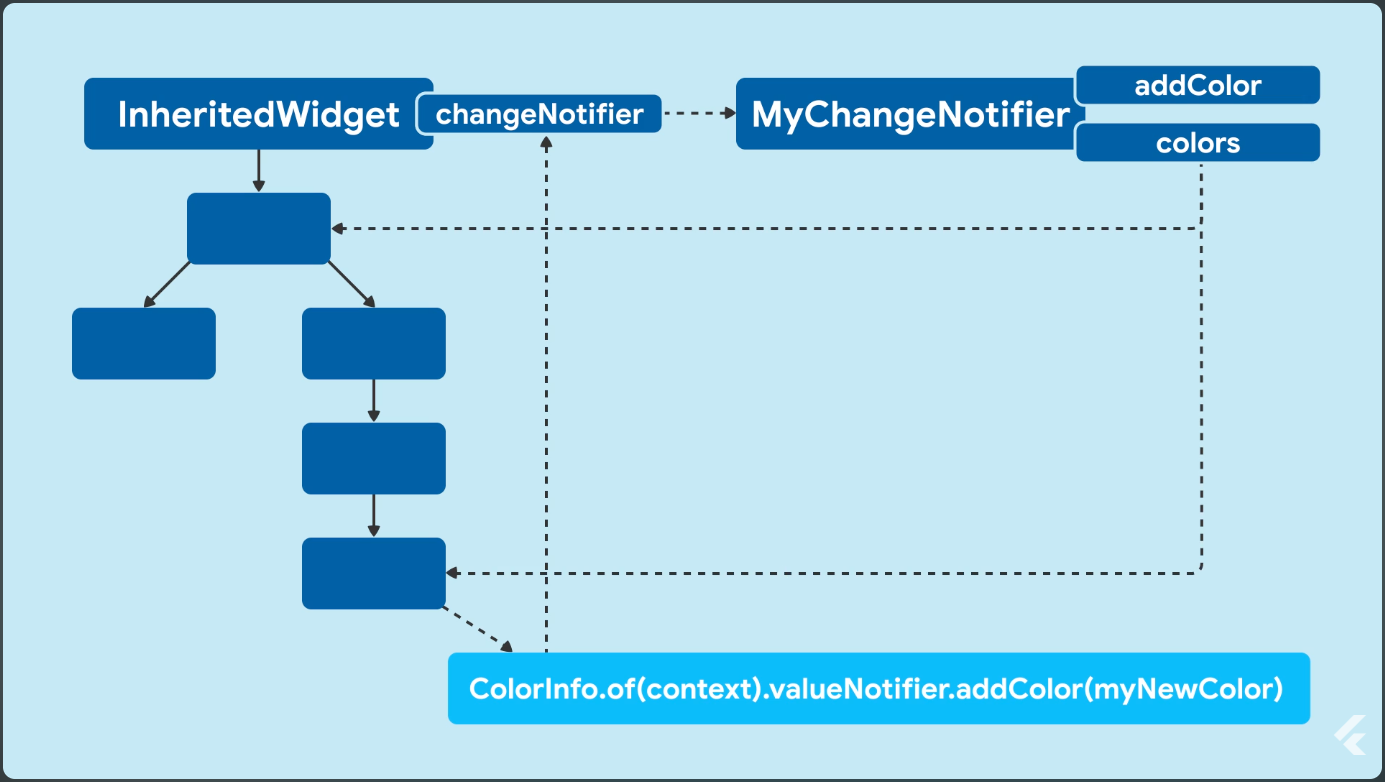
ただし、ツリーの下層から state を更新したり、更新を通知するのは ChangeNotifier などの別の仕組みの責務となっている。