
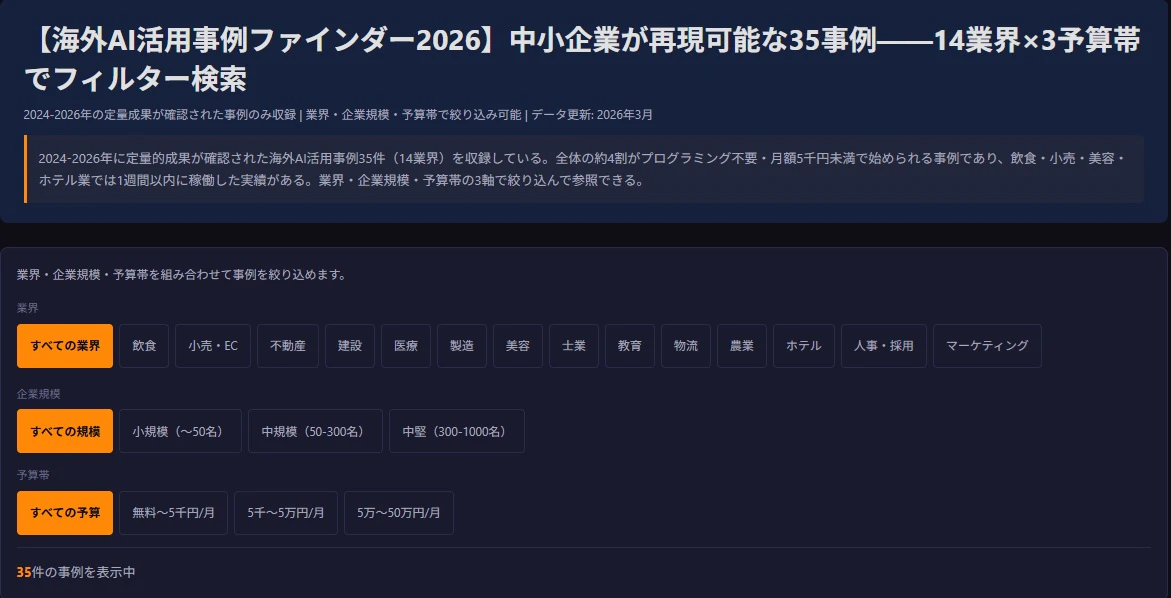
この記事でできること
- D3.jsのdata binding(
data().join())を使ったカードUIの動的フィルタリングを実装する - 定義・出典・コスト情報を持った構造化データで事例カードを管理する
- WordPress(SWELLテーマ)でカードUIが壊れる原因3つを回避する
実際に動作するツールは海外AI活用事例ファインダー(AI Japan Index)で確認できる。
環境・バージョン
- D3.js: v7.9.0(CDN:
https://cdn.jsdelivr.net/npm/d3@7/dist/d3.min.js) - WordPress: 6.7系
- SWELLテーマ: 2.10系
- ブラウザ確認: Chrome 133 / Safari 17 / Firefox 124
- 対象データ: 35事例・14業界・3規模帯・3予算帯
完成形
3つのフィルターボタン(業界・規模・予算帯)を選択すると、カードグリッドが動的に更新されるUIを作る。
実装するUI要素:
- 業界フィルターボタン(14業界 + すべて)
- 規模フィルターボタン(小規模・中規模・中堅 + すべて)
- 予算フィルターボタン(3予算帯 + すべて)
- カードグリッド(フィルター後の件数を表示)
- 各カードに「日本で始めるなら」の折りたたみ欄
Step 1: 事例データの構造設計
フィルタリングを後から楽にするために、最初からフィルター軸(industry・scale・budgetTier)をデータに持たせる。あとで追加するのは手間がかかる。
// data.js(HTMLにインライン展開)
const caseData = [
  {
    id: "case-001",
    industry: "飲食",
    industryEn: "food",     // フィルターキーに使う
    scale: "small",         // small / medium / large
    budgetTier: "low",      // low(<5k円) / mid(5k-50k) / high(50k+)
    title: "ChatGPTを活用したSNS動画マーケティング",
    region: "米国",
    outcome: "3週間で2,200万回再生、来客数1.5倍",
    noCode: true,
    setupDays: 1,
    monthlyCost: 0,
    source: "店舗公式ケーススタディ・メディア取材",
    japanGuide: "ChatGPT無料版でReels/TikTok用の動画スクリプトを生成。Buffer等で自動投稿設定。",
    lastVerified: "2026-03-28"
  },
  {
    id: "case-007",
    industry: "医療",
    industryEn: "medical",
    scale: "small",
    budgetTier: "high",
    title: "歯科クリニックのAI画像診断",
    region: "米国",
    outcome: "虫歯検出精度92%、ROI 18倍",
    noCode: false,
    setupDays: 30,
    monthlyCost: 150000,
    source: "Overjet公式事例集",
    japanGuide: "国内代替: DeepX。初年度費用は機器・トレーニングを含む。",
    lastVerified: "2026-03-28"
  }
  // ... 他33件
];
つまずきポイント: industryEn(英字キー)とindustry(表示用日本語)を分けない
フィルターボタンのdata-filter属性に日本語を使うと、HTMLの属性値と一致しないケースが発生する(全角スペース・文字コードの差異等)。英字のキー(industryEn: "food")と表示用の日本語(industry: "飲食")を分けて持つことで問題を回避できる。
Step 2: D3.jsの動的ロード
<script src="CDN">タグはSWELLが無視するため動的ロードが必要だ。
function loadD3(cb) {
  if (typeof d3 !== 'undefined') { cb(); return; }
  const s = document.createElement('script');
  s.src = 'https://cdn.jsdelivr.net/npm/d3@7/dist/d3.min.js';
  s.onload = cb;
  s.onerror = function() {
    document.getElementById('aji-global-cases-wrap').innerHTML =
      '<p>グラフの読み込みに失敗しました。再読み込みしてください。</p>';
  };
  document.head.appendChild(s);
}

document.addEventListener('DOMContentLoaded', function() {
  loadD3(initTool);
});
Step 3: フィルター状態管理とカード描画
フィルタリング状態をオブジェクトで一元管理し、条件が変わるたびにカードを再描画する。
// フィルタリング状態
const filterState = { industry: "all", scale: "all", budget: "all" };

function getFiltered() {
  return caseData.filter(function(d) {
    const i = (filterState.industry === "all") ? true : (d.industryEn === filterState.industry);
    const s = (filterState.scale === "all") ? true : (d.scale === filterState.scale);
    const b = (filterState.budget === "all") ? true : (d.budgetTier === filterState.budget);
    return i ? (s ? b : false) : false;
  });
}

function renderCards(data) {
  const container = d3.select('#case-grid');

  // D3のdata binding
  const cards = container.selectAll('.case-card')
    .data(data, function(d) { return d.id; });

  // 新しいカードを追加
  const enter = cards.enter()
    .append('div')
    .attr('class', 'case-card')
    .style('opacity', '0');

  enter.append('div')
    .attr('class', 'card-badges')
    .html(function(d) {
      const noCodeBadge = d.noCode ? '<span class="badge-nocode">プログラミング不要</span>' : '';
      const budgetBadge = '<span class="badge-budget ' + d.budgetTier + '">' + getBudgetLabel(d.budgetTier) + '</span>';
      return '<span class="badge-industry">' + d.industry + '</span>' + budgetBadge + noCodeBadge;
    });

  enter.append('h3')
    .attr('class', 'card-title')
    .text(function(d) { return d.title; });

  enter.append('p')
    .attr('class', 'card-outcome')
    .text(function(d) { return d.outcome; });

  enter.append('details')
    .attr('class', 'japan-guide')
    .html(function(d) {
      return '<summary>日本で始めるなら</summary><p>' + d.japanGuide + '</p>';
    });

  // フェードイン
  enter.transition().duration(180).style('opacity', '1');

  // 削除されるカードをフェードアウト
  cards.exit()
    .transition().duration(120)
    .style('opacity', '0')
    .remove();

  // 件数更新
  const countEl = document.getElementById('result-count');
  if (countEl) { countEl.textContent = data.length + '件'; }
}

function getBudgetLabel(tier) {
  if (tier === 'low') { return '月5千円未満'; }
  if (tier === 'mid') { return '月5千〜5万円'; }
  return '月5万円超';
}
Step 4: フィルターボタンのイベント設定
function initFilters() {
  // 業界ボタン
  const industryBtns = document.querySelectorAll('[data-filter-industry]');
  Array.prototype.forEach.call(industryBtns, function(btn) {
    btn.addEventListener('click', function() {
      filterState.industry = this.getAttribute('data-filter-industry');
      updateActiveClass(industryBtns, this);
      renderCards(getFiltered());
    });
  });

  // 予算ボタン
  const budgetBtns = document.querySelectorAll('[data-filter-budget]');
  Array.prototype.forEach.call(budgetBtns, function(btn) {
    btn.addEventListener('click', function() {
      filterState.budget = this.getAttribute('data-filter-budget');
      updateActiveClass(budgetBtns, this);
      renderCards(getFiltered());
    });
  });
}

function updateActiveClass(allBtns, activeBtn) {
  Array.prototype.forEach.call(allBtns, function(b) {
    b.classList.remove('active');
  });
  activeBtn.classList.add('active');
}
Step 5: && 問題を回避する
WordPressのコンテンツフィルターが&&を&&に変換する問題は、カードUIでも発生する。
// NG: WordPressが && に変換して構文エラー
const result = caseData.filter(d => d.scale === 'small' && d.budgetTier === 'low');

// OK: ネストfiltaerで回避
const byScale = caseData.filter(function(d) { return d.scale === 'small'; });
const result = byScale.filter(function(d) { return d.budgetTier === 'low'; });

// または三項演算子
const scaleOk = (d.scale === 'small');
const budgetOk = (d.budgetTier === 'low');
const match = scaleOk ? budgetOk : false;
つまずきポイントまとめ
-
<script src="CDN">がWordPressで無視される → 動的ロード(document.createElement('script')) -
&&演算子が&&に変換されてJS構文エラー → ネストfilter/三項演算子 - データのフィルターキーに日本語を使うとHTMLの
data-属性と一致しないケースがある → 英字キーと表示用日本語を分離 -
cards.exit().remove()をtransition()の前に呼ぶと即削除されてアニメーションが動かない →transition().duration().remove()の順序を守る - CSSのグローバルセレクタ(
*{},body{}等)がSWELLテーマを破壊 →.aji-wrap内でスコープ - D3.js v7でイベントハンドラが
function(d)からfunction(event, d)に変更 → 第一引数はeventオブジェクト -
querySelectorAllの結果は配列ではなくNodeListのためforEachが使えない環境がある →Array.prototype.forEach.call()で確実に動作させる
まとめ(今回学んだこと)
- D3.jsのdata binding(
data().join())はカードUIのフィルタリングにも使える - フィルターキーは英字・表示用テキストは日本語で分けて設計する
- WordPressで動かすには「動的ロード・&&禁止・スコープ付きCSS」の3点が必須
-
exit().transition().remove()の順序でフェードアウトアニメーションが正しく動く
全35件の事例と3軸フィルターはAI Japan Indexで無料公開している。