
諸般の事情から、ハードエッジを設定したモデルを多く扱います。
ハードエッジに線が出るので、それを境界に塗り分けとかをしないとイカンのですよ。
最初は手動でポチポチをポリゴンを選択していたわけですが・・・・
まぁ面倒で時間がかかるので何とかしたいなぁと。
処理設計
この領域をなるべく少ない手数で確実に選択したいです。

手動でやるときは適当に中央あたりを選択して、選択範囲を拡大させていき はみ出たら選択外して調整という感じですね。
なので、スクリプトでも似たようなことができないかなと。
ハードエッジからはみ出てほしくないので、
このポリゴンを選択して処理した場合には3つ選択面が増えてほしいですね。
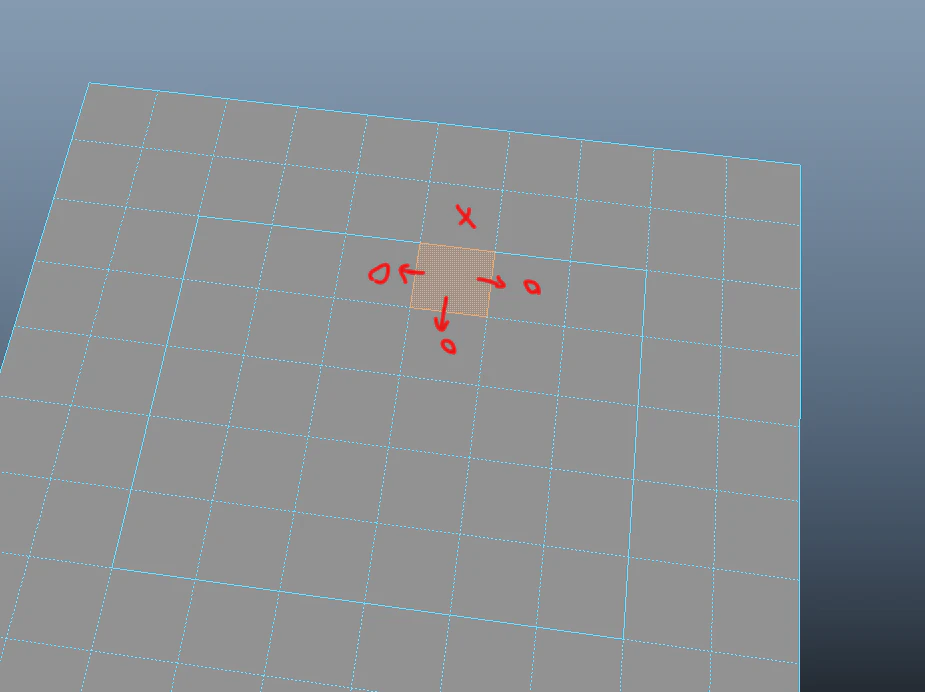
これを繰り返していけば一気に選択範囲を拡大できる・・・はず。
流れとしては
- ポリゴンを選択する
ここからループ
- 選択したポリゴンに隣接するポリゴンを取得する
- 選択したポリゴンと隣接ポリゴンが共有するエッジを取得する
- 共有するエッジがハードエッジだった場合は選択を広げない
- 共有するエッジがソフトエッジだった場合は隣接ポリゴンを選択に含める
- 選択しているポリゴン数が増えていなければループ終了
こんな感じですかね。
実装
faceの情報周りはAPIで取得してしまえば楽そうだったので、そうしました。
あとは再帰処理で拡大し続ける感じですね。
import maya.api.OpenMaya as om2
import maya.cmds as cmds

def getDagNode(target):
    try:
        sellist = om2.MGlobal.getSelectionListByName(target)
        return sellist.getDagPath(0)
    except:
        return None

def getShapeFn(dagPath):
    FnShape = None

    if dagPath.hasFn(om2.MFn.kMesh):
        FnShape = om2.MFnMesh(dagPath)

    elif dagPath.hasFn(om2.MFn.kNurbsSurface):
        FnShape = om2.MFnNurbsSurface(dagPath)

    elif dagPath.hasFn(om2.MFn.kNurbsCurve):
        FnShape = om2.MFnNurbsCurve(dagPath)

    return FnShape

def getHardEdges(target,idNumber = False):
    dagPath = getDagNode(target)
    FnShape = getShapeFn(dagPath)
    edgeNum = FnShape.numEdges

    hardEdgeIDs = []
    for edgeID in range(0,edgeNum):
        if FnShape.isEdgeSmooth(edgeID)==False:

            if idNumber:
                hardEdgeIDs.append(edgeID)
            else:
                hardEdgeIDs.append(target + ".e["+str(edgeID)+"]")

    return hardEdgeIDs

def expandFace(curFaceIDs,targetTransform):
    dagPath = getDagNode(targetTransform)
    meshIt = om2.MItMeshPolygon(dagPath)

    hardEdgeIDs = getHardEdges(targetTransform,idNumber = True)
    expandFaceIDs = []

    ##check face is contain hardEdge
    for targetFaceID in curFaceIDs:
        checkFaceIDs = []

        meshIt.setIndex(targetFaceID)
        composingEdges = meshIt.getEdges()
        connectedFaces = meshIt.getConnectedFaces()
        checkFaceIDs = list(set(checkFaceIDs) | set(connectedFaces))

        for checkFaceID in checkFaceIDs:
            meshIt.setIndex(checkFaceID)
            expandComposingEdges = meshIt.getEdges()
            commonEdges = list(set(composingEdges) & set(expandComposingEdges))

            if len(list(set(commonEdges) - set(hardEdgeIDs))) == 0:
                continue

            expandFaceIDs.append(checkFaceID)

    expandFaceIDs = list(set(expandFaceIDs) - set(curFaceIDs))

    if len(expandFaceIDs) == 0:
        return curFaceIDs

    curFaceIDs = list( set(curFaceIDs) | set(expandFaceIDs))
    curFaceIDs = expandFace(curFaceIDs,targetTransform)

    return curFaceIDs


def selectInsideHardEdge():
    selected = cmds.ls(sl = True, fl =True)

    targetDict = {}
    targets = []

    for target in selected:
        if ".f[" not in target:
            targets.append(target)
            continue

        trasnform = target.split(".f[")[0]
        faceID =  int(target.split("f[")[-1].replace("]",""))

        if trasnform in list(targetDict.keys()):
            targetDict[trasnform].append(faceID)
        else:
            targetDict[trasnform] = [faceID]

    for targetTransform in list(targetDict.keys()):
        curFaceIDs = expandFace(targetDict[targetTransform],targetTransform)

        for id in curFaceIDs:
            targets.append(targetTransform + ".f["+str(id)+"]")

    cmds.select(targets,r=True)

selectInsideHardEdge()
実験してみます。
ここを選択して実行すると・・・・

ピッタリハードエッジで止まってくれました。

試しに1辺だけソフトエッジにしてみるとどうでしょうか

ちゃんと機能しているようなので、選択が漏れ出て全部選択になっていますね。

おしまい
ハードエッジ以外にも クリースエッジなんかも対応できそうですね。