
リグをセットアップしてると
モデルをぶつ切りにして軽量化したセットアップを作ることがまぁあります。
とりあえず手作業でやってましたが、面倒すぎるので何とかしたいなぁと
以前作ったこの処理を使ってなんとかかんとか
もう少し解像度をあげる
ぶつ切りモデルを作ったところでおしまいではなく、最終的にjointでバインドするのが目的になります。
それを見越して手順をもう少し詳しく
-
モデルを用意する
-
対応するjointが判別できる名前でメッシュをextractFaceな処理する
-
jointで対応するモデルをバインドする
あー大体できてきましたね。
念のためもう少し詳しくしておきます
- モデルを用意する
- joint(骨格データ)を用意する
- jointと対応するマテリアルを生成する。(色はランダム)
- jointに対応するメッシュに、対応するマテリアルをアサインする
- アサインしたデータは別名で保存しておく
ここで一旦新規シーン
- モデルを用意する
- 先ほど作成したjoint対応モデルをリファレンスする
- マテリアルのアサイン情報からポリゴンを取得し、extractFaceな処理する
- 対応するjointが判別できる名前でextractFaceな処理したメッシュをリネーム
- jointで対応するモデルをバインドする
こんな流れですね。
やっていこう
とりあえず joint対応モデルの作成からやっていきます。
モデル・jointのトップノードを指定して、作業用データを作成します。
import maya.cmds as cmds
import maya.mel as mel
import random

def generateJointMT(joint):
    if cmds.objExists(joint + "_MT") == False:
        shader = cmds.shadingNode('lambert', name = joint + "_MT", asShader=True)
        shadingEngine = cmds.sets(renderable=1, noSurfaceShader=1, empty=1, name=shader + "SG")
        cmds.connectAttr(shader + ".outColor", shadingEngine + ".surfaceShader")
        cmds.setAttr(shader + ".ambientColor",0,0,0,type = "double3")

        color = [random.randrange(10,100,5) / 100.0 ,random.randrange(10,100,5) / 100.0 ,random.randrange(10,100,5) / 100.0 ]

        cmds.setAttr(shader + ".color",color[0],color[1],color[2],type = "double3")

    return joint + "_MT"

def generateAllJointMT(rootJoint = "root_jnt"):
    allJoint = cmds.listRelatives(rootJoint, ad =True,type ="joint")
    allJoint.append(rootJoint)
    for joint in allJoint:
        ##ignor endJoint
        if cmds.listRelatives(joint) == None:
            continue

        generateJointMT(joint)

def setDefaultMT(target):
    cmds.sets(target,e =True,forceElement = "initialShadingGroup")

def resetAllMT(topNode):
    meshNodes = cmds.listRelatives(topNode,ad =True,type = "mesh")

    for mesh in meshNodes:
        transform = cmds.listRelatives(mesh,p =True)[0]
        setDefaultMT(transform)

    mel.eval('MLdeleteUnused')

def preparation(topNode,rootJoint):
    resetAllMT(topNode)
    generateAllJointMT(rootJoint)
テスト用のデータを作成し実行してみます。

preparation("geo_gp","root_jnt")
色々生成されました。

ここからメッシュにマテリアルをアサインしていきますが、
いちいちjointの名前とマテリアルを照らし合わせてアサインするのは面倒なので
アサイン用のスクリプトを書いてしまします。
メッシュ(ポリゴン)とjointを選択して実行でぬりぬり
import maya.cmds as cmds
def assignMT():
    selectes = cmds.ls(sl =True)
    selectJoint = cmds.ls(selectes,type = "joint")

    for select in selectes:
        if select in selectJoint:
            continue

        cmds.sets(select,e =True,forceElement = selectJoint[0] + "_MTSG")
ぬりわけ完了。
ミラー塗り機能も欲しくなりますね。

それぞれのデータは個別に保存してあります。

これを組み合わせる
この処理をやってしまいます。
- モデルを用意する
- 先ほど作成したjoint対応モデルをリファレンスする
- マテリアルのアサイン情報からポリゴンを取得し、extractFaceな処理する
- 対応するjointが判別できる名前でextractFaceな処理したメッシュをリネーム
import maya.cmds as cmds
import maya.api.OpenMaya as om2

def splitmodels(rootJoint,refPrefix,parentGP,**kwargs):

    if cmds.objExists(parentGP) ==False:
        cmds.createNode("transform",name = parentGP)

    allJoints = cmds.listRelatives(rootJoint,ad =True, type = "joint")
    allJoints.append(rootJoint)

    for joint in allJoints:
        refMT = refPrefix + joint + "_MTSG"

        if cmds.objExists(refMT) == False:
            continue

        ##get assigned
        assigned = cmds.sets(refMT,q=True)
        assigned = cmds.ls(assigned,fl =True)

        keepFaceIDDict = {}
        transformNodes = []

        for assign in assigned:
            transform = assign.split(".")[0]

            if cmds.nodeType(transform) == "mesh":
                transform = cmds.listRelatives(transform,p =True)[0]

            if transform not in transformNodes:
                transformNodes.append(transform)

            if ".f[" in assign:
                faceID = assign.split("[")[-1].replace("]","")

                if transform in list(keepFaceIDDict.keys()):
                    keepFaceIDDict[transform].append(int(faceID))
                else:
                    keepFaceIDDict[transform] = [int(faceID)]

            else:
                mesh_dagPath = om2.MGlobal.getSelectionListByName(transform).getDagPath(0)
                FnShape = om2.MFnMesh(mesh_dagPath)
                polyNum = FnShape.numPolygons

                if transform not in list(keepFaceIDDict.keys()):
                    keepFaceIDDict[transform] = []

                for i in range(0,polyNum):
                    keepFaceIDDict[transform].append(int(i))

        transformNodes.sort()
        ##duplicate
        splitedMesh = []

        tmpPrefix = "BLKTMP"
        for transform in transformNodes:
            orgMesh = transform.replace(refPrefix ,"")

            if cmds.objExists(orgMesh) == False:
                continue

            dupTarget = cmds.duplicate(orgMesh, name = tmpPrefix + "_"+ orgMesh)[0]
            cmds.parent(dupTarget,world =True)

            splitedMesh.append(dupTarget)
            mesh_dagPath = om2.MGlobal.getSelectionListByName(dupTarget).getDagPath(0)
            FnShape = om2.MFnMesh(mesh_dagPath)
            polyNum = FnShape.numPolygons

            deleteFace = []
            for i in range(0,polyNum):
                if i not in keepFaceIDDict[transform]:
                    deleteFace.append(dupTarget + ".f["+str(i)+"]")

            cmds.delete(deleteFace)


        for i in range(0,len(splitedMesh)):
            renamed = cmds.rename(splitedMesh[i],joint + "_geo"+str(i+1).zfill(2))
            cmds.parent(renamed,parentGP,a=True)
このデータを・・・・
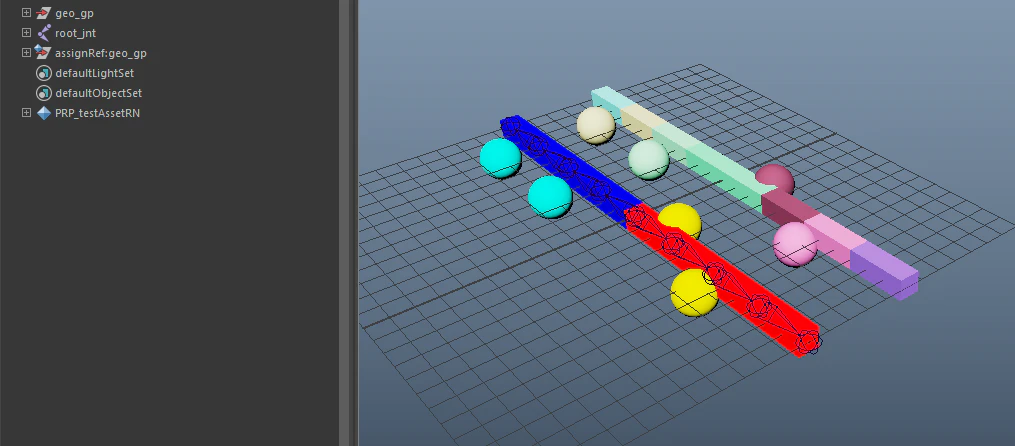
こう
splitmodels("root_jnt","assignRef:","hoge_gp")

こうなればあとはjoint名から引っ張ってバインドしていけばいいだけですね。
joint対応モデルを1回作ってしまえば、faceIdが変わっていなければ
- UV変更になりました
- マテリアル修正しました
- 形状ちょっと調整しました(vtxは足してません)
くらいの変更には即応できますねー