
サンプルアプリのおすすめ機能体験パックに含まれる休暇申請アプリを例に
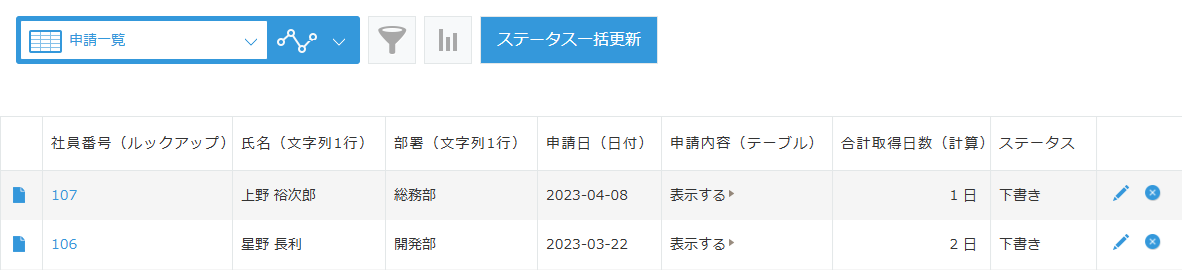
一覧に表示中のレコードのステータスを一括更新できるようにした。
一覧のメニューの右側にボタンを配置。
ボタンを押すと、確認ダイアログが出る。
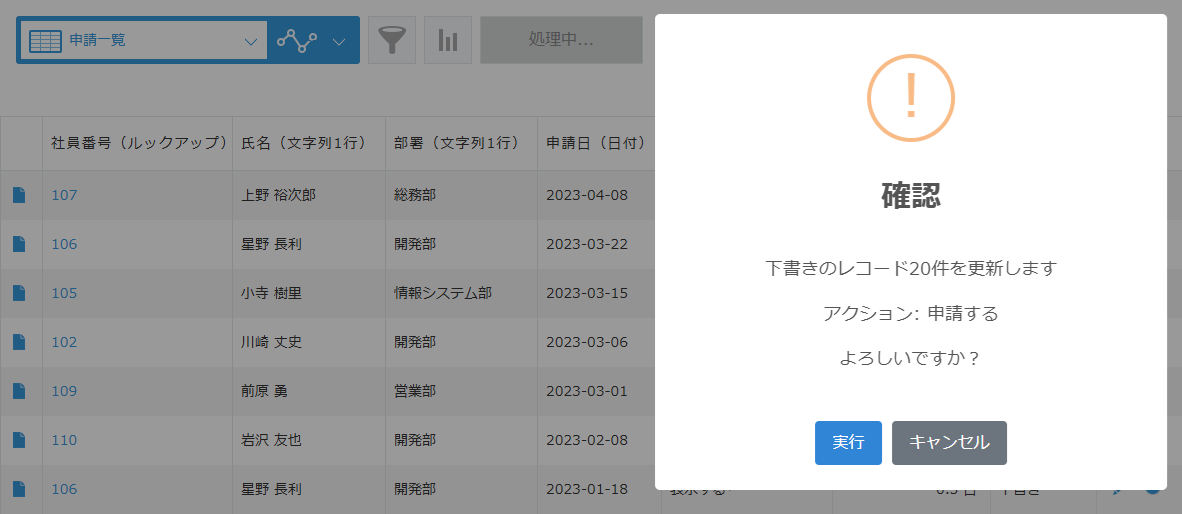
ステータス更新中はスピナーを表示。

更新が終わると、ステータスの遷移結果、実行されたアクション、更新件数が表示される。
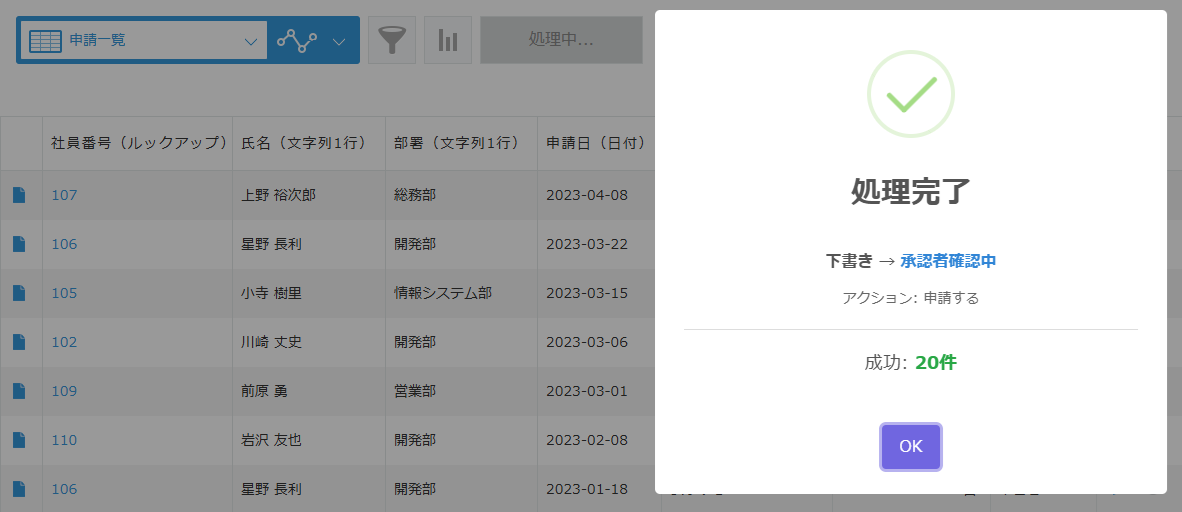
ダイアログを閉じると、リロードされ、ステータス更新が画面に反映される。

PC用のJavaScript / CSSファイル は下図のようにする。
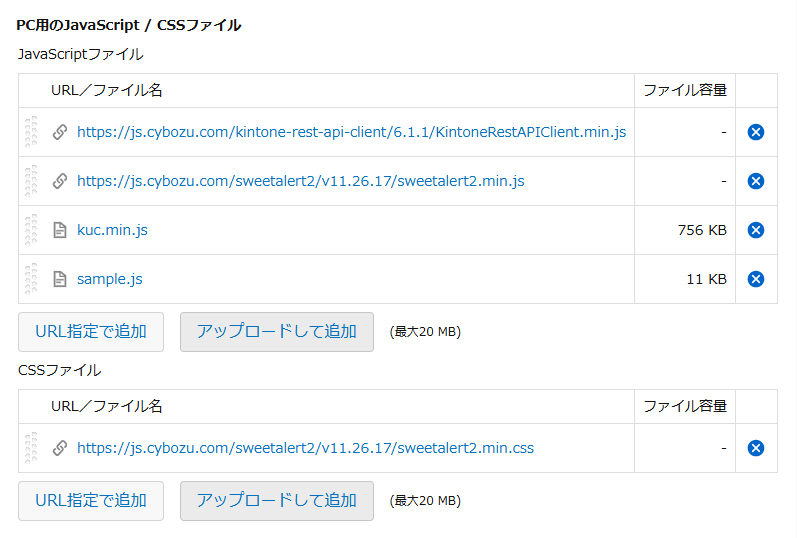
sample.js は、休暇申請アプリのプロセス管理の設定に合わせて以下のように書く。

sample.js
(() => {
  'use strict';

  // kintone REST API Client のインスタンスを生成
  const client = new KintoneRestAPIClient();

  // 更新対象となるステータス
  const UPDATE_STATUSES = ['下書き', '承認者確認中', '差し戻し'];

  // ステータスに対応するアクションのマッピング(複数のアクションを持つ承認者確認中は書かない)
  const ACTION_MAP = {
    '下書き': '申請する',
    '差し戻し': '再申請する'
  };

  // アクション実行後の遷移先ステータスのマッピング
  const NEXT_STATUS_MAP = {
    '申請する': '承認者確認中',
    '承認する': '完了',
    '差し戻す': '差し戻し',
    '再申請する': '承認者確認中'
  };

  // 一覧画面が表示されたときの処理
  kintone.events.on('app.record.index.show', async (event) => {
    // 一覧のメニューの右側の要素を取得
    const headerSpace = kintone.app.getHeaderMenuSpaceElement();

    // 既にボタンが追加されている場合は重複追加しない
    if (headerSpace.querySelector('.bulk-status-update-btn')) return event;

    // kintone UI Component を使用してボタンを作成
    const button = new Kuc.Button({
      text: 'ステータス一括更新',
      type: 'submit',
      className: 'bulk-status-update-btn'
    });

    // 取得した要素に作成したボタンを追加
    headerSpace.appendChild(button);

    // ボタンクリック時の処理
    button.addEventListener('click', async () => {
      try {
        // ボタンを無効化して二重クリックを防止
        button.disabled = true;
        button.text = '処理中...';

        // 現在のアプリIDを取得
        const appId = kintone.app.getId();

        // 現在の一覧に適用されているクエリを取得し、limit と offset を除去
        const query = kintone.app.getQuery()
          ?.replace(/limit\s+\d+/gi, '')
          .replace(/offset\s+\d+/gi, '')
          .trim();

        // クエリに一致する全レコードを取得
        const records = await client.record.getAllRecordsWithCursor({
          app: appId,
          ...(query && { query })
        });

        // レコードが1件も取得できなかった場合は処理終了
        if (records.length === 0) {
          await Swal.fire({
            icon: 'info',
            title: 'レコードなし',
            html: '現在表示中の一覧にレコードがありません'
          });
          return;
        }

        // ログインユーザーのログイン名を取得
        const loginUserCode = kintone.getLoginUser().code;

        // 作業者にログインユーザー以外が設定されているレコードの有無を示すフラグ
        let excludedByAssignee = false;

        // 取得したレコードから更新可能なレコードを絞り込む
        const validRecords = records.filter(r => {
          // 更新対象なステータス(下書き、承認者確認中、差し戻し)でないレコードは除外
          if (!UPDATE_STATUSES.includes(r.ステータス.value)) return false;

          // 作業者が空の場合は誰でも更新可能なのでtrueを返す
          if (!r.作業者?.value?.length) return true;

          // 作業者が設定されている場合は、ログインユーザーが作業者に含まれているかチェック
          const isAssigned = r.作業者.value.map(u => u.code).includes(loginUserCode);
          if (!isAssigned) excludedByAssignee = true;
          return isAssigned;
        });

        // ステータスごとのレコード件数を集計するためのオブジェクト
        const statusCounts = {};

        // 更新可能なレコードをループして、ステータス別に件数をカウント
        validRecords.forEach(r => {
          const status = r.ステータス.value;
          statusCounts[status] = (statusCounts[status] || 0) + 1;
        });

        // 全ステータスの合計件数を計算
        const totalCount = Object.values(statusCounts).reduce((a, b) => a + b, 0);

        // 更新可能なレコードが1件もない場合は処理終了
        if (totalCount === 0) {
          // 作業者チェックで除外されたレコードがある場合とない場合でメッセージを変える
          const msg = excludedByAssignee > 0
            ? '他のユーザーが作業者に指定されているので<br>更新できません'
            : 'ステータスが完了のレコードしかありません';
          await Swal.fire({ icon: 'info', title: '更新対象なし', html: msg });
          return;
        }

        // 更新するステータスの選択肢を作成
        const statusOptions = UPDATE_STATUSES
          .filter(s => statusCounts[s] > 0) // 件数が0のステータスは除外
          .map(s => ({ value: s, text: `${s} (${statusCounts[s]}件)` }));

        // 選択されたステータスを格納する変数
        let selectedStatus;

        // 選択肢が複数ある場合はユーザーに選ばせる
        if (statusOptions.length > 1) {
          // ラジオボタンのHTMLを生成
          const optionsHtml = statusOptions.map((opt, i) =>
            `<div style="margin: 10px 0;">
              <input type="radio" id="s${i}" name="status" value="${opt.value}" ${i === 0 ? 'checked' : ''}>
              <label for="s${i}" style="margin-left: 8px; cursor: pointer;">${opt.text}</label>
            </div>`
          ).join('');

          // ステータス選択ダイアログを表示
          const result = await Swal.fire({
            title: 'ステータス選択',
            html: `<div style="text-align: left;"><p style="margin-bottom: 15px;">更新するステータスを選択してください</p>${optionsHtml}</div>`,
            icon: 'question',
            showCancelButton: true,
            confirmButtonText: '次へ',
            cancelButtonText: 'キャンセル',
            confirmButtonColor: '#3085d6',
            cancelButtonColor: '#6c757d',
            preConfirm: () => document.querySelector('input[name="status"]:checked')?.value
          });

          // キャンセルされた場合は処理中止
          if (!result.isConfirmed) return;

          // 選択されたステータスを変数に保存
          selectedStatus = result.value;
        // 選択肢が1つしかない場合は自動的にそれを選ぶ
        } else {
          selectedStatus = statusOptions[0].value;
        }

        // アクションを取得
        let actionName = ACTION_MAP[selectedStatus];

        // 承認者確認中を更新する場合は「承認する」か「差し戻す」をユーザーに選ばせる
        if (selectedStatus === '承認者確認中') {
          const result = await Swal.fire({
            title: 'アクション選択',
            html: `<p>承認者確認中のレコード${statusCounts.承認者確認中}件に対する<br>アクションを選択してください</p>`,
            icon: 'question',
            showCancelButton: true,
            showDenyButton: true,
            confirmButtonText: '承認する',
            denyButtonText: '差し戻す',
            cancelButtonText: 'キャンセル',
            confirmButtonColor: '#3085d6',
            denyButtonColor: '#d33',
            cancelButtonColor: '#6c757d'
          });

          if (result.isConfirmed) actionName = '承認する';
          else if (result.isDenied) actionName = '差し戻す';
          else return;
        }

        // 選択されたステータスのレコードを抽出
        const targetRecords = validRecords.filter(r => r.ステータス.value === selectedStatus);

        // 更新前の最終確認ダイアログを表示
        const confirmResult = await Swal.fire({
          title: '確認',
          html: `<p>${selectedStatus}のレコード${targetRecords.length}件を更新します</p>
                 <p>アクション: ${actionName}</p><p>よろしいですか?</p>`,
          icon: 'warning',
          showCancelButton: true,
          confirmButtonText: '実行',
          cancelButtonText: 'キャンセル',
          confirmButtonColor: '#3085d6',
          cancelButtonColor: '#6c757d'
        });

        // キャンセルされた場合は処理中止
        if (!confirmResult.isConfirmed) return;

        // 処理中ダイアログを表示
        Swal.fire({
          title: '処理中...',
          html: '<div class="swal2-loader" style="display: block; margin: 20px auto;"></div><p style="margin-top: 20px;">ステータスを更新しています...</p>',
          allowOutsideClick: false,
          showConfirmButton: false
        });

        // 更新対象レコードの配列を作成
        const recordsToUpdate = targetRecords.map(r => ({
          id: r.$id.value,
          action: actionName,
          ...(actionName === '差し戻す' && { assignee: r.作成者.value.code }) // 差し戻す場合は作業者に作成者を指定
        }));

        // ステータス一括更新APIを実行
        await client.record.updateRecordsStatus({ app: appId, records: recordsToUpdate });

        // アクション実行後の遷移先ステータスを取得
        const afterStatus = NEXT_STATUS_MAP[actionName];

        // 処理完了ダイアログを表示(更新前後のステータスと実行されたアクション、更新件数を表示)
        await Swal.fire({
          icon: 'success',
          title: '処理完了',
          html: `<div style="margin-bottom: 20px;">
                   <p style="font-size: 16px; margin-bottom: 10px;">
                     <strong>${selectedStatus}</strong> → <strong style="color: #3085d6;">${afterStatus}</strong>
                   </p>
                   <p style="color: #666; font-size: 14px;">アクション: ${actionName}</p>
                 </div>
                 <hr style="margin: 20px 0; border: none; border-top: 1px solid #ddd;">
                 <p>成功: <strong style="color: #28a745;">${recordsToUpdate.length}件</strong></p>`,
          confirmButtonText: 'OK'
        });

        // リロードして最新の状態を画面に反映
        location.reload();

      // エラーが発生した場合はコンソールとダイアログにログを出力
      } catch (error) {
        console.error('エラー:', error);

        await Swal.fire({
          icon: 'error',
          title: 'エラー',
          text: error.message
        });
      // 処理完了後にボタンを元の状態に戻す
      } finally {
        button.disabled = false;
        button.text = 'ステータス一括更新';
      }
    });

    return event;
  });

})();