
はじめに
Web の技術(HTML / CSS / JavaScript)を使って、デスクトップアプリを作ってみます。
Electron のような選択肢もありますが、今回は Tauri を使って、シンプルな構成で実装していきます。
中身はあくまで「普通のWebアプリ」として作成し、Rustは書かずに進めます。
最終的には、インストーラーを作成し、実際にインストールできるところまで確認します。
今回やること
今回の記事では、以下の流れで進めます。
- Tauriプロジェクトの作成
- JavaScriptだけで簡単なアプリを作成
- デスクトップアプリとして起動
- インストーラーを作成して配布可能な形にする
作るアプリは、タスク管理 + 簡易ガントチャート表示のツールです。
前提環境
以下の環境を前提とします。
- Node.js がインストールされていること
- Rust(cargo)が利用できること
- Windows の場合は Build Tools が利用可能であること
Rustは普段あまり触らない場合でも、Tauri内部で利用されるためインストールが必要です。
プロジェクト作成
まずはプロジェクトを作成します。
npm create tauri-app@latest
コマンドを実行すると、プロジェクト名の入力やいくつかの質問が表示されます。
- Project name:任意の名前を入力
- Frontend:Vanilla
- Package manager:npm
- TypeScript:No
入力したプロジェクト名でディレクトリが作成されます。
そのディレクトリに移動して、依存関係をインストールします。
cd プロジェクト名
npm install
開発モードで起動
以下でデスクトップアプリとして起動できます。
npm run tauri dev
ウィンドウが表示されればOKです。
この時点で、「中身はWebアプリだが、デスクトップとして動いている」状態になります。
Webアプリを作成する
Tauriでは、デスクトップアプリの中身を通常のWebコンテンツとして構成できます。
そのため、特別なことはせず、HTML / JavaScript / CSS でアプリを作成します。
今回は、src 配下の以下のファイルを編集して実装しました。
- index.html
- main.js
- styles.css
今回は、タスク管理と簡易ガントチャート表示を組み合わせたアプリを作成してみます。
完成イメージ
アプリ全体の画面はこのようになります。
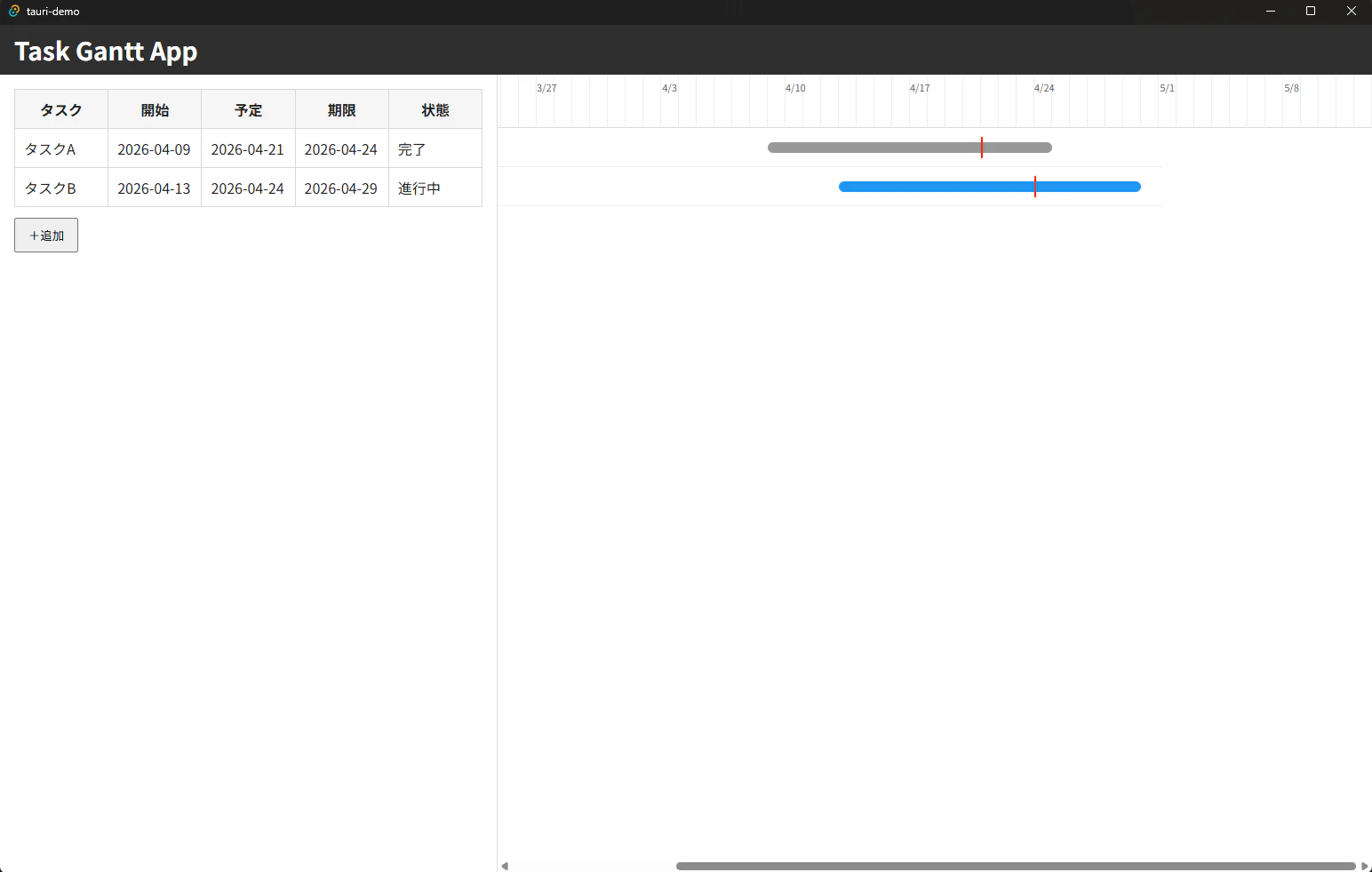
タスクをクリックすると、モーダルで編集できます。

実装のポイント
今回の実装はかなりシンプルです。
データ構造
タスクは配列で管理します。
- タスク名
- 開始日
- 予定日
- 期限日
- ステータス
localStorageに保存することで、簡易的な永続化も行っています。
ガントチャート表示
ガント表示はライブラリを使わずに実装しています。
- 開始〜期限 → 横バー
- 予定日 → 縦ライン
日付をpxに変換して配置するだけなので、意外とシンプルに実現できます。
UI設計
- 一覧はテーブル表示
- 行クリックで編集
- 削除はモーダル内
インライン編集にしないことで、実装と操作の両方をシンプルにしています。
インストーラーを作成する
配布用のビルドを行います。
npm run tauri build
ビルドが完了すると、以下に成果物が生成されます。
src-tauri/target/release/bundle/
Windowsの場合は .msi などのインストーラーが作成されます。
実際にインストールしてみる
生成されたインストーラーを実行すると、インストールできます。

配布時の設定と注意点
インストーラーの作成までは簡単に行えますが、実際に配布する場合はいくつか注意点があります。
発行元とユーザー名
デフォルトの状態では、インストーラーの情報にユーザー名が表示されることがあります。
これはビルド環境のユーザー情報が自動的に使用されるためです。
明示的に設定する場合は、tauri.conf.json に以下を追加します。
{
  "bundle": {
    "publisher": "Your Name"
  }
}
ただし、この設定はインストーラーのメタ情報に反映されるものであり、UACで表示される「発行元」とは別です。
インストーラーの言語
デフォルトでは英語になっているため、日本語に変更することもできます。
{
  "bundle": {
    "windows": {
      "wix": {
        "language": "ja-JP"
      }
    }
  }
}
再ビルドすることで、日本語のインストーラーになります。
署名について
未署名のアプリの場合、インストール時に以下のような表示になります。
- 「不明な発行元」と表示される
- 警告ダイアログが出る
これは危険という意味ではなく、「発行元が確認できない」という状態です。
正式に配布する場合は、コード署名証明書を使用して署名する必要があります。
まとめ
今回は、Tauriを使って以下を一通り確認しました。
- Webアプリをデスクトップアプリ化
- JavaScriptのみで実装
- インストーラー作成
- 実際のインストール確認
ポイントは、中身はあくまでWebアプリであることです。
特別なことをしなくても、普段のHTML / JavaScriptの知識でデスクトップアプリを作ることができます。
まずは最小構成で一度通してみると、Tauriの全体像が掴みやすいと思います。
スクリプト例
<!DOCTYPE html>
<html lang="ja">
<head>
  <meta charset="UTF-8" />
  <title>Task Gantt App</title>
  <link rel="stylesheet" href="styles.css" />
</head>
<body>
  <header>
    <h1>Task Gantt App</h1>
  </header>

  <main class="container">
    <section class="task-list">
      <table>
        <thead>
          <tr>
            <th>タスク</th>
            <th>開始</th>
            <th>予定</th>
            <th>期限</th>
            <th>状態</th>
          </tr>
        </thead>
        <tbody id="taskTableBody"></tbody>
      </table>

      <button id="addTaskBtn">+追加</button>
    </section>

    <section class="gantt">
      <div id="ganttHeader" class="gantt-header"></div>
      <div id="ganttBody" class="gantt-body"></div>
    </section>
  </main>

  <div id="modal" class="modal hidden">
    <div class="modal-content">
      <h2>タスク編集</h2>

      <div class="form-row">
        <label for="taskTitle">タスク名</label>
        <input id="taskTitle" type="text" placeholder="タスク名" />
      </div>

      <div class="form-row">
        <label for="startDate">開始日</label>
        <input id="startDate" type="date" />
      </div>

      <div class="form-row">
        <label for="plannedDate">予定日</label>
        <input id="plannedDate" type="date" />
      </div>

      <div class="form-row">
        <label for="dueDate">期限日</label>
        <input id="dueDate" type="date" />
      </div>

      <div class="form-row">
        <label for="status">ステータス</label>
        <select id="status">
          <option value="todo">未着手</option>
          <option value="doing">進行中</option>
          <option value="done">完了</option>
        </select>
      </div>

      <div class="actions">
        <button id="saveBtn">保存</button>
        <button id="deleteBtn">削除</button>
        <button id="cancelBtn">キャンセル</button>
      </div>
    </div>
  </div>

  <script src="main.js"></script>
</body>
</html>
const DAY_MS = 24 * 60 * 60 * 1000;
const PX_PER_DAY = 20;
const ROW_HEIGHT = 44;

let tasks = loadTasks();
let currentTaskId = null;

const today = new Date();
today.setHours(0, 0, 0, 0);

const startRange = new Date(today.getTime() - 30 * DAY_MS);
const endRange = new Date(today.getTime() + 30 * DAY_MS);
const totalDays = Math.floor((endRange - startRange) / DAY_MS);

// DOM
const taskTableBody = document.getElementById("taskTableBody");
const ganttHeader = document.getElementById("ganttHeader");
const ganttBody = document.getElementById("ganttBody");

const modal = document.getElementById("modal");
const addTaskBtn = document.getElementById("addTaskBtn");
const saveBtn = document.getElementById("saveBtn");
const deleteBtn = document.getElementById("deleteBtn");
const cancelBtn = document.getElementById("cancelBtn");

const taskTitleInput = document.getElementById("taskTitle");
const startDateInput = document.getElementById("startDate");
const plannedDateInput = document.getElementById("plannedDate");
const dueDateInput = document.getElementById("dueDate");
const statusSelect = document.getElementById("status");

function saveTasks() {
  localStorage.setItem("tasks", JSON.stringify(tasks));
}

function loadTasks() {
  const data = localStorage.getItem("tasks");
  return data ? JSON.parse(data) : [];
}

function toDate(str) {
  return new Date(`${str}T00:00:00`);
}

function diffDays(a, b) {
  return Math.floor((a - b) / DAY_MS);
}

function dateToX(dateStr) {
  const d = toDate(dateStr);
  return diffDays(d, startRange) * PX_PER_DAY;
}

function clamp(value, min, max) {
  return Math.max(min, Math.min(value, max));
}

function getStatusLabel(status) {
  switch (status) {
    case "todo":
      return "未着手";
    case "doing":
      return "進行中";
    case "done":
      return "完了";
    default:
      return "";
  }
}

function saveTask(task) {
  const index = tasks.findIndex((t) => t.id === task.id);
  if (index === -1) {
    tasks.push(task);
  } else {
    tasks[index] = task;
  }
  saveTasks();
  render();
}

function deleteTask(id) {
  tasks = tasks.filter((t) => t.id !== id);
  saveTasks();
  render();
}

function openModal(task = null) {
  if (task) {
    currentTaskId = task.id;
    taskTitleInput.value = task.title ?? "";
    startDateInput.value = task.startDate ?? "";
    plannedDateInput.value = task.plannedDate ?? "";
    dueDateInput.value = task.dueDate ?? "";
    statusSelect.value = task.status ?? "todo";
  } else {
    currentTaskId = null;
    taskTitleInput.value = "";
    startDateInput.value = "";
    plannedDateInput.value = "";
    dueDateInput.value = "";
    statusSelect.value = "todo";
  }

  modal.classList.remove("hidden");
}

function closeModal() {
  modal.classList.add("hidden");
}

function renderTaskList() {
  taskTableBody.innerHTML = "";

  tasks.forEach((task) => {
    const tr = document.createElement("tr");
    tr.className = "task-row";
    tr.innerHTML = `
      <td>${task.title ?? ""}</td>
      <td>${task.startDate ?? ""}</td>
      <td>${task.plannedDate ?? ""}</td>
      <td>${task.dueDate ?? ""}</td>
      <td>${getStatusLabel(task.status)}</td>
    `;

    tr.addEventListener("click", () => openModal(task));
    taskTableBody.appendChild(tr);
  });
}

function renderGanttHeader() {
  ganttHeader.innerHTML = "";
  ganttHeader.style.width = `${(totalDays + 1) * PX_PER_DAY}px`;

  for (let i = 0; i <= totalDays; i++) {
    const d = new Date(startRange.getTime() + i * DAY_MS);

    const cell = document.createElement("div");
    cell.className = "gantt-cell";
    cell.style.width = `${PX_PER_DAY}px`;

    if (i % 7 === 0) {
      cell.textContent = `${d.getMonth() + 1}/${d.getDate()}`;
    }

    ganttHeader.appendChild(cell);
  }
}

function createBar(task) {
  const bar = document.createElement("div");
  bar.className = "gantt-bar";

  const rawX1 = dateToX(task.startDate);
  const rawX2 = dateToX(task.dueDate) + PX_PER_DAY;

  const minX = 0;
  const maxX = (totalDays + 1) * PX_PER_DAY;

  const x1 = clamp(rawX1, minX, maxX);
  const x2 = clamp(rawX2, minX, maxX);

  bar.style.left = `${x1}px`;
  bar.style.width = `${Math.max(x2 - x1, 2)}px`;

  if (task.status === "done") {
    bar.classList.add("done");
  } else if (task.status === "doing") {
    bar.classList.add("doing");
  }

  return bar;
}

function createMarker(task) {
  if (!task.plannedDate) return null;

  const marker = document.createElement("div");
  marker.className = "gantt-marker";

  const x = dateToX(task.plannedDate);
  marker.style.left = x + "px";

  return marker;
}

function createGanttRow(task) {
  const row = document.createElement("div");
  row.className = "gantt-row";

  const bar = createBar(task);
  const marker = createMarker(task);

  row.appendChild(bar);

  if (marker) {
    row.appendChild(marker);
  }

  return row;
}

function renderGantt() {
  ganttBody.innerHTML = "";
  renderGanttHeader();

  tasks.forEach((task) => {
    ganttBody.appendChild(createGanttRow(task));
  });
}

function render() {
  renderTaskList();
  renderGantt();
}

addTaskBtn.addEventListener("click", () => openModal());

saveBtn.addEventListener("click", () => {
  const task = {
    id: currentTaskId || crypto.randomUUID(),
    title: taskTitleInput.value.trim(),
    startDate: startDateInput.value,
    plannedDate: plannedDateInput.value,
    dueDate: dueDateInput.value,
    status: statusSelect.value,
  };

  saveTask(task);
  closeModal();
});

deleteBtn.addEventListener("click", () => {
  if (currentTaskId) {
    deleteTask(currentTaskId);
  }
  closeModal();
});

cancelBtn.addEventListener("click", closeModal);

render();
* {
  box-sizing: border-box;
}

body {
  margin: 0;
  font-family: sans-serif;
  color: #222;
  background: #fff;
}

header {
  height: 56px;
  padding: 0 16px;
  display: flex;
  align-items: center;
  background: #2f2f2f;
  color: #fff;
}

header h1 {
  margin: 0;
  font-size: 28px;
}

.container {
  display: grid;
  grid-template-columns: 560px 1fr;
  height: calc(100vh - 56px);
}

.task-list {
  padding: 16px;
  overflow: auto;
  border-right: 1px solid #ddd;
}

.gantt {
  overflow: auto;
  background: #fff;
}

table {
  width: 100%;
  border-collapse: collapse;
  table-layout: fixed;
}

thead tr {
  height: 44px;
}

tbody tr {
  height: 44px;
}

th,
td {
  border: 1px solid #d9d9d9;
  padding: 8px 10px;
  white-space: nowrap;
  overflow: hidden;
  text-overflow: ellipsis;
}

th {
  background: #f5f5f5;
}

.task-row {
  cursor: pointer;
}

.task-row:hover {
  background: #fafafa;
}

#addTaskBtn {
  margin-top: 12px;
  padding: 8px 14px;
  cursor: pointer;
}

.gantt-header {
  display: flex;
  position: sticky;
  top: 0;
  z-index: 1;
  height: 60px;
  background: #fff;
  border-bottom: 1px solid #d9d9d9;
}

.gantt-cell {
  flex: 0 0 auto;
  height: 60px;
  padding-top: 6px;
  font-size: 11px;
  text-align: center;
  border-right: 1px solid #eee;
  color: #666;
}

.gantt-body {
  position: relative;
}

.gantt-row {
  position: relative;
  height: 44px;
  border-bottom: 1px solid #eee;
  cursor: pointer;
}

.gantt-row:hover {
  background: #fafafa;
}

.gantt-bar {
  position: absolute;
  top: 16px;
  height: 12px;
  border-radius: 6px;
  background: #4caf50;
}

.gantt-bar.doing {
  background: #2196f3;
}

.gantt-bar.done {
  background: #999;
}

.gantt-marker {
  position: absolute;
  top: 10px;
  width: 2px;
  height: 24px;
  background: red;
}

.modal {
  position: fixed;
  inset: 0;
  background: rgba(0, 0, 0, 0.35);
  display: flex;
  align-items: center;
  justify-content: center;
}

.hidden {
  display: none;
}

.modal-content {
  width: 420px;
  max-width: calc(100vw - 32px);
  background: #fff;
  padding: 24px;
  border-radius: 10px;
}

.modal-content h2 {
  margin-top: 0;
  margin-bottom: 20px;
}

.form-row {
  display: grid;
  grid-template-columns: 90px 1fr;
  align-items: center;
  gap: 12px;
  margin-bottom: 12px;
}

.form-row label {
  font-weight: 600;
}

.form-row input,
.form-row select {
  width: 100%;
  padding: 8px 10px;
  font: inherit;
}

.actions {
  display: flex;
  gap: 8px;
  margin-top: 20px;
}

.actions button {
  padding: 8px 14px;
  cursor: pointer;
}