
前回の記事で、faiss のインストールと、サービス(faiss_service.py)の作成(2025/4/28追記)を行いましたが、使いやすさのために補足します。すべてを使用しているわけではありません。
OpenAPI (Swagger) 対応
pip install flasgger
# from flask の下
from flasgger import Swagger
# app = ... の下
swagger = Swagger(app)

# """クエリベクトルで検索""" を以下に変更

    """
    クエリベクトルで検索
    ---
    tags:
      - Document Management
    description: クエリをベクトル化してナレッジベースから関連ドキュメントを検索します。
    parameters:
      - in: body
        name: body
        required: true
        schema:
          type: object
          required:
            - knowledge_id
            - query
            - retrieval_setting
          properties:
            knowledge_id:
              type: string
              description: 検索対象のKnowledge BaseのID
              example: "AAA-BBB-CCC"
            query:
              type: string
              description: 検索クエリのテキスト
              example: "売上レポートについて教えてください。"
            retrieval_setting:
              type: object
              description: 検索の詳細設定
              properties:
                top_k:
                  type: integer
                  description: 取得する上位ドキュメント数
                  example: 4
                score_threshold:
                  type: number
                  format: float
                  description: スコアの最低しきい値(小さいとヒットしやすい)
                  example: 0.4
    responses:
      200:
        description: 検索結果が返された場合
        schema:
          type: object
          properties:
            records:
              type: array
              items:
                type: object
                properties:
                  content:
                    type: string
                    description: ドキュメント本文
                    example: "売上レポート2023年第1四半期版"
                  title:
                    type: string
                    description: ドキュメントタイトル
                    example: "2023年Q1 売上まとめ.txt"
                  metadata:
                    type: object
                    description: メタデータ(任意)
                    example: {"category": "sales"}
                  score:
                    type: number
                    format: float
                    description: 類似スコア(1に近いほど類似)
                    example: 0.87
      500:
        description: サーバーエラー
        schema:
          type: object
          properties:
            error_code:
              type: integer
              example: 5000
            error_msg:
              type: string
              example: "Internal Server Error"
    """

# """新しいドキュメント追加""" を以下に変更

    """
    新しいドキュメント追加
    ---
    tags:
      - Document Management
    description: 新しいドキュメントをナレッジベースに追加します。
    parameters:
      - in: body
        name: body
        required: true
        schema:
          type: object
          required:
            - knowledge_id
            - content
            - title
          properties:
            knowledge_id:
              type: string
              description: 登録するナレッジベースのID
              example: "AAA-BBB-CCC"
            content:
              type: string
              description: 登録するドキュメントの本文
              example: "これはサンプルドキュメントの本文です。"
            title:
              type: string
              description: ドキュメントのタイトル
              example: "サンプルドキュメント.txt"
            metadata:
              type: object
              description: 任意のメタデータ情報
              example: {"category": "example"}
    responses:
      200:
        description: 正常に登録された場合
        schema:
          type: object
          properties:
            status:
              type: string
              example: "success"
            id:
              type: string
              description: 登録されたドキュメントのUUID
              example: "d290f1ee-6c54-4b01-90e6-d701748f0851"
      500:
        description: サーバーエラー(登録に失敗した場合)
        schema:
          type: object
          properties:
            error_code:
              type: integer
              example: 5000
            error_msg:
              type: string
              example: "Internal Server Error"
    """

# """ドキュメントを削除""" を以下に変更

    """
    ドキュメントを削除
    ---
    tags:
      - Document Management
    description: 指定されたIDのドキュメントを削除します。
    parameters:
      - in: body
        name: body
        required: true
        schema:
          type: object
          required:
            - id
          properties:
            id:
              type: string
              description: 削除対象のドキュメントID(UUID形式)
              example: "d290f1ee-6c54-4b01-90e6-d701748f0851"
    responses:
      200:
        description: 正常に削除された場合
        schema:
          type: object
          properties:
            status:
              type: string
              example: "success"
            id:
              type: string
              description: 削除されたドキュメントのID
      500:
        description: サーバーエラー(削除に失敗した場合)
        schema:
          type: object
          properties:
            error_code:
              type: integer
              example: 5000
            error_msg:
              type: string
              example: "Internal Server Error"
    """
ウェブページを表示
http://192.168.1.13:8000/apidocs/
画面


/add の「Try it out」ボタンを押下したとき
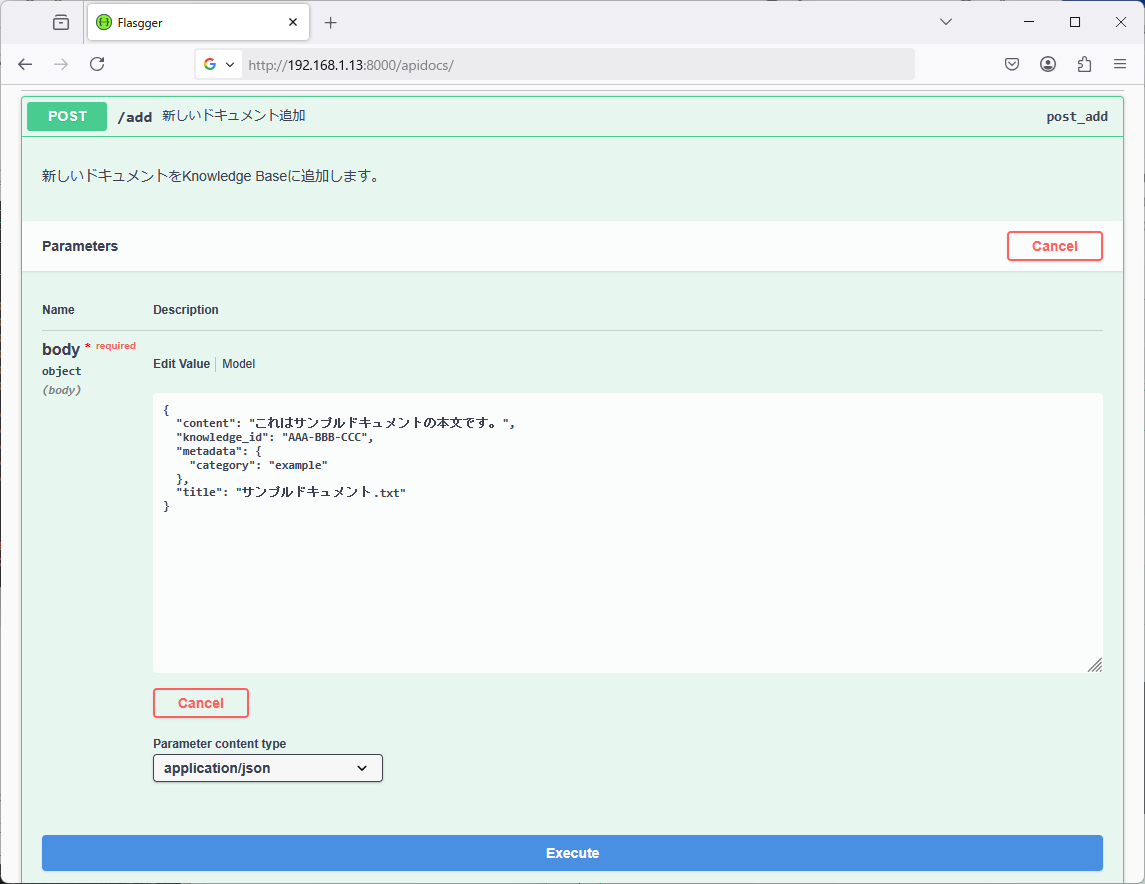
content に改行を入れる際は「¥n」を記入します(JSON の仕様)。テキストエディタで編集するときは、正規表現を利用して「¥r¥n」を「¥¥n」(¥を2つ)に置換します。
「"」は「¥¥"」に置換します。
タブは空白に置換します。正規表現を利用して「¥t」を「 」(半角空白4つ)に置換します。
「¥」(バックスラッシュ)は「¥¥」(¥を2つ)に置換します。
登録データの削除
rm faiss.index
rm doc_id_map.json
rm vector_map.npy # vector_map を使用している場合
psql -U webmaster -d webmaster -h localhost
DELETE FROM knowledge_documents;
登録データのバックアップ
mkdir backup
cp faiss.index ./backup/faiss_$(date '+%Y%m%d_%H%M%S').index
cp doc_id_map.json ./backup/doc_id_map_$(date '+%Y%m%d_%H%M%S').json
cp vector_map.npy ./backup/vector_map_$(date '+%Y%m%d_%H%M%S').npy # vector_map を使用している場合
pg_dump -U webmaster -d webmaster -t knowledge_documents -F p -f ./backup/knowledge_documents_$(date '+%Y%m%d_%H%M%S').sql
(「$」は半角文字)
Dify の構築
Ubuntu に Dify を構築する方法については、次のウェブページに記載しています。以下には、作業の順序と、Ubuntu Server で異なる部分のみ示します。
Docker をインストールします。今回は Ubuntu Server を使用しており、Docker Desktop は使用しないので、インストール作業のうち前半部分のみ行います。
sudo apt-get update
sudo apt-get install ca-certificates curl
sudo install -m 0755 -d /etc/apt/keyrings
sudo curl -fsSL https://download.docker.com/linux/ubuntu/gpg -o /etc/apt/keyrings/docker.asc
sudo chmod a+r /etc/apt/keyrings/docker.asc
echo \
  "deb [arch=$(dpkg --print-architecture) signed-by=/etc/apt/keyrings/docker.asc] https://download.docker.com/linux/ubuntu \
  $(. /etc/os-release && echo "${UBUNTU_CODENAME:-$VERSION_CODENAME}") stable" | \
  sudo tee /etc/apt/sources.list.d/docker.list > /dev/null
sudo apt-get update
sudo apt-get install docker-ce docker-ce-cli containerd.io docker-buildx-plugin docker-compose-plugin
途中で選択画面が表示されますが、デフォルトのまま「OK」で進みます
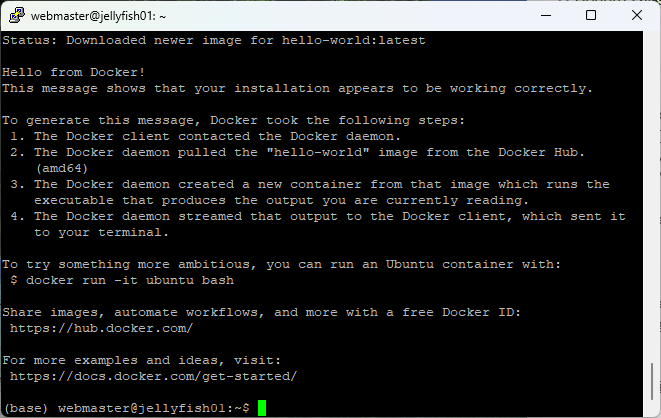
動作することを確認します
sudo docker run hello-world
Dify をインストールします。
mkdir Repos
cd Repos
git clone https://github.com/langgenius/dify.git
cd dify/docker
cp .env.example .env
docker compose up -d
delete で OpenAI API の再ベクトル化を行わない方法
以下のように変更します。
# doc_id_map の下
vector_map = {}

# それぞれ追加
# ロード
    vectors = np.load("vector_map.npy")
    vector_map = {doc_id: vectors[i] for i, doc_id in enumerate(doc_id_map)}
# 新規作成(上記で初期化)
# 保存
    vectors = np.array([vector_map[doc_id] for doc_id in doc_id_map], dtype=np.float32)
    np.save("vector_map.npy", vectors)
# def add()
# doc_id_map.append(new_id) の下
vector_map[new_id] = vector
@app.route('/delete', methods=['POST'])
def delete():
    """ドキュメントを削除"""
    try:
        data = request.get_json()
        doc_id = data['id'] # 削除対象のUUID文字列
        # knowledge が複数ある場合は、複数 faiss_service_n.py を作成して、ポートで分ける

        # 関数内で値を変更しする際は、global宣言が必要
        global gpu_index
        global doc_id_map
        global vector_map

        # PostgreSQLから削除
        cur = db_conn.cursor()
        cur.execute("DELETE FROM knowledge_documents WHERE id = %s", (doc_id,))
        db_conn.commit()

        # doc_id_map から削除対象の index を取得
        if doc_id not in doc_id_map or doc_id not in vector_map:
            return jsonify({"error_code": 4004, "error_msg": "Document ID not found"}), 404
        index_to_remove = doc_id_map.index(doc_id)

        # doc_id_map から削除し、vector_map からも削除
        doc_id_map.pop(index_to_remove)
        del vector_map[doc_id]

        # FAISS 再構築
        dimension = 1536
        index = faiss.IndexFlatL2(dimension)
        gpu_index = faiss.index_cpu_to_gpu(res, 0, index)

        for kept_id in doc_id_map:
            vector = vector_map[kept_id]
            gpu_index.add(np.array([vector]))

        # 保存
        save_faiss()

        return jsonify({"status": "success", "id": doc_id})

    except Exception as e:
        return jsonify({"error_code": 5000, "error_msg": str(e)}), 500
ドキュメント一覧を表示
@app.route('/list', methods=['GET'])
def list():
    """
    ドキュメント一覧を表示
    ---
    tags:
      - Document Management
    summary: 登録されたドキュメントの一覧を表示します
    description:
      登録されているすべてのドキュメントを取得し、index、doc_id、knowledge_id、title、文字数、metadata、作成日を表示します。
      さらに、データベース内レコード数、doc_id_map 数、vector_map 数の統計も返します。
    responses:
      200:
        description: ドキュメント一覧と統計情報
        schema:
          type: object
          properties:
            documents:
              type: array
              description: ドキュメントのリスト
              items:
                type: object
                properties:
                  index:
                    type: integer
                    description: リスト内の連番
                    example: 0
                  doc_id:
                    type: string
                    description: ドキュメントの一意ID
                    example: "abc123"
                  knowledge_id:
                    type: string
                    description: ナレッジベースのID
                    example: "AAA-BBB-CCC"
                  title:
                    type: string
                    description: ドキュメントのタイトル
                    example: "https://sample.com"
                  char_number:
                    type: integer
                    description: コンテンツの文字数
                    example: 1342
                  metadata:
                    type: object
                    description: メタデータ情報(JSON形式)
                    example: { "filename": "Sample.txt" }
                  created_at:
                    type: string
                    format: datetime
                    description: 作成日時
                    example: "2024-07-10 12:34:56"
            summary:
              type: object
              description: 登録数の統計
              properties:
                database_records:
                  type: integer
                  description: データベースのドキュメント総数
                  example: 25
                doc_id_map_count:
                  type: integer
                  description: メモリ上のdoc_id_map件数
                  example: 25
                vector_map_count:
                  type: integer
                  description: メモリ上のvector_map件数
                  example: 25
      500:
        description: サーバー内部エラー
        schema:
          type: object
          properties:
            error_code:
              type: integer
              example: 5000
            error_msg:
              type: string
              example: "Database connection failed"
    """
    global doc_id_map
    global vector_map

    try:
        cur = db_conn.cursor()
        cur.execute("SELECT id, knowledge_id, title, content, metadata, created_at FROM knowledge_documents ORDER BY created_at ASC")
        rows = cur.fetchall()

        documents = []
        for index, row in enumerate(rows):
            doc_id, knowledge_id, title, content, metadata, created_at = row
            documents.append({
                "index": index,
                "doc_id": doc_id,
                "knowledge_id": knowledge_id,
                "title": title,
                "char_number": len(content or ""),
                "metadata": metadata or {},
                "created_at": created_at.strftime("%Y-%m-%d %H:%M:%S")
            })

        summary = {
            "database_records": len(rows),
            "doc_id_map_count": len(doc_id_map),
            "vector_map_count": len(vector_map)
        }

        return jsonify({
            "documents": documents,
            "summary": summary
        })

    except Exception as e:
        return jsonify({"error_code": 5000, "error_msg": str(e)}), 500
テキストファイルをアップロードして登録
テキストファイルをアップロードして登録します。各ファイルについてタイトルを指定します。省略時はファイル名がタイトルになります。Dify で検索したとき、引用元としてタイトルが表示されます。ファイル名は metadata に保存されます。
@app.route('/upload_files', methods=['POST'])
def upload_files():
    """
    テキストファイルをアップロードして登録
    ---
    tags:
      - Document Management
    description: テキストファイルをアップロードしてナレッジベースに登録します。
    consumes:
      - multipart/form-data
    parameters:
      - in: formData
        name: knowledge_id
        type: string
        required: true
        description: 全ファイル共通の knowledge_id
        example: "AAA-BBB-CCC"
      - in: formData
        name: files
        type: array
        items:
          type: file
          format: binary
        required: true
        description: 最大20個のテキストファイル
        allowMultiple: true
      - in: formData
        name: titles
        type: array
        items:
          type: string
        required: false
        description: 各ファイルのタイトル(最大20件まで、省略時はファイル名になります)
    responses:
      200:
        description: 登録成功時
        schema:
          type: object
          properties:
            status:
              type: string
              example: "success"
            titles_uploaded:
              type: array
              items:
                type: string
              example:
                - "https://en.wikipedia.org/wiki/Curling_at_the_2022_Winter_Olympics"
            files_uploaded:
              type: array
              items:
                type: string
              example:
                - "CurlingAtThe2022WinterOlympics.txt"
            uploaded_doc_ids:
              type: array
              items:
                type: string
              example:
                - "4469d7e6-f5be-44a8-9808-a17c96b05e53"
    """
    global gpu_index, doc_id_map, vector_map

    # 入力取得
    knowledge_id = request.form.get('knowledge_id')
    files = request.files.getlist('files')
    titles_raw = request.form.get('titles', '')
    title_list = [t.strip() for t in titles_raw.split(',')] if titles_raw else []

    if not knowledge_id:
        return jsonify({"error": "knowledge_id is required"}), 400

    if not files or len(files) == 0:
        return jsonify({"error": "No files uploaded"}), 400

    if len(files) > 20:
        return jsonify({"error": "Maximum 20 files allowed"}), 400

    added_titles = []
    added_docs = []
    added_doc_ids = []

    for i, file in enumerate(files):
        try:
            filename = file.filename
            content = file.read().decode('utf-8')  # テキストファイル前提

            # 改行・タブ・クォート・バックスラッシュを置換
            content = content.replace("\r\n", "\n") \
                             .replace("\\", "\\\\") \
                             .replace("\"", "\\\"") \
                             .replace("\t", "    ")

            title = title_list[i] if i < len(title_list) and title_list[i] else filename

            # OpenAI APIで埋め込みベクトルを取得
            response = client.embeddings.create(
                input = content,
                model = "text-embedding-3-small"
            )
            vector = np.array(response.data[0].embedding, dtype=np.float32)

            # UUID生成
            doc_uuid = str(uuid.uuid4())

            # PostgreSQLに登録
            cur = db_conn.cursor()
            cur.execute("""
                INSERT INTO knowledge_documents (id, knowledge_id, title, content, metadata)
                VALUES (%s, %s, %s, %s, %s)
            """, (doc_uuid, knowledge_id, title, content, json.dumps({"filename": filename})))
            db_conn.commit()

            # FAISS に追加
            gpu_index.add(np.array([vector]))
            doc_id_map.append(doc_uuid)
            vector_map[doc_uuid] = vector

            added_titles.append(title)
            added_docs.append(filename)
            added_doc_ids.append(doc_uuid)

        except Exception as e:
            return jsonify({"error": f"Failed to process {file.filename}: {str(e)}"}), 500

    # 保存
    save_faiss()

    return jsonify({
        "status": "success",
        "titles_uploaded": added_titles,
        "files_uploaded": added_docs,
        "uploaded_doc_ids": added_doc_ids
    })
ドキュメントのタイトルを変更する
ドキュメントのタイトルを変更します。タイトルは PostgreSQL データベースに保存されており、ベクトルデータとはドキュメントIDで結び付けられているため、後からでも変更可能です。タイトルはチャットボットの回答において、引用情報として表示されます。
@app.route('/edit_title', methods=['POST'])
def edit_title():
    """
    ドキュメントのタイトルを変更
    ---
    tags:
      - Document Management
    description: 指定されたドキュメントIDのタイトルを変更します。チャットボットの回答では、タイトルが引用情報として使用されます。
    parameters:
      - in: body
        name: body
        required: true
        schema:
          type: object
          required:
            - id
            - title
          properties:
            id:
              type: string
              description: 変更対象のドキュメントUUID
              example: "d290f1ee-6c54-4b01-90e6-d701748f0851"
            title:
              type: string
              description: 新しいタイトル
              example: "2023年Q1 売上まとめ.txt"
    responses:
      200:
        description: タイトルの変更成功
        schema:
          type: object
          properties:
            status:
              type: string
              example: "success"
            id:
              type: string
              example: "d290f1ee-6c54-4b01-90e6-d701748f0851"
      404:
        description: 指定されたIDが存在しない場合
      500:
        description: サーバーエラー
    """
    try:
        data = request.get_json()
        doc_id = data['id']
        new_title = data['title']

        cur = db_conn.cursor()
        cur.execute("""
            UPDATE knowledge_documents
            SET title = %s
            WHERE id = %s
        """, (new_title, doc_id))

        if cur.rowcount == 0:
            return jsonify({"error_code": 404, "error_msg": "指定されたIDのドキュメントが見つかりません。"}), 404

        db_conn.commit()
        return jsonify({"status": "success", "id": doc_id})

    except Exception as e:
        return jsonify({"error_code": 5000, "error_msg": str(e)}), 500
Ubuntu 起動時に Python プログラムを実行する
参考ページ1:
https://note.com/ipa713/n/ndf1b4941362d
cd /etc/systemd/system
sudo nano run_python.service
[Unit]
Description=python run
After=network.target

[Service]
User=webmaster
WorkingDirectory=/home/webmaster/faiss_service
ExecStart=bash /home/webmaster/faiss_service.sh
Restart=always
type=simple

[Install]
WantedBy=multi-user.target
sudo systemctl daemon-reload
sudo systemctl enable run_python.service
sudo systemctl start run_python.service
sudo systemctl status run_python.service
sudo systemctl stop run_python.service
参考ページ2:
https://udemy.benesse.co.jp/development/system/shellscript.html
cd ~
nano faiss_service.sh
export PSQL_DB_PASSWORD="..."
export OPENAI_API_KEY="..."
export LANGCHAIN_TRACING_V2="true"
export LANGCHAIN_API_KEY="..."
export USER_AGENT="MyLangChainBot/1.0 (contact: your-email@example.com)"
/home/webmaster/anaconda3/bin/python3 /home/webmaster/faiss_service/faiss_service.py
chmod 744 faiss_service.sh
bash faiss_service.sh
テキストファイルをチャンク分割し、アップロードして登録
テキストファイルを、指定したサイズ、重なり量、セパレータでチャンク分割して登録します。分割されたテキストファイルは、異なるドキュメントIDで、同じタイトル、同じファイル名(メタデータ)になります。また、文書内インデックス(メタデータ)が追加されます。
チャンク分割に、langchain を使用しています。
pip install langchain
export LANGCHAIN_TRACING_V2="true"
export LANGCHAIN_API_KEY="..."
export USER_AGENT="MyLangChainBot/1.0 (contact: your-email@example.com)"
from langchain.text_splitter import RecursiveCharacterTextSplitter
@app.route('/upload_files_chunk', methods=['POST'])
def upload_files_chunk():
    """
    テキストファイルをチャンク分割し、アップロードして登録
    ---
    tags:
      - Document Management
    description: テキストファイルをチャンク分割してアップロードし、ナレッジベースに登録します。分割されたテキストファイルは、異なるドキュメントIDで、同じタイトル、同じファイル名(メタデータ)になります。また、文書内インデックス(メタデータ)が追加されます。
    consumes:
      - multipart/form-data
    parameters:
      - in: formData
        name: knowledge_id
        type: string
        required: true
        description: 全ファイル共通の knowledge_id
        example: "AAA-BBB-CCC"
      - in: formData
        name: chunk_size
        type: integer
        required: false
        description: チャンクサイズ(文字数)
        default: 1000
      - in: formData
        name: chunk_overlap
        type: integer
        required: false
        description: チャンクの重なり(文字数)
        default: 200
      - in: formData
        name: separator
        type: string
        required: false
        description: セパレータ(カンマ区切りで複数指定可)
      - in: formData
        name: files
        type: array
        items:
          type: file
          format: binary
        required: true
        description: 最大20個のテキストファイル
        allowMultiple: true
      - in: formData
        name: titles
        type: array
        items:
          type: string
        required: false
        description: 各ファイルのタイトル(最大20件まで、省略時はファイル名になります)
    responses:
      200:
        description: 登録成功時
        schema:
          type: object
          properties:
            status:
              type: string
              example: "success"
            titles_uploaded:
              type: array
              items:
                type: string
              example:
                - "https://en.wikipedia.org/wiki/europe/"
            files_uploaded:
              type: array
              items:
                type: string
              example:
                - "europe_summary.txt"
            chunks_uploaded:
              type: array
              items:
                type: integer
              example:
                - 3
            uploaded_doc_ids:
              type: array
              items:
                type: string
              example:
                - "fbcd332b-13c0-4473-b128-1f0d980f8ba5"
                - "3e519d79-4152-4ce3-9975-9b6103da4ceb"
                - "1dc574e1-dcec-4237-8e30-400efaf9f965"
    """
    global gpu_index, doc_id_map, vector_map

    # 入力取得
    knowledge_id = request.form.get('knowledge_id')

    chunk_size = int(request.form.get('chunk_size', '1000'))
    chunk_overlap = int(request.form.get('chunk_overlap', '200'))
    separator_raw = request.form.get('separator', '')
    separator = [s.strip(' ') for s in separator_raw.split(',') if s.strip(' ')]

    files = request.files.getlist('files')
    titles_raw = request.form.get('titles', '')
    title_list = [t.strip() for t in titles_raw.split(',')] if titles_raw else []

    if not knowledge_id:
        return jsonify({"error": "knowledge_id is required"}), 400

    if not files or len(files) == 0:
        return jsonify({"error": "No files uploaded"}), 400

    if len(files) > 20:
        return jsonify({"error": "Maximum 20 files allowed"}), 400

    added_titles = []
    added_docs = []
    added_chunks = []
    added_doc_ids = []

    for i, file in enumerate(files):
        try:
            filename = file.filename
            docs = file.read().decode('utf-8')  # テキストファイル前提

            # チャンク分割
            if not separator:
                text_splitter = RecursiveCharacterTextSplitter(
                    chunk_size=chunk_size,
                    chunk_overlap=chunk_overlap
                )
            else:
                text_splitter = RecursiveCharacterTextSplitter(
                    chunk_size=chunk_size,
                    chunk_overlap=chunk_overlap,
                    separators=separator
                )

            title = title_list[i] if i < len(title_list) and title_list[i] else filename

            splits = text_splitter.split_text(docs)

            for idx, content in enumerate(splits, start=0):

                # 改行・タブ・クォート・バックスラッシュを置換
                content = content.replace("\r\n", "\n") \
                                 .replace("\\", "\\\\") \
                                 .replace("\"", "\\\"") \
                                 .replace("\t", "    ")

                # OpenAI APIで埋め込みベクトルを取得
                response = client.embeddings.create(
                    input = content,
                    model = "text-embedding-3-small"
                )
                vector = np.array(response.data[0].embedding, dtype=np.float32)

                # UUID生成
                doc_uuid = str(uuid.uuid4())

                # PostgreSQLに登録
                cur = db_conn.cursor()
                cur.execute("""
                    INSERT INTO knowledge_documents (id, knowledge_id, title, content, metadata)
                    VALUES (%s, %s, %s, %s, %s)
                """, (doc_uuid, knowledge_id, title, content, json.dumps({"filename": filename, "in-document index": idx})))
                db_conn.commit()

                # FAISS に追加
                gpu_index.add(np.array([vector]))
                doc_id_map.append(doc_uuid)
                vector_map[doc_uuid] = vector

                added_doc_ids.append(doc_uuid)

            added_titles.append(title)
            added_docs.append(filename)
            added_chunks.append(len(splits))

        except Exception as e:
            return jsonify({"error": f"Failed to process {file.filename}: {str(e)}"}), 500

    # 保存
    save_faiss()

    return jsonify({
        "status": "success",
        "titles_uploaded": added_titles,
        "files_uploaded": added_docs,
        "chunks_uploaded": added_chunks,
        "uploaded_doc_ids": added_doc_ids
    })
ナレッジIDで FAISS インデックスを切り替える
これまでは、ナレッジID(knowledge_id)を使用せず、ナレッジを切り替える際には、別フォルダ・別ファイル・別ポート番号でそれぞれのナレッジを作成することを記述していました。
大分複雑になるのですが、今回、プログラムを変更し、ナレッジID(knowledge_id)によって FAISS インデックスを切り替えられるようにしました。
概要としては、gpu_indexes、doc_id_map、vector_map を、knowledge_id で切り替わる配列にしました。gpu_index は、ベクトルを追加した順番(インデックス)しか保持していないため、ベクトル検索時にはその「順番」が返されます。doc_id_map はこの順番と文書IDをマッピングします。gpu_index に格納されたベクトル配列は直接加工できないため、再構築用に、vector_map に文書IDとベクトルのペアを保存します。
ナレッジに属するドキュメントをすべて削除した後でも、空のナレッジは残りますが、delete_knowledge を使用してそれを削除できます。
プログラム全体は次の記事の「faiss_service 補足 2」に記述します。
# インポート文
import gc


# FAISSインデックスの初期化
knowledge_info_path = "knowledge_id_to_no.json"
knowledge_id_to_no = {}
gpu_indexes = {}
doc_id_map = {}
vector_map = {}


# 読み込み
if os.path.exists(knowledge_info_path):
    with open(knowledge_info_path, "r") as f:
        knowledge_id_to_no = json.load(f)

    for knowledge_id, no in knowledge_id_to_no.items():
        index = faiss.read_index(f"faiss_{no:03d}.index")
        gpu_index = faiss.index_cpu_to_gpu(res, 0, index)
        gpu_indexes[knowledge_id] = gpu_index

    vectors = np.load("vector_map.npy")
    vector_map = {}
    i = 0
    for knowledge_id, doc_ids in doc_id_map.items():
        vector_map[knowledge_id] = {}
        for doc_id in doc_ids:
            vector_map[knowledge_id][doc_id] = vectors[i]
            i += 1


# 保存
    with open(knowledge_info_path, "w") as f:
        json.dump(knowledge_id_to_no, f)

    for knowledge_id, no in knowledge_id_to_no.items():
        index = faiss.index_gpu_to_cpu(gpu_indexes[knowledge_id])
        faiss.write_index(index, f"faiss_{no:03d}.index")

    vectors = []
    for knowledge_id in doc_id_map:
        for doc_id in doc_id_map[knowledge_id]:
            vectors.append(vector_map[knowledge_id][doc_id])
    vectors = np.array(vectors, dtype=np.float32)
    np.save("vector_map.npy", vectors)


# 新規FAISS作成
def create_faiss_index(knowledge_id):
    global gpu_indexes, doc_id_map, vector_map, knowledge_id_to_no

    if knowledge_id_to_no:
        new_index_no = max(knowledge_id_to_no.values()) + 1
    else:
        new_index_no = 0  # 初回は0からスタート

    if new_index_no > 999: # 1000以上は作成せず、999を使いまわす
        knowledge_id_to_no[knowledge_id] = 999
        return

    index = faiss.IndexFlatL2(dimension)
    gpu_index = faiss.index_cpu_to_gpu(res, 0, index)
    gpu_indexes[knowledge_id] = gpu_index
    knowledge_id_to_no[knowledge_id] = new_index_no

    doc_id_map.setdefault(knowledge_id, [])
    vector_map.setdefault(knowledge_id, {})
    print("FAISS新規インデックスを作成しました")


# retrieval
        D, I = gpu_indexes[knowledge_id].search(np.array([query_vector]), top_k)

            doc_uuid = doc_id_map[knowledge_id][idx]


# add
        # knowledge が存在しない場合に、新しくインデックスを作成
        if knowledge_id not in knowledge_id_to_no:
            create_faiss_index(knowledge_id)

        gpu_indexes[knowledge_id].add(np.array([vector]))
        doc_id_map[knowledge_id].append(new_id)
        vector_map[knowledge_id][new_id] = vector


# delete
        cur.execute("SELECT id FROM knowledge_documents WHERE knowledge_id = %s", (knowledge_id,))
        rows = cur.fetchall()

        new_doc_id_map = {}
        new_vector_map = {}
        new_doc_id_map[knowledge_id] = []
        new_vector_map[knowledge_id] = {}

        index = faiss.IndexFlatL2(dimension)
        for row in rows:
            add_doc_id = row[0]
            if add_doc_id in vector_map[knowledge_id]:
                vector = vector_map[knowledge_id][add_doc_id]
                index.add(np.array([vector]))
                new_doc_id_map[knowledge_id].append(add_doc_id)
                new_vector_map[knowledge_id][add_doc_id] = vector

        doc_id_map[knowledge_id] = new_doc_id_map[knowledge_id]
        vector_map[knowledge_id] = new_vector_map[knowledge_id]


# delete_knowledge
        # 空のナレッジを削除
        index_no = knowledge_id_to_no.get(knowledge_id)
        if index_no != 999: # 999 は共有なので除外
            del gpu_indexes[knowledge_id]
            if os.path.exists(f"faiss_{index_no:03d}.index"):
                os.remove(f"faiss_{index_no:03d}.index")
            gc.collect()
            print(f"FAISSインデックス  {index_no} ({knowledge_id})を削除しました。")

        del doc_id_map[knowledge_id]
        del vector_map[knowledge_id]
        del knowledge_id_to_no[knowledge_id]
        save_faiss()


# list
            "doc_id_map_count": {k: len(v) for k, v in doc_id_map.items()},
            "vector_map_count": {k: len(v) for k, v in vector_map.items()},
            "knowledge_count": len(knowledge_id_to_no),

            "knowledge": knowledge_id_to_no,


# upload_files
            # knowledge が存在しない場合に、新しくインデックスを作成
            if knowledge_id not in knowledge_id_to_no:
                create_faiss_index(knowledge_id)

            gpu_indexes[knowledge_id].add(np.array([vector]))
            doc_id_map[knowledge_id].append(doc_uuid)
            vector_map[knowledge_id][doc_uuid] = vector


# upload_files_chunk
                # knowledge が存在しない場合に、新しくインデックスを作成
                if knowledge_id not in knowledge_id_to_no:
                    create_faiss_index(knowledge_id)

                # FAISS に追加
                gpu_indexes[knowledge_id].add(np.array([vector]))
                doc_id_map[knowledge_id].append(doc_uuid)
                vector_map[knowledge_id][doc_uuid] = vector